
بالنسبة لأولئك منكم الذين يمتلكون مواقع ويب مبنية على Laravel، فإن توفير محتوى ترجمة دقيق وطبيعي مهم جدًا لـ ترجمة موقع الويب الخاص بك وتقديم تجربة مستخدم جيدة.
لحسن الحظ، تتوفر عدة خدمات ترجمة آلية لمساعدة المطورين على التغلب على هذا التحدي، بما في ذلك Google Cloud AI API Translation وGoogle Translate. تقدم كلتا الخدمتين إمكانات ترجمة باستخدام تقنية الآلة.
في هذه المقالة، سنستكشف الفروقات الرئيسية بين تطبيق ترجمة الذكاء الاصطناعي من Google Cloud وترجمة Google لتطبيقات Laravel ونوصي بأفضل خدمات الترجمة لموقعك Laravel الإلكتروني.
ما هي ترجمة Google Cloud AI API وGoogle Translate؟
قبل الدخول في المناقشة، سنناقش المعاني المقابلة لترجمات Google Cloud AI API وGoogle Translate.
ترجمة Google Cloud AI API

ترجمة Google Cloud AI API هي خدمة ترجمة آلية متقدمة مقدمة من Google Cloud Platform. تستفيد هذه الخدمة من أحدث تقنيات الذكاء الاصطناعي (AI) والتعلم الآلي لتقديم ترجمات دقيقة وطبيعية للنصوص والصوت والمستندات.
يستخدم Google Cloud AI API Translation نماذج ترجمة عصبية قائمة على التعلم العميق، مما يتيح له التقاط الفروق اللغوية والسياق بشكل أفضل، وتقديم ترجمات أكثر أصالة تتماشى مع الاستخدام الفعلي للغة. بالإضافة إلى ذلك، فإن استخدام Google Cloud AI Translation لما يصل إلى 500,000 حرف مجاني، بينما تترتب على الـ 75,000 حرف التالية تكلفة قدرها 20 دولارًا لكل مليون حرف.
Google Translate
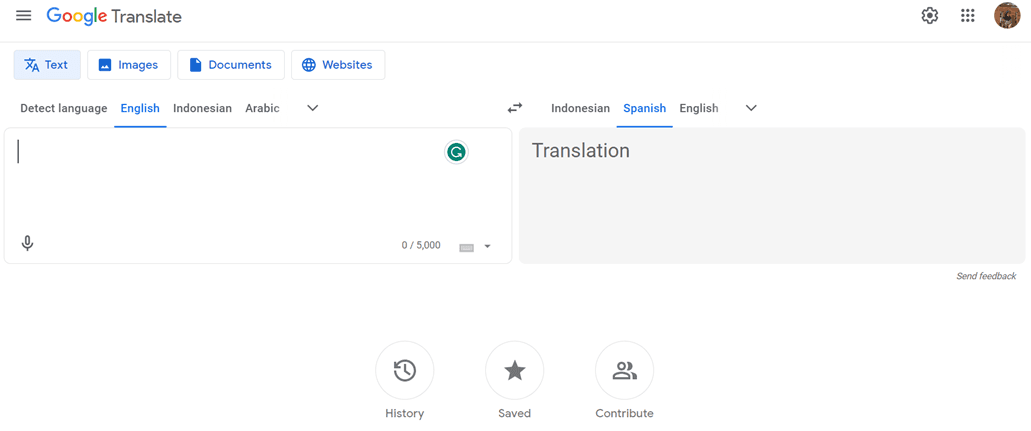
في المقابل، يُعد Google Translate خدمة ترجمة نصية تلقائية عريقة ومعروفة على نطاق واسع. وهي تستخدم نهجًا إحصائيًا أكثر تقليدية في الترجمة، حيث تُنشئ الترجمات بناءً على الأنماط والاحتمالات المستخلصة من مجموعات بيانات تدريبية ضخمة.
على الرغم من أنه ليس متقدمًا مثل ترجمة Google Cloud AI API من حيث الدقة والتعامل مع الفروق اللغوية، إلا أن Google Translate يظل خيارًا شائعًا بسبب سهولة استخدامه وتوفره المجاني للاستخدام غير التجاري.
تنفيذ ترجمة واجهة برمجة تطبيقات الذكاء الاصطناعي من جوجل كلاود على Laravel
تستخدم العديد من خدمات الترجمة، بما في ذلك Linguise، تقنية الترجمة بالذكاء الاصطناعي السحابية لترجمة المواقع الإلكترونية.
تستخدم خدمة ترجمة اللغات واجهة برمجة تطبيقات الذكاء الاصطناعي السحابية كإحدى تقنيات الترجمة لديها. فيما يلي خطوات التنفيذ على موقع Laravel . نفترض هنا أن لديك بالفعل موقع مشروع Laravel جاهزًا.
إنشاء حساب Linguise
لاستخدام Linguise، يجب عليك إنشاء حساب أولاً. يمكنك القيام بذلك مجانًا أو الاشتراك لمدة شهر أو سنة. كل ما عليك فعله هو تقديم معلومات مثل بريدك الإلكتروني واسم المستخدم وكلمة المرور.
أضف معلومات موقع Laravel
بعد ذلك، أضف معلومات حول الموقع الإلكتروني الذي ستستخدمه، وأدخل معلومات حسابك في Linguise وعنوان URL للموقع، واختر منصة Laravel ، وأضف اللغة الافتراضية واللغة التي تريد إضافتها إلى الموقع الإلكتروني.
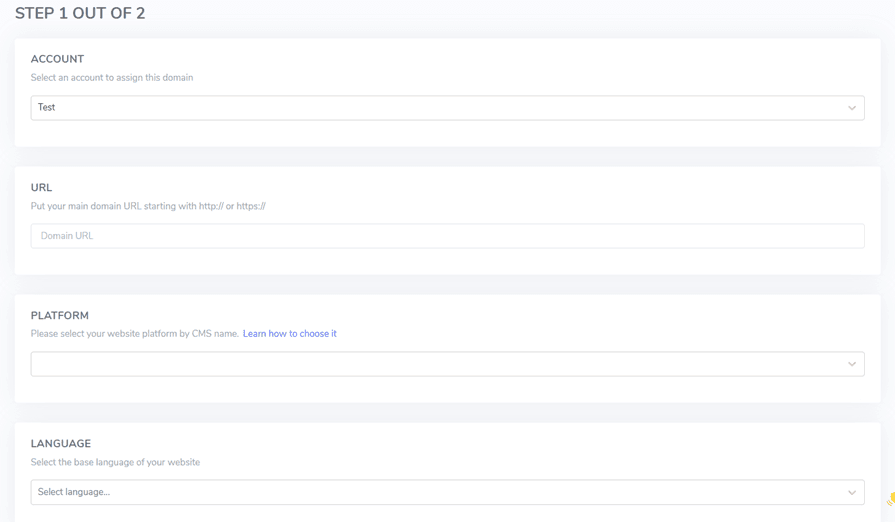
ثم قم بتنزيل سكريبت PHP عبر الزر التالي واحفظه على جهاز الكمبيوتر المحلي الخاص بك.
تحميل وتكوين سكريبت PHP
بعد تنزيل السكريبت، قم بفك ضغطه ورفعه إلى المجلد الجذر حيث تم تثبيت Laravel . تأكد من أنه موجود في جذر تثبيت Laravel الخاص بك (عادةً حيث توجد ملفات نظام إدارة المحتوى الخاص بك). تأكد من أن المجلد مسمى "linguise" (الاسم الافتراضي عند فك ضغط المجلد).
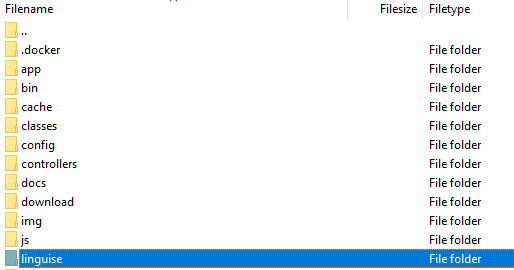
بعد ذلك، يجب نسخ مفتاح Linguise API إلى ملف …/linguise/Configuration.php الذي رفعته إلى خادمك. حرّر الملف والصق مفتاح API الخاص بك بين علامتي الاقتباس، مع استبدال النص REPLACE_BY_YOUR_TOKEN.
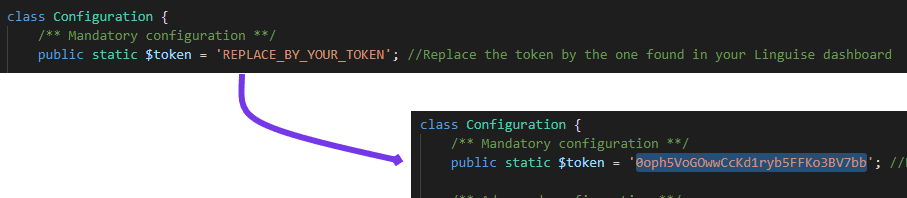
إدراج سكريبت مبدّل اللغة
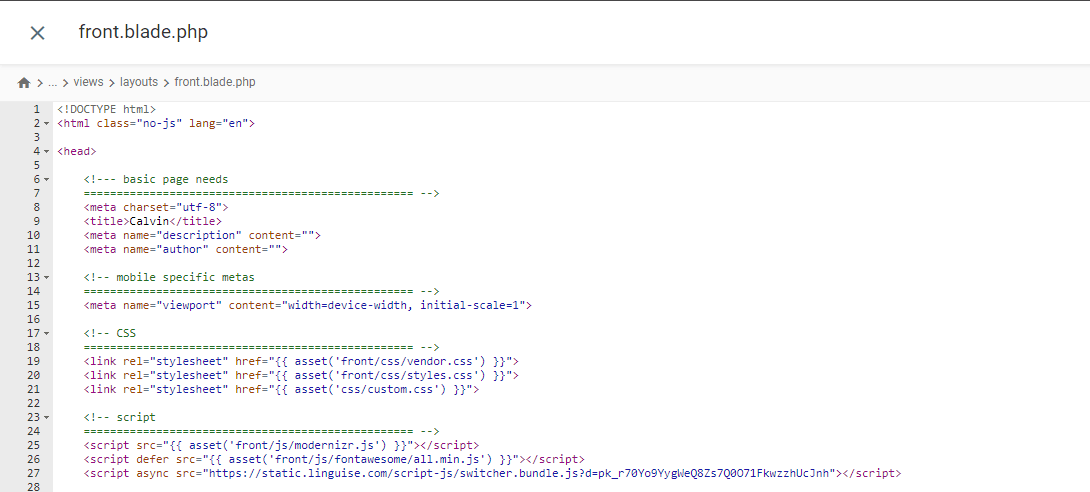
بعد ذلك، أدخل نص تبديل اللغة الذي حصلت عليه من Linguise لوحة التحكم.

يُدرج في ملف front.blade.php داخل دليل resources/views/layouts/. إليك معاينة للسكربت المُدرج.
قم بتكوين ملف .htaccess
أخيرًا، يجب تكوين عناوين URL القائمة على اللغة في ملف .htaccess. إذا كان ملفك يتضمن "RewriteBase /،" فما عليك سوى نسخ ولصق الكود التالي بعد ذلك السطر.
					<IfModule mod_rewrite.c>
  RewriteEngine On
  RewriteRule ^(af|sq|am|ar|hy|az|eu|be|bn|bs|bg|ca|ceb|ny|zh-cn|zh-tw|co|hr|cs|da|nl|en|eo|et|tl|fi|fr|fy|gl|ka|de|el|gu|ht|ha|haw|iw|hi|hmn|hu|is|ig|id|ga|it|ja|jw|kn|kk|km|ko|ku|ky|lo|la|lv|lt|lb|mk|mg|ms|ml|mt|mi|mr|mn|my|ne|no|ps|fa|pl|pt|pa|ro|ru|sm|gd|sr|st|sn|sd|si|sk|sl|so|es|su|sw|sv|tg|ta|te|th|tr|uk|ur|uz|vi|cy|xh|yi|yo|zu|zz-zz)(?:$|/)(.*)$ linguise/linguise.php?linguise_language=$1&original_url=$2 [L,QSA]
</IfModule>
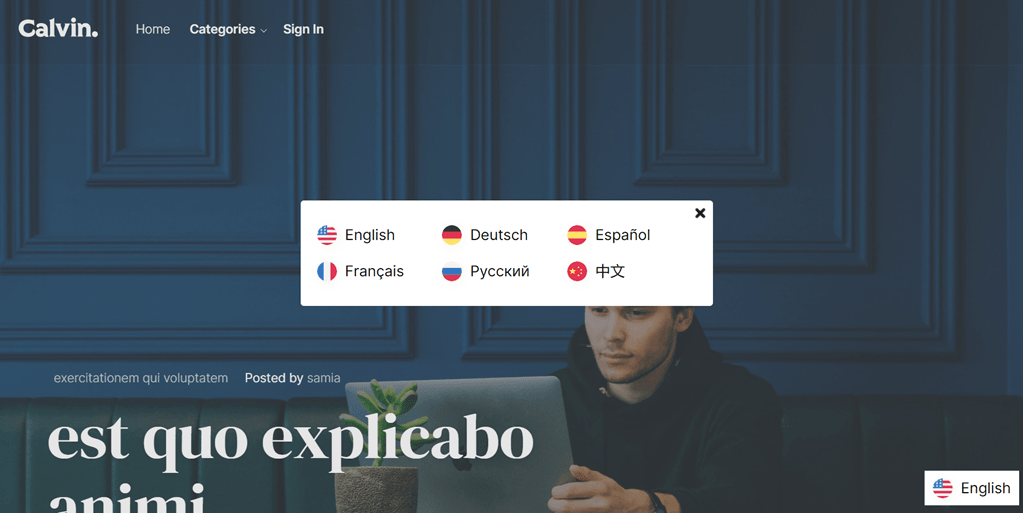
تم. في هذه المرحلة، تكون قد نفذت بنجاح ترجمة Cloud AI API على خدمة Linguise . الآن، يمكنك التحقق من موقع Laravel . سيظهر مبدل اللغة الافتراضي، ويمكنك تخصيص مبدل اللغة لـ Laravel عبر لوحة التحكم.
تطبيق Google Translate على Laravel
الآن سنحاول تنفيذ ترجمة Google في Laravel. هنا نفترض أنك أنشأت مشروع Laravel بنجاح وتحتاج فقط إلى إضافة ترجمة Google.
يمكنك أيضًا العثور على خطوات التثبيت التالية على الموقع الرسمي Laravel .
تثبيت حزمة Google Translator
لتثبيت حزمة Google Translator، افتح موجّه الأوامر في المشروع وأدخل الأمر التالي. ستمكّنك هذه الحزمة من استخدام الوظائف العاملة لـ google-translator-language.
composer require stichoza/google-translate-php
إعداد حزمة مترجم Google
يجب علينا إعداد "حزمة مترجم جوجل" داخل التطبيق. افتح ملف app.php في مجلد /config، وابحث عن قسم "aliases"، وأضف السطر التالي من الكود.
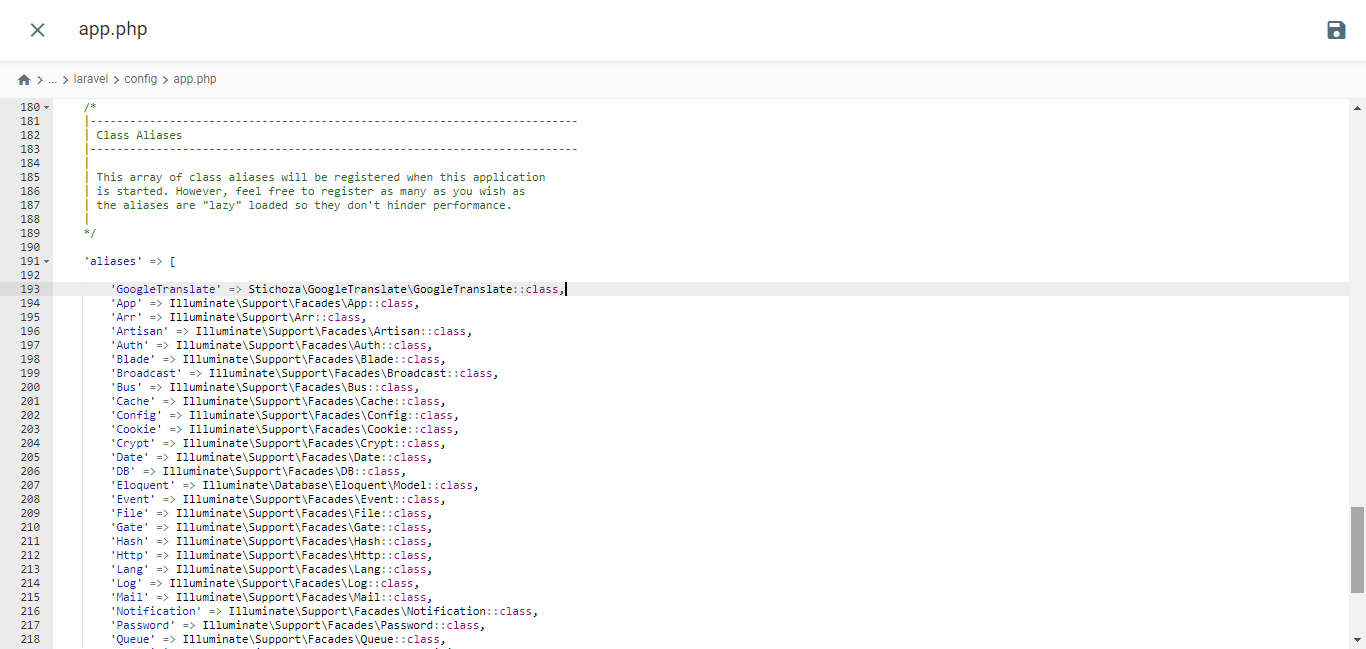
					/*
|--------------------------------------------------------------------------
| Class Aliases
|--------------------------------------------------------------------------
|
| This array of class aliases will be registered when this application
| is started. However, feel free to register as many as you wish as
| the aliases are "lazy" loaded so they don't hinder performance.
|
*/

'aliases' => Facade::defaultAliases()->merge([
    // 'Example' => App\Facades\Example::class,
    'GoogleTranslate' => Stichoza\GoogleTranslate\GoogleTranslate::class,
])->toArray(),
إعداد وحدة التحكم باللغة
تحتاج إلى إنشاء ملف تحكم اللغة مثل التالي
php artisan make:controller LangController
سيتم إنشاء ملف LangController.php داخل مجلد /app/Http/Controllers.
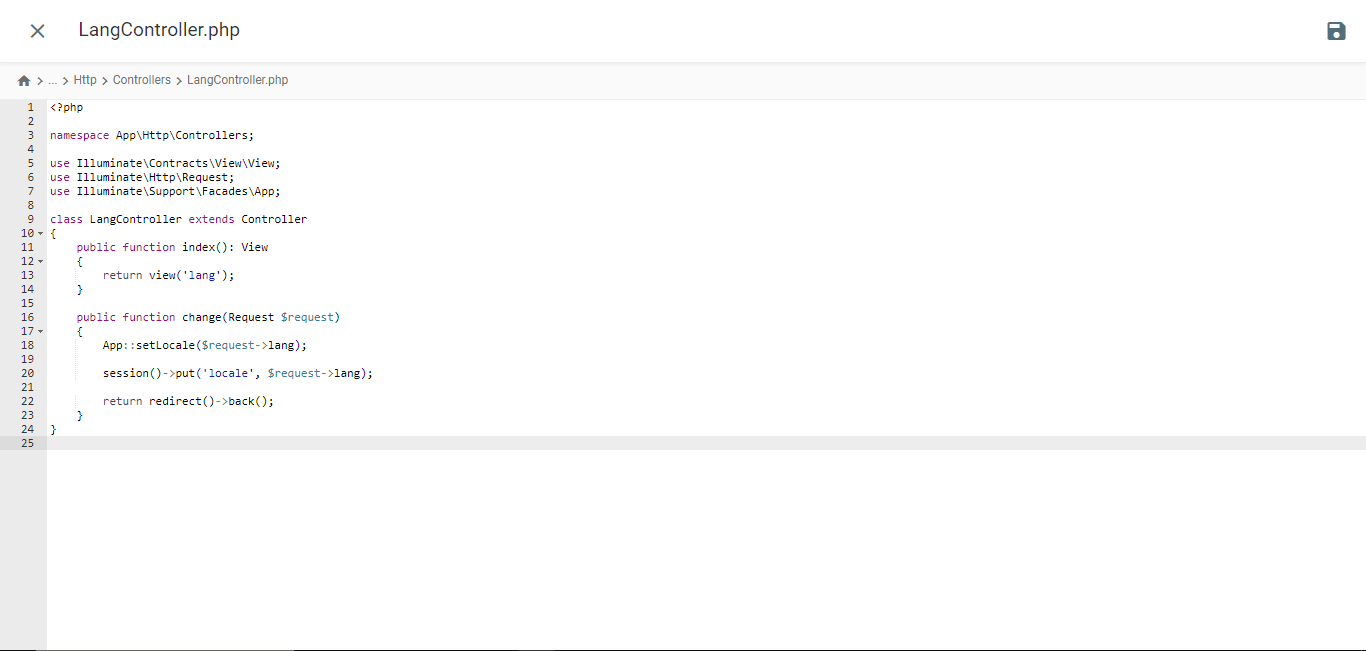
					<?php

namespace App\Http\Controllers;

use Illuminate\Contracts\View\View;
use Illuminate\Http\Request;
use Illuminate\Support\Facades\App;

class LangController extends Controller
{
    public function index(): View
    {
        return view('lang');
    }

    public function change(Request $request)
    {
        App::setLocale($request->lang);

        session()->put('locale', $request->lang);

        return redirect()->back();
    }
}
إنشاء ملف قالب Blade
انتقل إلى مجلد /resources/views وأنشئ ملفًا باسم lang.blade.php. افتح الملف وأدرج الكود التالي فيه.
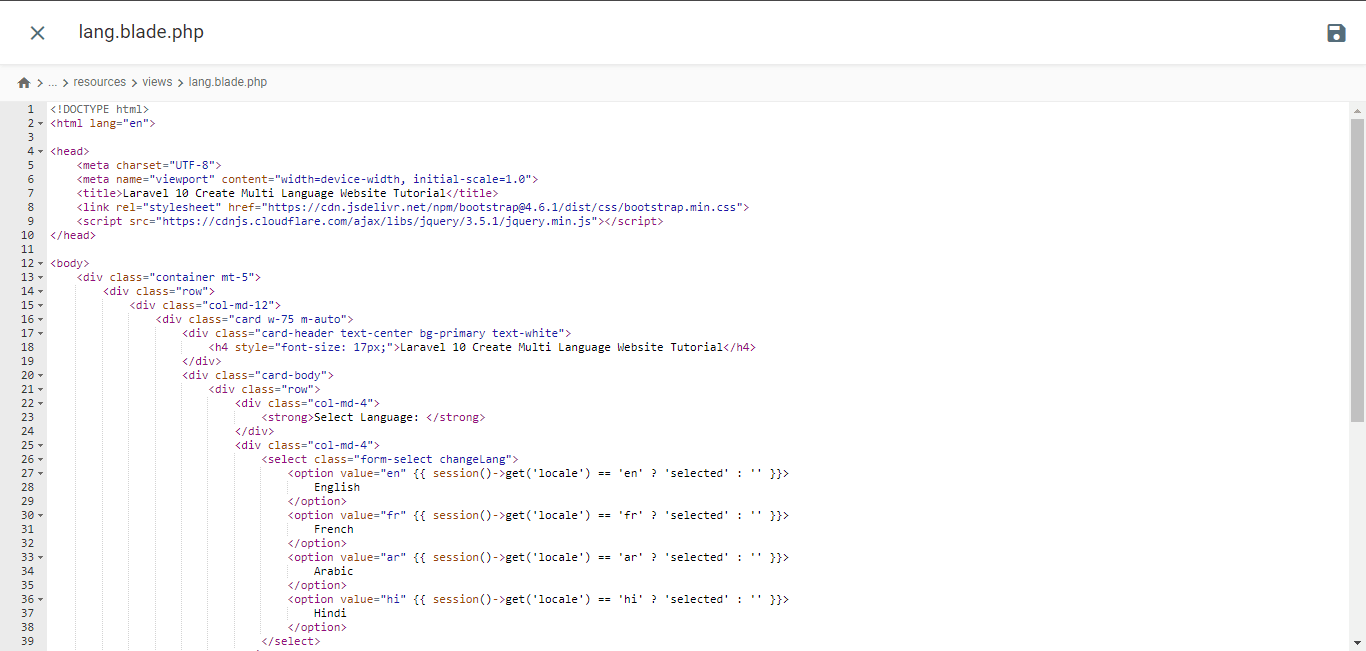
<!DOCTYPE html>
<html lang="en">
<head>
<meta charset="UTF-8">
<meta name="viewport" content="width=device-width, initial-scale=1.0">
<title>Laravel 10 Create Multi Language Website Tutorial</title>
<link rel="stylesheet" href="https://cdn.jsdelivr.net/npm/bootstrap@4.6.1/dist/css/bootstrap.min.css">
<script src="https://cdnjs.cloudflare.com/ajax/libs/jquery/3.5.1/jquery.min.js"></script>
<script type="application/ld+json" class="gnpub-schema-markup-output">
{"@context":"https:\/\/schema.org\/","@type":"NewsArticle","@id":"https:\/\/www.linguise.com\/blog\/guide\/implement-google-cloud-ai-api-translation-vs-google-translate-for-laravel\/#newsarticle","url":"https:\/\/www.linguise.com\/blog\/guide\/implement-google-cloud-ai-api-translation-vs-google-translate-for-laravel\/","image":{"@type":"ImageObject","url":"https:\/\/www.linguise.com\/wp-content\/uploads\/2024\/05\/Implement-Google-Cloud-AI-API-translation-vs-Google-Translate-for-Laravel-150x150.png","width":150,"height":150},"headline":"Implement Google Cloud AI API translation vs Google Translate for Laravel","mainEntityOfPage":"https:\/\/www.linguise.com\/blog\/guide\/implement-google-cloud-ai-api-translation-vs-google-translate-for-laravel\/","datePublished":"2024-05-31T07:32:47+00:00","dateModified":"2024-08-26T19:19:15+00:00","description":"For those of you who own Laravel-based websites, providing accurate and natural translation content is very important to translate your website and offer a good","articleSection":"Guide","articleBody":"For those of you who own Laravel-based websites, providing accurate and natural translation content is very important to translate your website and offer a good user experience.\nFortunately, several automatic translation services are available to help developers overcome this challenge, including Google Cloud AI API Translation and Google Translate. Both services offer translation capabilities using machine technology.\nIn this article, we will explore the main differences between implementing Google Cloud AI Translation and Google Translate for Laravel applications and recommend the best translation services for your Laravel website. \t\t\n\t\t\tWhat are Google Cloud AI API translation & Google Translate?\n\t\t\n\t\tBefore entering into the discussion, we will discuss the respective meanings of Google Cloud AI API and Google Translate translations.\t\t\n\t\t\tGoogle Cloud AI API translation\n\t\t\n\t\t\t\t\t\t\t\t\t\t\t\t\t\t\t\t\t\t\t\t\t\t\t\t\t\t\n\t\tGoogle Cloud AI API Translation is an advanced automatic translation service provided by Google Cloud Platform. This service leverages the latest artificial intelligence (AI) and machine learning technologies to deliver accurate and natural translations of text, voice, and documents.Google Cloud AI API Translation uses neural translation models based on deep learning, which allows it to capture language nuances and context better, providing more idiomatic translations that align with actual language usage. Additionally, using Google Cloud AI Translation for up to 500,000 characters is free of charge, while the next 75,000 characters will incur a cost of $20 per million characters.\u00a0\t\t\n\t\t\tGoogle Translate\n\t\t\n\t\t\t\t\t\t\t\t\t\t\t\t\t\t\t\t\t\t\t\t\t\t\t\t\t\t\n\t\tMeanwhile, Google Translate is a long-standing and widely known automatic text translation service. It uses a more traditional statistical translation approach, which generates translations based on patterns and probabilities learned from large training datasets.Although it is not as advanced as Google Cloud AI API Translation in terms of accuracy and handling language nuances, Google Translate remains a popular choice due to its ease of use and free availability for non-commercial use.\t\t\n\t\t\tImplement Google Cloud AI API translation on Laravel\n\t\t\n\t\tSeveral translation services, including Linguise, use AI Translation cloud technology to translate websites.The language translation service uses cloud AI API as one of its translation technologies. The following are the implementation steps on the Laravel website. We assume here that you already have a ready Laravel project website.\t\t\n\t\t\tCreate Linguise account\n\t\t\n\t\tTo use Linguise, you must register an account first. You can do this for free or subscribe for one month or a year. You only need to provide information such as your email, username, and password.\t\t\n\t\t\tAdd Laravel website info\n\t\t\n\t\tAfter that, add information about the website you will use, enter your Linguise account info and web URL, select the Laravel platform, and add the default language and the language you want to add to the website.\u00a0\t\t\n\t\t\t\t\t\t\t\t\t\t\t\t\t\t\t\t\t\t\t\t\t\t\t\t\t\t\n\t\tThen download the PHP script via the following button and save it on your local computer.\t\t\n\t\t\t\n\t\t\t\t\t\t\t\n\t\t\t\t\t\t\t\t\tDOWNLOAD PHP-JS TRANSLATION SCRIPT\n\t\t\t\t\t\n\t\t\tUpload and configure the PHP script\n\t\t\n\t\tAfter downloading the script, unzip it and upload it to the root folder where Laravel is installed. Ensure it is located at the root of your Laravel installation (typically where your CMS files are). Ensure the folder is named \"linguise\" (the default name when the folder is unzipped).\t\t\n\t\t\t\t\t\t\t\t\t\t\t\t\t\t\t\t\t\t\t\t\t\t\t\t\t\t\n\t\tThen, the Linguise API key must be copied into the \u2026\/linguise\/Configuration.php file you uploaded to your server. Edit the file and paste your API key between the quotes, replacing the text REPLACE_BY_YOUR_TOKEN.\t\t\n\t\t\t\t\t\t\t\t\t\t\t\t\t\t\t\t\t\t\t\t\t\t\t\t\t\t\n\t\t\tInsert script of language switcher\t\t\n\t\tNext, insert the language switch script that you got from the Linguise dashboard.\t\t\n\t\t\t\t\t\t\t\t\t\t\t\t\t\t\t\t\t\t\t\t\t\t\t\t\t\t\n\t\tInserted into the front.blade.php file in the resources\/views\/layouts\/ directory. Here is a preview of the inserted script.\t\t\n\t\t\t\t\t\t\t\t\t\t\t\t\t\t\t\t\t\t\t\t\t\t\t\t\t\t\n\t\t\tConfigure .htaccess\n\t\t\n\t\tLastly, language-based URLs need to be configured in the .htaccess file. If your file includes \"RewriteBase \/,\" simply copy and paste the following code after that line.\t\t\n\t\t\t\n\t\t\t\t\n\t\t\t\t\t\n RewriteEngine On\n RewriteRule ^(af|sq|am|ar|hy|az|eu|be|bn|bs|bg|ca|ceb|ny|zh-cn|zh-tw|co|hr|cs|da|nl|en|eo|et|tl|fi|fr|fy|gl|ka|de|el|gu|ht|ha|haw|iw|hi|hmn|hu|is|ig|id|ga|it|ja|jw|kn|kk|km|ko|ku|ky|lo|la|lv|lt|lb|mk|mg|ms|ml|mt|mi|mr|mn|my|ne|no|ps|fa|pl|pt|pa|ro|ru|sm|gd|sr|st|sn|sd|si|sk|sl|so|es|su|sw|sv|tg|ta|te|th|tr|uk|ur|uz|vi|cy|xh|yi|yo|zu|zz-zz)(?:$|\/)(.*)$ linguise\/linguise.php?linguise_language=$1&original_url=$2 [L,QSA]\n\n\t\t\t\t\n\t\t\t\n\t\tDone. At this point, you have successfully implemented cloud AI API Translation on the Linguise service. Now, you can check the Laravel website. A default language switcher will appear, and you can customize the Language switcher for Laravel via the dashboard.\t\t\n\t\t\t\t\t\t\t\t\t\t\t\t\t\t\t\t\t\t\t\t\t\t\t\t\t\t\n\t\t\tImplement Google Translate on Laravel\t\t\n\t\tNow we will try to implement Google Translate in Laravel. Here we assume that you have successfully created a Laravel project and just need to add Google Translate.You can also find the following installation steps on the official Laravel website.\t\t\n\t\t\tInstall Google Translator Package\n\t\t\n\t\tTo install the Google Translator Package, open the project prompt and input the following command. This package will enable you to utilize the working functions of the google-translator-language.\t\t\n\t\t\t\n\t\t\t\t\n\t\t\t\t\tcomposer require stichoza\/google-translate-php\n\t\t\t\t\n\t\t\t\n\t\t\tSetting of Google Translator Package\n\t\t\n\t\tWe must set up the \"google translator package\" within the the application. Open the app.php file in the \/config folder, find the \"aliases\" section, and add the following line of code.\t\t\n\t\t\t\t\t\t\t\t\t\t\t\t\t\t\t\t\t\t\t\t\t\t\t\t\t\t\n\t\t\t\n\t\t\t\t\n\t\t\t\t\t\/*\n|--------------------------------------------------------------------------\n| Class Aliases\n|--------------------------------------------------------------------------\n|\n| This array of class aliases will be registered when this application\n| is started. However, feel free to register as many as you wish as\n| the aliases are \"lazy\" loaded so they don't hinder performance.\n|\n*\/\n'aliases' => Facade::defaultAliases()->merge([\n \/\/ 'Example' => AppFacadesExample::class,\n 'GoogleTranslate' => StichozaGoogleTranslateGoogleTranslate::class,\n])->toArray(),\n\n\t\t\t\t\n\t\t\t\n\t\t\tSetup Language Controller\n\t\t\n\t\tYou need to create a language controller file like the following\t\t\n\t\t\t\n\t\t\t\t\n\t\t\t\t\tphp artisan make:controller LangController\n\t\t\t\t\n\t\t\t\n\t\tIt will create LangController.php file inside \/app\/Http\/Controllers folder.","keywords":"","name":"Implement Google Cloud AI API translation vs Google Translate for Laravel","thumbnailUrl":"https:\/\/www.linguise.com\/wp-content\/uploads\/2024\/05\/Implement-Google-Cloud-AI-API-translation-vs-Google-Translate-for-Laravel-150x150.png","wordCount":809,"timeRequired":"PT3M35S","mainEntity":{"@type":"WebPage","@id":"https:\/\/www.linguise.com\/blog\/guide\/implement-google-cloud-ai-api-translation-vs-google-translate-for-laravel\/"},"author":{"@type":"Person","name":"Tristan","url":"https:\/\/www.linguise.com\/author\/tristan\/","sameAs":[],"image":{"@type":"ImageObject","url":"https:\/\/secure.gravatar.com\/avatar\/50d7238660b192d8d54ebf6367be5e97bb41c24dbd190daae062d931efd351ae?s=96&d=mm&r=g","height":96,"width":96}},"editor":{"@type":"Person","name":"Tristan","url":"https:\/\/www.linguise.com\/author\/tristan\/","sameAs":[],"image":{"@type":"ImageObject","url":"https:\/\/secure.gravatar.com\/avatar\/50d7238660b192d8d54ebf6367be5e97bb41c24dbd190daae062d931efd351ae?s=96&d=mm&r=g","height":96,"width":96}}}
</script>
</head>
<body>
<div class="container mt-5">
<div class="row">
<div class="col-md-12">
<div class="card w-75 m-auto">
<div class="card-header text-center bg-primary text-white">
<h4 style="font-size: 17px;">Laravel 10 Create Multi Language Website Tutorial</h4>
</div>
<div class="card-body">
<div class="row">
<div class="col-md-4">
<strong>Select Language: </strong>
</div>
<div class="col-md-4">
<select class="form-select changeLang">
<option value="en" {{ session()->get('locale') == 'en' ? 'selected' : '' }}>
English
</option>
<option value="fr" {{ session()->get('locale') == 'fr' ? 'selected' : '' }}>
French
</option>
<option value="ar" {{ session()->get('locale') == 'ar' ? 'selected' : '' }}>
Arabic
</option>
<option value="hi" {{ session()->get('locale') == 'hi' ? 'selected' : '' }}>
Hindi
</option>
</select>
</div>
</div>
<div style="margin-top: 20px;">
<p>{{ GoogleTranslate::trans('Welcome to Online Web Tutor', app()->getLocale()) }}</p>
<p>{{ GoogleTranslate::trans('It is a passionate and innovative Web Development Community dedicated to empowering aspiring web developers with the latest tools and techniques. Our platform offers a comprehensive range of web development courses, including PHP and its frameworks, Node.js, MySQL, Javascript and WordPress.', app()->getLocale()) }}
</p>
</div>
</div>
</div>
</div>
</div>
</div>
<!--- Language Change event from Dropdown --->
<script type="text/javascript">
var url = "{{ route('changeLang') }}";
$(".changeLang").change(function() {
window.location.href = url + "?lang=" + $(this).val();
});
</script>
</body>
</html>
إعداد البرمجيات الوسيطة للغة
افتح طرفية المشروع ونفّذ هذا الأمر،
php artisan make:middleware LanguageManager
سيُنشئ ملف LanguageManager.php داخل مجلد /app/Http/Middleware والصق هذا.
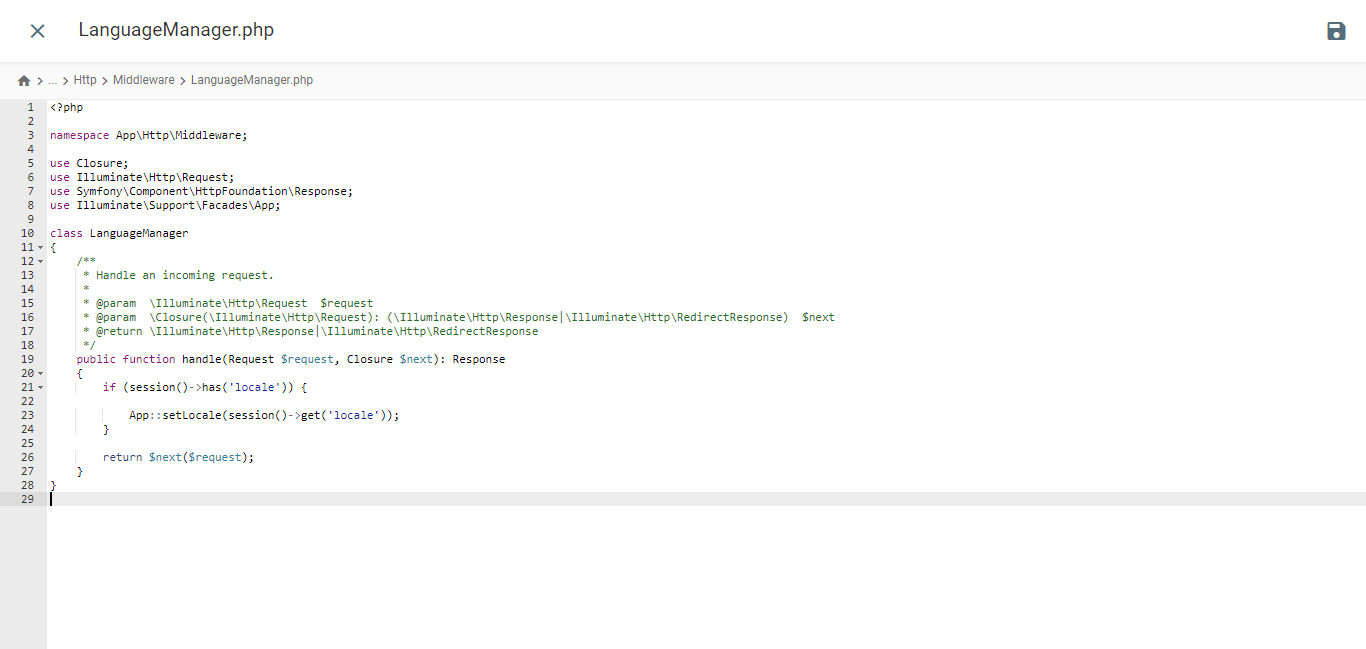
					<?php

namespace App\Http\Middleware;

use Closure;
use Illuminate\Http\Request;
use Symfony\Component\HttpFoundation\Response;
use Illuminate\Support\Facades\App;

class LanguageManager
{
    /**
     * Handle an incoming request.
     *
     * @param  \Closure(\Illuminate\Http\Request): (\Symfony\Component\HttpFoundation\Response)  $next
     */
    public function handle(Request $request, Closure $next): Response
    {
        if (session()->has('locale')) {

            App::setLocale(session()->get('locale'));
        }

        return $next($request);
    }
}
برنامج وسيط للغة التسجيل عبر Kernel.php
افتح ملف Kernel.php الموجود في دليل /app/Http. ابحث عن مصفوفة $middlewareGroups وانتقل إلى قسم web.
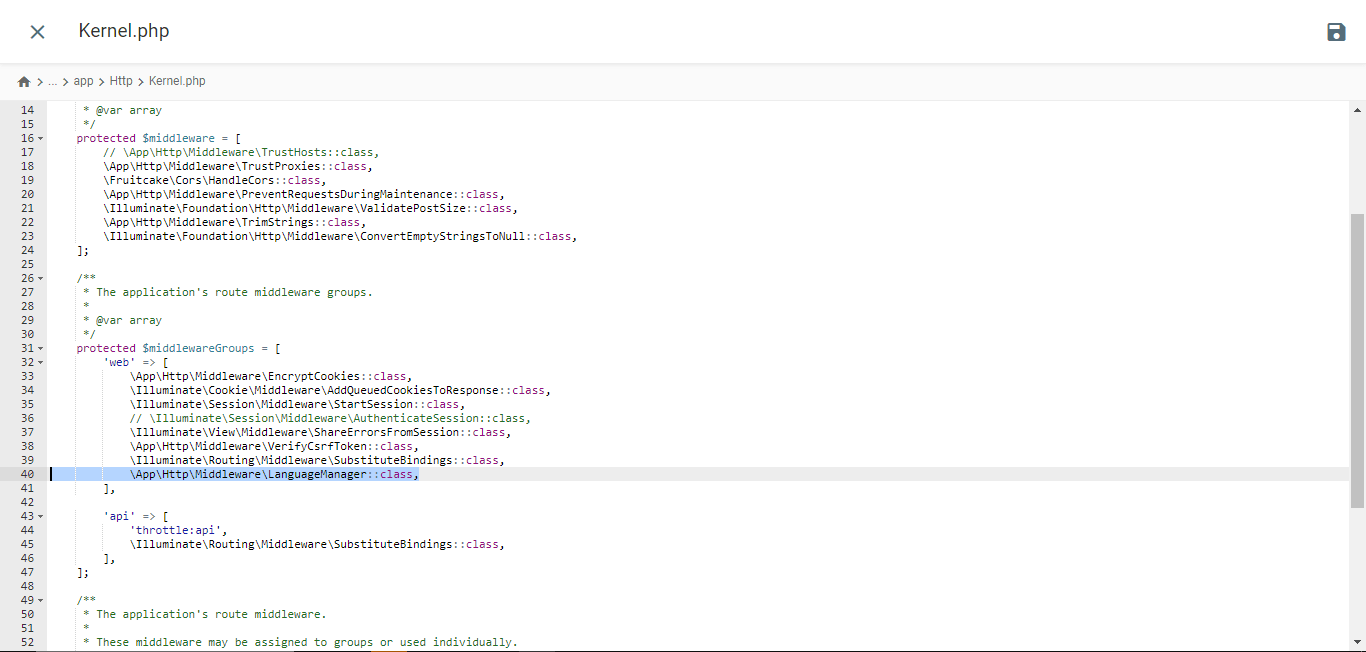
					/**
 * The application's route middleware groups.
 *
 * @var array<string, array<int, class-string|string>>
 */
protected $middlewareGroups = [
    'web' => [

        //...

        \App\Http\Middleware\LanguageManager::class,
    ],

    'api' => [

        //...
    ],
];
إضافة مسار
افتح ملف web.php من مجلد /routes وأضف هذه المسارات إليه.
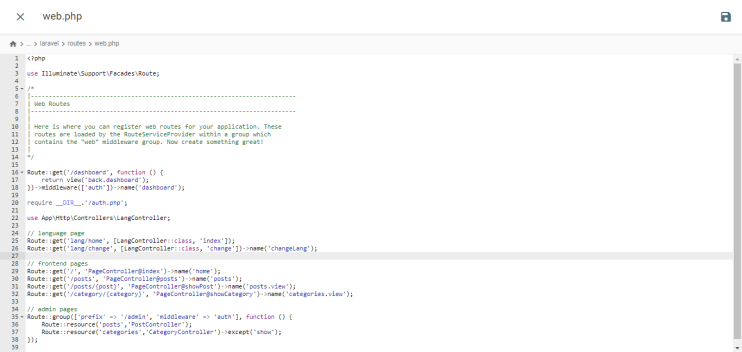
					//...
use App\Http\Controllers\LangController;

//...

Route::get('lang/home', [LangController::class, 'index']);
Route::get('lang/change', [LangController::class, 'change'])->name('changeLang');
اختبار الموقع الإلكتروني
نفّذ هذا الأمر في طرفية المشروع لتشغيل خادم التطوير.
php artisan serve
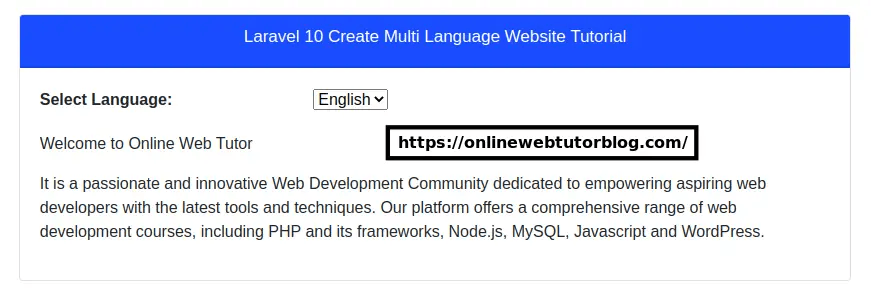
إليك عرضًا لموقع Laravel من موقع onlinewebtutorblog.com الذي تم إنشاؤه، كما ترى في العرض التالي هناك قائمة منسدلة لترجمة Google.
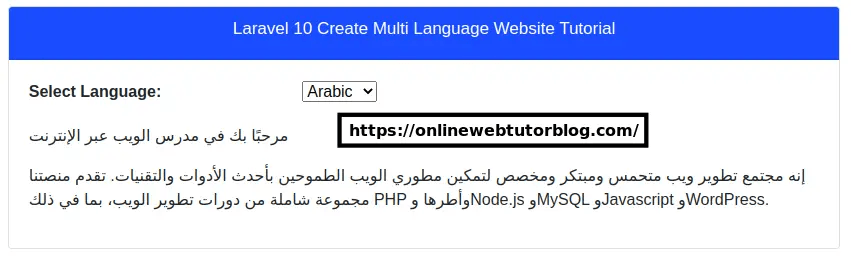
ثم يبدو الأمر هكذا عندما يتم ترجمة موقع Laravel إلى اللغة العربية.
ما الفرق بين تنفيذ ترجمة Google Cloud AI وترجمة Google على Laravel؟
بعد فهم كل تنفيذ لترجمة Google Cloud AI وGoogle Translate في Laravel، سنناقش الفروقات بينهما.
عملية التثبيت والإعداد

- ترجمة واجهة برمجة تطبيقات Google Cloud AI: عملية التثبيت والإعداد أكثر تعقيدًا لأنك يجب أن تنشئ مشروعًا على منصة Google Cloud Platform (GCP)، وتمكّن واجهة برمجة تطبيقات Cloud Translation، وتنشئ حساب خدمة، وتولّد مفاتيح API، وتُعدّ عميل API في تطبيق Laravel . يتضمن ذلك عدة خطوات ويتطلب حساب GCP صالحًا.
- ترجمة Google: التثبيت والإعداد أبسط بكثير. كل ما عليك فعله هو تثبيت حزمة أو مكتبة تابعة لجهة خارجية عبر Composer، مثل stichoza/google-translate-php. بعد ذلك، يمكنك تكوين مفتاح Google Translate API في ملف إعدادات Laravel .
دقة الترجمة
- ترجمة Google Cloud AI API: بفضل قدرات التعلم العميق، يمكن لهذه الخدمة التقاط سياقات اللغة المعقدة والفروق الدقيقة بشكل أفضل. وهذا يسمح بترجمة أكثر دقة للتعبيرات الاصطلاحية والعبارات المجازية والتلاعب اللفظي التي يصعب ترجمتها حرفيًا.
- ترجمة Google: غالبًا ما تجد صعوبة في التقاط السياق والفروق الدقيقة في اللغة، مما يجعل النتائج تبدو جافة أو أقل طبيعية. ونظرًا لاعتمادها على المنهج الإحصائي، غالبًا ما تكون ترجمة التعبيرات الاصطلاحية أو العبارات المجازية أقل دقة.
سرعة الاستجابة

- ترجمة Google Cloud AI API: عادةً أسرع في الاستجابة لطلبات الترجمة لأنها تستخدم نماذج الترجمة الآلية العصبية المحسّنة المستضافة على البنية السحابية القوية من Google. وهذا يوفر أوقات استجابة أسرع، خاصةً للنصوص الأطول أو كميات الترجمة الكبيرة.
- ترجمة Google: قد تكون أبطأ قليلاً في الاستجابة لطلبات الترجمة، خاصةً للمستندات أو النصوص الطويلة. وذلك لأنها تستخدم مزيجاً أكثر تقليدية من أساليب الترجمة الإحصائية والعصبية، والتي قد لا تكون بنفس كفاءة النماذج العصبية المستخدمة في ترجمة Google Cloud AI API.
إمكانيات التخصيص والتحكم
- ترجمة Google Cloud AI API: توفر المزيد من الخيارات لتخصيص عملية الترجمة والتحكم فيها، مثل ضبط تفضيلات الترجمة، وتحميل قوائم مصطلحات مخصصة، والوصول إلى واجهة ترجمة المحرر المباشر لتحرير نتائج الترجمة يدويًا. يتيح ذلك للمستخدمين تحسين دقة الترجمة وفقًا لاحتياجاتهم.
- ترجمة Google: لديها خيارات تخصيص وتحكم أكثر محدودية. يجب على المستخدمين الاعتماد على نتائج الترجمة التلقائية دون قدرة كبيرة على تحرير أو تخصيص النتائج مباشرة.
الميزات المتقدمة

- ترجمة Google Cloud AI API: تتميز تقنية الترجمة من Google Cloud AI بعدة ميزات متقدمة مثل المسرد واختيار النموذج ونماذج AutoML. بالإضافة إلى ذلك، في سياق الترجمة السحابية بالذكاء الاصطناعي مع Linguise، فإنها تمتلك أيضًا ميزات متقدمة مثل استثناءات الترجمة لكلمات محددة مثل المصطلحات التقنية وأسماء العلامات التجارية وغيرها، بناءً على الأسطر أو الصفحات أو عناوين URL.
- ترجمة Google: لا يمكن لـ Google Translate المثبّت في Laravel ترجمة المستندات الصوتية أو غيرها. يمكنه فقط ترجمة النص الموجود على الموقع الإلكتروني إلى لغة أخرى دون القدرة على تعديل نتائج الترجمة.
العوامل التي يجب أن تأخذها في الاعتبار عند اختيار خدمة ترجمة لموقع Laravel الخاص بك
إليك بعض الاعتبارات عند اختيار أفضل خدمة ترجمة لموقع Laravel الخاص بك.
- دقة ترجمة عالية – من أهم العوامل هي دقة الترجمة الناتجة. إذا كان موقعك الإلكتروني يتطلب ترجمات عالية الدقة، خاصة للمحتوى المعقد واللغة الدقيقة، فقد تكون ترجمة Google Cloud AI API خيارًا أفضل من Google Translate.
- سهولة التكامل والإعداد — فكر في تثبيت خدمة الترجمة وإعدادها مع تطبيق Laravel . عادةً ما يكون Google Translate أسهل في التكامل لأنه متاح كحزمة أو مكتبة PHP. وفي الوقت نفسه، تتطلب ترجمة Google Cloud AI API إعدادًا أكثر تعقيدًا على منصة Google Cloud.
- الميزات وخيارات التخصيص – إذا كنت بحاجة إلى ميزات إضافية مثل مسرد المصطلحات أو ترجمة المصطلحات المتخصصة، ترجمة المحرر أو خيارات تخصيص أخرى، فإن Google Cloud AI API Translation يقدم خيارات أكثر من Google Translate.
- السرعة وزمن الاستجابة – بالنسبة للتطبيقات ذات أحجام الترجمة الكبيرة أو التي تحتاج إلى استجابة سريعة، تستجيب ترجمة Google Cloud AI API بشكل عام لطلبات الترجمة أسرع من ترجمة Google.
- التكلفة والميزانية – يتوفر Google Translate مجانًا للاستخدام غير التجاري، بينما تستخدم Google Cloud AI API Translation نموذج فواتير مدفوعًا بناءً على الاستخدام. ضع في اعتبارك ميزانيتك وحجم الترجمة المتوقع لاختيار الخدمة الأكثر فعالية من حيث التكلفة.
- الدعم والتوثيق – أيضًا، ضع في اعتبارك الدعم الفني والتوثيق المتاحين لكل خدمة. قد توفر ترجمة Google Cloud AI API توثيقًا ودعمًا أكثر شمولاً من Google.
Linguise، أفضل خدمة ترجمة سحابية بالذكاء الاصطناعي لموقع Laravel
حتى هذه النقطة، أنت تعرف بالفعل الاعتبارات اللازمة لاختيار خدمة ترجمة لـ Laravel؛ فجميع العوامل المذكورة أعلاه متوفرة في خدمة الترجمة Linguise .
Linguise هي خدمة ترجمة مواقع تستخدم تقنية الترجمة السحابية بالذكاء الاصطناعي لإنتاج ترجمات المحتوى. يمكن أن تكون هذه الخدمة الحل الأفضل لترجمة موقع Laravel قائم على. لماذا؟ لأن Linguise تعالج الاعتبارات المذكورة أعلاه.
- Linguise يتمتع بـ جودة ترجمة مثالية. وعلى الرغم من أن هذه الدقة تتفاوت حسب زوج اللغات، Linguise يفتخر بمعدل دقة يقارب 97%، مشابه للترجمة البشرية.
- Linguise متكامل أيضًا مع أكثر من 40 نظام إدارة محتوى ومنشئ مواقع، بالإضافة إلى التكامل مع المواقع المبنية على PHP مثل Laravel.
- على الرغم من أنه يترجم تلقائيًا، فإن Linguise يحتوي على محرر مباشر يمكن استخدامه لتحرير نتائج الترجمة. وبهذه الطريقة، يمكن تعديل الترجمة وفقًا لتفضيلات العمل.
- مدة تحميل الصفحات متعددة اللغات أطول بنسبة 5% فقط من صفحات اللغة الأصلية.
- تتوفر خدمتنا في ثلاث باقات تتراوح أسعارها من 15 دولارًا إلى 45 دولارًا شهريًا. وعلى الرغم من أنها مدفوعة، فإننا نقدم أيضًا فترة تجريبية مجانية لمدة 30 يومًا بحد أقصى 600,000 كلمة قابلة للترجمة.
- أخيرًا، يدعم Linguise جميع أشكال مساعدة العملاء، بما في ذلك المقالات الإرشادية والوثائق وأخبار المنتجات ودروس الفيديو على YouTube ودردشة الدعم على مدار الساعة طوال أيام الأسبوع.
من النقاط المذكورة أعلاه، يمكن أن يكون Linguise حلاً تقنيًا للترجمة بالذكاء الاصطناعي السحابي لـ Laravel.
الخلاصة
في هذا المقال، استكشفنا الفروقات الرئيسية بين تطبيق ترجمة Google Cloud AI API وترجمة Google لتطبيقات الويب Laravel .
تتميز ترجمة Google Cloud AI API بالدقة وتلبي الحاجة إلى ترجمات عالية الدقة. ومع ذلك، تتطلب هذه الخدمة إعدادًا أكثر تعقيدًا وهي أكثر تكلفة من Google Translate. من ناحية أخرى، يوفر Google Translate سهولة في التكامل لكنه يمتلك قيودًا في الدقة وخيارات التخصيص.
يبرز Linguise كخدمة ترجمة سحابية بديلة تعتمد على الذكاء الاصطناعي ومتوافقة مع مواقع Laravel . مع مستويات دقة تقترب من الترجمات البشرية، وخيارات محرر الترجمة، وأوقات تحميل سريعة، ودعم عملاء شامل، يصبح Linguise حلاً ممتازاً للترجمة لموقع Laravel الخاص بك.
إذا كنت ترغب في تجربة Linguise، يمكنك التسجيل للحصول على حساب مجاني والاستمتاع بفترة تجريبية مدتها 30 يومًا بحد أقصى 600,000 كلمة مترجمة. قم بزيارة linguise.com للحصول على مزيد من المعلومات!