Laravel所有している方にとって、正確で自然な翻訳コンテンツを提供することは Web サイトを翻訳して優れたユーザー エクスペリエンスを提供するために非常に重要です。
幸いなことに、Google Cloud AI API TranslationやGoogle Translateなど、開発者がこの課題を克服するのに役立つ自動翻訳サービスがいくつかあります。どちらのサービスも、機械技術を用いた翻訳機能を提供しています。.
LaravelにGoogle Cloud AI Translation と Google Translate を実装する場合の主な違いを説明し Laravelに最適な翻訳サービスを推奨します。
Google Cloud AI API 翻訳と Google 翻訳とは何ですか?
議論に入る前に、Google Cloud AI API と Google Translate の翻訳のそれぞれの意味について説明します。.
Google Cloud AI API 翻訳

Google Cloud AI API Translationは、Google Cloud Platformが提供する高度な自動翻訳サービス。このサービスは、最新の人工知能(AI)と機械学習技術を活用し、テキスト、音声、ドキュメントの正確で自然な翻訳を実現します。
Google Cloud AI API Translationは、ディープラーニングに基づくニューラル翻訳モデルを採用しています。これにより、言語のニュアンスや文脈をより正確に捉え、実際の言語使用法に沿った、より慣用的な翻訳を提供できます。また、Google Cloud AI Translationは50万文字まで無料でご利用いただけますが、それ以降の7万5千文字については、100万文字あたり20ドルの費用が発生します。.
Google翻訳
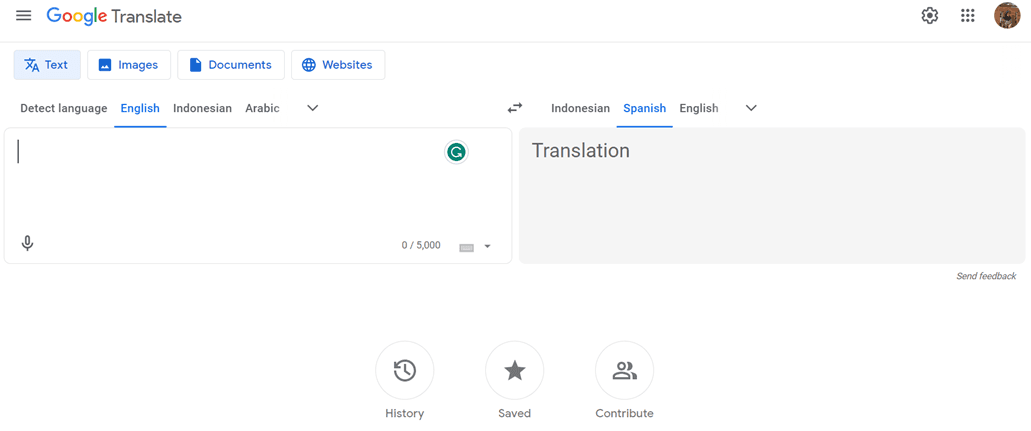
一方、Google翻訳は長年にわたり広く知られている自動テキスト翻訳サービスです。Google翻訳は、大規模なトレーニングデータセットから学習したパターンと確率に基づいて翻訳を生成する、より伝統的な統計的翻訳アプローチを採用しています。.
Google 翻訳は、精度や言語のニュアンスの処理という点では Google Cloud AI API 翻訳ほど進んではいませんが、使いやすさと非商用での無料利用により、依然として人気のある選択肢となっています。.
Laravelで Google Cloud AI API 翻訳を実装する
Linguise アカウントを作成する
Linguise使用するには、アカウントを登録する。無料登録、または1ヶ月または1年間のサブスクリプションをご利用いただけます。メールアドレス、ユーザー名、パスワードなどの情報を入力するだけでご利用いただけます。
Laravel ウェブサイト情報を追加する
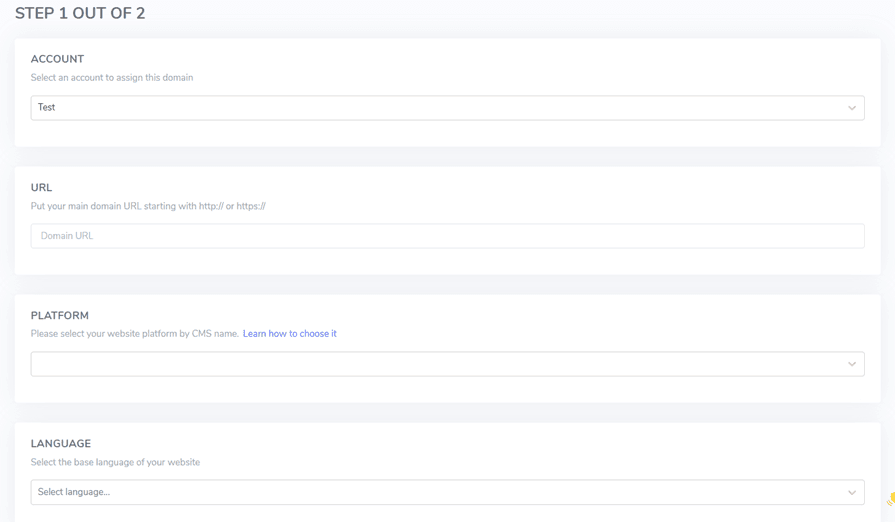
その後、使用する Web サイトに関する情報を追加し、 Linguise アカウント情報と Web URL を入力し、 Laravel プラットフォームを選択して、デフォルトの言語と Web サイトに追加する言語を追加します。.
次に、次のボタンから PHP スクリプトをダウンロードし、ローカル コンピューターに保存します。.
PHPスクリプトをアップロードして設定する
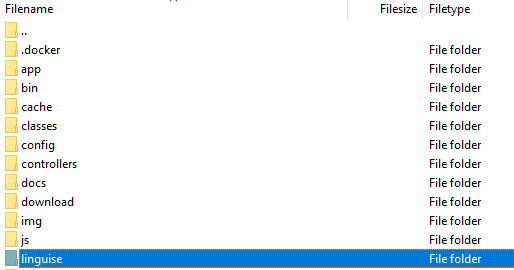
スクリプトをダウンロードしたら、解凍して Laravel がインストールされているルートフォルダにアップロードしてください。Laravelインストールのルート Laravel (通常はCMSファイルが保存されているフォルダ)に配置されていることを確認してください。フォルダ名は「linguise」(解凍時のデフォルト名)にしてください。.
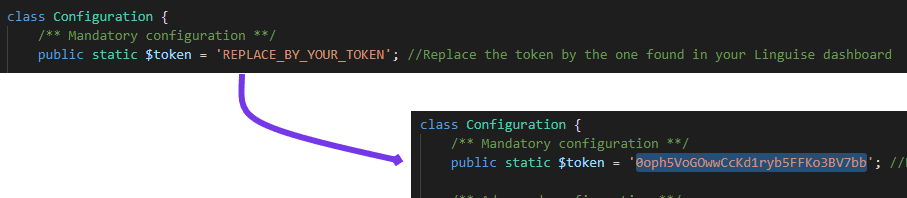
次に、 Linguise APIキーを、サーバーにアップロードした…/linguise/Configuration.phpファイルにコピーします。ファイルを編集し、引用符で囲まれたAPIキーを貼り付け、「REPLACE_BY_YOUR_TOKEN」というテキストを置き換えます。.
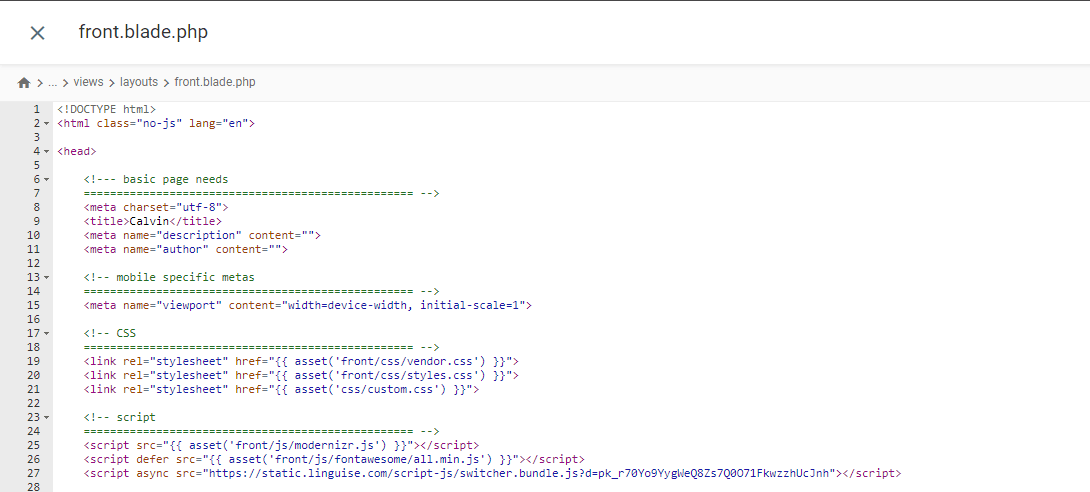
言語切り替えのスクリプトを挿入する

resources/views/layouts/ ディレクトリ内の front.blade.php ファイルに挿入されます。挿入されたスクリプトのプレビューを以下に示します。.
.htaccess を設定する
最後に、言語ベースのURLは.htaccessファイルで設定する必要があります。ファイルに「RewriteBase /」が含まれている場合は、その行の後に以下のコードをコピーして貼り付けてください。.
					<IfModule mod_rewrite.c>
  RewriteEngine On
  RewriteRule ^(af|sq|am|ar|hy|az|eu|be|bn|bs|bg|ca|ceb|ny|zh-cn|zh-tw|co|hr|cs|da|nl|en|eo|et|tl|fi|fr|fy|gl|ka|de|el|gu|ht|ha|haw|iw|hi|hmn|hu|is|ig|id|ga|it|ja|jw|kn|kk|km|ko|ku|ky|lo|la|lv|lt|lb|mk|mg|ms|ml|mt|mi|mr|mn|my|ne|no|ps|fa|pl|pt|pa|ro|ru|sm|gd|sr|st|sn|sd|si|sk|sl|so|es|su|sw|sv|tg|ta|te|th|tr|uk|ur|uz|vi|cy|xh|yi|yo|zu|zz-zz)(?:$|/)(.*)$ linguise/linguise.php?linguise_language=$1&original_url=$2 [L,QSA]
</IfModule>
完了です。これで、 LinguiseLaravelで確認してみましょう。デフォルトの言語スイッチャーが表示され、ダッシュボードからLaravelの言語スイッチャーをカスタマイズ
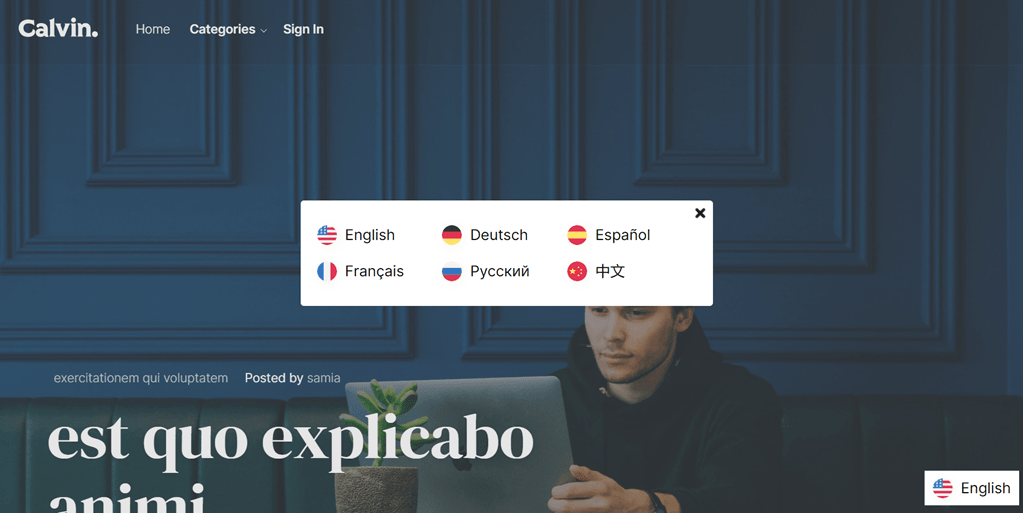
LaravelでGoogle翻訳を実装する
それでは、 Laravelに Google Translate を実装してみましょう。ここでは、 Laravel プロジェクトが既に作成済みで、Google Translate を追加するだけであると想定しています。.
以下のインストール手順は、 Laravel公式Web サイトでも参照できます。
Google Translatorパッケージをインストールする
Google Translatorパッケージをインストールするには、プロジェクトプロンプトを開き、次のコマンドを入力します。このパッケージにより、google-translator-languageの機能を使用できるようになります。.
composer require stichoza/google-translate-php
Google Translatorパッケージの設定
アプリケーション内に「Google Translator パッケージ」を設定する必要があります。/config フォルダ内の app.php ファイルを開き、「aliases」セクションを見つけて、次のコード行を追加します。.
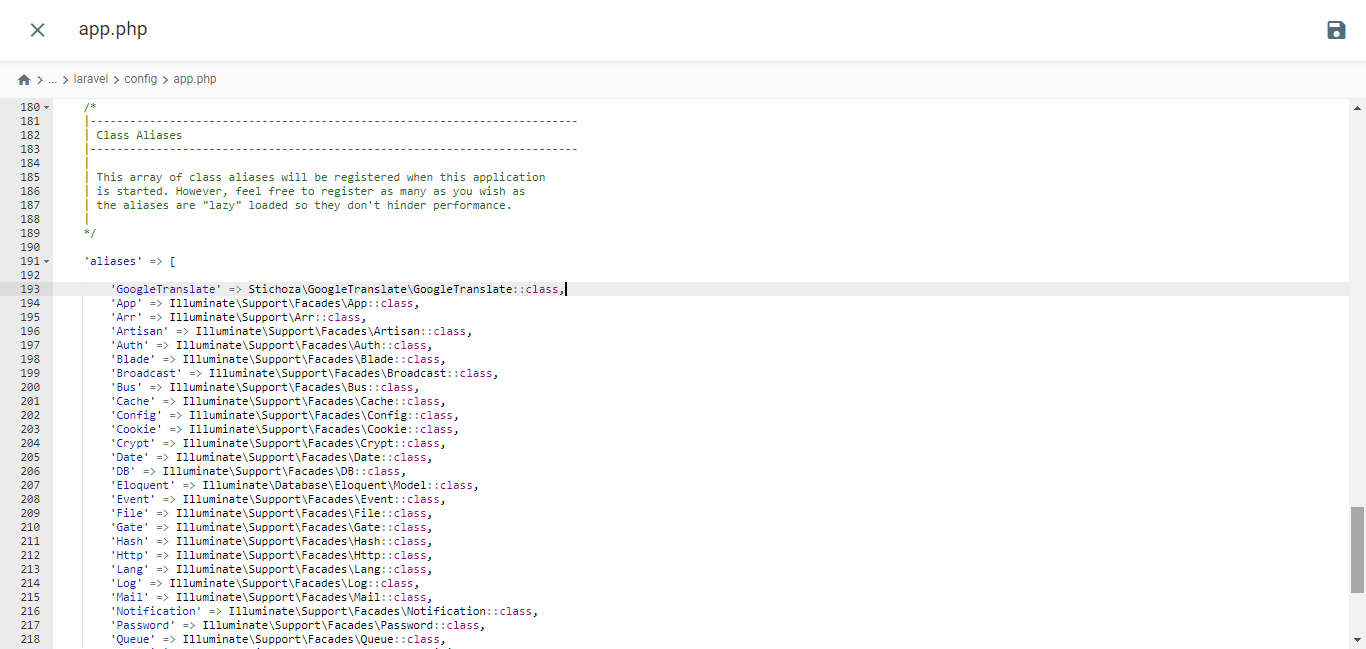
					/*
|--------------------------------------------------------------------------
| Class Aliases
|--------------------------------------------------------------------------
|
| This array of class aliases will be registered when this application
| is started. However, feel free to register as many as you wish as
| the aliases are "lazy" loaded so they don't hinder performance.
|
*/

'aliases' => Facade::defaultAliases()->merge([
    // 'Example' => App\Facades\Example::class,
    'GoogleTranslate' => Stichoza\GoogleTranslate\GoogleTranslate::class,
])->toArray(),
言語コントローラーの設定
次のような言語コントローラファイルを作成する必要があります。
php artisan make:controller LangController
/app/Http/Controllers フォルダー内に LangController.php ファイルが作成されます。.
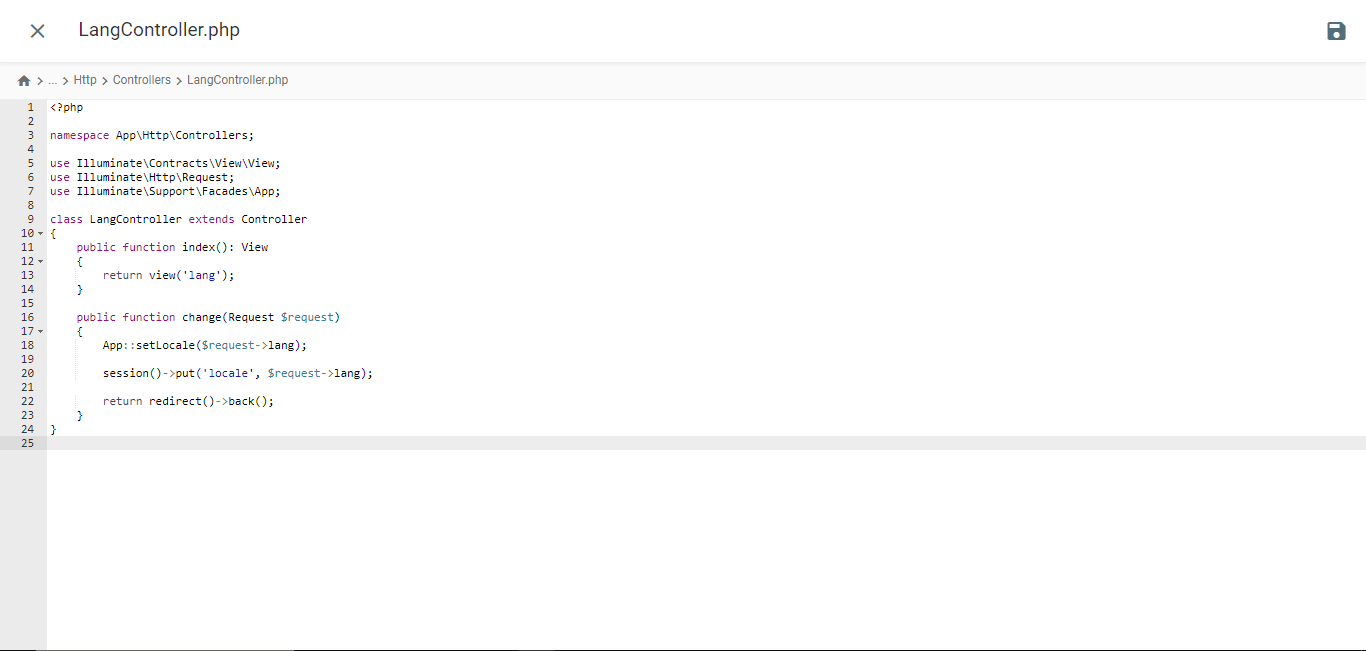
					<?php

namespace App\Http\Controllers;

use Illuminate\Contracts\View\View;
use Illuminate\Http\Request;
use Illuminate\Support\Facades\App;

class LangController extends Controller
{
    public function index(): View
    {
        return view('lang');
    }

    public function change(Request $request)
    {
        App::setLocale($request->lang);

        session()->put('locale', $request->lang);

        return redirect()->back();
    }
}
Bladeテンプレートファイルを作成する
/resources/views フォルダに移動し、lang.blade.php というファイルを作成します。ファイルを開き、次のコードを挿入します。.
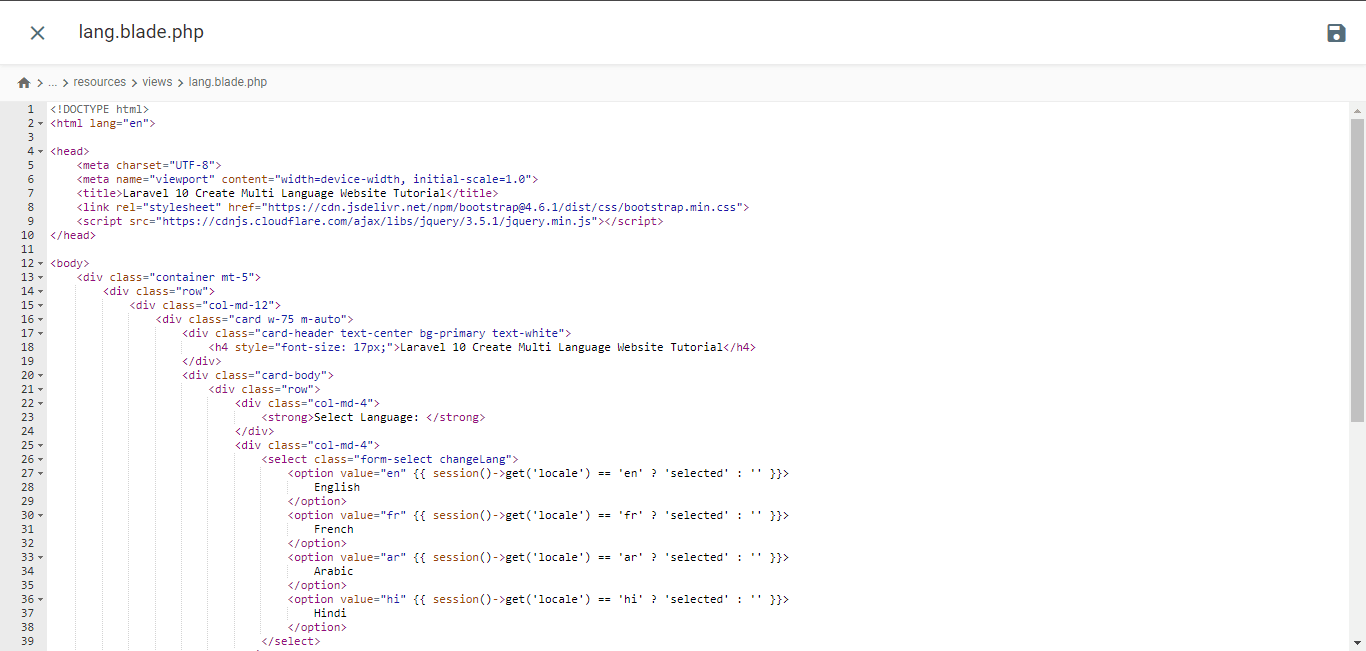
<!DOCTYPE html>
<html lang="en">
<head>
<meta charset="UTF-8">
<meta name="viewport" content="width=device-width, initial-scale=1.0">
<title>Laravel 10 Create Multi Language Website Tutorial</title> <script type="litespeed/javascript" data-src="https://cdnjs.cloudflare.com/ajax/libs/jquery/3.5.1/jquery.min.js"></script> <script type="application/ld+json" class="gnpub-schema-markup-output">{"@context":"https:\/\/schema.org\/","@type":"NewsArticle","@id":"https:\/\/www.linguise.com\/blog\/guide\/implement-google-cloud-ai-api-translation-vs-google-translate-for-laravel\/#newsarticle","url":"https:\/\/www.linguise.com\/blog\/guide\/implement-google-cloud-ai-api-translation-vs-google-translate-for-laravel\/","image":{"@type":"ImageObject","url":"https:\/\/www.linguise.com\/wp-content\/uploads\/2024\/05\/Implement-Google-Cloud-AI-API-translation-vs-Google-Translate-for-Laravel-150x150.png","width":150,"height":150},"headline":"Implement Google Cloud AI API translation vs Google Translate for Laravel","mainEntityOfPage":"https:\/\/www.linguise.com\/blog\/guide\/implement-google-cloud-ai-api-translation-vs-google-translate-for-laravel\/","datePublished":"2024-05-31T07:32:47+00:00","dateModified":"2024-08-26T19:19:15+00:00","description":"For those of you who own Laravel-based websites, providing accurate and natural translation content is very important to translate your website and offer a good","articleSection":"Guide","articleBody":"For those of you who own Laravel-based websites, providing accurate and natural translation content is very important to translate your website and offer a good user experience.\nFortunately, several automatic translation services are available to help developers overcome this challenge, including Google Cloud AI API Translation and Google Translate. Both services offer translation capabilities using machine technology.\nIn this article, we will explore the main differences between implementing Google Cloud AI Translation and Google Translate for Laravel applications and recommend the best translation services for your Laravel website. \t\t\n\t\t\tWhat are Google Cloud AI API translation & Google Translate?\n\t\t\n\t\tBefore entering into the discussion, we will discuss the respective meanings of Google Cloud AI API and Google Translate translations.\t\t\n\t\t\tGoogle Cloud AI API translation\n\t\t\n\t\t\t\t\t\t\t\t\t\t\t\t\t\t\t\t\t\t\t\t\t\t\t\t\t\t\n\t\tGoogle Cloud AI API Translation is an advanced automatic translation service provided by Google Cloud Platform. This service leverages the latest artificial intelligence (AI) and machine learning technologies to deliver accurate and natural translations of text, voice, and documents.Google Cloud AI API Translation uses neural translation models based on deep learning, which allows it to capture language nuances and context better, providing more idiomatic translations that align with actual language usage. Additionally, using Google Cloud AI Translation for up to 500,000 characters is free of charge, while the next 75,000 characters will incur a cost of $20 per million characters.\u00a0\t\t\n\t\t\tGoogle Translate\n\t\t\n\t\t\t\t\t\t\t\t\t\t\t\t\t\t\t\t\t\t\t\t\t\t\t\t\t\t\n\t\tMeanwhile, Google Translate is a long-standing and widely known automatic text translation service. It uses a more traditional statistical translation approach, which generates translations based on patterns and probabilities learned from large training datasets.Although it is not as advanced as Google Cloud AI API Translation in terms of accuracy and handling language nuances, Google Translate remains a popular choice due to its ease of use and free availability for non-commercial use.\t\t\n\t\t\tImplement Google Cloud AI API translation on Laravel\n\t\t\n\t\tSeveral translation services, including Linguise, use AI Translation cloud technology to translate websites.The language translation service uses cloud AI API as one of its translation technologies. The following are the implementation steps on the Laravel website. We assume here that you already have a ready Laravel project website.\t\t\n\t\t\tCreate Linguise account\n\t\t\n\t\tTo use Linguise, you must register an account first. You can do this for free or subscribe for one month or a year. You only need to provide information such as your email, username, and password.\t\t\n\t\t\tAdd Laravel website info\n\t\t\n\t\tAfter that, add information about the website you will use, enter your Linguise account info and web URL, select the Laravel platform, and add the default language and the language you want to add to the website.\u00a0\t\t\n\t\t\t\t\t\t\t\t\t\t\t\t\t\t\t\t\t\t\t\t\t\t\t\t\t\t\n\t\tThen download the PHP script via the following button and save it on your local computer.\t\t\n\t\t\t\n\t\t\t\t\t\t\t\n\t\t\t\t\t\t\t\t\tDOWNLOAD PHP-JS TRANSLATION SCRIPT\n\t\t\t\t\t\n\t\t\tUpload and configure the PHP script\n\t\t\n\t\tAfter downloading the script, unzip it and upload it to the root folder where Laravel is installed. Ensure it is located at the root of your Laravel installation (typically where your CMS files are). Ensure the folder is named \"linguise\" (the default name when the folder is unzipped).\t\t\n\t\t\t\t\t\t\t\t\t\t\t\t\t\t\t\t\t\t\t\t\t\t\t\t\t\t\n\t\tThen, the Linguise API key must be copied into the \u2026\/linguise\/Configuration.php file you uploaded to your server. Edit the file and paste your API key between the quotes, replacing the text REPLACE_BY_YOUR_TOKEN.\t\t\n\t\t\t\t\t\t\t\t\t\t\t\t\t\t\t\t\t\t\t\t\t\t\t\t\t\t\n\t\t\tInsert script of language switcher\t\t\n\t\tNext, insert the language switch script that you got from the Linguise dashboard.\t\t\n\t\t\t\t\t\t\t\t\t\t\t\t\t\t\t\t\t\t\t\t\t\t\t\t\t\t\n\t\tInserted into the front.blade.php file in the resources\/views\/layouts\/ directory. Here is a preview of the inserted script.\t\t\n\t\t\t\t\t\t\t\t\t\t\t\t\t\t\t\t\t\t\t\t\t\t\t\t\t\t\n\t\t\tConfigure .htaccess\n\t\t\n\t\tLastly, language-based URLs need to be configured in the .htaccess file. If your file includes \"RewriteBase \/,\" simply copy and paste the following code after that line.\t\t\n\t\t\t\n\t\t\t\t\n\t\t\t\t\t\n RewriteEngine On\n RewriteRule ^(af|sq|am|ar|hy|az|eu|be|bn|bs|bg|ca|ceb|ny|zh-cn|zh-tw|co|hr|cs|da|nl|en|eo|et|tl|fi|fr|fy|gl|ka|de|el|gu|ht|ha|haw|iw|hi|hmn|hu|is|ig|id|ga|it|ja|jw|kn|kk|km|ko|ku|ky|lo|la|lv|lt|lb|mk|mg|ms|ml|mt|mi|mr|mn|my|ne|no|ps|fa|pl|pt|pa|ro|ru|sm|gd|sr|st|sn|sd|si|sk|sl|so|es|su|sw|sv|tg|ta|te|th|tr|uk|ur|uz|vi|cy|xh|yi|yo|zu|zz-zz)(?:$|\/)(.*)$ linguise\/linguise.php?linguise_language=$1&original_url=$2 [L,QSA]\n\n\t\t\t\t\n\t\t\t\n\t\tDone. At this point, you have successfully implemented cloud AI API Translation on the Linguise service. Now, you can check the Laravel website. A default language switcher will appear, and you can customize the Language switcher for Laravel via the dashboard.\t\t\n\t\t\t\t\t\t\t\t\t\t\t\t\t\t\t\t\t\t\t\t\t\t\t\t\t\t\n\t\t\tImplement Google Translate on Laravel\t\t\n\t\tNow we will try to implement Google Translate in Laravel. Here we assume that you have successfully created a Laravel project and just need to add Google Translate.You can also find the following installation steps on the official Laravel website.\t\t\n\t\t\tInstall Google Translator Package\n\t\t\n\t\tTo install the Google Translator Package, open the project prompt and input the following command. This package will enable you to utilize the working functions of the google-translator-language.\t\t\n\t\t\t\n\t\t\t\t\n\t\t\t\t\tcomposer require stichoza\/google-translate-php\n\t\t\t\t\n\t\t\t\n\t\t\tSetting of Google Translator Package\n\t\t\n\t\tWe must set up the \"google translator package\" within the the application. Open the app.php file in the \/config folder, find the \"aliases\" section, and add the following line of code.\t\t\n\t\t\t\t\t\t\t\t\t\t\t\t\t\t\t\t\t\t\t\t\t\t\t\t\t\t\n\t\t\t\n\t\t\t\t\n\t\t\t\t\t\/*\n|--------------------------------------------------------------------------\n| Class Aliases\n|--------------------------------------------------------------------------\n|\n| This array of class aliases will be registered when this application\n| is started. However, feel free to register as many as you wish as\n| the aliases are \"lazy\" loaded so they don't hinder performance.\n|\n*\/\n'aliases' => Facade::defaultAliases()->merge([\n \/\/ 'Example' => AppFacadesExample::class,\n 'GoogleTranslate' => StichozaGoogleTranslateGoogleTranslate::class,\n])->toArray(),\n\n\t\t\t\t\n\t\t\t\n\t\t\tSetup Language Controller\n\t\t\n\t\tYou need to create a language controller file like the following\t\t\n\t\t\t\n\t\t\t\t\n\t\t\t\t\tphp artisan make:controller LangController\n\t\t\t\t\n\t\t\t\n\t\tIt will create LangController.php file inside \/app\/Http\/Controllers folder.","keywords":"","name":"Implement Google Cloud AI API translation vs Google Translate for Laravel","thumbnailUrl":"https:\/\/www.linguise.com\/wp-content\/uploads\/2024\/05\/Implement-Google-Cloud-AI-API-translation-vs-Google-Translate-for-Laravel-150x150.png","wordCount":809,"timeRequired":"PT3M35S","mainEntity":{"@type":"WebPage","@id":"https:\/\/www.linguise.com\/blog\/guide\/implement-google-cloud-ai-api-translation-vs-google-translate-for-laravel\/"},"author":{"@type":"Person","name":"Tristan","url":"https:\/\/www.linguise.com\/author\/tristan\/","sameAs":[],"image":{"@type":"ImageObject","url":"https:\/\/secure.gravatar.com\/avatar\/50d7238660b192d8d54ebf6367be5e97bb41c24dbd190daae062d931efd351ae?s=96&d=mm&r=g","height":96,"width":96}},"editor":{"@type":"Person","name":"Tristan","url":"https:\/\/www.linguise.com\/author\/tristan\/","sameAs":[],"image":{"@type":"ImageObject","url":"https:\/\/secure.gravatar.com\/avatar\/50d7238660b192d8d54ebf6367be5e97bb41c24dbd190daae062d931efd351ae?s=96&d=mm&r=g","height":96,"width":96}}}</script> </head>
<body>
<div class="container mt-5">
<div class="row">
<div class="col-md-12">
<div class="card w-75 m-auto">
<div class="card-header text-center bg-primary text-white">
<h4 style="font-size: 17px;">Laravel 10 Create Multi Language Website Tutorial</h4>
</div>
<div class="card-body">
<div class="row">
<div class="col-md-4">
<strong>Select Language: </strong>
</div>
<div class="col-md-4">
<select class="form-select changeLang">
<option value="en" {{ session()->get('locale') == 'en' ? 'selected' : '' }}>
English
</option>
<option value="fr" {{ session()->get('locale') == 'fr' ? 'selected' : '' }}>
French
</option>
<option value="ar" {{ session()->get('locale') == 'ar' ? 'selected' : '' }}>
Arabic
</option>
<option value="hi" {{ session()->get('locale') == 'hi' ? 'selected' : '' }}>
Hindi
</option>
</select>
</div>
</div>
<div style="margin-top: 20px;">
<p>{{ GoogleTranslate::trans('Welcome to Online Web Tutor', app()->getLocale()) }}</p>
<p>{{ GoogleTranslate::trans('It is a passionate and innovative Web Development Community dedicated to empowering aspiring web developers with the latest tools and techniques. Our platform offers a comprehensive range of web development courses, including PHP and its frameworks, Node.js, MySQL, Javascript and WordPress.', app()->getLocale()) }}
</p>
</div>
</div>
</div>
</div>
</div>
</div>
<script data-no-optimize="1">window.lazyLoadOptions=Object.assign({},{threshold:300},window.lazyLoadOptions||{});!function(t,e){"object"==typeof exports&&"undefined"!=typeof module?module.exports=e():"function"==typeof define&&define.amd?define(e):(t="undefined"!=typeof globalThis?globalThis:t||self).LazyLoad=e()}(this,function(){"use strict";function e(){return(e=Object.assign||function(t){for(var e=1;e<arguments.length;e++){var n,a=arguments[e];for(n in a)Object.prototype.hasOwnProperty.call(a,n)&&(t[n]=a[n])}return t}).apply(this,arguments)}function o(t){return e({},at,t)}function l(t,e){return t.getAttribute(gt+e)}function c(t){return l(t,vt)}function s(t,e){return function(t,e,n){e=gt+e;null!==n?t.setAttribute(e,n):t.removeAttribute(e)}(t,vt,e)}function i(t){return s(t,null),0}function r(t){return null===c(t)}function u(t){return c(t)===_t}function d(t,e,n,a){t&&(void 0===a?void 0===n?t(e):t(e,n):t(e,n,a))}function f(t,e){et?t.classList.add(e):t.className+=(t.className?" ":"")+e}function _(t,e){et?t.classList.remove(e):t.className=t.className.replace(new RegExp("(^|\\s+)"+e+"(\\s+|$)")," ").replace(/^\s+/,"").replace(/\s+$/,"")}function g(t){return t.llTempImage}function v(t,e){!e||(e=e._observer)&&e.unobserve(t)}function b(t,e){t&&(t.loadingCount+=e)}function p(t,e){t&&(t.toLoadCount=e)}function n(t){for(var e,n=[],a=0;e=t.children[a];a+=1)"SOURCE"===e.tagName&&n.push(e);return n}function h(t,e){(t=t.parentNode)&&"PICTURE"===t.tagName&&n(t).forEach(e)}function a(t,e){n(t).forEach(e)}function m(t){return!!t[lt]}function E(t){return t[lt]}function I(t){return delete t[lt]}function y(e,t){var n;m(e)||(n={},t.forEach(function(t){n[t]=e.getAttribute(t)}),e[lt]=n)}function L(a,t){var o;m(a)&&(o=E(a),t.forEach(function(t){var e,n;e=a,(t=o[n=t])?e.setAttribute(n,t):e.removeAttribute(n)}))}function k(t,e,n){f(t,e.class_loading),s(t,st),n&&(b(n,1),d(e.callback_loading,t,n))}function A(t,e,n){n&&t.setAttribute(e,n)}function O(t,e){A(t,rt,l(t,e.data_sizes)),A(t,it,l(t,e.data_srcset)),A(t,ot,l(t,e.data_src))}function w(t,e,n){var a=l(t,e.data_bg_multi),o=l(t,e.data_bg_multi_hidpi);(a=nt&&o?o:a)&&(t.style.backgroundImage=a,n=n,f(t=t,(e=e).class_applied),s(t,dt),n&&(e.unobserve_completed&&v(t,e),d(e.callback_applied,t,n)))}function x(t,e){!e||0<e.loadingCount||0<e.toLoadCount||d(t.callback_finish,e)}function M(t,e,n){t.addEventListener(e,n),t.llEvLisnrs[e]=n}function N(t){return!!t.llEvLisnrs}function z(t){if(N(t)){var e,n,a=t.llEvLisnrs;for(e in a){var o=a[e];n=e,o=o,t.removeEventListener(n,o)}delete t.llEvLisnrs}}function C(t,e,n){var a;delete t.llTempImage,b(n,-1),(a=n)&&--a.toLoadCount,_(t,e.class_loading),e.unobserve_completed&&v(t,n)}function R(i,r,c){var l=g(i)||i;N(l)||function(t,e,n){N(t)||(t.llEvLisnrs={});var a="VIDEO"===t.tagName?"loadeddata":"load";M(t,a,e),M(t,"error",n)}(l,function(t){var e,n,a,o;n=r,a=c,o=u(e=i),C(e,n,a),f(e,n.class_loaded),s(e,ut),d(n.callback_loaded,e,a),o||x(n,a),z(l)},function(t){var e,n,a,o;n=r,a=c,o=u(e=i),C(e,n,a),f(e,n.class_error),s(e,ft),d(n.callback_error,e,a),o||x(n,a),z(l)})}function T(t,e,n){var a,o,i,r,c;t.llTempImage=document.createElement("IMG"),R(t,e,n),m(c=t)||(c[lt]={backgroundImage:c.style.backgroundImage}),i=n,r=l(a=t,(o=e).data_bg),c=l(a,o.data_bg_hidpi),(r=nt&&c?c:r)&&(a.style.backgroundImage='url("'.concat(r,'")'),g(a).setAttribute(ot,r),k(a,o,i)),w(t,e,n)}function G(t,e,n){var a;R(t,e,n),a=e,e=n,(t=Et[(n=t).tagName])&&(t(n,a),k(n,a,e))}function D(t,e,n){var a;a=t,(-1<It.indexOf(a.tagName)?G:T)(t,e,n)}function S(t,e,n){var a;t.setAttribute("loading","lazy"),R(t,e,n),a=e,(e=Et[(n=t).tagName])&&e(n,a),s(t,_t)}function V(t){t.removeAttribute(ot),t.removeAttribute(it),t.removeAttribute(rt)}function j(t){h(t,function(t){L(t,mt)}),L(t,mt)}function F(t){var e;(e=yt[t.tagName])?e(t):m(e=t)&&(t=E(e),e.style.backgroundImage=t.backgroundImage)}function P(t,e){var n;F(t),n=e,r(e=t)||u(e)||(_(e,n.class_entered),_(e,n.class_exited),_(e,n.class_applied),_(e,n.class_loading),_(e,n.class_loaded),_(e,n.class_error)),i(t),I(t)}function U(t,e,n,a){var o;n.cancel_on_exit&&(c(t)!==st||"IMG"===t.tagName&&(z(t),h(o=t,function(t){V(t)}),V(o),j(t),_(t,n.class_loading),b(a,-1),i(t),d(n.callback_cancel,t,e,a)))}function $(t,e,n,a){var o,i,r=(i=t,0<=bt.indexOf(c(i)));s(t,"entered"),f(t,n.class_entered),_(t,n.class_exited),o=t,i=a,n.unobserve_entered&&v(o,i),d(n.callback_enter,t,e,a),r||D(t,n,a)}function q(t){return t.use_native&&"loading"in HTMLImageElement.prototype}function H(t,o,i){t.forEach(function(t){return(a=t).isIntersecting||0<a.intersectionRatio?$(t.target,t,o,i):(e=t.target,n=t,a=o,t=i,void(r(e)||(f(e,a.class_exited),U(e,n,a,t),d(a.callback_exit,e,n,t))));var e,n,a})}function B(e,n){var t;tt&&!q(e)&&(n._observer=new IntersectionObserver(function(t){H(t,e,n)},{root:(t=e).container===document?null:t.container,rootMargin:t.thresholds||t.threshold+"px"}))}function J(t){return Array.prototype.slice.call(t)}function K(t){return t.container.querySelectorAll(t.elements_selector)}function Q(t){return c(t)===ft}function W(t,e){return e=t||K(e),J(e).filter(r)}function X(e,t){var n;(n=K(e),J(n).filter(Q)).forEach(function(t){_(t,e.class_error),i(t)}),t.update()}function t(t,e){var n,a,t=o(t);this._settings=t,this.loadingCount=0,B(t,this),n=t,a=this,Y&&window.addEventListener("online",function(){X(n,a)}),this.update(e)}var Y="undefined"!=typeof window,Z=Y&&!("onscroll"in window)||"undefined"!=typeof navigator&&/(gle|ing|ro)bot|crawl|spider/i.test(navigator.userAgent),tt=Y&&"IntersectionObserver"in window,et=Y&&"classList"in document.createElement("p"),nt=Y&&1<window.devicePixelRatio,at={elements_selector:".lazy",container:Z||Y?document:null,threshold:300,thresholds:null,data_src:"src",data_srcset:"srcset",data_sizes:"sizes",data_bg:"bg",data_bg_hidpi:"bg-hidpi",data_bg_multi:"bg-multi",data_bg_multi_hidpi:"bg-multi-hidpi",data_poster:"poster",class_applied:"applied",class_loading:"litespeed-loading",class_loaded:"litespeed-loaded",class_error:"error",class_entered:"entered",class_exited:"exited",unobserve_completed:!0,unobserve_entered:!1,cancel_on_exit:!0,callback_enter:null,callback_exit:null,callback_applied:null,callback_loading:null,callback_loaded:null,callback_error:null,callback_finish:null,callback_cancel:null,use_native:!1},ot="src",it="srcset",rt="sizes",ct="poster",lt="llOriginalAttrs",st="loading",ut="loaded",dt="applied",ft="error",_t="native",gt="data-",vt="ll-status",bt=[st,ut,dt,ft],pt=[ot],ht=[ot,ct],mt=[ot,it,rt],Et={IMG:function(t,e){h(t,function(t){y(t,mt),O(t,e)}),y(t,mt),O(t,e)},IFRAME:function(t,e){y(t,pt),A(t,ot,l(t,e.data_src))},VIDEO:function(t,e){a(t,function(t){y(t,pt),A(t,ot,l(t,e.data_src))}),y(t,ht),A(t,ct,l(t,e.data_poster)),A(t,ot,l(t,e.data_src)),t.load()}},It=["IMG","IFRAME","VIDEO"],yt={IMG:j,IFRAME:function(t){L(t,pt)},VIDEO:function(t){a(t,function(t){L(t,pt)}),L(t,ht),t.load()}},Lt=["IMG","IFRAME","VIDEO"];return t.prototype={update:function(t){var e,n,a,o=this._settings,i=W(t,o);{if(p(this,i.length),!Z&&tt)return q(o)?(e=o,n=this,i.forEach(function(t){-1!==Lt.indexOf(t.tagName)&&S(t,e,n)}),void p(n,0)):(t=this._observer,o=i,t.disconnect(),a=t,void o.forEach(function(t){a.observe(t)}));this.loadAll(i)}},destroy:function(){this._observer&&this._observer.disconnect(),K(this._settings).forEach(function(t){I(t)}),delete this._observer,delete this._settings,delete this.loadingCount,delete this.toLoadCount},loadAll:function(t){var e=this,n=this._settings;W(t,n).forEach(function(t){v(t,e),D(t,n,e)})},restoreAll:function(){var e=this._settings;K(e).forEach(function(t){P(t,e)})}},t.load=function(t,e){e=o(e);D(t,e)},t.resetStatus=function(t){i(t)},t}),function(t,e){"use strict";function n(){e.body.classList.add("litespeed_lazyloaded")}function a(){console.log("[LiteSpeed] Start Lazy Load"),o=new LazyLoad(Object.assign({},t.lazyLoadOptions||{},{elements_selector:"[data-lazyloaded]",callback_finish:n})),i=function(){o.update()},t.MutationObserver&&new MutationObserver(i).observe(e.documentElement,{childList:!0,subtree:!0,attributes:!0})}var o,i;t.addEventListener?t.addEventListener("load",a,!1):t.attachEvent("onload",a)}(window,document);</script><script data-no-optimize="1">window.litespeed_ui_events=window.litespeed_ui_events||["mouseover","click","keydown","wheel","touchmove","touchstart"];var urlCreator=window.URL||window.webkitURL;function litespeed_load_delayed_js_force(){console.log("[LiteSpeed] Start Load JS Delayed"),litespeed_ui_events.forEach(e=>{window.removeEventListener(e,litespeed_load_delayed_js_force,{passive:!0})}),document.querySelectorAll("iframe[data-litespeed-src]").forEach(e=>{e.setAttribute("src",e.getAttribute("data-litespeed-src"))}),"loading"==document.readyState?window.addEventListener("DOMContentLoaded",litespeed_load_delayed_js):litespeed_load_delayed_js()}litespeed_ui_events.forEach(e=>{window.addEventListener(e,litespeed_load_delayed_js_force,{passive:!0})});async function litespeed_load_delayed_js(){let t=[];for(var d in document.querySelectorAll('script[type="litespeed/javascript"]').forEach(e=>{t.push(e)}),t)await new Promise(e=>litespeed_load_one(t[d],e));document.dispatchEvent(new Event("DOMContentLiteSpeedLoaded")),window.dispatchEvent(new Event("DOMContentLiteSpeedLoaded"))}function litespeed_load_one(t,e){console.log("[LiteSpeed] Load ",t);var d=document.createElement("script");d.addEventListener("load",e),d.addEventListener("error",e),t.getAttributeNames().forEach(e=>{"type"!=e&&d.setAttribute("data-src"==e?"src":e,t.getAttribute(e))});let a=!(d.type="text/javascript");!d.src&&t.textContent&&(d.src=litespeed_inline2src(t.textContent),a=!0),t.after(d),t.remove(),a&&e()}function litespeed_inline2src(t){try{var d=urlCreator.createObjectURL(new Blob([t.replace(/^(?:<!--)?(.*?)(?:-->)?$/gm,"$1")],{type:"text/javascript"}))}catch(e){d="data:text/javascript;base64,"+btoa(t.replace(/^(?:<!--)?(.*?)(?:-->)?$/gm,"$1"))}return d}</script><script data-no-optimize="1">var litespeed_vary=document.cookie.replace(/(?:(?:^|.*;\s*)_lscache_vary\s*\=\s*([^;]*).*$)|^.*$/,"");litespeed_vary||(sessionStorage.getItem("litespeed_reloaded")?console.log("LiteSpeed: skipping guest vary reload (already reloaded this session)"):fetch("/wp-content/plugins/litespeed-cache/guest.vary.php",{method:"POST",cache:"no-cache",redirect:"follow"}).then(e=>e.json()).then(e=>{console.log(e),e.hasOwnProperty("reload")&&"yes"==e.reload&&(sessionStorage.setItem("litespeed_docref",document.referrer),sessionStorage.setItem("litespeed_reloaded","1"),window.location.reload(!0))}));</script><script data-optimized="1" type="litespeed/javascript" data-src="https://www.linguise.com/wp-content/litespeed/js/7af15cc97e5765237ef1d42f32934472.js?ver=e7c8e"></script></body>
</html>
言語ミドルウェアの設定
プロジェクトターミナルを開いてこのコマンドを実行します。
php artisan make:middleware LanguageManager
/app/Http/Middleware フォルダー内に LanguageManager.php ファイルが作成され、これが貼り付けられます。.
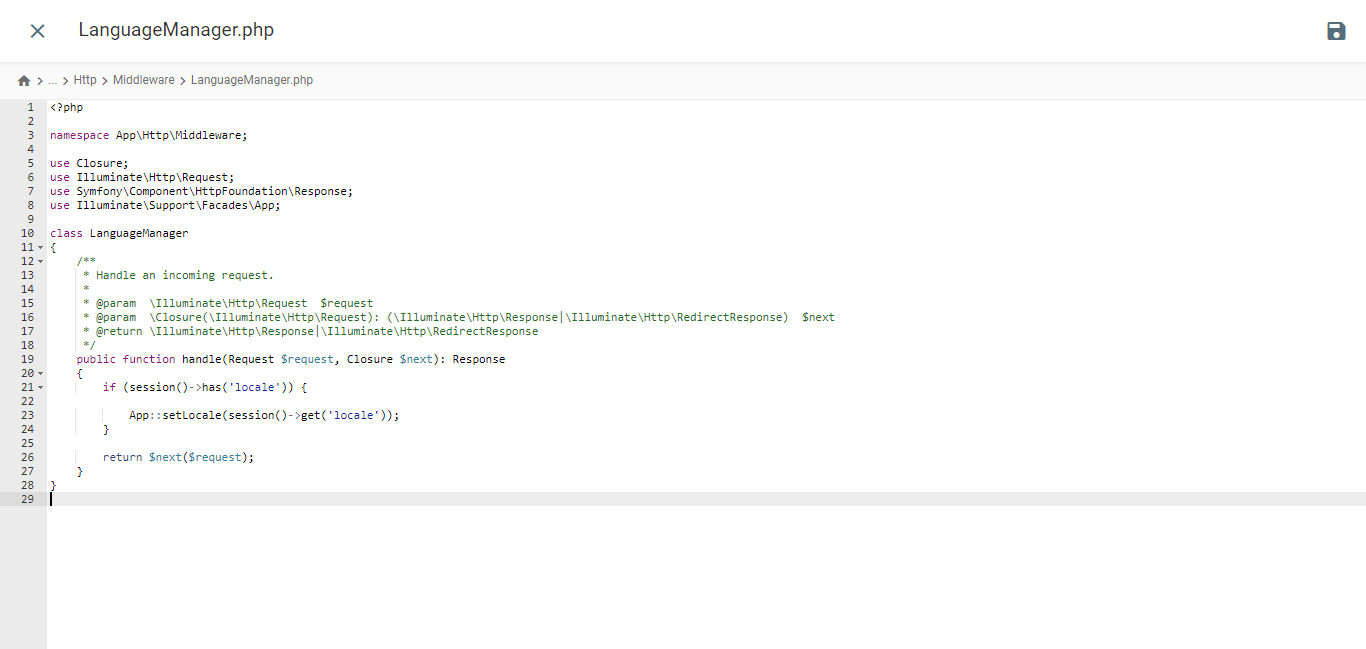
					<?php

namespace App\Http\Middleware;

use Closure;
use Illuminate\Http\Request;
use Symfony\Component\HttpFoundation\Response;
use Illuminate\Support\Facades\App;

class LanguageManager
{
    /**
     * Handle an incoming request.
     *
     * @param  \Closure(\Illuminate\Http\Request): (\Symfony\Component\HttpFoundation\Response)  $next
     */
    public function handle(Request $request, Closure $next): Response
    {
        if (session()->has('locale')) {

            App::setLocale(session()->get('locale'));
        }

        return $next($request);
    }
}
Kernel.php 経由で言語ミドルウェアを登録する
/app/Http ディレクトリにある Kernel.php ファイルを開きます。$middlewareGroups 配列を探し、Web セクションに移動します。.
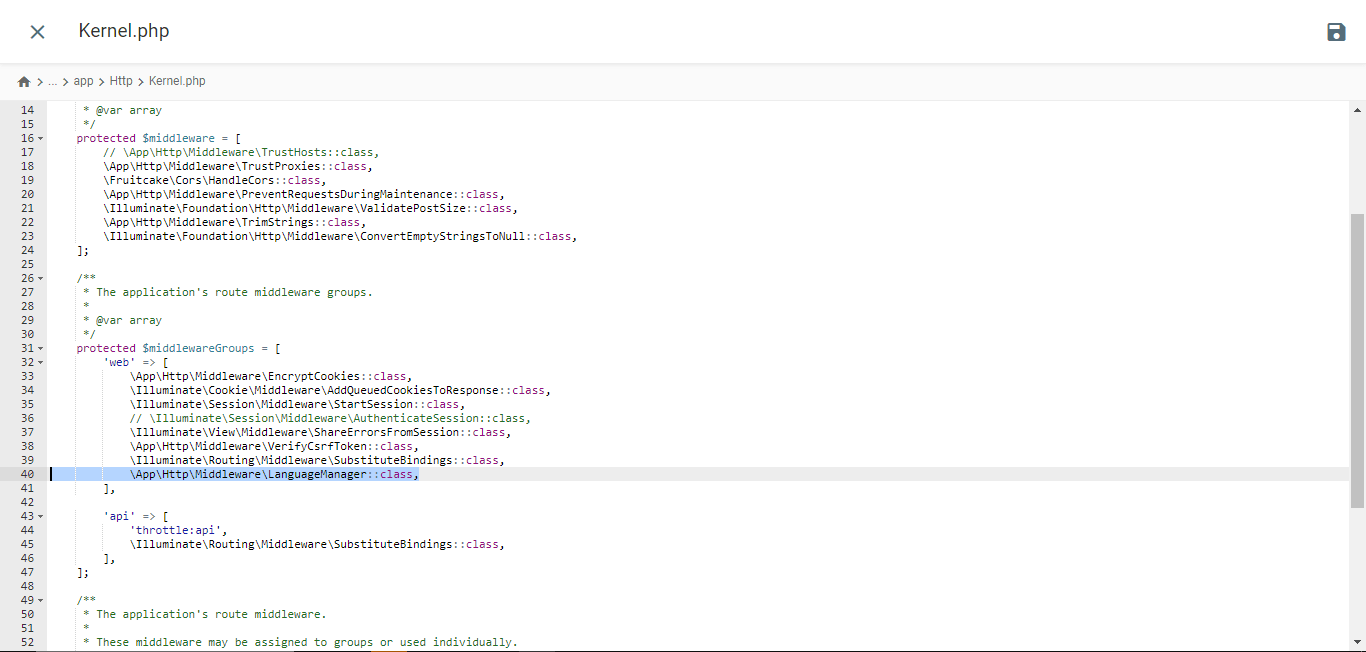
					/**
 * The application's route middleware groups.
 *
 * @var array<string, array<int, class-string|string>>
 */
protected $middlewareGroups = [
    'web' => [

        //...

        \App\Http\Middleware\LanguageManager::class,
    ],

    'api' => [

        //...
    ],
];
ルートを追加
/routes フォルダーから web.php を開き、これらのルートを追加します。.
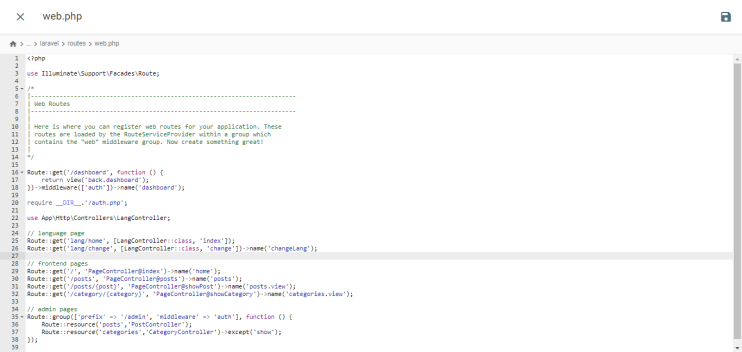
					//...
use App\Http\Controllers\LangController;

//...

Route::get('lang/home', [LangController::class, 'index']);
Route::get('lang/change', [LangController::class, 'change'])->name('changeLang');
テストウェブサイト
プロジェクト ターミナルでこのコマンドを実行して、開発サーバーを起動します。.
php artisan serve
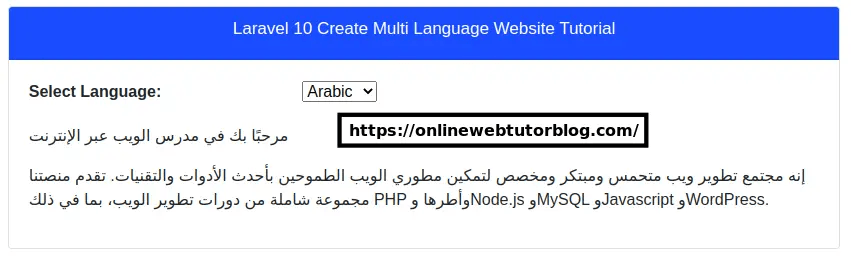
onlinewebtutorblog.comLaravelウェブサイトの表示です。次の表示からわかるように、Google 翻訳のドロップダウンがあります。
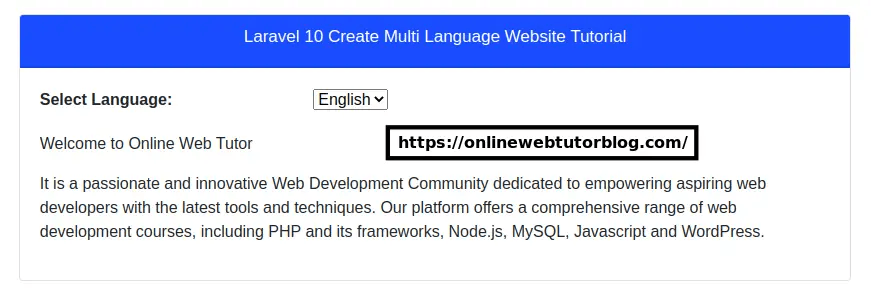
Laravel Web サイトをアラビア語に翻訳すると、次のようになります。.
Google Cloud AI 翻訳と Google Translate を Laravelに実装することの違いは何ですか?
Laravelでの Google Cloud AI と Google Translate 翻訳のそれぞれの実装を理解した後、それらの違いについて説明します。.
インストールと構成のプロセス

- Google Cloud AI API 翻訳:インストールと設定のプロセスはより複雑です。Google Cloud Platform(GCP)上にプロジェクトを作成し、Cloud Translation API を有効化し、サービスアカウントを作成し、API キーを生成し、Laravel アプリケーションで API クライアントを設定する必要がありますLaravelこれには複数の手順が必要であり、有効な GCP アカウントが必要です。
- Google Translate:インストールと設定ははるかに簡単です。Composer経由でstichoza/google-translate-phpなどのサードパーティ製パッケージまたはライブラリをインストールするだけで済みます。その後、 Laravel設定ファイルでGoogle Translate APIキーを設定できます。
翻訳精度
- Google Cloud AI API 翻訳:ディープラーニング機能により、このサービスは複雑な言語の文脈やニュアンスをより正確に捉えることができます。これにより、直訳が難しい慣用表現、比喩表現、言葉遊びなどをより正確に翻訳できます。
- Google翻訳:言語の文脈やニュアンスを捉えるのが難しい場合が多く、翻訳結果がぎこちなく、自然さに欠けることがあります。統計的なアプローチのため、慣用表現や比喩的なフレーズの翻訳精度が低くなることがよくあります。
応答速度

- Google Cloud AI API 翻訳: ニューラル機械翻訳を使用しているため、翻訳リクエストへの応答が一般的に高速です。これにより、特に長いテキストや大量の翻訳の場合に応答時間が短縮されます。
- Google翻訳:翻訳リクエストへの応答が若干遅くなる場合があります。特に長い文書やテキストの場合、応答が遅くなることがあります。これは、統計的翻訳とニューラルネットワーク翻訳を組み合わせた従来型のアプローチを使用しているためです。Google Cloud AI API翻訳で使用されるニューラルネットワークモデルほど効率的ではない可能性があります。
カスタマイズと制御機能
- Google Cloud AI API 翻訳:翻訳設定、カスタム用語集のアップロード、ライブエディタ翻訳インターフェースへのアクセスによる翻訳結果の手動編集など、翻訳プロセスをカスタマイズおよび制御するためのオプションが拡充されました。これにより、ユーザーはニーズに合わせて翻訳精度を向上させることができます。
- Google 翻訳:カスタマイズと制御のオプションが限られています。ユーザーは自動翻訳の結果に頼るしかなく、結果を編集したり直接カスタマイズしたりする機能がほとんどありません。
高度な機能

- Google Cloud AI API 翻訳: Google Cloud AI 翻訳テクノロジーには、用語集、モデル選択、AutoML モデルといった高度な機能が備わっています。さらに、 Linguiseを翻訳から除外するといった高度な機能も備わっています。
- Google翻訳: LaravelにインストールされているGoogle翻訳は、音声ドキュメントなどを翻訳できません。ウェブサイト上のテキストを別の言語に翻訳することしかできず、翻訳結果を編集することはできません。
Laravel ウェブサイトの翻訳サービスを選ぶ際に考慮すべき要素
ここでは、 Laravel ウェブサイトに最適な翻訳サービスを選択する際に考慮すべき事項をいくつか紹介します。.
- 高い翻訳精度 -最も重要な要素の一つは、生成される翻訳の精度です。ウェブサイトで特に複雑なコンテンツやニュアンスのある言語において、高精度な翻訳が必要な場合は、Google 翻訳よりも Google Cloud AI API 翻訳の方が適しているかもしれません。
- 統合と設定の容易さ — Laravelに翻訳サービスをインストールして設定することを検討してください。Google TranslateはPHPパッケージまたはライブラリとして利用できるため、一般的に統合が容易です。一方、Google Cloud AI API Translationは、Google Cloud Platform上でより複雑な設定が必要です。
- 機能とカスタマイズ オプション –エディタの翻訳結果、その他のカスタマイズ オプションなどの追加機能が必要な場合
- 速度と応答時間 –翻訳量が多いアプリケーションや、素早い応答が必要なアプリケーションの場合、Google Cloud AI API Translation は通常、Google 翻訳よりも速く翻訳リクエストに応答します。
- 費用と予算 – Google 翻訳は非商用利用の場合無料でご利用いただけますが、Google Cloud AI API 翻訳は使用量に基づいた有料課金モデルを採用しています。予算と推定翻訳量を考慮して、最も費用対効果の高いサービスをお選びください。
- サポートとドキュメント –各サービスで利用可能な技術サポートとドキュメントも検討してください。Google Cloud AI API Translation には、Google からより包括的なドキュメントとサポートが提供されている場合があります。
Linguise、 Laravel ウェブサイトに最適なクラウド AI 翻訳サービスです。
ここまでで、 Laravelの翻訳サービスを選択する際の考慮事項はすでにご存じのとおりです。上記の要素のほぼすべてが、 Linguise 翻訳サービスに含まれています。.
Linguiseウェブサイト翻訳サービスです Laravel翻訳するのに最適なソリューションと言えるでしょう。その理由は、 Linguise上記の考慮事項に対応しているからです。
- Linguise完璧な翻訳品質を誇ります精度は言語ペアによって異なりますが、 Linguise人間による翻訳とほぼ同等の97%近くの精度を誇ります。
- Linguiseは 40 を超える CMS や Web ビルダーと統合されているほか、 Laravelなどの PHP ベースの Web サイトとも統合されています。
- Linguise 自動翻訳ですが、翻訳結果を編集できるライブエディタも搭載しています。これにより、ビジネスの好みに合わせて翻訳を調整できます。.
- 多言語ページの読み込み時間は、元の言語ページの読み込み時間よりわずか 5% 長くなります。.
- 当社のサービスは、月額15ドルから45ドルまでの3つのパッケージをご用意しています。有料ではありますが、翻訳可能な単語数60万語までの30日間の無料トライアル期間もご用意しております。.
- 最後に、 Linguise 、ガイド記事、ドキュメント、製品ニュース、YouTube ビデオ チュートリアル、24 時間年中無休のサポート チャットなど、あらゆる形式の顧客サポートをサポートしています。.
以上の点から、 Linguise Laravel向けのクラウド AI 翻訳テクノロジー ソリューションとなり得ます。.
結論
この記事では、 Laravel Web アプリケーションに Google Cloud AI API Translation と Google Translate を実装する際の主な違いについて説明しました。.
Google Cloud AI API Translationは、精度と高精度翻訳のニーズに優れています。ただし、このサービスはGoogle翻訳よりも複雑な設定が必要で、費用も高くなります。一方、Google翻訳は統合が容易ですが、精度とカスタマイズオプションには限界があります。.
Linguise 、 Laravel ウェブサイトに対応したクラウドAIベースの翻訳サービスとして登場しました。人手による翻訳にほぼ匹敵する精度、翻訳エディタのオプション、高速な読み込み時間、そして包括的なカスタマーサポートを備えた Linguise 、 Laravel ウェブサイトに最適な翻訳ソリューションです。.
Linguiseお試しになりたい方は、無料アカウントにご登録いただく詳しくはlinguiseをご覧ください