
Đối với những người sở hữu trang web dựa trên Laravel, việc cung cấp nội dung dịch thuật chính xác và tự nhiên là rất quan trọng để dịch trang web của bạn và mang lại trải nghiệm người dùng tốt.
May mắn thay, một số dịch vụ dịch tự động có sẵn để giúp các nhà phát triển vượt qua thách thức này, bao gồm cả Google Cloud AI API Translation và Google Translate. Cả hai dịch vụ đều cung cấp khả năng dịch bằng công nghệ máy.
Trong bài viết này, chúng tôi sẽ khám phá những khác biệt chính giữa việc triển khai Google Cloud AI Translation và Google Translate cho Laravel ứng dụng và đề xuất các dịch vụ dịch thuật tốt nhất cho Laravel
Google Cloud AI API dịch và Google Translate là gì?
Trước khi đi vào thảo luận, chúng tôi sẽ thảo luận về ý nghĩa tương ứng của Google Cloud AI API và bản dịch Google Translate.
Dịch API Google Cloud AI

Dịch API Google Cloud AI là một dịch vụ dịch tự động tiên tiến được cung cấp bởi Nền tảng Google Cloud. Dịch vụ này tận dụng trí tuệ nhân tạo (AI) và công nghệ học máy mới nhất để cung cấp các bản dịch chính xác và tự nhiên của văn bản, giọng nói và tài liệu.
Google Cloud AI API Translation sử dụng các mô hình dịch thuật nơ-ron dựa trên học sâu, giúp nó nắm bắt được sắc thái ngôn ngữ và ngữ cảnh tốt hơn, cung cấp các bản dịch tự nhiên hơn phù hợp với cách sử dụng ngôn ngữ thực tế. Ngoài ra, sử dụng Google Cloud AI Translation cho tối đa 500.000 ký tự là miễn phí, trong khi 75.000 ký tự tiếp theo sẽ có chi phí là 20 USD cho mỗi triệu ký tự.
Google Dịch
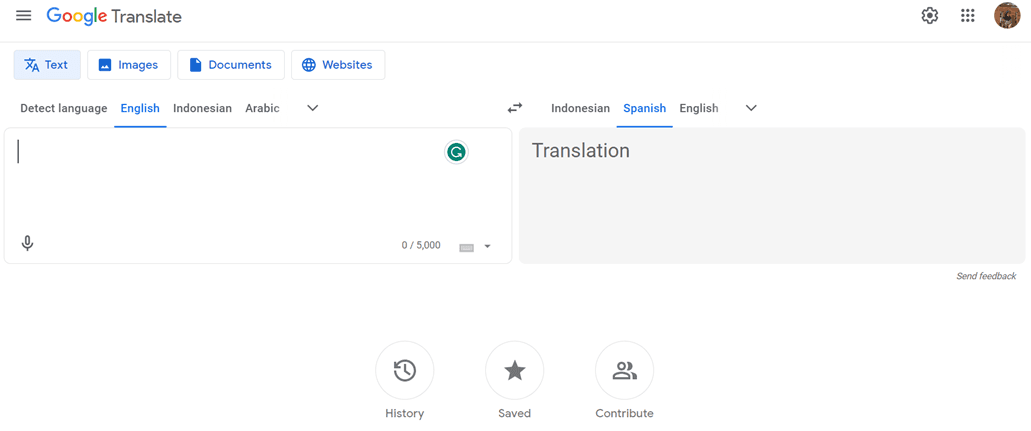
Trong khi đó, Google Translate là một dịch vụ dịch văn bản tự động lâu đời và được biết đến rộng rãi. Nó sử dụng một cách tiếp cận dịch thống kê truyền thống hơn, tạo ra các bản dịch dựa trên các mẫu và xác suất được học từ các tập dữ liệu đào tạo lớn.
Mặc dù nó không tiên tiến như Google Cloud AI API Translation về độ chính xác và xử lý sắc thái ngôn ngữ, Google Translate vẫn là một lựa chọn phổ biến do sự dễ sử dụng và miễn phí cho mục đích phi thương mại.
Triển khai bản dịch Google Cloud AI API trên Laravel
Một số dịch vụ dịch thuật, bao gồm Linguise, sử dụng công nghệ đám mây Dịch thuật AI để dịch các trang web.
Dịch vụ dịch ngôn ngữ sử dụng API đám mây AI như một trong các công nghệ dịch thuật của nó. Dưới đây là các bước triển khai trên trang web Laravel. Chúng tôi giả định rằng bạn đã có một trang web dự án Laravel sẵn sàng.
Tạo tài khoản Linguise
Để sử dụng Linguise, bạn phải đăng ký tài khoản trước. Bạn có thể làm điều này miễn phí hoặc đăng ký trong một tháng hoặc một năm. Bạn chỉ cần cung cấp thông tin như email, tên người dùng và mật khẩu của bạn.
Thêm thông tin trang web Laravel
Sau đó, thêm thông tin về trang web bạn sẽ sử dụng, nhập thông tin tài khoản Linguise và URL web của bạn, chọn nền tảng Laravel và thêm ngôn ngữ mặc định và ngôn ngữ bạn muốn thêm vào trang web.
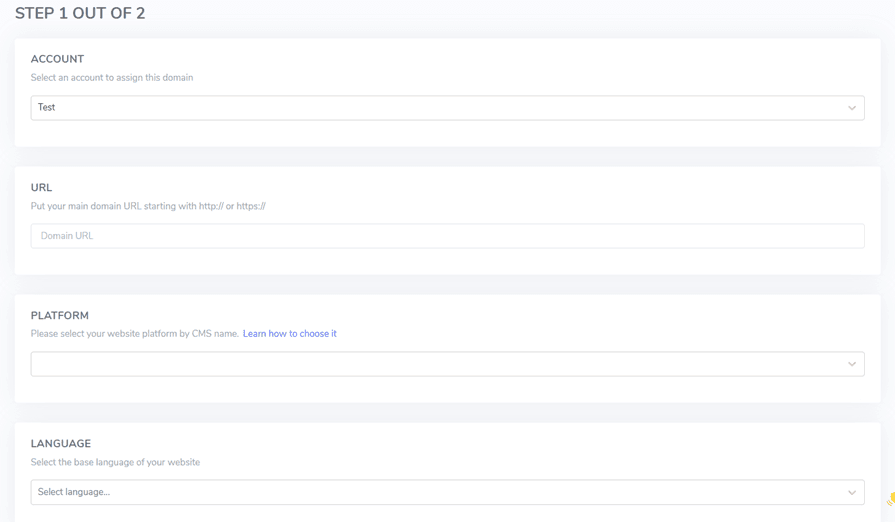
Sau đó, tải xuống tập lệnh PHP thông qua nút sau và lưu nó trên máy tính cục bộ của bạn.
Tải lên và cấu hình tập lệnh PHP
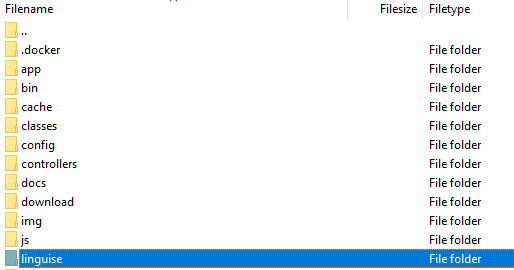
Sau khi tải tập lệnh, giải nén và tải nó lên thư mục gốc nơi Laravel được cài đặt. Đảm bảo nó nằm ở gốc của quá trình cài đặt Laravel (thường là nơi chứa các tệp CMS của bạn). Đảm bảo thư mục được đặt tên là “linguise” (tên mặc định khi thư mục được giải nén).
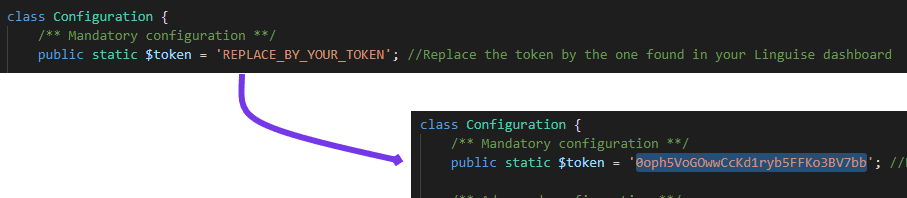
Sau đó, khóa API Linguise phải được sao chép vào tệp …/linguise/Configuration.php mà bạn đã tải lên máy chủ của mình. Chỉnh sửa tệp và dán khóa API của bạn vào giữa các dấu ngoặc kép, thay thế văn bản REPLACE_BY_YOUR_TOKEN.
Chèn tập lệnh chuyển đổi ngôn ngữ

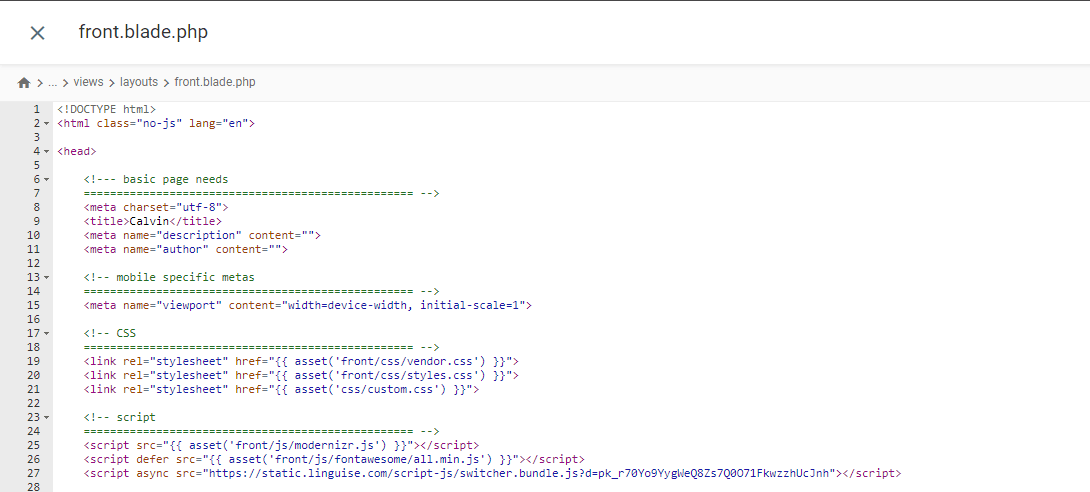
Được chèn vào tệp front.blade.php trong thư mục resources/views/layouts/. Đây là bản xem trước của tập lệnh được chèn.
Cấu hình .htaccess
Cuối cùng, các URL dựa trên ngôn ngữ cần được cấu hình trong tệp .htaccess. Nếu tệp của bạn bao gồm “RewriteBase /,” chỉ cần sao chép và dán mã sau vào sau dòng đó.
					<IfModule mod_rewrite.c>
  RewriteEngine On
  RewriteRule ^(af|sq|am|ar|hy|az|eu|be|bn|bs|bg|ca|ceb|ny|zh-cn|zh-tw|co|hr|cs|da|nl|en|eo|et|tl|fi|fr|fy|gl|ka|de|el|gu|ht|ha|haw|iw|hi|hmn|hu|is|ig|id|ga|it|ja|jw|kn|kk|km|ko|ku|ky|lo|la|lv|lt|lb|mk|mg|ms|ml|mt|mi|mr|mn|my|ne|no|ps|fa|pl|pt|pa|ro|ru|sm|gd|sr|st|sn|sd|si|sk|sl|so|es|su|sw|sv|tg|ta|te|th|tr|uk|ur|uz|vi|cy|xh|yi|yo|zu|zz-zz)(?:$|/)(.*)$ linguise/linguise.php?linguise_language=$1&original_url=$2 [L,QSA]
</IfModule>
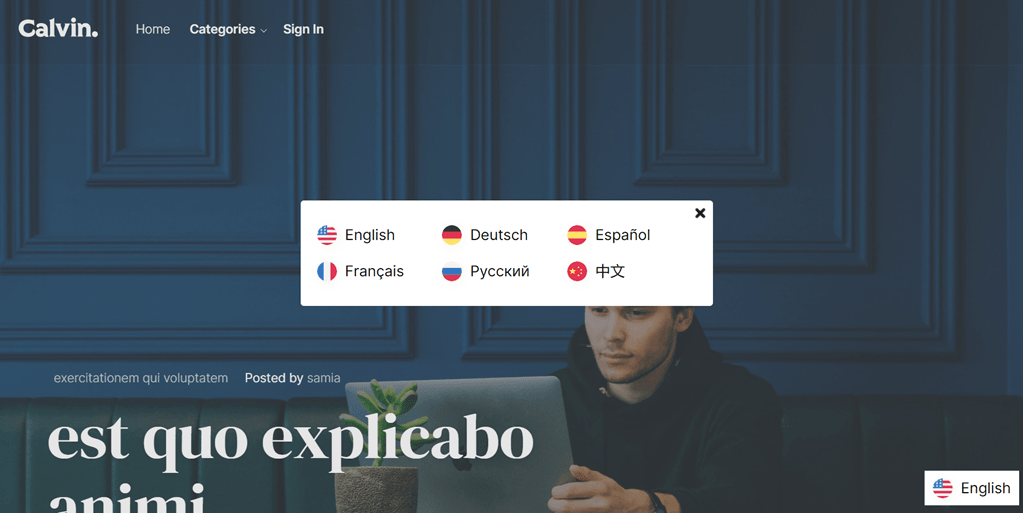
Xong. Tại thời điểm này, bạn đã triển khai thành công Cloud AI API Translation trên dịch vụ Linguise. Giờ đây, bạn có thể kiểm tra trang web Laravel. Một công tắc ngôn ngữ mặc định sẽ xuất hiện và bạn có thể tùy chỉnh công tắc ngôn ngữ cho Laravel thông qua bảng điều khiển.
Thực hiện Google Dịch trên Laravel
Bây giờ chúng tôi sẽ cố gắng triển khai Google Dịch trong Laravel. Ở đây, chúng tôi giả định rằng bạn đã tạo thành công một dự án Laravel và chỉ cần thêm Google Dịch.
Bạn cũng có thể tìm thấy các bước cài đặt sau trên trang web chính thức của Laravel.
Cài đặt Gói Dịch Google
Để cài đặt Gói Dịch Google, hãy mở dấu nhắc dự án và nhập lệnh sau. Gói này sẽ cho phép bạn sử dụng các chức năng làm việc của ngôn ngữ dịch google.
composer require stichoza/google-translate-php
Cài đặt Gói Dịch Google
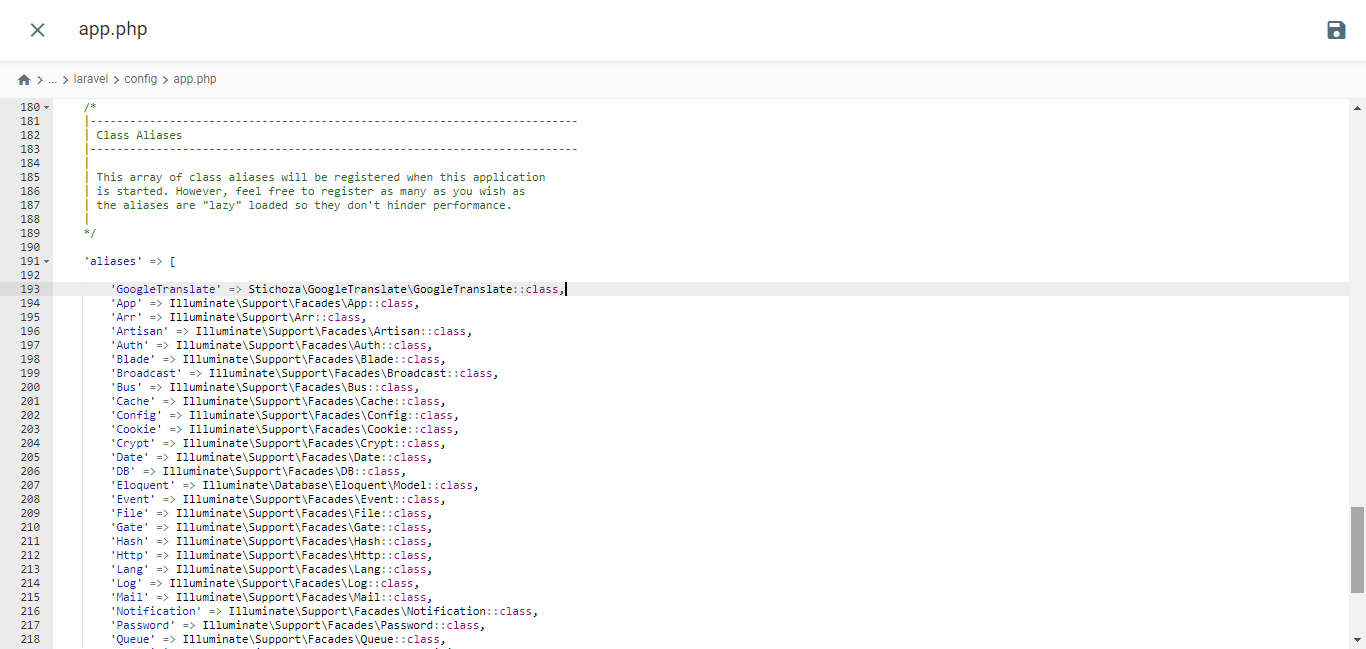
Chúng ta phải thiết lập "gói dịch google" trong ứng dụng. Mở file app.php trong thư mục /config, tìm phần "aliases" và thêm dòng code sau.
					/*
|--------------------------------------------------------------------------
| Class Aliases
|--------------------------------------------------------------------------
|
| This array of class aliases will be registered when this application
| is started. However, feel free to register as many as you wish as
| the aliases are "lazy" loaded so they don't hinder performance.
|
*/

'aliases' => Facade::defaultAliases()->merge([
    // 'Example' => App\Facades\Example::class,
    'GoogleTranslate' => Stichoza\GoogleTranslate\GoogleTranslate::class,
])->toArray(),
Thiết lập Bộ điều khiển Ngôn ngữ
Bạn cần tạo một file điều khiển ngôn ngữ như sau
php artisan make:controller LangController
Nó sẽ tạo tệp LangController.php bên trong thư mục /app/Http/Controllers.
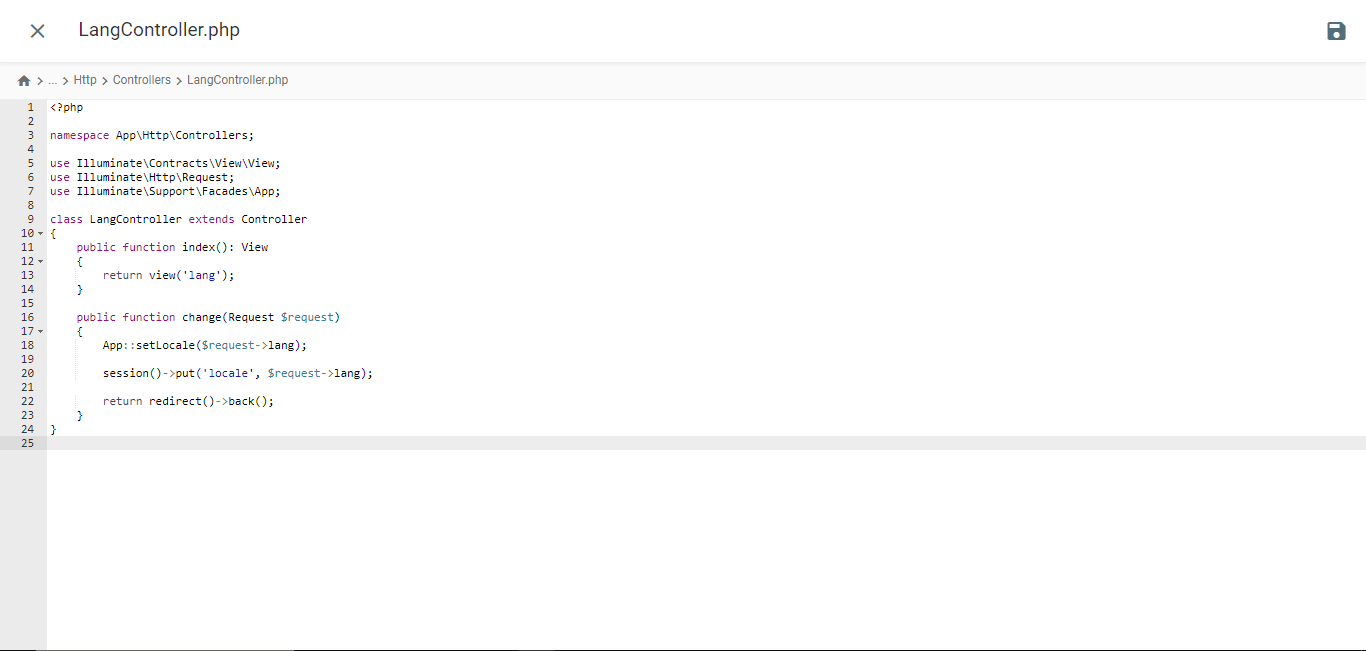
					<?php

namespace App\Http\Controllers;

use Illuminate\Contracts\View\View;
use Illuminate\Http\Request;
use Illuminate\Support\Facades\App;

class LangController extends Controller
{
    public function index(): View
    {
        return view('lang');
    }

    public function change(Request $request)
    {
        App::setLocale($request->lang);

        session()->put('locale', $request->lang);

        return redirect()->back();
    }
}
Tạo Tệp Mẫu Blade
Điều hướng đến thư mục /resources/views và tạo một tệp có tên lang.blade.php. Mở tệp và chèn mã sau vào đó.
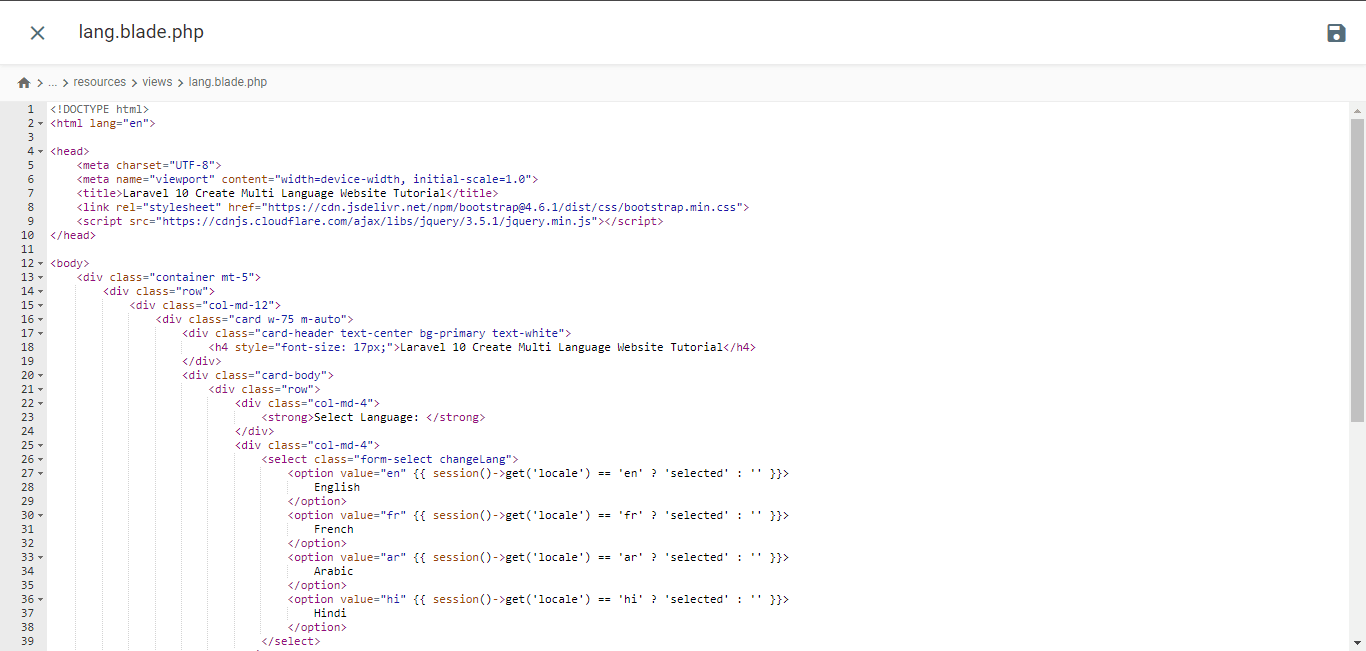
<!DOCTYPE html>
<html lang="en">
<head>
<meta charset="UTF-8">
<meta name="viewport" content="width=device-width, initial-scale=1.0">
<title>Laravel 10 Create Multi Language Website Tutorial</title> <script type="litespeed/javascript" data-src="https://cdnjs.cloudflare.com/ajax/libs/jquery/3.5.1/jquery.min.js"></script> <script type="application/ld+json" class="gnpub-schema-markup-output">{"@context":"https:\/\/schema.org\/","@type":"NewsArticle","@id":"https:\/\/www.linguise.com\/blog\/guide\/implement-google-cloud-ai-api-translation-vs-google-translate-for-laravel\/#newsarticle","url":"https:\/\/www.linguise.com\/blog\/guide\/implement-google-cloud-ai-api-translation-vs-google-translate-for-laravel\/","image":{"@type":"ImageObject","url":"https:\/\/www.linguise.com\/wp-content\/uploads\/2024\/05\/Implement-Google-Cloud-AI-API-translation-vs-Google-Translate-for-Laravel-150x150.png","width":150,"height":150},"headline":"Implement Google Cloud AI API translation vs Google Translate for Laravel","mainEntityOfPage":"https:\/\/www.linguise.com\/blog\/guide\/implement-google-cloud-ai-api-translation-vs-google-translate-for-laravel\/","datePublished":"2024-05-31T07:32:47+00:00","dateModified":"2024-08-26T19:19:15+00:00","description":"For those of you who own Laravel-based websites, providing accurate and natural translation content is very important to translate your website and offer a good","articleSection":"Guide","articleBody":"For those of you who own Laravel-based websites, providing accurate and natural translation content is very important to translate your website and offer a good user experience.\nFortunately, several automatic translation services are available to help developers overcome this challenge, including Google Cloud AI API Translation and Google Translate. Both services offer translation capabilities using machine technology.\nIn this article, we will explore the main differences between implementing Google Cloud AI Translation and Google Translate for Laravel applications and recommend the best translation services for your Laravel website. \t\t\n\t\t\tWhat are Google Cloud AI API translation & Google Translate?\n\t\t\n\t\tBefore entering into the discussion, we will discuss the respective meanings of Google Cloud AI API and Google Translate translations.\t\t\n\t\t\tGoogle Cloud AI API translation\n\t\t\n\t\t\t\t\t\t\t\t\t\t\t\t\t\t\t\t\t\t\t\t\t\t\t\t\t\t\n\t\tGoogle Cloud AI API Translation is an advanced automatic translation service provided by Google Cloud Platform. This service leverages the latest artificial intelligence (AI) and machine learning technologies to deliver accurate and natural translations of text, voice, and documents.Google Cloud AI API Translation uses neural translation models based on deep learning, which allows it to capture language nuances and context better, providing more idiomatic translations that align with actual language usage. Additionally, using Google Cloud AI Translation for up to 500,000 characters is free of charge, while the next 75,000 characters will incur a cost of $20 per million characters.\u00a0\t\t\n\t\t\tGoogle Translate\n\t\t\n\t\t\t\t\t\t\t\t\t\t\t\t\t\t\t\t\t\t\t\t\t\t\t\t\t\t\n\t\tMeanwhile, Google Translate is a long-standing and widely known automatic text translation service. It uses a more traditional statistical translation approach, which generates translations based on patterns and probabilities learned from large training datasets.Although it is not as advanced as Google Cloud AI API Translation in terms of accuracy and handling language nuances, Google Translate remains a popular choice due to its ease of use and free availability for non-commercial use.\t\t\n\t\t\tImplement Google Cloud AI API translation on Laravel\n\t\t\n\t\tSeveral translation services, including Linguise, use AI Translation cloud technology to translate websites.The language translation service uses cloud AI API as one of its translation technologies. The following are the implementation steps on the Laravel website. We assume here that you already have a ready Laravel project website.\t\t\n\t\t\tCreate Linguise account\n\t\t\n\t\tTo use Linguise, you must register an account first. You can do this for free or subscribe for one month or a year. You only need to provide information such as your email, username, and password.\t\t\n\t\t\tAdd Laravel website info\n\t\t\n\t\tAfter that, add information about the website you will use, enter your Linguise account info and web URL, select the Laravel platform, and add the default language and the language you want to add to the website.\u00a0\t\t\n\t\t\t\t\t\t\t\t\t\t\t\t\t\t\t\t\t\t\t\t\t\t\t\t\t\t\n\t\tThen download the PHP script via the following button and save it on your local computer.\t\t\n\t\t\t\n\t\t\t\t\t\t\t\n\t\t\t\t\t\t\t\t\tDOWNLOAD PHP-JS TRANSLATION SCRIPT\n\t\t\t\t\t\n\t\t\tUpload and configure the PHP script\n\t\t\n\t\tAfter downloading the script, unzip it and upload it to the root folder where Laravel is installed. Ensure it is located at the root of your Laravel installation (typically where your CMS files are). Ensure the folder is named \"linguise\" (the default name when the folder is unzipped).\t\t\n\t\t\t\t\t\t\t\t\t\t\t\t\t\t\t\t\t\t\t\t\t\t\t\t\t\t\n\t\tThen, the Linguise API key must be copied into the \u2026\/linguise\/Configuration.php file you uploaded to your server. Edit the file and paste your API key between the quotes, replacing the text REPLACE_BY_YOUR_TOKEN.\t\t\n\t\t\t\t\t\t\t\t\t\t\t\t\t\t\t\t\t\t\t\t\t\t\t\t\t\t\n\t\t\tInsert script of language switcher\t\t\n\t\tNext, insert the language switch script that you got from the Linguise dashboard.\t\t\n\t\t\t\t\t\t\t\t\t\t\t\t\t\t\t\t\t\t\t\t\t\t\t\t\t\t\n\t\tInserted into the front.blade.php file in the resources\/views\/layouts\/ directory. Here is a preview of the inserted script.\t\t\n\t\t\t\t\t\t\t\t\t\t\t\t\t\t\t\t\t\t\t\t\t\t\t\t\t\t\n\t\t\tConfigure .htaccess\n\t\t\n\t\tLastly, language-based URLs need to be configured in the .htaccess file. If your file includes \"RewriteBase \/,\" simply copy and paste the following code after that line.\t\t\n\t\t\t\n\t\t\t\t\n\t\t\t\t\t\n RewriteEngine On\n RewriteRule ^(af|sq|am|ar|hy|az|eu|be|bn|bs|bg|ca|ceb|ny|zh-cn|zh-tw|co|hr|cs|da|nl|en|eo|et|tl|fi|fr|fy|gl|ka|de|el|gu|ht|ha|haw|iw|hi|hmn|hu|is|ig|id|ga|it|ja|jw|kn|kk|km|ko|ku|ky|lo|la|lv|lt|lb|mk|mg|ms|ml|mt|mi|mr|mn|my|ne|no|ps|fa|pl|pt|pa|ro|ru|sm|gd|sr|st|sn|sd|si|sk|sl|so|es|su|sw|sv|tg|ta|te|th|tr|uk|ur|uz|vi|cy|xh|yi|yo|zu|zz-zz)(?:$|\/)(.*)$ linguise\/linguise.php?linguise_language=$1&original_url=$2 [L,QSA]\n\n\t\t\t\t\n\t\t\t\n\t\tDone. At this point, you have successfully implemented cloud AI API Translation on the Linguise service. Now, you can check the Laravel website. A default language switcher will appear, and you can customize the Language switcher for Laravel via the dashboard.\t\t\n\t\t\t\t\t\t\t\t\t\t\t\t\t\t\t\t\t\t\t\t\t\t\t\t\t\t\n\t\t\tImplement Google Translate on Laravel\t\t\n\t\tNow we will try to implement Google Translate in Laravel. Here we assume that you have successfully created a Laravel project and just need to add Google Translate.You can also find the following installation steps on the official Laravel website.\t\t\n\t\t\tInstall Google Translator Package\n\t\t\n\t\tTo install the Google Translator Package, open the project prompt and input the following command. This package will enable you to utilize the working functions of the google-translator-language.\t\t\n\t\t\t\n\t\t\t\t\n\t\t\t\t\tcomposer require stichoza\/google-translate-php\n\t\t\t\t\n\t\t\t\n\t\t\tSetting of Google Translator Package\n\t\t\n\t\tWe must set up the \"google translator package\" within the the application. Open the app.php file in the \/config folder, find the \"aliases\" section, and add the following line of code.\t\t\n\t\t\t\t\t\t\t\t\t\t\t\t\t\t\t\t\t\t\t\t\t\t\t\t\t\t\n\t\t\t\n\t\t\t\t\n\t\t\t\t\t\/*\n|--------------------------------------------------------------------------\n| Class Aliases\n|--------------------------------------------------------------------------\n|\n| This array of class aliases will be registered when this application\n| is started. However, feel free to register as many as you wish as\n| the aliases are \"lazy\" loaded so they don't hinder performance.\n|\n*\/\n'aliases' => Facade::defaultAliases()->merge([\n \/\/ 'Example' => AppFacadesExample::class,\n 'GoogleTranslate' => StichozaGoogleTranslateGoogleTranslate::class,\n])->toArray(),\n\n\t\t\t\t\n\t\t\t\n\t\t\tSetup Language Controller\n\t\t\n\t\tYou need to create a language controller file like the following\t\t\n\t\t\t\n\t\t\t\t\n\t\t\t\t\tphp artisan make:controller LangController\n\t\t\t\t\n\t\t\t\n\t\tIt will create LangController.php file inside \/app\/Http\/Controllers folder.","keywords":"","name":"Implement Google Cloud AI API translation vs Google Translate for Laravel","thumbnailUrl":"https:\/\/www.linguise.com\/wp-content\/uploads\/2024\/05\/Implement-Google-Cloud-AI-API-translation-vs-Google-Translate-for-Laravel-150x150.png","wordCount":809,"timeRequired":"PT3M35S","mainEntity":{"@type":"WebPage","@id":"https:\/\/www.linguise.com\/blog\/guide\/implement-google-cloud-ai-api-translation-vs-google-translate-for-laravel\/"},"author":{"@type":"Person","name":"Tristan","url":"https:\/\/www.linguise.com\/author\/tristan\/","sameAs":[],"image":{"@type":"ImageObject","url":"https:\/\/secure.gravatar.com\/avatar\/50d7238660b192d8d54ebf6367be5e97bb41c24dbd190daae062d931efd351ae?s=96&d=mm&r=g","height":96,"width":96}},"editor":{"@type":"Person","name":"Tristan","url":"https:\/\/www.linguise.com\/author\/tristan\/","sameAs":[],"image":{"@type":"ImageObject","url":"https:\/\/secure.gravatar.com\/avatar\/50d7238660b192d8d54ebf6367be5e97bb41c24dbd190daae062d931efd351ae?s=96&d=mm&r=g","height":96,"width":96}}}</script> </head>
<body>
<div class="container mt-5">
<div class="row">
<div class="col-md-12">
<div class="card w-75 m-auto">
<div class="card-header text-center bg-primary text-white">
<h4 style="font-size: 17px;">Laravel 10 Create Multi Language Website Tutorial</h4>
</div>
<div class="card-body">
<div class="row">
<div class="col-md-4">
<strong>Select Language: </strong>
</div>
<div class="col-md-4">
<select class="form-select changeLang">
<option value="en" {{ session()->get('locale') == 'en' ? 'selected' : '' }}>
English
</option>
<option value="fr" {{ session()->get('locale') == 'fr' ? 'selected' : '' }}>
French
</option>
<option value="ar" {{ session()->get('locale') == 'ar' ? 'selected' : '' }}>
Arabic
</option>
<option value="hi" {{ session()->get('locale') == 'hi' ? 'selected' : '' }}>
Hindi
</option>
</select>
</div>
</div>
<div style="margin-top: 20px;">
<p>{{ GoogleTranslate::trans('Welcome to Online Web Tutor', app()->getLocale()) }}</p>
<p>{{ GoogleTranslate::trans('It is a passionate and innovative Web Development Community dedicated to empowering aspiring web developers with the latest tools and techniques. Our platform offers a comprehensive range of web development courses, including PHP and its frameworks, Node.js, MySQL, Javascript and WordPress.', app()->getLocale()) }}
</p>
</div>
</div>
</div>
</div>
</div>
</div>
<script data-no-optimize="1">window.lazyLoadOptions=Object.assign({},{threshold:300},window.lazyLoadOptions||{});!function(t,e){"object"==typeof exports&&"undefined"!=typeof module?module.exports=e():"function"==typeof define&&define.amd?define(e):(t="undefined"!=typeof globalThis?globalThis:t||self).LazyLoad=e()}(this,function(){"use strict";function e(){return(e=Object.assign||function(t){for(var e=1;e<arguments.length;e++){var n,a=arguments[e];for(n in a)Object.prototype.hasOwnProperty.call(a,n)&&(t[n]=a[n])}return t}).apply(this,arguments)}function o(t){return e({},at,t)}function l(t,e){return t.getAttribute(gt+e)}function c(t){return l(t,vt)}function s(t,e){return function(t,e,n){e=gt+e;null!==n?t.setAttribute(e,n):t.removeAttribute(e)}(t,vt,e)}function i(t){return s(t,null),0}function r(t){return null===c(t)}function u(t){return c(t)===_t}function d(t,e,n,a){t&&(void 0===a?void 0===n?t(e):t(e,n):t(e,n,a))}function f(t,e){et?t.classList.add(e):t.className+=(t.className?" ":"")+e}function _(t,e){et?t.classList.remove(e):t.className=t.className.replace(new RegExp("(^|\\s+)"+e+"(\\s+|$)")," ").replace(/^\s+/,"").replace(/\s+$/,"")}function g(t){return t.llTempImage}function v(t,e){!e||(e=e._observer)&&e.unobserve(t)}function b(t,e){t&&(t.loadingCount+=e)}function p(t,e){t&&(t.toLoadCount=e)}function n(t){for(var e,n=[],a=0;e=t.children[a];a+=1)"SOURCE"===e.tagName&&n.push(e);return n}function h(t,e){(t=t.parentNode)&&"PICTURE"===t.tagName&&n(t).forEach(e)}function a(t,e){n(t).forEach(e)}function m(t){return!!t[lt]}function E(t){return t[lt]}function I(t){return delete t[lt]}function y(e,t){var n;m(e)||(n={},t.forEach(function(t){n[t]=e.getAttribute(t)}),e[lt]=n)}function L(a,t){var o;m(a)&&(o=E(a),t.forEach(function(t){var e,n;e=a,(t=o[n=t])?e.setAttribute(n,t):e.removeAttribute(n)}))}function k(t,e,n){f(t,e.class_loading),s(t,st),n&&(b(n,1),d(e.callback_loading,t,n))}function A(t,e,n){n&&t.setAttribute(e,n)}function O(t,e){A(t,rt,l(t,e.data_sizes)),A(t,it,l(t,e.data_srcset)),A(t,ot,l(t,e.data_src))}function w(t,e,n){var a=l(t,e.data_bg_multi),o=l(t,e.data_bg_multi_hidpi);(a=nt&&o?o:a)&&(t.style.backgroundImage=a,n=n,f(t=t,(e=e).class_applied),s(t,dt),n&&(e.unobserve_completed&&v(t,e),d(e.callback_applied,t,n)))}function x(t,e){!e||0<e.loadingCount||0<e.toLoadCount||d(t.callback_finish,e)}function M(t,e,n){t.addEventListener(e,n),t.llEvLisnrs[e]=n}function N(t){return!!t.llEvLisnrs}function z(t){if(N(t)){var e,n,a=t.llEvLisnrs;for(e in a){var o=a[e];n=e,o=o,t.removeEventListener(n,o)}delete t.llEvLisnrs}}function C(t,e,n){var a;delete t.llTempImage,b(n,-1),(a=n)&&--a.toLoadCount,_(t,e.class_loading),e.unobserve_completed&&v(t,n)}function R(i,r,c){var l=g(i)||i;N(l)||function(t,e,n){N(t)||(t.llEvLisnrs={});var a="VIDEO"===t.tagName?"loadeddata":"load";M(t,a,e),M(t,"error",n)}(l,function(t){var e,n,a,o;n=r,a=c,o=u(e=i),C(e,n,a),f(e,n.class_loaded),s(e,ut),d(n.callback_loaded,e,a),o||x(n,a),z(l)},function(t){var e,n,a,o;n=r,a=c,o=u(e=i),C(e,n,a),f(e,n.class_error),s(e,ft),d(n.callback_error,e,a),o||x(n,a),z(l)})}function T(t,e,n){var a,o,i,r,c;t.llTempImage=document.createElement("IMG"),R(t,e,n),m(c=t)||(c[lt]={backgroundImage:c.style.backgroundImage}),i=n,r=l(a=t,(o=e).data_bg),c=l(a,o.data_bg_hidpi),(r=nt&&c?c:r)&&(a.style.backgroundImage='url("'.concat(r,'")'),g(a).setAttribute(ot,r),k(a,o,i)),w(t,e,n)}function G(t,e,n){var a;R(t,e,n),a=e,e=n,(t=Et[(n=t).tagName])&&(t(n,a),k(n,a,e))}function D(t,e,n){var a;a=t,(-1<It.indexOf(a.tagName)?G:T)(t,e,n)}function S(t,e,n){var a;t.setAttribute("loading","lazy"),R(t,e,n),a=e,(e=Et[(n=t).tagName])&&e(n,a),s(t,_t)}function V(t){t.removeAttribute(ot),t.removeAttribute(it),t.removeAttribute(rt)}function j(t){h(t,function(t){L(t,mt)}),L(t,mt)}function F(t){var e;(e=yt[t.tagName])?e(t):m(e=t)&&(t=E(e),e.style.backgroundImage=t.backgroundImage)}function P(t,e){var n;F(t),n=e,r(e=t)||u(e)||(_(e,n.class_entered),_(e,n.class_exited),_(e,n.class_applied),_(e,n.class_loading),_(e,n.class_loaded),_(e,n.class_error)),i(t),I(t)}function U(t,e,n,a){var o;n.cancel_on_exit&&(c(t)!==st||"IMG"===t.tagName&&(z(t),h(o=t,function(t){V(t)}),V(o),j(t),_(t,n.class_loading),b(a,-1),i(t),d(n.callback_cancel,t,e,a)))}function $(t,e,n,a){var o,i,r=(i=t,0<=bt.indexOf(c(i)));s(t,"entered"),f(t,n.class_entered),_(t,n.class_exited),o=t,i=a,n.unobserve_entered&&v(o,i),d(n.callback_enter,t,e,a),r||D(t,n,a)}function q(t){return t.use_native&&"loading"in HTMLImageElement.prototype}function H(t,o,i){t.forEach(function(t){return(a=t).isIntersecting||0<a.intersectionRatio?$(t.target,t,o,i):(e=t.target,n=t,a=o,t=i,void(r(e)||(f(e,a.class_exited),U(e,n,a,t),d(a.callback_exit,e,n,t))));var e,n,a})}function B(e,n){var t;tt&&!q(e)&&(n._observer=new IntersectionObserver(function(t){H(t,e,n)},{root:(t=e).container===document?null:t.container,rootMargin:t.thresholds||t.threshold+"px"}))}function J(t){return Array.prototype.slice.call(t)}function K(t){return t.container.querySelectorAll(t.elements_selector)}function Q(t){return c(t)===ft}function W(t,e){return e=t||K(e),J(e).filter(r)}function X(e,t){var n;(n=K(e),J(n).filter(Q)).forEach(function(t){_(t,e.class_error),i(t)}),t.update()}function t(t,e){var n,a,t=o(t);this._settings=t,this.loadingCount=0,B(t,this),n=t,a=this,Y&&window.addEventListener("online",function(){X(n,a)}),this.update(e)}var Y="undefined"!=typeof window,Z=Y&&!("onscroll"in window)||"undefined"!=typeof navigator&&/(gle|ing|ro)bot|crawl|spider/i.test(navigator.userAgent),tt=Y&&"IntersectionObserver"in window,et=Y&&"classList"in document.createElement("p"),nt=Y&&1<window.devicePixelRatio,at={elements_selector:".lazy",container:Z||Y?document:null,threshold:300,thresholds:null,data_src:"src",data_srcset:"srcset",data_sizes:"sizes",data_bg:"bg",data_bg_hidpi:"bg-hidpi",data_bg_multi:"bg-multi",data_bg_multi_hidpi:"bg-multi-hidpi",data_poster:"poster",class_applied:"applied",class_loading:"litespeed-loading",class_loaded:"litespeed-loaded",class_error:"error",class_entered:"entered",class_exited:"exited",unobserve_completed:!0,unobserve_entered:!1,cancel_on_exit:!0,callback_enter:null,callback_exit:null,callback_applied:null,callback_loading:null,callback_loaded:null,callback_error:null,callback_finish:null,callback_cancel:null,use_native:!1},ot="src",it="srcset",rt="sizes",ct="poster",lt="llOriginalAttrs",st="loading",ut="loaded",dt="applied",ft="error",_t="native",gt="data-",vt="ll-status",bt=[st,ut,dt,ft],pt=[ot],ht=[ot,ct],mt=[ot,it,rt],Et={IMG:function(t,e){h(t,function(t){y(t,mt),O(t,e)}),y(t,mt),O(t,e)},IFRAME:function(t,e){y(t,pt),A(t,ot,l(t,e.data_src))},VIDEO:function(t,e){a(t,function(t){y(t,pt),A(t,ot,l(t,e.data_src))}),y(t,ht),A(t,ct,l(t,e.data_poster)),A(t,ot,l(t,e.data_src)),t.load()}},It=["IMG","IFRAME","VIDEO"],yt={IMG:j,IFRAME:function(t){L(t,pt)},VIDEO:function(t){a(t,function(t){L(t,pt)}),L(t,ht),t.load()}},Lt=["IMG","IFRAME","VIDEO"];return t.prototype={update:function(t){var e,n,a,o=this._settings,i=W(t,o);{if(p(this,i.length),!Z&&tt)return q(o)?(e=o,n=this,i.forEach(function(t){-1!==Lt.indexOf(t.tagName)&&S(t,e,n)}),void p(n,0)):(t=this._observer,o=i,t.disconnect(),a=t,void o.forEach(function(t){a.observe(t)}));this.loadAll(i)}},destroy:function(){this._observer&&this._observer.disconnect(),K(this._settings).forEach(function(t){I(t)}),delete this._observer,delete this._settings,delete this.loadingCount,delete this.toLoadCount},loadAll:function(t){var e=this,n=this._settings;W(t,n).forEach(function(t){v(t,e),D(t,n,e)})},restoreAll:function(){var e=this._settings;K(e).forEach(function(t){P(t,e)})}},t.load=function(t,e){e=o(e);D(t,e)},t.resetStatus=function(t){i(t)},t}),function(t,e){"use strict";function n(){e.body.classList.add("litespeed_lazyloaded")}function a(){console.log("[LiteSpeed] Start Lazy Load"),o=new LazyLoad(Object.assign({},t.lazyLoadOptions||{},{elements_selector:"[data-lazyloaded]",callback_finish:n})),i=function(){o.update()},t.MutationObserver&&new MutationObserver(i).observe(e.documentElement,{childList:!0,subtree:!0,attributes:!0})}var o,i;t.addEventListener?t.addEventListener("load",a,!1):t.attachEvent("onload",a)}(window,document);</script><script data-no-optimize="1">window.litespeed_ui_events=window.litespeed_ui_events||["mouseover","click","keydown","wheel","touchmove","touchstart"];var urlCreator=window.URL||window.webkitURL;function litespeed_load_delayed_js_force(){console.log("[LiteSpeed] Start Load JS Delayed"),litespeed_ui_events.forEach(e=>{window.removeEventListener(e,litespeed_load_delayed_js_force,{passive:!0})}),document.querySelectorAll("iframe[data-litespeed-src]").forEach(e=>{e.setAttribute("src",e.getAttribute("data-litespeed-src"))}),"loading"==document.readyState?window.addEventListener("DOMContentLoaded",litespeed_load_delayed_js):litespeed_load_delayed_js()}litespeed_ui_events.forEach(e=>{window.addEventListener(e,litespeed_load_delayed_js_force,{passive:!0})});async function litespeed_load_delayed_js(){let t=[];for(var d in document.querySelectorAll('script[type="litespeed/javascript"]').forEach(e=>{t.push(e)}),t)await new Promise(e=>litespeed_load_one(t[d],e));document.dispatchEvent(new Event("DOMContentLiteSpeedLoaded")),window.dispatchEvent(new Event("DOMContentLiteSpeedLoaded"))}function litespeed_load_one(t,e){console.log("[LiteSpeed] Load ",t);var d=document.createElement("script");d.addEventListener("load",e),d.addEventListener("error",e),t.getAttributeNames().forEach(e=>{"type"!=e&&d.setAttribute("data-src"==e?"src":e,t.getAttribute(e))});let a=!(d.type="text/javascript");!d.src&&t.textContent&&(d.src=litespeed_inline2src(t.textContent),a=!0),t.after(d),t.remove(),a&&e()}function litespeed_inline2src(t){try{var d=urlCreator.createObjectURL(new Blob([t.replace(/^(?:<!--)?(.*?)(?:-->)?$/gm,"$1")],{type:"text/javascript"}))}catch(e){d="data:text/javascript;base64,"+btoa(t.replace(/^(?:<!--)?(.*?)(?:-->)?$/gm,"$1"))}return d}</script><script data-no-optimize="1">var litespeed_vary=document.cookie.replace(/(?:(?:^|.*;\s*)_lscache_vary\s*\=\s*([^;]*).*$)|^.*$/,"");litespeed_vary||fetch("/wp-content/plugins/litespeed-cache/guest.vary.php",{method:"POST",cache:"no-cache",redirect:"follow"}).then(e=>e.json()).then(e=>{console.log(e),e.hasOwnProperty("reload")&&"yes"==e.reload&&(sessionStorage.setItem("litespeed_docref",document.referrer),window.location.reload(!0))});</script><script data-optimized="1" type="litespeed/javascript" data-src="https://www.linguise.com/wp-content/litespeed/js/c1d7d7ded8d8b116e6af6d34c6a48fbd.js?ver=bae56"></script></body>
</html>
Cài đặt Middleware Ngôn ngữ
Mở thiết bị đầu cuối dự án và chạy lệnh này,
php artisan make:middleware LanguageManager
Nó sẽ tạo một tệp LanguageManager.php bên trong thư mục /app/Http/Middleware và dán cái này.
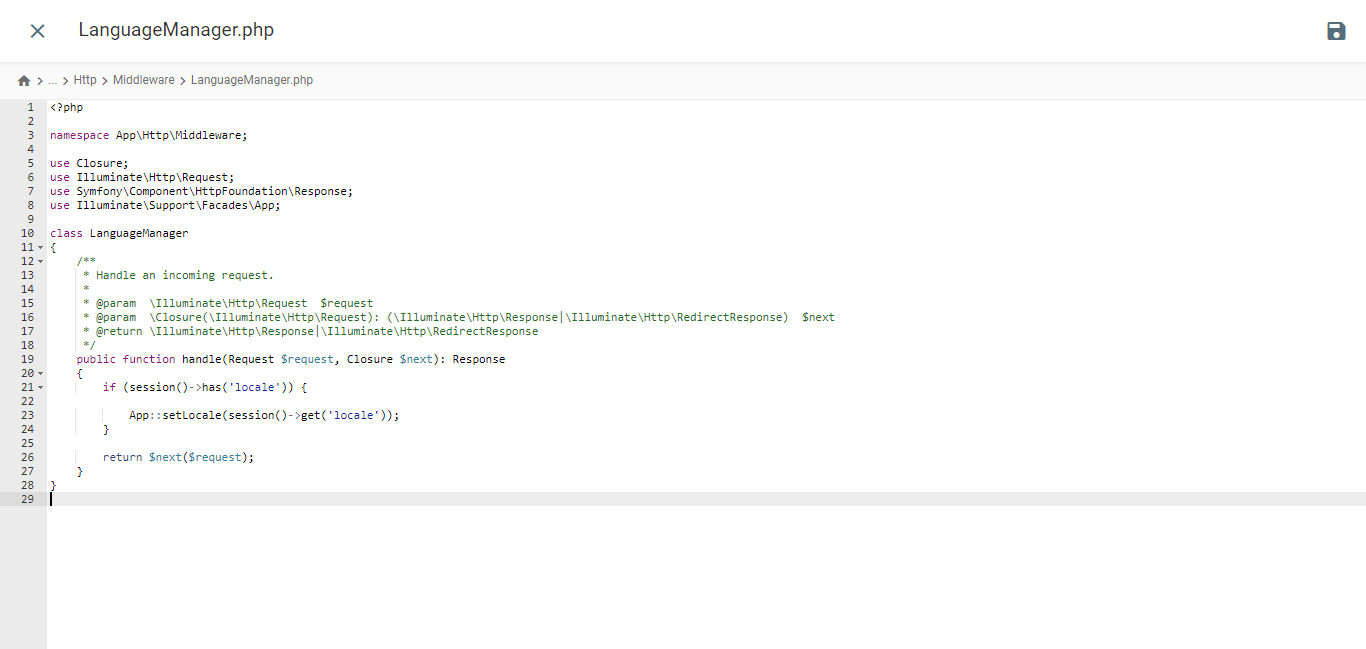
					<?php

namespace App\Http\Middleware;

use Closure;
use Illuminate\Http\Request;
use Symfony\Component\HttpFoundation\Response;
use Illuminate\Support\Facades\App;

class LanguageManager
{
    /**
     * Handle an incoming request.
     *
     * @param  \Closure(\Illuminate\Http\Request): (\Symfony\Component\HttpFoundation\Response)  $next
     */
    public function handle(Request $request, Closure $next): Response
    {
        if (session()->has('locale')) {

            App::setLocale(session()->get('locale'));
        }

        return $next($request);
    }
}
Đăng ký Language Middleware qua Kernel.php
Mở file Kernel.php nằm trong thư mục /app/Http. Tìm kiếm mảng $middlewareGroups và điều hướng đến phần web.
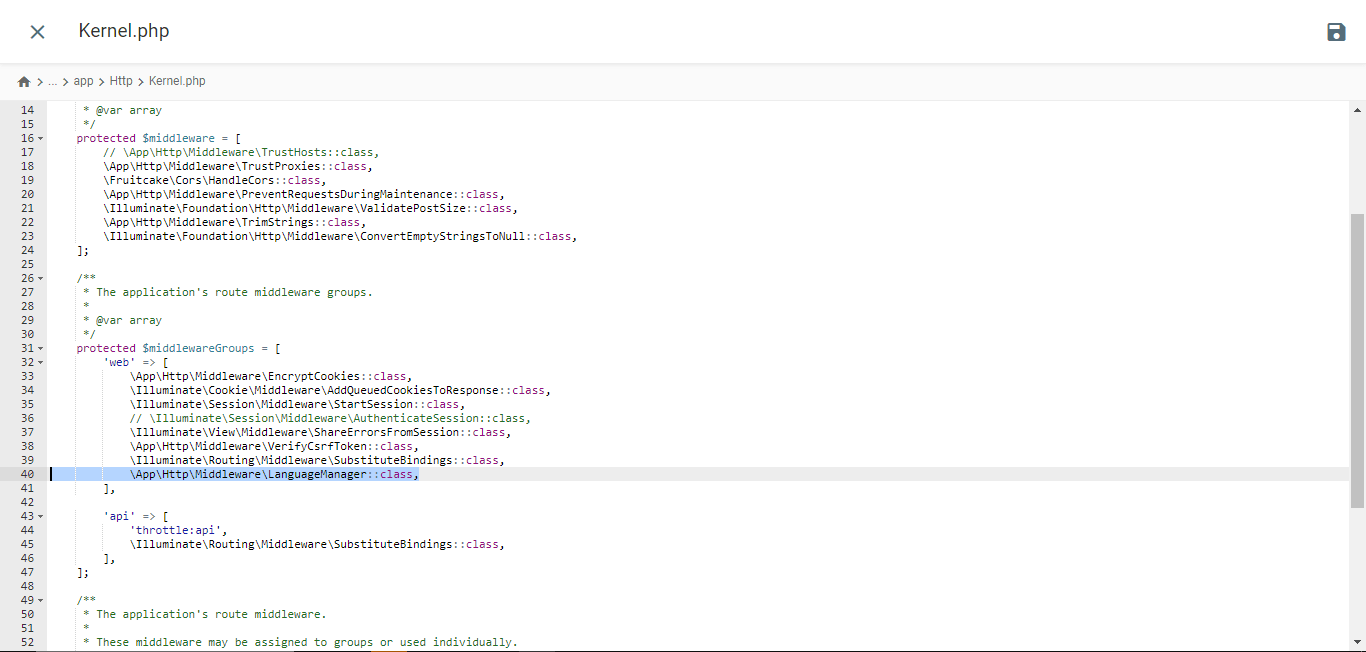
					/**
 * The application's route middleware groups.
 *
 * @var array<string, array<int, class-string|string>>
 */
protected $middlewareGroups = [
    'web' => [

        //...

        \App\Http\Middleware\LanguageManager::class,
    ],

    'api' => [

        //...
    ],
];
Thêm tuyến đường
Mở web.php từ thư mục /routes và thêm các tuyến đường này vào đó.
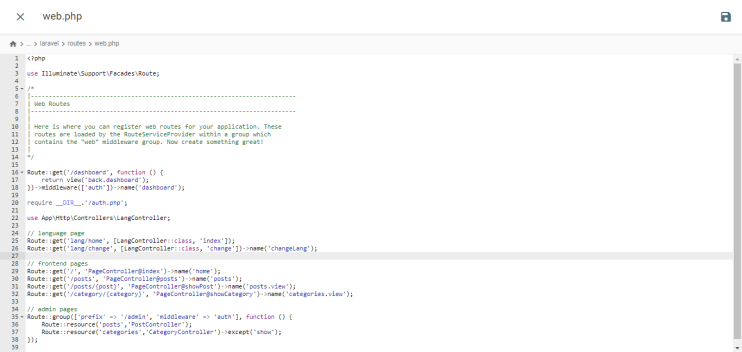
					//...
use App\Http\Controllers\LangController;

//...

Route::get('lang/home', [LangController::class, 'index']);
Route::get('lang/change', [LangController::class, 'change'])->name('changeLang');
Kiểm tra trang web
Thực hiện lệnh này trong thiết bị đầu cuối dự án để khởi chạy máy chủ phát triển.
php artisan serve
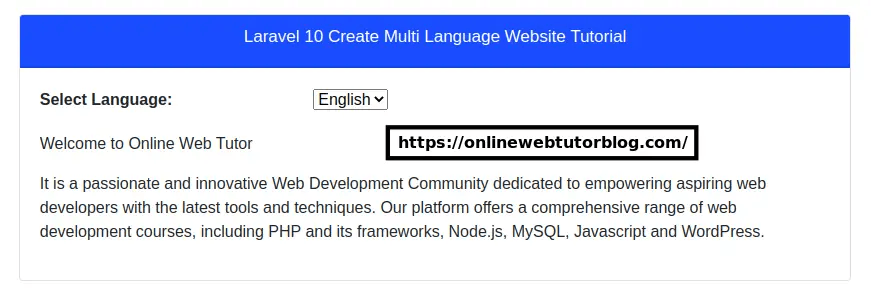
Đây là hiển thị của trang web Laravel từ trang web onlinewebtutorblog.com đã được tạo, như bạn có thể thấy trong hiển thị sau đây có một trình đơn thả xuống Google Dịch.
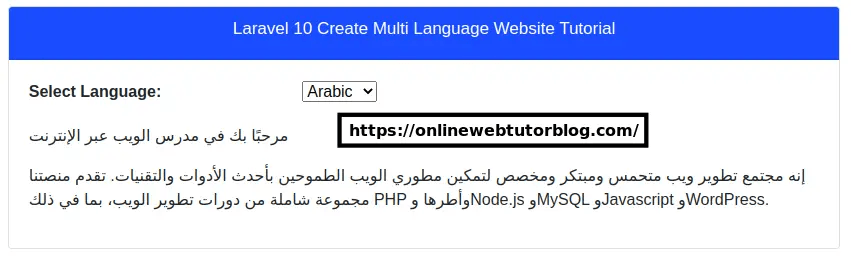
Sau đó, đây là những gì nó trông giống như khi trang web Laravel được dịch sang tiếng Ả Rập.
Sự khác biệt giữa việc triển khai dịch Google Cloud AI và Google Translate trên Laravellà gì?
Sau khi hiểu từng cách triển khai của Google Cloud AI và Google Translate trong Laravel, chúng tôi sẽ thảo luận về sự khác biệt của chúng.
Quá trình Cài đặt và Cấu hình

- Dịch thuật API Google Cloud AI: Quá trình cài đặt và cấu hình phức tạp hơn vì bạn phải tạo một dự án trên Nền tảng Google Cloud (GCP), kích hoạt API Dịch thuật Cloud, tạo tài khoản dịch vụ, tạo khóa API và cấu hình ứng dụng khách API trong ứng dụng Laravel. Điều này bao gồm một số bước và yêu cầu một tài khoản GCP hợp lệ.
- Google Dịch: Cài đặt và cấu hình đơn giản hơn nhiều. Bạn chỉ cần cài đặt một gói hoặc thư viện của bên thứ ba thông qua Composer, chẳng hạn như stichoza/google-translate-php. Sau đó, bạn có thể cấu hình khóa API Google Dịch trong tệp cấu hình Laravel.
Độ chính xác dịch thuật
- Google Cloud AI API Translation: Nhờ khả năng học sâu, dịch vụ này có thể nắm bắt tốt hơn các ngữ cảnh và sắc thái ngôn ngữ phức tạp. Điều này cho phép dịch chính xác hơn các biểu thức thông tục, cụm từ ẩn dụ và chơi chữ khó dịch theo nghĩa đen.
- Google Dịch:
Tốc độ phản hồi

- Dịch thuật API Google Cloud AI: Nhìn chung, nhanh hơn trong việc phản hồi các yêu cầu dịch vì nó sử dụng các mô hình dịch máy neural được tối ưu hóa được lưu trữ trên cơ sở hạ tầng đám mây mạnh mẽ của Google. Điều này cung cấp thời gian phản hồi nhanh hơn, đặc biệt là đối với các văn bản dài hơn hoặc khối lượng lớn bản dịch.
- Google Translate: Nó có thể chậm hơn một chút trong việc phản hồi các yêu cầu dịch, đặc biệt là đối với các tài liệu hoặc văn bản dài hơn. Điều này là do nó sử dụng một sự kết hợp truyền thống giữa các phương pháp dịch thống kê và thần kinh, có thể không hiệu quả như các mô hình thần kinh được sử dụng bởi Google Cloud AI API translation.
Khả năng tùy chỉnh và kiểm soát
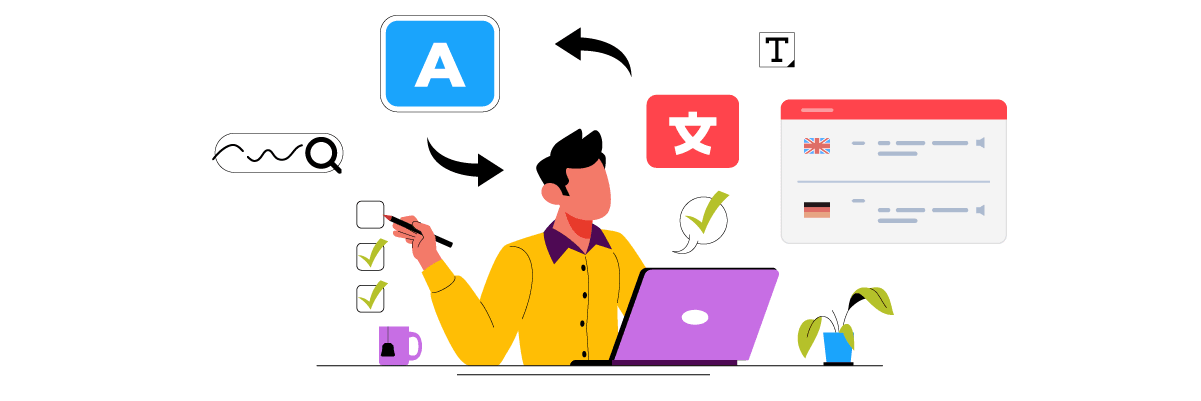
- Dịch thuật API Google Cloud AI: Cung cấp nhiều tùy chọn hơn để tùy chỉnh và kiểm soát quá trình dịch, chẳng hạn như thiết lập tùy chọn dịch, tải lên từ điển tùy chỉnh và truy cập giao diện dịch trực tiếp để chỉnh sửa kết quả dịch thủ công. Điều này cho phép người dùng cải thiện độ chính xác của bản dịch theo nhu cầu của họ.
- Google Translate: Có các tùy chọn tùy chỉnh và kiểm soát hạn chế hơn. Người dùng phải dựa vào kết quả dịch tự động mà không có khả năng chỉnh sửa hoặc tùy chỉnh trực tiếp kết quả.
Tính năng Nâng cao

- Dịch thuật API Google Cloud AI: Công nghệ dịch thuật AI của Google Cloud có một số tính năng tiên tiến như Bảng thuật ngữ, Lựa chọn mô hình và Mô hình AutoML. Ngoài ra, trong bối cảnh dịch thuật AI đám mây với Linguise, nó cũng có các tính năng tiên tiến như loại trừ dịch thuật cho các từ cụ thể như thuật ngữ kỹ thuật, tên thương hiệu, v.v., dựa trên dòng, trang hoặc URL.
- Google Dịch: Google Dịch được cài đặt trong Laravel không thể dịch tài liệu âm thanh hoặc các tài liệu khác. Nó chỉ có thể dịch văn bản trên trang web sang ngôn ngữ khác mà không có khả năng chỉnh sửa kết quả dịch.
Những yếu tố bạn nên cân nhắc khi chọn dịch vụ dịch thuật cho trang web Laravel của mình
Dưới đây là một số cân nhắc khi chọn dịch vụ dịch thuật tốt nhất cho trang web Laravel của bạn.
- Độ chính xác dịch thuật cao – Một trong những yếu tố quan trọng nhất là độ chính xác của bản dịch được tạo ra. Nếu trang web của bạn yêu cầu bản dịch chính xác cao, đặc biệt là đối với nội dung phức tạp và ngôn ngữ sắc thái, thì Google Cloud AI API Translation có thể là một lựa chọn tốt hơn so với Google Dịch.
- Dễ dàng tích hợp và cấu hình — Cân nhắc cài đặt và cấu hình dịch vụ dịch thuật với ứng dụng Laravel của bạn. Google Dịch thường dễ tích hợp hơn vì nó có sẵn dưới dạng gói hoặc thư viện PHP. Trong khi đó, Google Cloud AI API Translation yêu cầu cấu hình phức tạp hơn trên Nền tảng Google Cloud.
- Tính năng và Tùy chọn Tùy chỉnh – Nếu bạn cần các tính năng bổ sung như từ điển hoặc dịch thuật ngữ chuyên ngành, dịch trình soạn thảo kết quả, hoặc các tùy chọn tùy chỉnh khác, Google Cloud AI API Translation cung cấp nhiều lựa chọn hơn Google Translate.
- Tốc độ và Thời gian Phản hồi – Đối với các ứng dụng có khối lượng dịch lớn hoặc cần phản hồi nhanh, Google Cloud AI API Translation thường phản hồi các yêu cầu dịch nhanh hơn Google Translate.
- Chi phí và Ngân sách –
- Hỗ trợ và Tài liệu – Ngoài ra, hãy xem xét hỗ trợ kỹ thuật và tài liệu có sẵn cho từng dịch vụ. Google Cloud AI API Translation có thể có tài liệu và hỗ trợ toàn diện hơn từ Google.
Linguise, dịch vụ dịch thuật AI đám mây tốt nhất cho trang web Laravel
Đến thời điểm này, bạn đã biết những cân nhắc để chọn một dịch vụ dịch cho Laravel; hầu như tất cả các yếu tố được đề cập ở trên đều có trong dịch vụ dịch Linguise .
Linguise là một dịch vụ dịch thuật website sử dụng công nghệ dịch thuật AI đám mây để tạo ra bản dịch nội dung. Dịch vụ này có thể là giải pháp tốt nhất để dịch một trang web dựa trên Laravel. Tại sao lại như vậy? Bởi vì Linguise giải quyết các cân nhắc được đề cập ở trên.
- Linguise có chất lượng dịch thuật hoàn hảo. Mặc dù độ chính xác này khác nhau tùy thuộc vào cặp ngôn ngữ, Linguise tự hào có tỷ lệ chính xác gần 97%, tương tự như dịch thuật của con người.
- Linguise cũng được tích hợp với hơn 40 CMS và trình xây dựng trang web, cũng như tích hợp với các trang web dựa trên PHP như Laravel
- Mặc dù nó dịch tự động, Linguise có một trình chỉnh sửa trực tiếp có thể được sử dụng để chỉnh sửa kết quả dịch. Bằng cách này, bản dịch có thể được điều chỉnh theo sở thích kinh doanh.
- Thời gian tải cho các trang đa ngôn ngữ chỉ dài hơn 5% so với các trang ngôn ngữ gốc.
- Dịch vụ của chúng tôi có sẵn trong ba gói khác nhau, dao động từ 15 đến 45 đô la mỗi tháng. Mặc dù nó là trả phí, chúng tôi cũng cung cấp thời gian dùng thử miễn phí 30 ngày với giới hạn 600.000 từ có thể dịch.
- Cuối cùng, Linguise hỗ trợ tất cả các hình thức hỗ trợ khách hàng, bao gồm các bài viết hướng dẫn, tài liệu, tin tức sản phẩm, hướng dẫn video YouTube và trò chuyện hỗ trợ 24/7.
Từ những điểm trên, Linguise có thể là một giải pháp công nghệ dịch AI đám mây cho Laravel.
Kết luận
Trong bài viết này, chúng tôi đã khám phá những khác biệt chính giữa việc triển khai Google Cloud AI API Translation và Google Translate cho các ứng dụng web Laravel .
Dịch thuật API Google Cloud AI vượt trội về độ chính xác và nhu cầu dịch thuật có độ chính xác cao. Tuy nhiên, dịch vụ này đòi hỏi cấu hình phức tạp hơn và đắt hơn so với Google Translate. Mặt khác, Google Translate cung cấp sự dễ dàng tích hợp nhưng có hạn chế về độ chính xác và tùy chọn tùy chỉnh.
Linguise nổi lên như một dịch vụ dịch thuật dựa trên AI đám mây thay thế tương thích với các trang web Laravel . Với mức độ chính xác gần như khớp với bản dịch của con người, các tùy chọn biên tập dịch, thời gian tải nhanh và hỗ trợ khách hàng toàn diện, Linguise trở thành một giải pháp dịch thuật tuyệt vời cho trang web Laravel của bạn.
Nếu bạn muốn thử Linguise, bạn có thể đăng ký tài khoản miễn phí và tận hưởng thời gian dùng thử 30 ngày với giới hạn 600.000 từ dịch. Truy cập linguise.com để biết thêm thông tin!