
Đối với những bạn sở hữu các trang web dựa trên Laravel, việc cung cấp nội dung dịch chính xác và tự nhiên là rất quan trọng để dịch trang web của bạn và mang lại trải nghiệm người dùng tốt.
May mắn thay, có một số dịch vụ dịch tự động sẵn có để giúp các nhà phát triển vượt qua thách thức này, bao gồm Google Cloud AI API Translation và Google Translate. Cả hai dịch vụ đều cung cấp khả năng dịch thuật bằng công nghệ máy móc.
Trong bài viết này, chúng ta sẽ khám phá những khác biệt chính giữa việc triển khai Google Cloud AI Translation và Google Translate cho các ứng dụng Laravel và đề xuất các dịch vụ dịch thuật tốt nhất cho Laravel trang web của bạn.
Google Cloud AI API translation & Google Translate là gì?
Trước khi đi vào thảo luận, chúng ta sẽ bàn về ý nghĩa tương ứng của Google Cloud AI API và bản dịch Google Translate.
Dịch bằng Google Cloud AI API

Google Cloud AI API Translation là một dịch vụ dịch tự động tiên tiến được cung cấp bởi Google Cloud Platform. Dịch vụ này tận dụng các công nghệ trí tuệ nhân tạo (AI) và học máy mới nhất để cung cấp các bản dịch chính xác và tự nhiên cho văn bản, giọng nói và tài liệu.
Dịch thuật bằng Google Cloud AI API sử dụng các mô hình dịch máy nơ-ron dựa trên học sâu, cho phép nắm bắt sắc thái ngôn ngữ và ngữ cảnh tốt hơn, mang lại các bản dịch tự nhiên hơn, phù hợp với cách sử dụng ngôn ngữ thực tế. Ngoài ra, sử dụng Google Cloud AI Translation cho tối đa 500.000 ký tự là miễn phí, trong khi 75.000 ký tự tiếp theo sẽ phát sinh chi phí 20 đô la cho mỗi triệu ký tự.
Google Translate
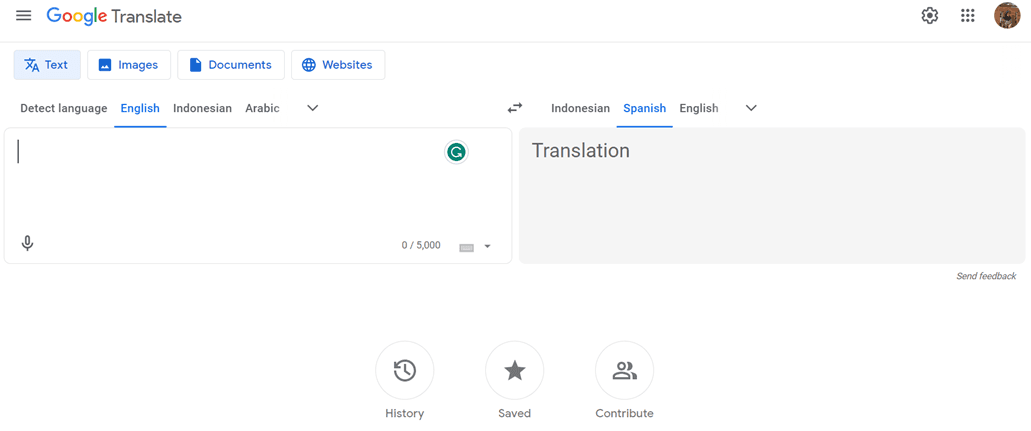
Trong khi đó, Google Translate là một dịch vụ dịch văn bản tự động lâu đời và được biết đến rộng rãi. Nó sử dụng phương pháp dịch thống kê truyền thống hơn, tạo ra bản dịch dựa trên các mẫu và xác suất được học từ các tập dữ liệu huấn luyện lớn.
Mặc dù không tiên tiến bằng Google Cloud AI API Translation về độ chính xác và khả năng xử lý các sắc thái ngôn ngữ, Google Translate vẫn là lựa chọn phổ biến nhờ tính dễ sử dụng và miễn phí cho mục đích phi thương mại.
Triển khai dịch thuật Google Cloud AI API trên Laravel
Một số dịch vụ dịch thuật, bao gồm Linguise, sử dụng Dịch thuật AI công nghệ đám mây để dịch trang web.
Dịch vụ dịch ngôn ngữ sử dụng API AI trên đám mây như một trong những công nghệ dịch của nó. Sau đây là các bước triển khai trên trang web Laravel . Chúng tôi giả định ở đây rằng bạn đã có sẵn một trang web dự án Laravel .
Tạo tài khoản Linguise
Để sử dụng Linguise, bạn phải đăng ký tài khoản trước. Bạn có thể làm điều này miễn phí hoặc đăng ký trong một tháng hoặc một năm. Bạn chỉ cần cung cấp thông tin như email, tên người dùng và mật khẩu.
Thêm thông tin trang web Laravel
Sau đó, thêm thông tin về trang web bạn sẽ sử dụng, nhập thông tin tài khoản Linguise và URL web của bạn, chọn nền tảng Laravel , và thêm ngôn ngữ mặc định và ngôn ngữ bạn muốn thêm vào trang web.
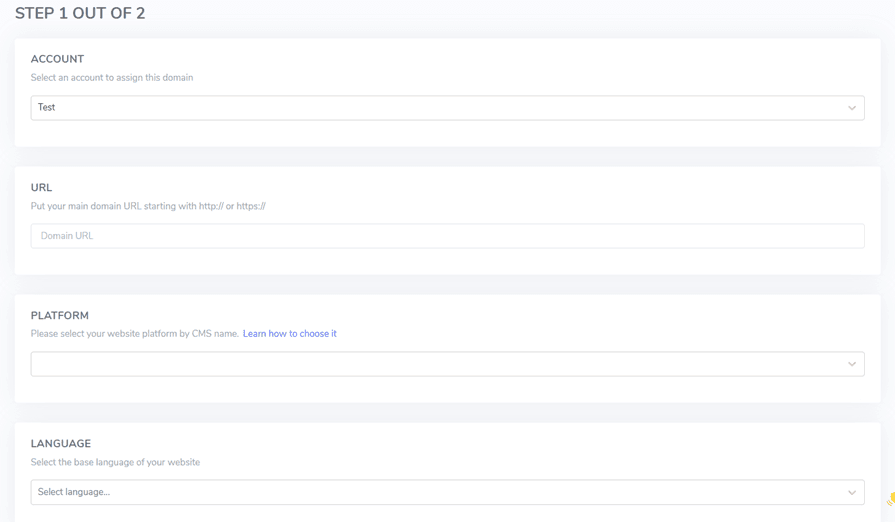
Sau đó tải xuống script PHP thông qua nút sau và lưu nó trên máy tính cục bộ của bạn.
Tải lên và cấu hình tập lệnh PHP
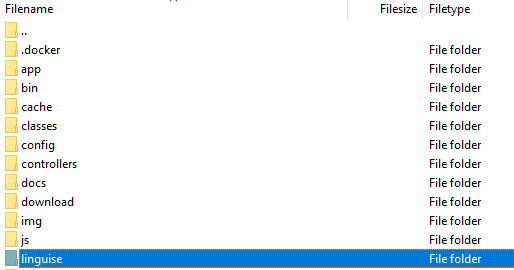
Sau khi tải xuống tập lệnh, hãy giải nén và tải lên thư mục gốc nơi Laravel được cài đặt. Đảm bảo nó nằm ở thư mục gốc của bản cài đặt Laravel của bạn (thường là nơi chứa các tệp CMS của bạn). Đảm bảo thư mục được đặt tên là “linguise” (tên mặc định khi thư mục được giải nén).
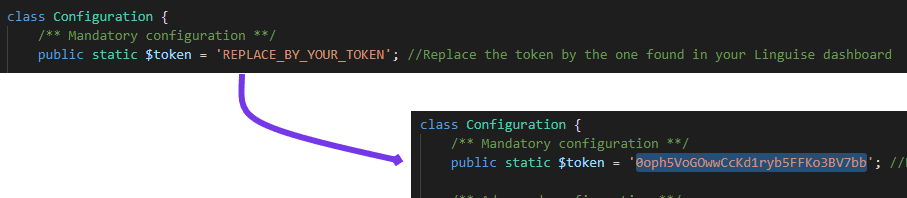
Sau đó, khóa API Linguise phải được sao chép vào tệp …/linguise/Configuration.php mà bạn đã tải lên máy chủ của mình. Chỉnh sửa tệp và dán khóa API của bạn vào giữa các dấu ngoặc kép, thay thế văn bản REPLACE_BY_YOUR_TOKEN.
Chèn tập lệnh của trình chuyển đổi ngôn ngữ
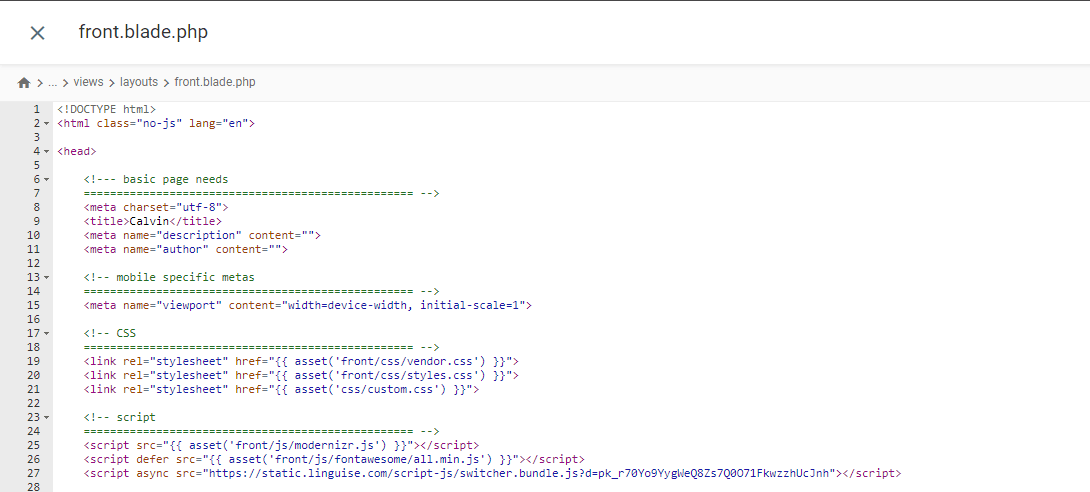
Tiếp theo, chèn script chuyển đổi ngôn ngữ mà bạn đã nhận được từ Linguise dashboard.

Được chèn vào tệp front.blade.php trong thư mục resources/views/layouts/. Đây là bản xem trước của tập lệnh đã chèn.
Cấu hình .htaccess
Cuối cùng, các URL dựa trên ngôn ngữ cần được cấu hình trong tệp .htaccess. Nếu tệp của bạn có chứa “RewriteBase /,” chỉ cần sao chép và dán đoạn mã sau vào dòng đó.
					<IfModule mod_rewrite.c>
  RewriteEngine On
  RewriteRule ^(af|sq|am|ar|hy|az|eu|be|bn|bs|bg|ca|ceb|ny|zh-cn|zh-tw|co|hr|cs|da|nl|en|eo|et|tl|fi|fr|fy|gl|ka|de|el|gu|ht|ha|haw|iw|hi|hmn|hu|is|ig|id|ga|it|ja|jw|kn|kk|km|ko|ku|ky|lo|la|lv|lt|lb|mk|mg|ms|ml|mt|mi|mr|mn|my|ne|no|ps|fa|pl|pt|pa|ro|ru|sm|gd|sr|st|sn|sd|si|sk|sl|so|es|su|sw|sv|tg|ta|te|th|tr|uk|ur|uz|vi|cy|xh|yi|yo|zu|zz-zz)(?:$|/)(.*)$ linguise/linguise.php?linguise_language=$1&original_url=$2 [L,QSA]
</IfModule>
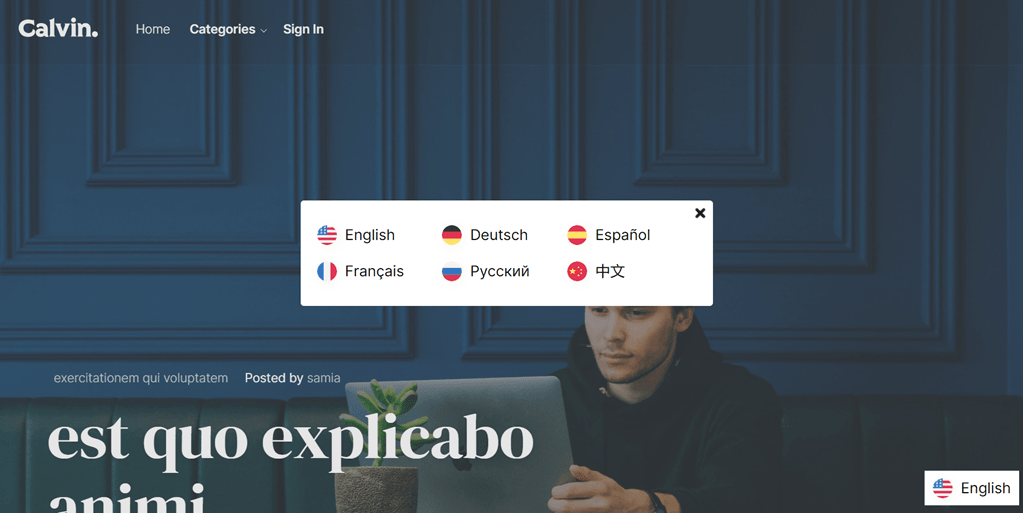
Xong. Tại thời điểm này, bạn đã triển khai thành công cloud AI API Translation trên dịch vụ Linguise . Bây giờ, bạn có thể kiểm tra trang web Laravel . Một trình chuyển đổi ngôn ngữ mặc định sẽ xuất hiện và bạn có thể tùy chỉnh trình chuyển đổi ngôn ngữ cho Laravel thông qua bảng điều khiển.
Triển khai Google Translate trên Laravel
Bây giờ chúng ta sẽ thử triển khai Google Translate trong Laravel. Ở đây chúng tôi giả định rằng bạn đã tạo thành công một dự án Laravel và chỉ cần thêm Google Translate.
Bạn cũng có thể tìm thấy các bước cài đặt sau trên trang web chính thức của Laravel .
Cài đặt gói Google Translator
Để cài đặt Gói Google Translator, hãy mở dấu nhắc dự án và nhập lệnh sau. Gói này sẽ cho phép bạn sử dụng các chức năng hoạt động của google-translator-language.
composer require stichoza/google-translate-php
Cài đặt Gói Google Translator
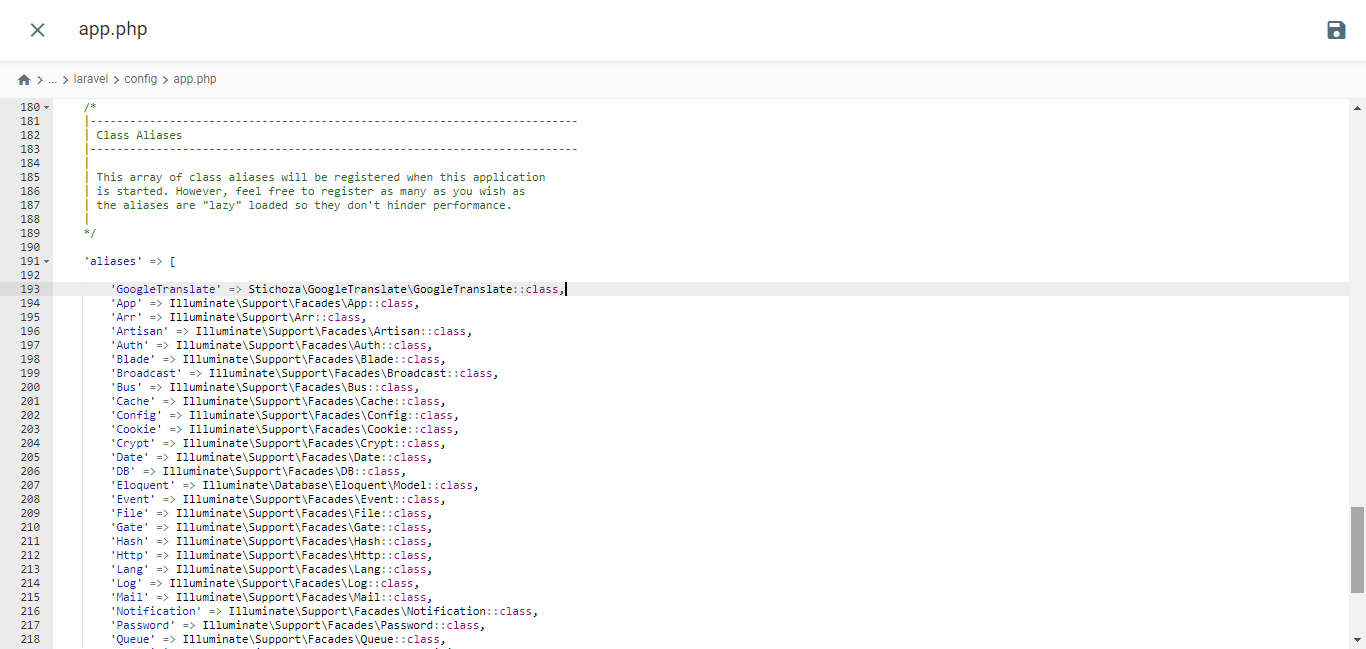
Chúng ta phải thiết lập “gói google translator” trong ứng dụng. Mở tệp app.php trong thư mục /config, tìm phần “aliases” và thêm dòng mã sau.
					/*
|--------------------------------------------------------------------------
| Class Aliases
|--------------------------------------------------------------------------
|
| This array of class aliases will be registered when this application
| is started. However, feel free to register as many as you wish as
| the aliases are "lazy" loaded so they don't hinder performance.
|
*/

'aliases' => Facade::defaultAliases()->merge([
    // 'Example' => App\Facades\Example::class,
    'GoogleTranslate' => Stichoza\GoogleTranslate\GoogleTranslate::class,
])->toArray(),
Thiết lập Bộ điều khiển Ngôn ngữ
Bạn cần tạo một tệp điều khiển ngôn ngữ như sau
php artisan make:controller LangController
Nó sẽ tạo tệp LangController.php bên trong thư mục /app/Http/Controllers.
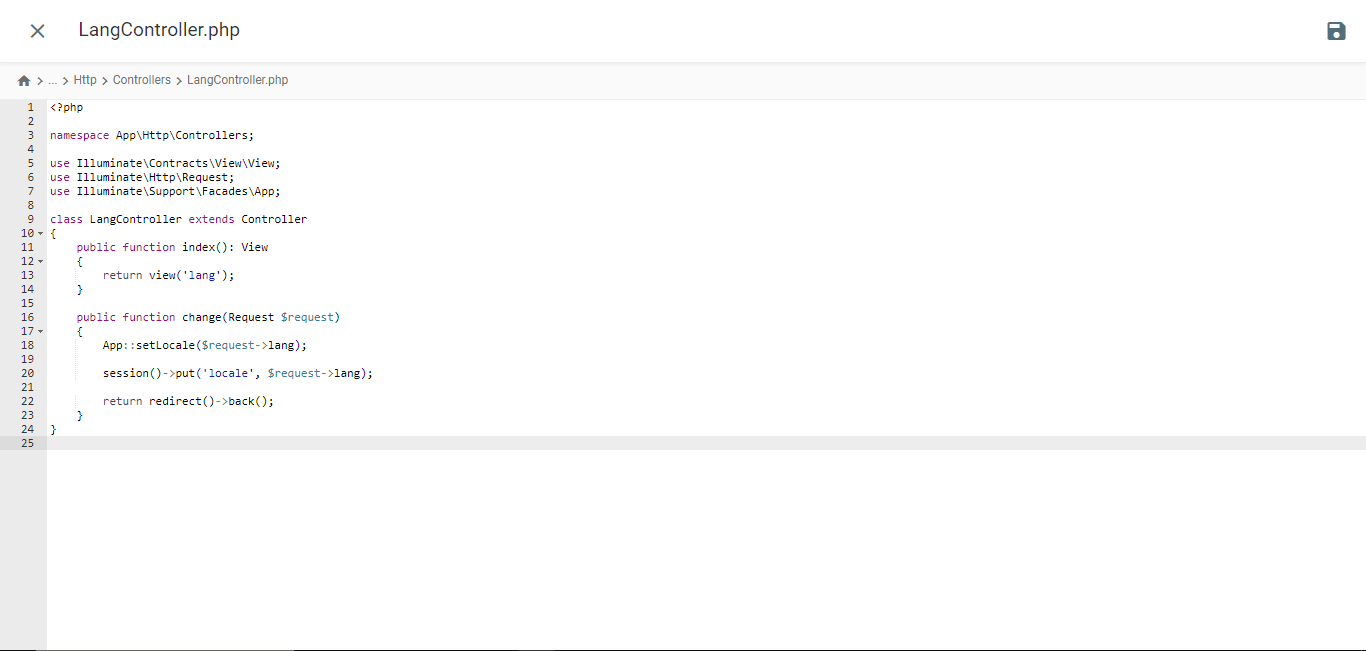
					<?php

namespace App\Http\Controllers;

use Illuminate\Contracts\View\View;
use Illuminate\Http\Request;
use Illuminate\Support\Facades\App;

class LangController extends Controller
{
    public function index(): View
    {
        return view('lang');
    }

    public function change(Request $request)
    {
        App::setLocale($request->lang);

        session()->put('locale', $request->lang);

        return redirect()->back();
    }
}
Tạo tệp mẫu Blade
Điều hướng đến thư mục /resources/views và tạo một tệp có tên lang.blade.php. Mở tệp và chèn mã sau vào đó.
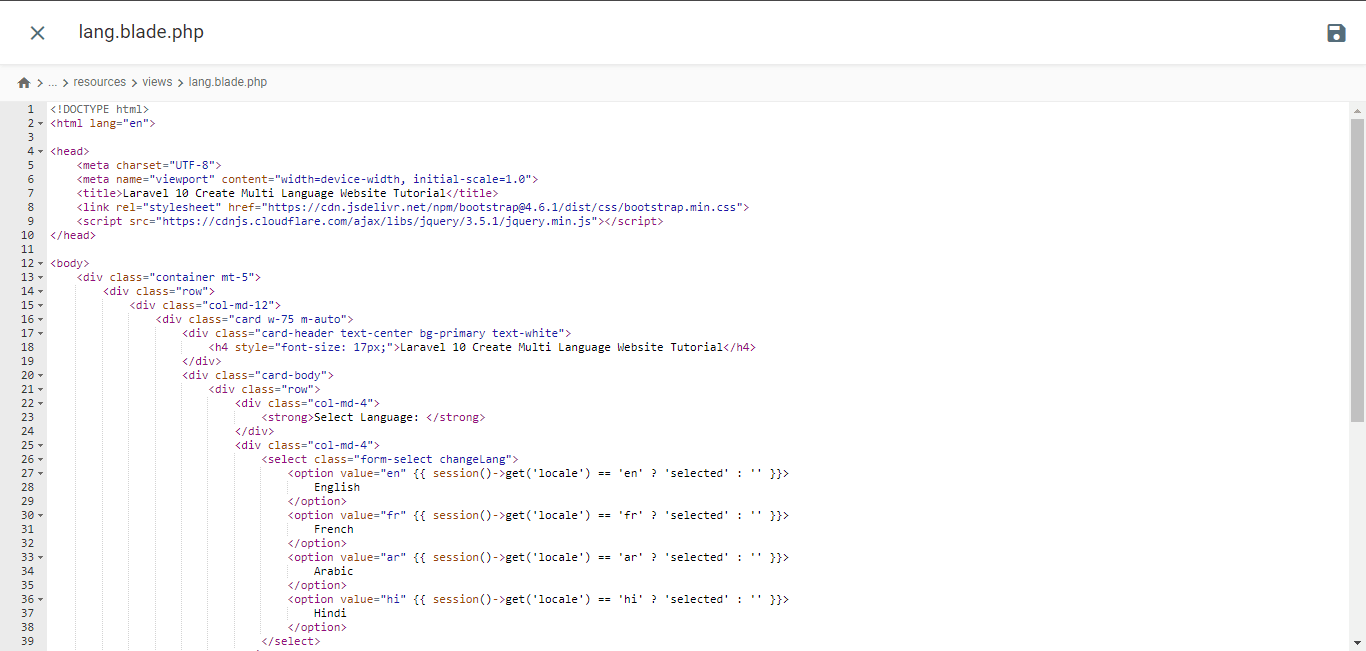
<!DOCTYPE html>
<html lang="en">
<head>
<meta charset="UTF-8">
<meta name="viewport" content="width=device-width, initial-scale=1.0">
<title>Laravel 10 Create Multi Language Website Tutorial</title>
<link rel="stylesheet" href="https://cdn.jsdelivr.net/npm/bootstrap@4.6.1/dist/css/bootstrap.min.css"> <script type="litespeed/javascript" data-src="https://cdnjs.cloudflare.com/ajax/libs/jquery/3.5.1/jquery.min.js"></script> <script type="application/ld+json" class="gnpub-schema-markup-output">{"@context":"https:\/\/schema.org\/","@type":"NewsArticle","@id":"https:\/\/www.linguise.com\/blog\/guide\/implement-google-cloud-ai-api-translation-vs-google-translate-for-laravel\/#newsarticle","url":"https:\/\/www.linguise.com\/blog\/guide\/implement-google-cloud-ai-api-translation-vs-google-translate-for-laravel\/","image":{"@type":"ImageObject","url":"https:\/\/www.linguise.com\/wp-content\/uploads\/2024\/05\/Implement-Google-Cloud-AI-API-translation-vs-Google-Translate-for-Laravel-150x150.png","width":150,"height":150},"headline":"Implement Google Cloud AI API translation vs Google Translate for Laravel","mainEntityOfPage":"https:\/\/www.linguise.com\/blog\/guide\/implement-google-cloud-ai-api-translation-vs-google-translate-for-laravel\/","datePublished":"2024-05-31T07:32:47+00:00","dateModified":"2024-08-26T19:19:15+00:00","description":"For those of you who own Laravel-based websites, providing accurate and natural translation content is very important to translate your website and offer a good","articleSection":"Guide","articleBody":"For those of you who own Laravel-based websites, providing accurate and natural translation content is very important to translate your website and offer a good user experience.\nFortunately, several automatic translation services are available to help developers overcome this challenge, including Google Cloud AI API Translation and Google Translate. Both services offer translation capabilities using machine technology.\nIn this article, we will explore the main differences between implementing Google Cloud AI Translation and Google Translate for Laravel applications and recommend the best translation services for your Laravel website. \t\t\n\t\t\tWhat are Google Cloud AI API translation & Google Translate?\n\t\t\n\t\tBefore entering into the discussion, we will discuss the respective meanings of Google Cloud AI API and Google Translate translations.\t\t\n\t\t\tGoogle Cloud AI API translation\n\t\t\n\t\t\t\t\t\t\t\t\t\t\t\t\t\t\t\t\t\t\t\t\t\t\t\t\t\t\n\t\tGoogle Cloud AI API Translation is an advanced automatic translation service provided by Google Cloud Platform. This service leverages the latest artificial intelligence (AI) and machine learning technologies to deliver accurate and natural translations of text, voice, and documents.Google Cloud AI API Translation uses neural translation models based on deep learning, which allows it to capture language nuances and context better, providing more idiomatic translations that align with actual language usage. Additionally, using Google Cloud AI Translation for up to 500,000 characters is free of charge, while the next 75,000 characters will incur a cost of $20 per million characters.\u00a0\t\t\n\t\t\tGoogle Translate\n\t\t\n\t\t\t\t\t\t\t\t\t\t\t\t\t\t\t\t\t\t\t\t\t\t\t\t\t\t\n\t\tMeanwhile, Google Translate is a long-standing and widely known automatic text translation service. It uses a more traditional statistical translation approach, which generates translations based on patterns and probabilities learned from large training datasets.Although it is not as advanced as Google Cloud AI API Translation in terms of accuracy and handling language nuances, Google Translate remains a popular choice due to its ease of use and free availability for non-commercial use.\t\t\n\t\t\tImplement Google Cloud AI API translation on Laravel\n\t\t\n\t\tSeveral translation services, including Linguise, use AI Translation cloud technology to translate websites.The language translation service uses cloud AI API as one of its translation technologies. The following are the implementation steps on the Laravel website. We assume here that you already have a ready Laravel project website.\t\t\n\t\t\tCreate Linguise account\n\t\t\n\t\tTo use Linguise, you must register an account first. You can do this for free or subscribe for one month or a year. You only need to provide information such as your email, username, and password.\t\t\n\t\t\tAdd Laravel website info\n\t\t\n\t\tAfter that, add information about the website you will use, enter your Linguise account info and web URL, select the Laravel platform, and add the default language and the language you want to add to the website.\u00a0\t\t\n\t\t\t\t\t\t\t\t\t\t\t\t\t\t\t\t\t\t\t\t\t\t\t\t\t\t\n\t\tThen download the PHP script via the following button and save it on your local computer.\t\t\n\t\t\t\n\t\t\t\t\t\t\t\n\t\t\t\t\t\t\t\t\tDOWNLOAD PHP-JS TRANSLATION SCRIPT\n\t\t\t\t\t\n\t\t\tUpload and configure the PHP script\n\t\t\n\t\tAfter downloading the script, unzip it and upload it to the root folder where Laravel is installed. Ensure it is located at the root of your Laravel installation (typically where your CMS files are). Ensure the folder is named \"linguise\" (the default name when the folder is unzipped).\t\t\n\t\t\t\t\t\t\t\t\t\t\t\t\t\t\t\t\t\t\t\t\t\t\t\t\t\t\n\t\tThen, the Linguise API key must be copied into the \u2026\/linguise\/Configuration.php file you uploaded to your server. Edit the file and paste your API key between the quotes, replacing the text REPLACE_BY_YOUR_TOKEN.\t\t\n\t\t\t\t\t\t\t\t\t\t\t\t\t\t\t\t\t\t\t\t\t\t\t\t\t\t\n\t\t\tInsert script of language switcher\t\t\n\t\tNext, insert the language switch script that you got from the Linguise dashboard.\t\t\n\t\t\t\t\t\t\t\t\t\t\t\t\t\t\t\t\t\t\t\t\t\t\t\t\t\t\n\t\tInserted into the front.blade.php file in the resources\/views\/layouts\/ directory. Here is a preview of the inserted script.\t\t\n\t\t\t\t\t\t\t\t\t\t\t\t\t\t\t\t\t\t\t\t\t\t\t\t\t\t\n\t\t\tConfigure .htaccess\n\t\t\n\t\tLastly, language-based URLs need to be configured in the .htaccess file. If your file includes \"RewriteBase \/,\" simply copy and paste the following code after that line.\t\t\n\t\t\t\n\t\t\t\t\n\t\t\t\t\t\n RewriteEngine On\n RewriteRule ^(af|sq|am|ar|hy|az|eu|be|bn|bs|bg|ca|ceb|ny|zh-cn|zh-tw|co|hr|cs|da|nl|en|eo|et|tl|fi|fr|fy|gl|ka|de|el|gu|ht|ha|haw|iw|hi|hmn|hu|is|ig|id|ga|it|ja|jw|kn|kk|km|ko|ku|ky|lo|la|lv|lt|lb|mk|mg|ms|ml|mt|mi|mr|mn|my|ne|no|ps|fa|pl|pt|pa|ro|ru|sm|gd|sr|st|sn|sd|si|sk|sl|so|es|su|sw|sv|tg|ta|te|th|tr|uk|ur|uz|vi|cy|xh|yi|yo|zu|zz-zz)(?:$|\/)(.*)$ linguise\/linguise.php?linguise_language=$1&original_url=$2 [L,QSA]\n\n\t\t\t\t\n\t\t\t\n\t\tDone. At this point, you have successfully implemented cloud AI API Translation on the Linguise service. Now, you can check the Laravel website. A default language switcher will appear, and you can customize the Language switcher for Laravel via the dashboard.\t\t\n\t\t\t\t\t\t\t\t\t\t\t\t\t\t\t\t\t\t\t\t\t\t\t\t\t\t\n\t\t\tImplement Google Translate on Laravel\t\t\n\t\tNow we will try to implement Google Translate in Laravel. Here we assume that you have successfully created a Laravel project and just need to add Google Translate.You can also find the following installation steps on the official Laravel website.\t\t\n\t\t\tInstall Google Translator Package\n\t\t\n\t\tTo install the Google Translator Package, open the project prompt and input the following command. This package will enable you to utilize the working functions of the google-translator-language.\t\t\n\t\t\t\n\t\t\t\t\n\t\t\t\t\tcomposer require stichoza\/google-translate-php\n\t\t\t\t\n\t\t\t\n\t\t\tSetting of Google Translator Package\n\t\t\n\t\tWe must set up the \"google translator package\" within the the application. Open the app.php file in the \/config folder, find the \"aliases\" section, and add the following line of code.\t\t\n\t\t\t\t\t\t\t\t\t\t\t\t\t\t\t\t\t\t\t\t\t\t\t\t\t\t\n\t\t\t\n\t\t\t\t\n\t\t\t\t\t\/*\n|--------------------------------------------------------------------------\n| Class Aliases\n|--------------------------------------------------------------------------\n|\n| This array of class aliases will be registered when this application\n| is started. However, feel free to register as many as you wish as\n| the aliases are \"lazy\" loaded so they don't hinder performance.\n|\n*\/\n'aliases' => Facade::defaultAliases()->merge([\n \/\/ 'Example' => AppFacadesExample::class,\n 'GoogleTranslate' => StichozaGoogleTranslateGoogleTranslate::class,\n])->toArray(),\n\n\t\t\t\t\n\t\t\t\n\t\t\tSetup Language Controller\n\t\t\n\t\tYou need to create a language controller file like the following\t\t\n\t\t\t\n\t\t\t\t\n\t\t\t\t\tphp artisan make:controller LangController\n\t\t\t\t\n\t\t\t\n\t\tIt will create LangController.php file inside \/app\/Http\/Controllers folder.","keywords":"","name":"Implement Google Cloud AI API translation vs Google Translate for Laravel","thumbnailUrl":"https:\/\/www.linguise.com\/wp-content\/uploads\/2024\/05\/Implement-Google-Cloud-AI-API-translation-vs-Google-Translate-for-Laravel-150x150.png","wordCount":809,"timeRequired":"PT3M35S","mainEntity":{"@type":"WebPage","@id":"https:\/\/www.linguise.com\/blog\/guide\/implement-google-cloud-ai-api-translation-vs-google-translate-for-laravel\/"},"author":{"@type":"Person","name":"Tristan","url":"https:\/\/www.linguise.com\/author\/tristan\/","sameAs":[],"image":{"@type":"ImageObject","url":"https:\/\/secure.gravatar.com\/avatar\/50d7238660b192d8d54ebf6367be5e97bb41c24dbd190daae062d931efd351ae?s=96&d=mm&r=g","height":96,"width":96}},"editor":{"@type":"Person","name":"Tristan","url":"https:\/\/www.linguise.com\/author\/tristan\/","sameAs":[],"image":{"@type":"ImageObject","url":"https:\/\/secure.gravatar.com\/avatar\/50d7238660b192d8d54ebf6367be5e97bb41c24dbd190daae062d931efd351ae?s=96&d=mm&r=g","height":96,"width":96}}}</script> </head>
<body>
<div class="container mt-5">
<div class="row">
<div class="col-md-12">
<div class="card w-75 m-auto">
<div class="card-header text-center bg-primary text-white">
<h4 style="font-size: 17px;">Laravel 10 Create Multi Language Website Tutorial</h4>
</div>
<div class="card-body">
<div class="row">
<div class="col-md-4">
<strong>Select Language: </strong>
</div>
<div class="col-md-4">
<select class="form-select changeLang">
<option value="en" {{ session()->get('locale') == 'en' ? 'selected' : '' }}>
English
</option>
<option value="fr" {{ session()->get('locale') == 'fr' ? 'selected' : '' }}>
French
</option>
<option value="ar" {{ session()->get('locale') == 'ar' ? 'selected' : '' }}>
Arabic
</option>
<option value="hi" {{ session()->get('locale') == 'hi' ? 'selected' : '' }}>
Hindi
</option>
</select>
</div>
</div>
<div style="margin-top: 20px;">
<p>{{ GoogleTranslate::trans('Welcome to Online Web Tutor', app()->getLocale()) }}</p>
<p>{{ GoogleTranslate::trans('It is a passionate and innovative Web Development Community dedicated to empowering aspiring web developers with the latest tools and techniques. Our platform offers a comprehensive range of web development courses, including PHP and its frameworks, Node.js, MySQL, Javascript and WordPress.', app()->getLocale()) }}
</p>
</div>
</div>
</div>
</div>
</div>
</div>
<script type="litespeed/javascript">var url="{{ route('changeLang') }}";$(".changeLang").change(function(){window.location.href=url+"?lang="+$(this).val()})</script> <script data-no-optimize="1">window.lazyLoadOptions=Object.assign({},{threshold:300},window.lazyLoadOptions||{});!function(t,e){"object"==typeof exports&&"undefined"!=typeof module?module.exports=e():"function"==typeof define&&define.amd?define(e):(t="undefined"!=typeof globalThis?globalThis:t||self).LazyLoad=e()}(this,function(){"use strict";function e(){return(e=Object.assign||function(t){for(var e=1;e<arguments.length;e++){var n,a=arguments[e];for(n in a)Object.prototype.hasOwnProperty.call(a,n)&&(t[n]=a[n])}return t}).apply(this,arguments)}function o(t){return e({},at,t)}function l(t,e){return t.getAttribute(gt+e)}function c(t){return l(t,vt)}function s(t,e){return function(t,e,n){e=gt+e;null!==n?t.setAttribute(e,n):t.removeAttribute(e)}(t,vt,e)}function i(t){return s(t,null),0}function r(t){return null===c(t)}function u(t){return c(t)===_t}function d(t,e,n,a){t&&(void 0===a?void 0===n?t(e):t(e,n):t(e,n,a))}function f(t,e){et?t.classList.add(e):t.className+=(t.className?" ":"")+e}function _(t,e){et?t.classList.remove(e):t.className=t.className.replace(new RegExp("(^|\\s+)"+e+"(\\s+|$)")," ").replace(/^\s+/,"").replace(/\s+$/,"")}function g(t){return t.llTempImage}function v(t,e){!e||(e=e._observer)&&e.unobserve(t)}function b(t,e){t&&(t.loadingCount+=e)}function p(t,e){t&&(t.toLoadCount=e)}function n(t){for(var e,n=[],a=0;e=t.children[a];a+=1)"SOURCE"===e.tagName&&n.push(e);return n}function h(t,e){(t=t.parentNode)&&"PICTURE"===t.tagName&&n(t).forEach(e)}function a(t,e){n(t).forEach(e)}function m(t){return!!t[lt]}function E(t){return t[lt]}function I(t){return delete t[lt]}function y(e,t){var n;m(e)||(n={},t.forEach(function(t){n[t]=e.getAttribute(t)}),e[lt]=n)}function L(a,t){var o;m(a)&&(o=E(a),t.forEach(function(t){var e,n;e=a,(t=o[n=t])?e.setAttribute(n,t):e.removeAttribute(n)}))}function k(t,e,n){f(t,e.class_loading),s(t,st),n&&(b(n,1),d(e.callback_loading,t,n))}function A(t,e,n){n&&t.setAttribute(e,n)}function O(t,e){A(t,rt,l(t,e.data_sizes)),A(t,it,l(t,e.data_srcset)),A(t,ot,l(t,e.data_src))}function w(t,e,n){var a=l(t,e.data_bg_multi),o=l(t,e.data_bg_multi_hidpi);(a=nt&&o?o:a)&&(t.style.backgroundImage=a,n=n,f(t=t,(e=e).class_applied),s(t,dt),n&&(e.unobserve_completed&&v(t,e),d(e.callback_applied,t,n)))}function x(t,e){!e||0<e.loadingCount||0<e.toLoadCount||d(t.callback_finish,e)}function M(t,e,n){t.addEventListener(e,n),t.llEvLisnrs[e]=n}function N(t){return!!t.llEvLisnrs}function z(t){if(N(t)){var e,n,a=t.llEvLisnrs;for(e in a){var o=a[e];n=e,o=o,t.removeEventListener(n,o)}delete t.llEvLisnrs}}function C(t,e,n){var a;delete t.llTempImage,b(n,-1),(a=n)&&--a.toLoadCount,_(t,e.class_loading),e.unobserve_completed&&v(t,n)}function R(i,r,c){var l=g(i)||i;N(l)||function(t,e,n){N(t)||(t.llEvLisnrs={});var a="VIDEO"===t.tagName?"loadeddata":"load";M(t,a,e),M(t,"error",n)}(l,function(t){var e,n,a,o;n=r,a=c,o=u(e=i),C(e,n,a),f(e,n.class_loaded),s(e,ut),d(n.callback_loaded,e,a),o||x(n,a),z(l)},function(t){var e,n,a,o;n=r,a=c,o=u(e=i),C(e,n,a),f(e,n.class_error),s(e,ft),d(n.callback_error,e,a),o||x(n,a),z(l)})}function T(t,e,n){var a,o,i,r,c;t.llTempImage=document.createElement("IMG"),R(t,e,n),m(c=t)||(c[lt]={backgroundImage:c.style.backgroundImage}),i=n,r=l(a=t,(o=e).data_bg),c=l(a,o.data_bg_hidpi),(r=nt&&c?c:r)&&(a.style.backgroundImage='url("'.concat(r,'")'),g(a).setAttribute(ot,r),k(a,o,i)),w(t,e,n)}function G(t,e,n){var a;R(t,e,n),a=e,e=n,(t=Et[(n=t).tagName])&&(t(n,a),k(n,a,e))}function D(t,e,n){var a;a=t,(-1<It.indexOf(a.tagName)?G:T)(t,e,n)}function S(t,e,n){var a;t.setAttribute("loading","lazy"),R(t,e,n),a=e,(e=Et[(n=t).tagName])&&e(n,a),s(t,_t)}function V(t){t.removeAttribute(ot),t.removeAttribute(it),t.removeAttribute(rt)}function j(t){h(t,function(t){L(t,mt)}),L(t,mt)}function F(t){var e;(e=yt[t.tagName])?e(t):m(e=t)&&(t=E(e),e.style.backgroundImage=t.backgroundImage)}function P(t,e){var n;F(t),n=e,r(e=t)||u(e)||(_(e,n.class_entered),_(e,n.class_exited),_(e,n.class_applied),_(e,n.class_loading),_(e,n.class_loaded),_(e,n.class_error)),i(t),I(t)}function U(t,e,n,a){var o;n.cancel_on_exit&&(c(t)!==st||"IMG"===t.tagName&&(z(t),h(o=t,function(t){V(t)}),V(o),j(t),_(t,n.class_loading),b(a,-1),i(t),d(n.callback_cancel,t,e,a)))}function $(t,e,n,a){var o,i,r=(i=t,0<=bt.indexOf(c(i)));s(t,"entered"),f(t,n.class_entered),_(t,n.class_exited),o=t,i=a,n.unobserve_entered&&v(o,i),d(n.callback_enter,t,e,a),r||D(t,n,a)}function q(t){return t.use_native&&"loading"in HTMLImageElement.prototype}function H(t,o,i){t.forEach(function(t){return(a=t).isIntersecting||0<a.intersectionRatio?$(t.target,t,o,i):(e=t.target,n=t,a=o,t=i,void(r(e)||(f(e,a.class_exited),U(e,n,a,t),d(a.callback_exit,e,n,t))));var e,n,a})}function B(e,n){var t;tt&&!q(e)&&(n._observer=new IntersectionObserver(function(t){H(t,e,n)},{root:(t=e).container===document?null:t.container,rootMargin:t.thresholds||t.threshold+"px"}))}function J(t){return Array.prototype.slice.call(t)}function K(t){return t.container.querySelectorAll(t.elements_selector)}function Q(t){return c(t)===ft}function W(t,e){return e=t||K(e),J(e).filter(r)}function X(e,t){var n;(n=K(e),J(n).filter(Q)).forEach(function(t){_(t,e.class_error),i(t)}),t.update()}function t(t,e){var n,a,t=o(t);this._settings=t,this.loadingCount=0,B(t,this),n=t,a=this,Y&&window.addEventListener("online",function(){X(n,a)}),this.update(e)}var Y="undefined"!=typeof window,Z=Y&&!("onscroll"in window)||"undefined"!=typeof navigator&&/(gle|ing|ro)bot|crawl|spider/i.test(navigator.userAgent),tt=Y&&"IntersectionObserver"in window,et=Y&&"classList"in document.createElement("p"),nt=Y&&1<window.devicePixelRatio,at={elements_selector:".lazy",container:Z||Y?document:null,threshold:300,thresholds:null,data_src:"src",data_srcset:"srcset",data_sizes:"sizes",data_bg:"bg",data_bg_hidpi:"bg-hidpi",data_bg_multi:"bg-multi",data_bg_multi_hidpi:"bg-multi-hidpi",data_poster:"poster",class_applied:"applied",class_loading:"litespeed-loading",class_loaded:"litespeed-loaded",class_error:"error",class_entered:"entered",class_exited:"exited",unobserve_completed:!0,unobserve_entered:!1,cancel_on_exit:!0,callback_enter:null,callback_exit:null,callback_applied:null,callback_loading:null,callback_loaded:null,callback_error:null,callback_finish:null,callback_cancel:null,use_native:!1},ot="src",it="srcset",rt="sizes",ct="poster",lt="llOriginalAttrs",st="loading",ut="loaded",dt="applied",ft="error",_t="native",gt="data-",vt="ll-status",bt=[st,ut,dt,ft],pt=[ot],ht=[ot,ct],mt=[ot,it,rt],Et={IMG:function(t,e){h(t,function(t){y(t,mt),O(t,e)}),y(t,mt),O(t,e)},IFRAME:function(t,e){y(t,pt),A(t,ot,l(t,e.data_src))},VIDEO:function(t,e){a(t,function(t){y(t,pt),A(t,ot,l(t,e.data_src))}),y(t,ht),A(t,ct,l(t,e.data_poster)),A(t,ot,l(t,e.data_src)),t.load()}},It=["IMG","IFRAME","VIDEO"],yt={IMG:j,IFRAME:function(t){L(t,pt)},VIDEO:function(t){a(t,function(t){L(t,pt)}),L(t,ht),t.load()}},Lt=["IMG","IFRAME","VIDEO"];return t.prototype={update:function(t){var e,n,a,o=this._settings,i=W(t,o);{if(p(this,i.length),!Z&&tt)return q(o)?(e=o,n=this,i.forEach(function(t){-1!==Lt.indexOf(t.tagName)&&S(t,e,n)}),void p(n,0)):(t=this._observer,o=i,t.disconnect(),a=t,void o.forEach(function(t){a.observe(t)}));this.loadAll(i)}},destroy:function(){this._observer&&this._observer.disconnect(),K(this._settings).forEach(function(t){I(t)}),delete this._observer,delete this._settings,delete this.loadingCount,delete this.toLoadCount},loadAll:function(t){var e=this,n=this._settings;W(t,n).forEach(function(t){v(t,e),D(t,n,e)})},restoreAll:function(){var e=this._settings;K(e).forEach(function(t){P(t,e)})}},t.load=function(t,e){e=o(e);D(t,e)},t.resetStatus=function(t){i(t)},t}),function(t,e){"use strict";function n(){e.body.classList.add("litespeed_lazyloaded")}function a(){console.log("[LiteSpeed] Start Lazy Load"),o=new LazyLoad(Object.assign({},t.lazyLoadOptions||{},{elements_selector:"[data-lazyloaded]",callback_finish:n})),i=function(){o.update()},t.MutationObserver&&new MutationObserver(i).observe(e.documentElement,{childList:!0,subtree:!0,attributes:!0})}var o,i;t.addEventListener?t.addEventListener("load",a,!1):t.attachEvent("onload",a)}(window,document);</script><script data-no-optimize="1">window.litespeed_ui_events=window.litespeed_ui_events||["mouseover","click","keydown","wheel","touchmove","touchstart","pointerup","pointerdown"];var urlCreator=window.URL||window.webkitURL;function litespeed_load_delayed_js_force(){console.log("[LiteSpeed] Start Load JS Delayed"),litespeed_ui_events.forEach(e=>{window.removeEventListener(e,litespeed_load_delayed_js_force,{passive:!0})}),document.querySelectorAll("iframe[data-litespeed-src]").forEach(e=>{e.setAttribute("src",e.getAttribute("data-litespeed-src"))}),"loading"==document.readyState?window.addEventListener("DOMContentLoaded",litespeed_load_delayed_js):litespeed_load_delayed_js()}litespeed_ui_events.forEach(e=>{window.addEventListener(e,litespeed_load_delayed_js_force,{passive:!0})});async function litespeed_load_delayed_js(){let t=[];for(var d in document.querySelectorAll('script[type="litespeed/javascript"]').forEach(e=>{t.push(e)}),t)await new Promise(e=>litespeed_load_one(t[d],e));document.dispatchEvent(new Event("DOMContentLiteSpeedLoaded")),window.dispatchEvent(new Event("DOMContentLiteSpeedLoaded"))}function litespeed_load_one(t,e){console.log("[LiteSpeed] Load ",t);function d(){o.src.startsWith("blob:")&&URL.revokeObjectURL(o.src),e()}var o=document.createElement("script");o.addEventListener("load",d),o.addEventListener("error",d),t.getAttributeNames().forEach(e=>{"type"!=e&&o.setAttribute("data-src"==e?"src":e,t.getAttribute(e))}),o.type="text/javascript",!o.src&&t.textContent&&(o.src=litespeed_inline2src(t.textContent)),t.after(o),t.remove()}function litespeed_inline2src(t){try{var d=urlCreator.createObjectURL(new Blob([t.replace(/^(?:<!--)?(.*?)(?:-->)?$/gm,"$1")],{type:"text/javascript"}))}catch(e){d="data:text/javascript;base64,"+btoa(t.replace(/^(?:<!--)?(.*?)(?:-->)?$/gm,"$1"))}return d}</script><script data-no-optimize="1">var litespeed_vary=document.cookie.replace(/(?:(?:^|.*;\s*)_lscache_vary\s*\=\s*([^;]*).*$)|^.*$/,"");litespeed_vary||(sessionStorage.getItem("litespeed_reloaded")?console.log("LiteSpeed: skipping guest vary reload (already reloaded this session)"):fetch("/wp-content/plugins/litespeed-cache/guest.vary.php",{method:"POST",cache:"no-cache",redirect:"follow"}).then(e=>e.json()).then(e=>{console.log(e),e.hasOwnProperty("reload")&&"yes"==e.reload&&(sessionStorage.setItem("litespeed_docref",document.referrer),sessionStorage.setItem("litespeed_reloaded","1"),window.location.reload(!0))}));</script><script data-optimized="1" type="litespeed/javascript" data-src="https://www.linguise.com/wp-content/litespeed/js/1745bed7fcdc6be1f2c39bfacf53a5fd.js?ver=1529d"></script></body>
</html>
Cài đặt Middleware Ngôn ngữ
Mở terminal dự án và chạy lệnh này,
php artisan make:middleware LanguageManager
Nó sẽ tạo một tệp LanguageManager.php bên trong thư mục /app/Http/Middleware và dán cái này.
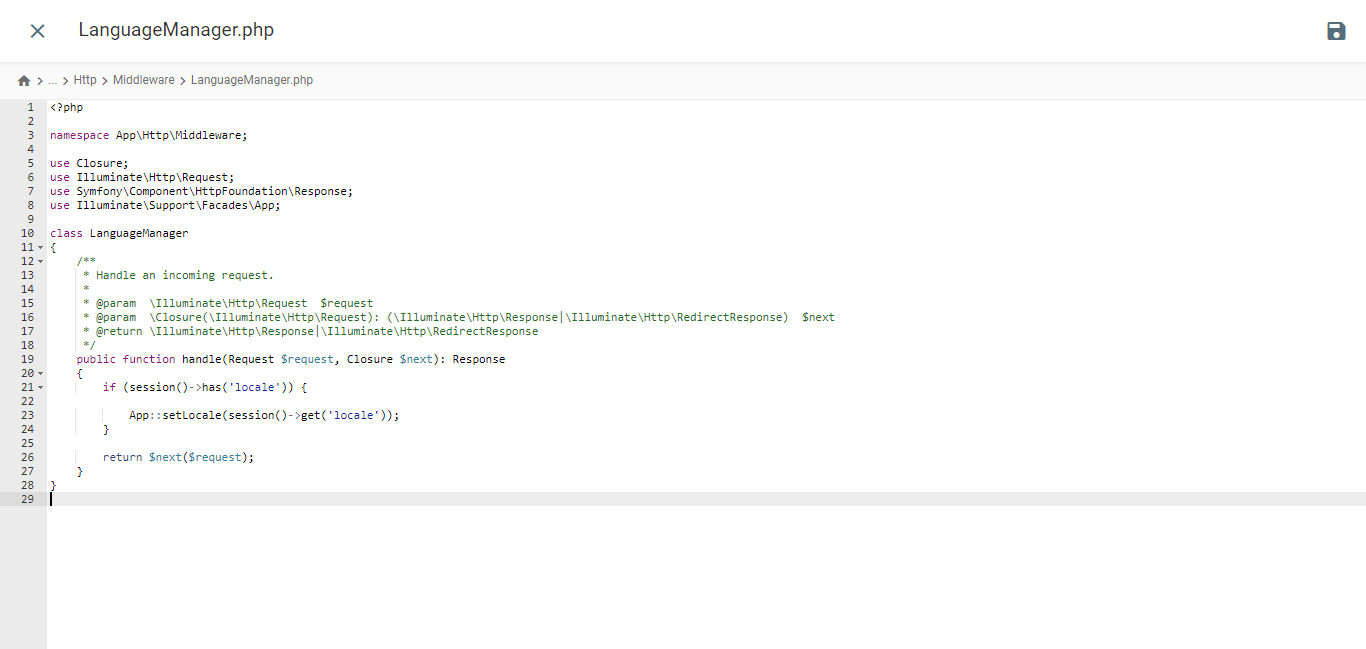
					<?php

namespace App\Http\Middleware;

use Closure;
use Illuminate\Http\Request;
use Symfony\Component\HttpFoundation\Response;
use Illuminate\Support\Facades\App;

class LanguageManager
{
    /**
     * Handle an incoming request.
     *
     * @param  \Closure(\Illuminate\Http\Request): (\Symfony\Component\HttpFoundation\Response)  $next
     */
    public function handle(Request $request, Closure $next): Response
    {
        if (session()->has('locale')) {

            App::setLocale(session()->get('locale'));
        }

        return $next($request);
    }
}
Đăng ký Middleware Ngôn ngữ qua Kernel.php
Mở tệp Kernel.php nằm trong thư mục /app/Http. Tìm mảng $middlewareGroups và điều hướng đến phần web.
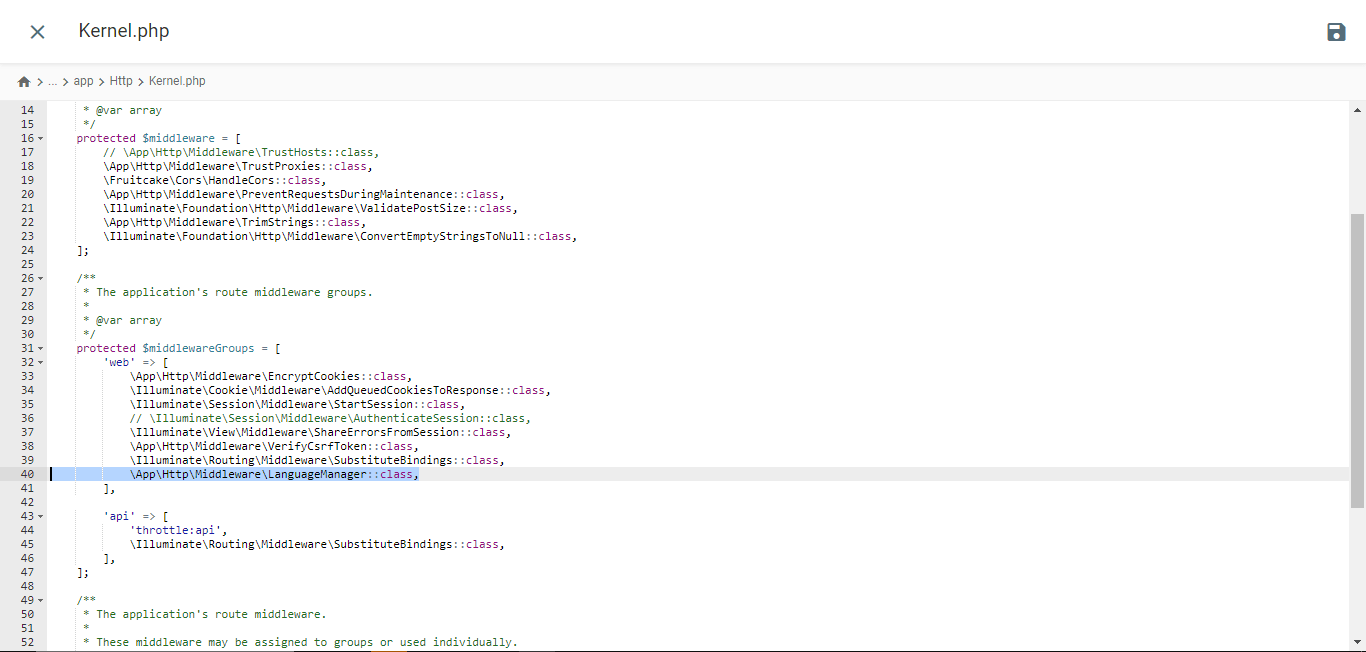
					/**
 * The application's route middleware groups.
 *
 * @var array<string, array<int, class-string|string>>
 */
protected $middlewareGroups = [
    'web' => [

        //...

        \App\Http\Middleware\LanguageManager::class,
    ],

    'api' => [

        //...
    ],
];
Thêm route
Mở web.php từ thư mục /routes và thêm các route này vào đó.
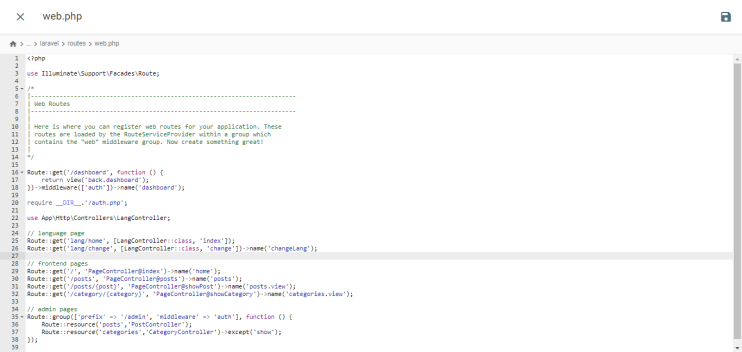
					//...
use App\Http\Controllers\LangController;

//...

Route::get('lang/home', [LangController::class, 'index']);
Route::get('lang/change', [LangController::class, 'change'])->name('changeLang');
Kiểm thử website
Thực thi lệnh này trong terminal của dự án để khởi chạy máy chủ phát triển.
php artisan serve
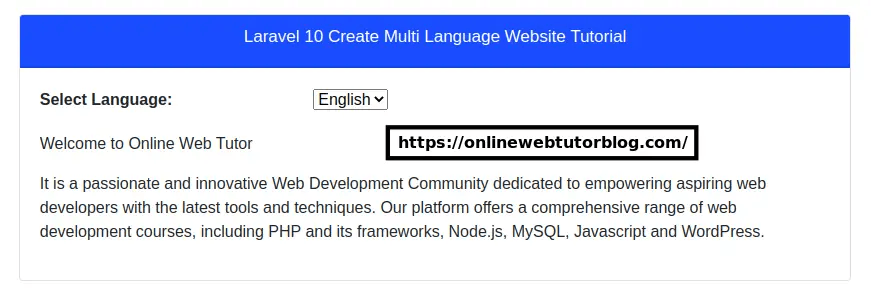
Đây là hiển thị của Laravel website từ website onlinewebtutorblog.com đã được tạo, như bạn có thể thấy trong hiển thị sau đây có một dropdown Google Translate.
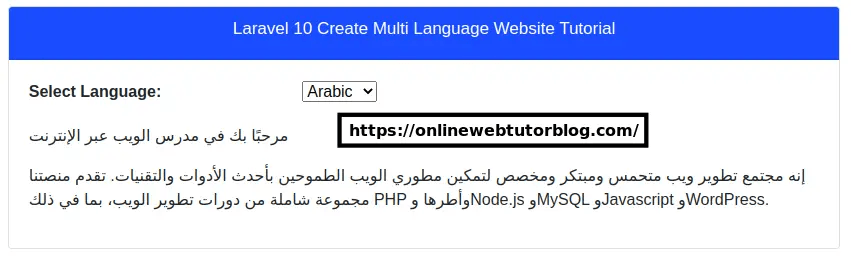
Sau đó, đây là giao diện khi trang web Laravel được dịch sang tiếng Ả Rập.
Sự khác biệt giữa việc triển khai dịch thuật Google Cloud AI & Google Translate trên Laravellà gì?
Sau khi hiểu rõ từng cách triển khai dịch bằng Google Cloud AI và Google Translate trong Laravel, chúng ta sẽ thảo luận về sự khác biệt giữa chúng.
Quy trình cài đặt và cấu hình

- Dịch bằng Google Cloud AI API: Quá trình cài đặt và cấu hình phức tạp hơn vì bạn phải tạo một dự án trên Google Cloud Platform (GCP), bật Cloud Translation API, tạo tài khoản dịch vụ, tạo khóa API và cấu hình ứng dụng khách API trong ứng dụng Laravel của bạn. Điều này bao gồm nhiều bước và yêu cầu tài khoản GCP hợp lệ.
- Google Translate: Cài đặt và cấu hình đơn giản hơn nhiều. Bạn chỉ cần cài đặt một gói hoặc thư viện bên thứ ba thông qua Composer, chẳng hạn như stichoza/google-translate-php. Sau đó, bạn có thể cấu hình khóa API Google Translate trong tệp cấu hình Laravel .
Độ chính xác của bản dịch
- Dịch bằng Google Cloud AI API: Nhờ khả năng học sâu, dịch vụ này có thể nắm bắt tốt hơn các ngữ cảnh và sắc thái ngôn ngữ phức tạp. Điều này cho phép dịch chính xác hơn các thành ngữ, cụm từ ẩn dụ và lối chơi chữ khó dịch theo nghĩa đen.
- Google Translate: thường gặp khó khăn trong việc nắm bắt ngữ cảnh và sắc thái ngôn ngữ tinh tế, khiến kết quả nghe cứng nhắc hoặc kém tự nhiên. Do phương pháp thống kê, việc dịch các thành ngữ hoặc cụm từ ẩn dụ thường kém chính xác hơn.
Tốc độ phản hồi

- Dịch bằng Google Cloud AI API: Thường phản hồi các yêu cầu dịch nhanh hơn vì sử dụng các mô hình dịch máy nơ-ron được tối ưu hóa, lưu trữ trên cơ sở hạ tầng đám mây mạnh mẽ của Google. Điều này mang lại thời gian phản hồi nhanh hơn, đặc biệt đối với các văn bản dài hoặc khối lượng lớn bản dịch.
- Google Dịch: Có thể phản hồi các yêu cầu dịch chậm hơn một chút, đặc biệt đối với các tài liệu hoặc văn bản dài. Điều này là do nó sử dụng kết hợp phương pháp dịch thống kê và mạng nơ-ron truyền thống hơn, có thể không hiệu quả bằng các mô hình mạng nơ-ron được sử dụng bởi API dịch thuật Google Cloud AI.
Khả năng tùy chỉnh và kiểm soát
- Google Cloud AI API Translation: Cung cấp nhiều tùy chọn hơn để tùy chỉnh và kiểm soát quá trình dịch, chẳng hạn như thiết lập tùy chọn dịch, tải lên bảng thuật ngữ tùy chỉnh và truy cập giao diện dịch bằng trình chỉnh sửa trực tiếp để chỉnh sửa kết quả dịch theo cách thủ công. Điều này cho phép người dùng cải thiện độ chính xác của bản dịch theo nhu cầu của họ.
- Google Translate: Có ít tùy chọn tùy chỉnh và kiểm soát hơn. Người dùng phải dựa vào kết quả dịch tự động mà không có nhiều khả năng chỉnh sửa hoặc tùy chỉnh trực tiếp kết quả.
Tính năng Nâng cao

- Dịch bằng Google Cloud AI API: Công nghệ dịch thuật Google Cloud AI có một số tính năng nâng cao như Bảng thuật ngữ, Lựa chọn mô hình và mô hình AutoML. Ngoài ra, trong bối cảnh dịch thuật AI đám mây với Linguise, nó cũng có các tính năng nâng cao như loại trừ dịch thuật cho các từ cụ thể như thuật ngữ kỹ thuật, tên thương hiệu, v.v., dựa trên dòng, trang hoặc URL.
- Google Dịch: Google Dịch được cài đặt trong Laravel không thể dịch tài liệu âm thanh hoặc các nội dung khác. Nó chỉ có thể dịch văn bản trên trang web sang ngôn ngữ khác mà không có khả năng chỉnh sửa kết quả dịch.
Những yếu tố bạn nên cân nhắc khi chọn dịch vụ dịch thuật cho trang web Laravel của bạn
Dưới đây là một số cân nhắc khi chọn dịch vụ dịch tốt nhất cho website Laravel của bạn.
- Độ chính xác dịch cao – Một trong những yếu tố quan trọng nhất là độ chính xác của bản dịch được tạo ra. Nếu trang web của bạn yêu cầu bản dịch có độ chính xác cao, đặc biệt là đối với nội dung phức tạp và ngôn ngữ tinh tế, thì Google Cloud AI API Translation có thể là lựa chọn tốt hơn so với Google Translate.
- Dễ dàng tích hợp và cấu hình — Hãy cân nhắc việc cài đặt và cấu hình dịch vụ dịch thuật với ứng dụng Laravel của bạn. Google Translate thường dễ tích hợp hơn vì nó có sẵn dưới dạng gói hoặc thư viện PHP. Trong khi đó, Google Cloud AI API Translation yêu cầu cấu hình phức tạp hơn trên Google Cloud Platform.
- Tính năng và Tùy chọn Tùy chỉnh – Nếu bạn cần các tính năng bổ sung như bảng thuật ngữ hoặc dịch thuật ngữ chuyên ngành, chỉnh sửa bản dịch kết quả hoặc các tùy chọn tùy chỉnh khác, Google Cloud AI API Translation cung cấp nhiều lựa chọn hơn Google Dịch.
- Tốc độ và Thời gian Phản hồi – Đối với các ứng dụng có khối lượng dịch lớn hoặc cần phản hồi nhanh, Google Cloud AI API Translation thường phản hồi các yêu cầu dịch nhanh hơn Google Translate.
- Chi phí và Ngân sách – Google Translate có sẵn miễn phí cho mục đích phi thương mại, trong khi Google Cloud AI API Translation sử dụng mô hình thanh toán dựa trên mức sử dụng. Hãy cân nhắc ngân sách và khối lượng dịch ước tính của bạn để chọn dịch vụ tiết kiệm chi phí nhất.
- Hỗ trợ và Tài liệu – Ngoài ra, hãy xem xét hỗ trợ kỹ thuật và tài liệu có sẵn cho mỗi dịch vụ. Google Cloud AI API Translation có thể có tài liệu và hỗ trợ toàn diện hơn từ Google.
Linguise, dịch vụ dịch thuật AI đám mây tốt nhất cho trang web Laravel
Đến thời điểm này, bạn đã biết những cân nhắc khi chọn dịch vụ dịch thuật cho Laravel; hầu hết các yếu tố được đề cập ở trên đều có trong dịch vụ dịch thuật Linguise .
Linguise là một dịch vụ dịch trang web sử dụng công nghệ dịch thuật AI đám mây để tạo bản dịch nội dung. Dịch vụ này có thể là giải pháp tốt nhất để dịch một trang web dựa trên Laravel. Tại sao lại như vậy? Bởi vì Linguise giải quyết các cân nhắc được đề cập ở trên.
- Linguise có chất lượng dịch hoàn hảo. Mặc dù độ chính xác này thay đổi tùy theo cặp ngôn ngữ, Linguise tự hào có tỷ lệ chính xác gần 97%, tương tự như dịch thuật của con người.
- Linguise cũng được tích hợp với hơn 40 CMS và trình tạo website, cũng như tích hợp với các website dựa trên PHP như Laravel.
- Mặc dù dịch tự động, Linguise có trình chỉnh sửa trực tiếp có thể được sử dụng để chỉnh sửa kết quả dịch. Bằng cách này, bản dịch có thể được điều chỉnh theo sở thích kinh doanh.
- Thời gian tải cho các trang đa ngôn ngữ chỉ dài hơn 5% so với các trang ngôn ngữ gốc.
- Dịch vụ của chúng tôi có sẵn trong ba gói với mức giá từ 15 đến 45 đô la mỗi tháng. Mặc dù là dịch vụ trả phí, chúng tôi cũng cung cấp thời gian dùng thử miễn phí 30 ngày với giới hạn 600.000 từ có thể được dịch.
- Cuối cùng, Linguise hỗ trợ tất cả các hình thức hỗ trợ khách hàng, bao gồm bài viết hướng dẫn, tài liệu, tin tức sản phẩm, video hướng dẫn trên YouTube và chat hỗ trợ 24/7.
Từ những điểm trên, Linguise có thể là giải pháp công nghệ dịch AI đám mây cho Laravel.
Kết luận
Trong bài viết này, chúng tôi đã khám phá những khác biệt chính giữa việc triển khai Google Cloud AI API Translation và Google Translate cho các ứng dụng web Laravel .
Google Cloud AI API Translation vượt trội về độ chính xác và đáp ứng nhu cầu dịch thuật có độ chính xác cao. Tuy nhiên, dịch vụ này yêu cầu cấu hình phức tạp hơn và đắt hơn so với Google Translate. Mặt khác, Google Translate mang lại sự dễ dàng tích hợp nhưng có hạn chế về độ chính xác và các tùy chọn tùy chỉnh.
Linguise nổi lên như một dịch vụ dịch thuật dựa trên AI đám mây thay thế tương thích với các trang web Laravel . Với mức độ chính xác gần như tương đương với bản dịch của con người, các tùy chọn trình chỉnh sửa bản dịch, thời gian tải nhanh và hỗ trợ khách hàng toàn diện, Linguise trở thành một giải pháp dịch thuật tuyệt vời cho trang web Laravel của bạn.
Nếu bạn muốn dùng thử Linguise, bạn có thể đăng ký tài khoản miễn phí và tận hưởng 30 ngày dùng thử với giới hạn 600.000 từ được dịch. Truy cập linguise.com để biết thêm thông tin!