Użytkownicy trafiają na Twoją stronę i wszystko wydaje się idealne—treść jest przetłumaczona, nawigacja jest przejrzysta, a doświadczenie wydaje się dopasowane do ich języka. Ale nagle pojawia się wyskakujące okienko w języku angielskim lub czat na żywo odpowiada w języku, którego nie rozumieją. To właśnie nazywa się luką tłumaczeniową w interaktywnych witrynach—mały, ale zakłócający moment, który przerywa ścieżkę użytkownika i tworzy zamieszanie dokładnie wtedy, gdy ma to największe znaczenie.
Ponieważ nowoczesne strony internetowe opierają się na AJAX, wyskakujących okienkach i widżetach firm trzecich, utrzymanie spójnego tłumaczenia w każdej interakcji staje się coraz bardziej złożone. Jeśli chcesz zapewnić naprawdę płynne doświadczenie wielojęzyczne, czas przemyśleć na nowo sposób obsługi tłumaczeń dynamicznych i interaktywnych treści w całej witrynie.
Najważniejsze informacje: Automatyzacja tłumaczenia dla AJAX, wyskakujących okienek i widżetów firm trzecich
Na czym polega luka w tłumaczeniach na interaktywnych stronach internetowych?
Luka w tłumaczeniu na stronach interaktywnych odnosi się do momentu, gdy witryna wydaje się w pełni przetłumaczona, a nagle niektóre elementy interaktywne przełączają się z powrotem na język oryginalny. Często zdarza się to w przypadku komponentów takich jak wyskakujące okienka, komunikaty ładowania, powiadomienia czy widżety czatu, które nie są częścią statycznej zawartości strony. W rezultacie użytkownicy doświadczają nieoczekiwanego przerwania spójności językowej, co może wydawać się mylące i nieprofesjonalne.
Ta luka zwykle pojawia się, ponieważ nowoczesne strony internetowe opierają się na dynamicznych technologiach, takich jak AJAX i skrypty firm trzecich, które ładują treść po początkowym renderowaniu strony. Tradycyjne metody tłumaczenia często skupiają się wyłącznie na statycznym HTML, co oznacza, że każda treść pojawiająca się później—jak wskaźnik „Ładowanie…” lub wyskakujące okienko przy zamiarze wyjścia—może łatwo zostać pominięta. Z czasem te drobne niespójności narastają, tworząc fragmentaryczne doświadczenie wielojęzyczne.
Choć może się to wydawać drobiazgiem, jego wpływ jest znaczący. Gdy użytkownicy napotykają mieszane języki, może to osłabić zaufanie, zakłócić zrozumienie i sprawić, że zawahają się przed kontynuowaniem swojej ścieżki, zwłaszcza w kluczowych momentach, takich jak rejestracja lub zakup. Na globalnym rynku nawet krótka luka w tłumaczeniu może być różnicą między konwersją a utraconą szansą.
Dlaczego treści AJAX psują spójność tłumaczenia
AJAX odgrywa kluczową rolę w tworzeniu szybkich, płynnych doświadczeń internetowych, ale wprowadza również wyzwania związane z utrzymaniem spójności wielojęzycznej. Ponieważ AJAX ładuje treści dynamicznie bez odświeżania strony, niektóre elementy mogą omijać tradycyjne procesy tłumaczenia i zamiast tego pojawiać się w języku domyślnym.
- Treść ładuje się po początkowym tłumaczeniu – AJAX pobiera dane po wyrenderowaniu strony, więc mogą one nie zostać przechwycone przez standardowe metody tłumaczenia.
- Nie wykryto jako części strony głównej – Elementy dynamiczne są często traktowane oddzielnie od statycznego HTML, co utrudnia ich automatyczne tłumaczenie.
- Niespójny język w interakcjach – Nowo załadowana treść może pojawić się w innym języku niż reszta strony.
- Trudne do śledzenia i kontrolowania – Ponieważ zawartość AJAX zmienia się w zależności od działań użytkownika, wymaga bardziej zaawansowanej obsługi, aby zapewnić spójne tłumaczenie.
Jak tłumaczyć wyskakujące okienka bez problemów z UX
Wyskakujące okienka oparte na AJAX lub wyzwalaczach mogą pojawiać się w kluczowych momentach ścieżki użytkownika, dlatego ich prawidłowe tłumaczenie jest niezbędne, aby zachować płynne doświadczenie. Jeśli nie zostaną odpowiednio obsłużone, wyskakujące okienka mogą wydawać się natrętne—nie tylko dlatego, że przerywają, ale ponieważ nagle zmieniają język i podważają zaufanie użytkownika.
Dopasuj język wyskakującego okienka do ustawień użytkownika
Wyskakujące okienka powinny zawsze używać tego samego języka, który wybrał użytkownik lub w którym aktualnie przegląda stronę. Gdy użytkownik widzi inny język w wyskakującym okienku, powoduje to dezorientację i sprawia, że doświadczenie wydaje się niespójne, nawet jeśli reszta strony jest już przetłumaczona.
Aby tego uniknąć, upewnij się, że Twój system wykrywa i stosuje preferencje językowe użytkownika do każdego wywołanego elementu. Dzięki temu doświadczenie pozostaje płynne, a użytkownicy mogą skupić się na przekazie, zamiast zastanawiać się nad interfejsem.
Tłumacz dynamiczną treść wyskakujących okienek
Wiele wyskakujących okienek nie jest statycznych – pojawiają się one w oparciu o zachowanie użytkownika, czas lub konkretne wyzwalacze. Oznacza to, że ich treść może nie istnieć przy początkowym ładowaniu strony, przez co łatwo je pominąć przy użyciu podstawowych metod tłumaczenia.
Potrzebujesz rozwiązania, które potrafi przechwytywać i tłumaczyć treści w czasie rzeczywistym, w tym tekst pojawiający się dopiero po określonych interakcjach. Narzędzia takie jak Linguise pomagają zapewnić, że dynamiczna treść wyskakujących okienek jest automatycznie tłumaczona w momencie pojawienia się, dzięki czemu każdy użytkownik widzi w pełni zlokalizowaną wiadomość bez opóźnień i niespójności.
Jak pokazano poniżej, możesz łatwo zarządzać tym za pomocą panelu Linguise , włączając lub wyłączając tłumaczenie dynamicznej zawartości—dając Ci pełną kontrolę nad tym, jak treści oparte na AJAX i skryptach są obsługiwane w Twojej witrynie.
Przełam bariery językowe
Pożegnaj bariery językowe i przywitaj nieograniczony rozwój! Wypróbuj naszą usługę automatycznego tłumaczenia już dziś.
Unikaj opóźnień w tłumaczeniu
Czas odgrywa kluczową rolę w przypadku wyskakujących okienek. Jeśli wyskakujące okienko pojawi się przed zastosowaniem tłumaczenia, użytkownicy mogą przez chwilę zobaczyć oryginalny język, co zakłóca doświadczenie i zmniejsza czytelność.
Dobrym podejściem jest zapewnienie, że tłumaczenia są przetwarzane natychmiast po załadowaniu treści. Dzięki temu użytkownicy widzą tylko ostateczną przetłumaczoną wersję, co tworzy płynniejszą i bardziej profesjonalną interakcję.
Testuj na różnych urządzeniach
Wyskakujące okienka mogą zachowywać się różnie w zależności od używanego urządzenia, rozmiaru ekranu lub przeglądarki. Tłumaczenie, które dobrze działa na komputerze stacjonarnym, może nie wyświetlać się poprawnie na urządzeniach mobilnych, zwłaszcza jeśli zmienia się układ lub wyzwalacze.
Regularne testowanie na różnych urządzeniach pomaga wcześnie wychwycić te niespójności. Zapewniając prawidłowe tłumaczenie wyskakujących okien na wszystkich platformach, utrzymujesz spójne doświadczenie dla wszystkich użytkowników, niezależnie od tego, jak uzyskują dostęp do Twojej witryny.
Tłumaczenie widżetów firm trzecich i botów czatu na żywo
Widżety firm trzecich i boty czatu na żywo są często dodawane, aby zwiększyć funkcjonalność, ale łatwo mogą stać się największym źródłem luk w tłumaczeniach. W przeciwieństwie do głównej treści Twojej witryny, te elementy zwykle pochodzą z zewnętrznych skryptów, co oznacza, że nie podążają automatycznie za ustawieniami językowymi Twojej witryny.
Wykryj nieprzetłumaczone widżety
Wyobraź sobie użytkownika przeglądającego Twoją stronę w języku indonezyjskim; wszystko wygląda idealnie—dopóki nie otworzy widżetu recenzji lub czatu, który nagle przełącza się na angielski. Zwykle dzieje się tak, ponieważ te widżety są ładowane ze źródeł zewnętrznych i nie są uwzględnione w Twoim procesie tłumaczenia.
Pierwszym krokiem jest zidentyfikowanie, które elementy nie są tłumaczone. Audytując swoją witrynę i wykrywając te luki, możesz zapewnić, że żaden komponent zewnętrzny nie zostanie pominięty i nie zakłóci doświadczenia użytkownika.
Włącz automatyczne tłumaczenie dla skryptów
Większość widżetów firm trzecich jest osadzana za pomocą skryptów, więc ich zawartość nie jest częścią Twojej struktury HTML. Z tego powodu tradycyjne narzędzia do tłumaczenia często całkowicie je pomijają.
Aby to rozwiązać, potrzebujesz systemu, który automatycznie przetwarza i tłumaczy treści oparte na skryptach. Dzięki temu nawet elementy ładowane zewnętrznie, takie jak formularze rezerwacji czy wtyczki do recenzji—mogą pojawiać się w preferowanym języku użytkownika bez ręcznego wysiłku.
Lokalizuj odpowiedzi chatbotów
Czaty na żywo mają sprawiać wrażenie osobistych i pomocnych, ale szybko się to zmienia, jeśli odpowiadają w niewłaściwym języku. Na przykład użytkownik zadający pytanie po indonezyjsku może czuć frustrację, jeśli bot odpowie po angielsku, nawet jeśli sama odpowiedź jest poprawna.
Lokalizacja odpowiedzi chatbota zapewnia, że rozmowy są naturalne i trafne. Obejmuje to tłumaczenie nie tylko odpowiedzi, ale także powitań, komunikatów o błędach i odpowiedzi awaryjnych, aby użytkownicy czuli się zrozumiani na każdym etapie.
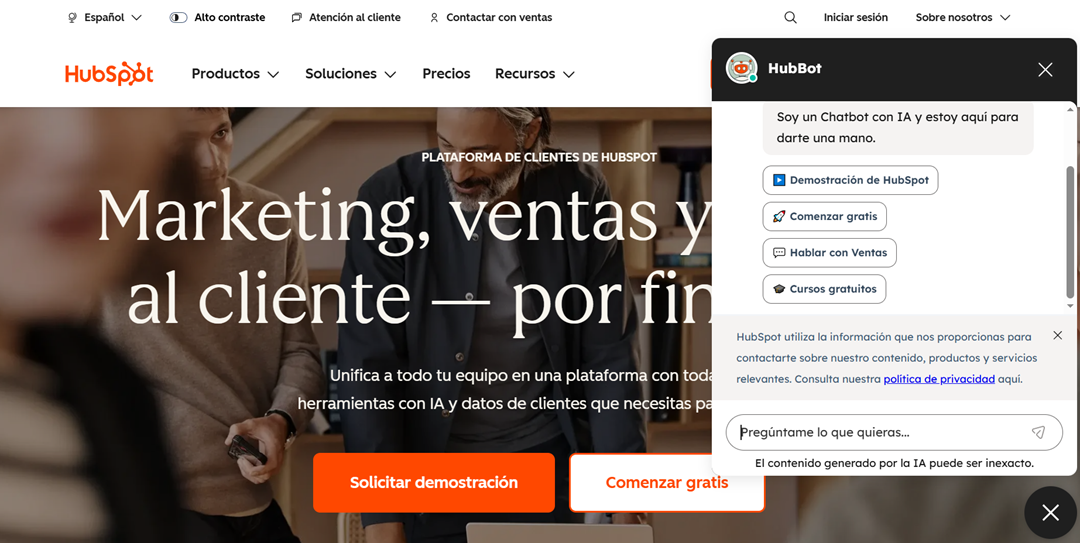
Jak pokazano poniżej, gdy strona internetowa jest w pełni przetłumaczona na język hiszpański, chatbot również dostosowuje swój język, tworząc spójne, płynne doświadczenie bez zakłócania wrażeń użytkownika.