Dil değiştirici ayarlama Magento için gereklidir. Bu özellik, uluslararası bir hedef kitleye yönelik web siteleri için çok önemlidir, çünkü diller arasında zahmetsizce geçiş yapabilme yeteneği mevcut pazarda acil bir ihtiyaç haline gelmiştir.
İlk başta süreç göz korkutucu görünse de, bu rehber sizi dil değiştiriciyi Magento web sitenizde etkin bir şekilde kurma adımlarında yönlendirecektir. Bu talimatları takip ederek, bu değerli özelliği sorunsuz bir şekilde uygulayabilir, sitenizin çeşitli, çok dilli bir kitleye hitap etme yeteneğini geliştirebilirsiniz.
Neden Magentoiçin bir dil değiştirici kurmalısınız?
Here are four key reasons you should set up a language switcher for Magento.
- Enhanced User Experience: A language switcher allows visitors to access content in their preferred language, improving their understanding and engagement with your website. For example, a Spanish-speaking customer visiting an English-based Magento store can easily switch to Spanish, making it simpler to browse products, read descriptions, and complete purchases.
- Expanded Market Reach: By offering multiple languages, you can target a global audience and enter new markets, potentially increasing your customer base and sales. For example, an online clothing store in the US implements a language switcher with options for English, French, and German. This allows them to market their products effectively to customers in Canada and other European countries without creating separate websites.
- Improved SEO Performance: A well-implemented language switcher can boost your multilingual SEO efforts, making your site more visible in search results across different languages and regions. For example, a Magento-based electronics store offers content in both English and Japanese. When Japanese users search for products in their language, the store’s Japanese pages are more likely to appear in search results, driving more targeted traffic.
- Increased Conversion Rates: When visitors can understand product details, policies, and the purchasing process in their native language, they’re more likely to complete transactions and become customers. For example, an Italian customer browsing an international beauty products store on Magento finds the option to switch to Italian. They can now easily understand the product ingredients, usage instructions, and shipping policies, increasing their confidence to purchase.
By implementing these features, you make your Magento store more accessible and user-friendly for a diverse, global audience, potentially increasing web traffic, engagement, and sales.
How to setup a language switcher on Magento?
Website translation services generally offer this functionality, which can be tailored to suit your specific requirements.
However, it’s worth noting that not all translation services provide a language switcher that is easily customizable and user-friendly. Thus, selecting an automatic translation service compatible with various frameworks and offering a flexible language switcher feature is crucial.
One service that stands out in meeting these criteria is Linguise. It provides a language switcher feature that is easily customizable and user-friendly and integrates seamlessly with Magento.
By leveraging Linguise’s smooth integration with the Magento CMS, you can effortlessly incorporate a language switcher into your multi-language website. With Linguise features and intuitive interface, setting up and maintaining a language switcher on your Magento website becomes significantly more straightforward. The following section outlines the steps to install Linguise on a multilingual Magento website and configure the language switcher.
Adım 1: Ücretsiz bir Linguise hesabı için kaydolun
İlk olarak, Linguise hesabına ücretsiz olarak kaydolun ve bir aylık deneme süresinden yararlanın. Kayıt işlemi basittir – giriş bilgilerinizi oluşturmak için e-posta adresinizi girmeniz yeterlidir.
During this trial phase, you’ll have access to Linguise’s impressive features. Once the trial period ends, you’ll be automatically redirected to the Linguise dashboard.
Step 2: Adding domain website Magento
Hesabınızı başarıyla oluşturduktan sonra Linguise hesabınız, kontrol paneline yönlendirileceksiniz. Orada, web sitenizin alan adını eklemeniz gerekecek. “Alan adı ekle” seçeneğini arayın ve üzerine tıklayın. Ardından doldurmanız gereken birkaç alan içeren bir form ile karşılaşacaksınız:
- Account details
- Web sitesi URL'si
- Platform seçimi ( Magentoseçin)
- Sitenizin ana dili
- Çevirmek istediğiniz diller
- Option to translate URLs
- Dinamik içerik çevirisi için ayar
Once you’ve completed all the necessary information, click the “Next Step” button.
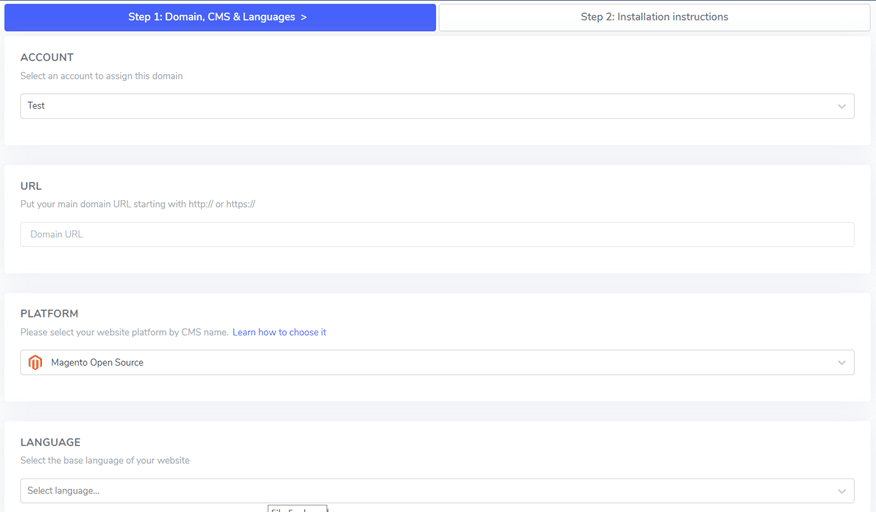
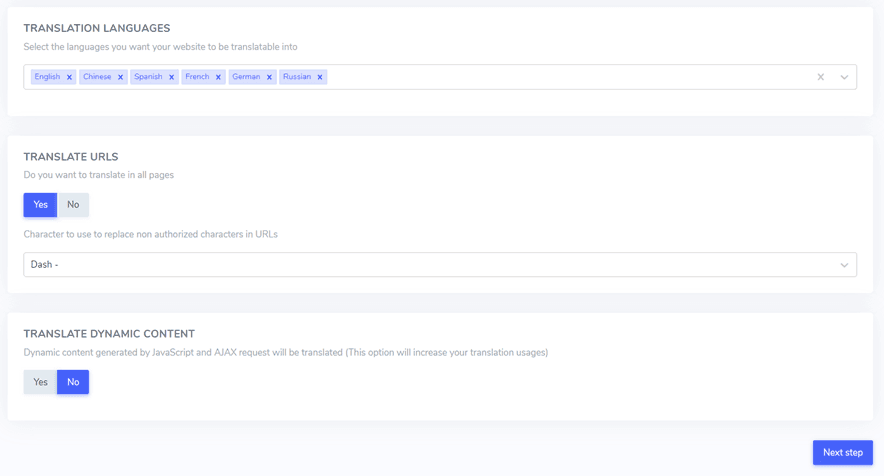
Sonraki aşamada, bir API anahtarı girmeniz gerekecektir. Bu anahtar size sağlanacak ve kurulum işlemi için gereklidir.
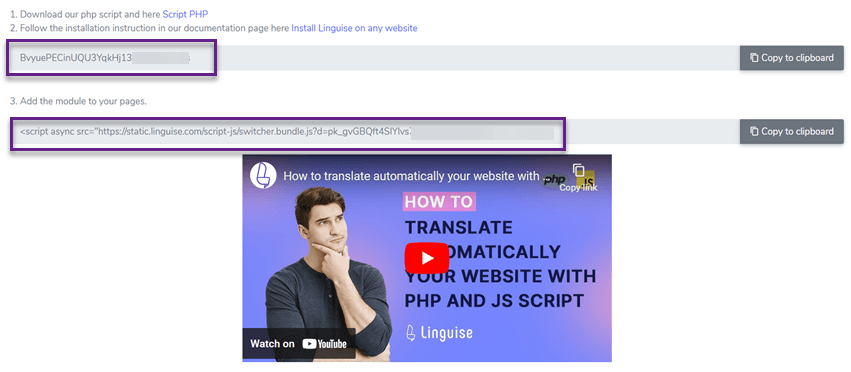
Step 3: Upload the Linguise script
The next step involves adding the Linguise translation script to your Magento server:
- Linguise'den PHP-JS çeviri betiğini alın.
- Extract the contents of the downloaded file.
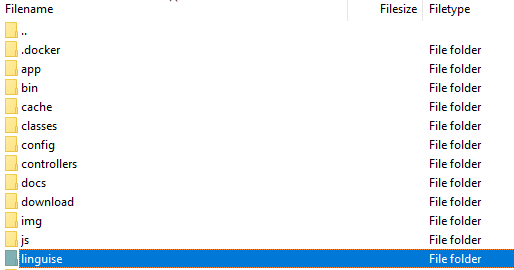
- Ayıklanan dosyaları Magento kurulumunuzun ana dizinine aktarın.
Şunlardan emin olun:
- Komut dosyası, web sitenizin üst düzey dizininde Magento dosyalarınızın yanında konumlandırılmıştır.
- The folder maintains its original name, “linguise”.
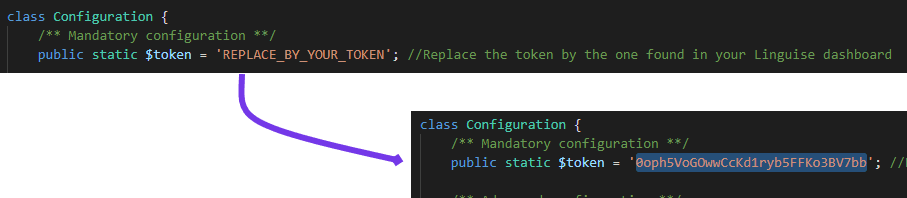
Bunu takiben, Linguise API anahtarınızı az önce yüklediğiniz Configuration.php dosyasına dahil etmelisiniz. Bu dosyayı düzenlemek için açın, “REPLACE_BY_YOUR_TOKEN” yer tutucu metnini bulun ve gerçek API anahtarınızla değiştirin, tırnak işaretleri içinde tutun.
Adım 4: Magento için URL yeniden yazmayı yapılandırın
Erişim Magento yönetici panelinize gidin ve kenar çubuğu menüsünden şu yolu izleyin: Mağazalar > Ayarlar > Yapılandırma > Genel > Web > Arama Motoru Optimizasyonu
Once there, locate and activate the “Use Web Server Rewrite” option.
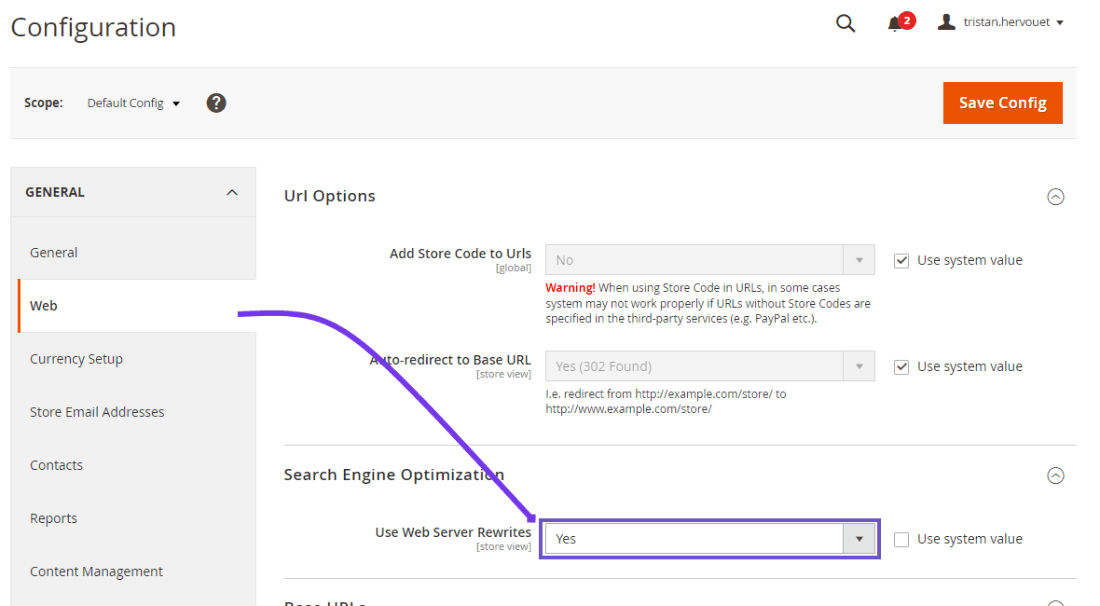
Next, you’ll need to set up language-specific URLs in your .htaccess file. Open the default Magento 2 .htaccess file and find the line that reads “RewriteEngine on”. Immediately after this line, you’ll insert a specific code snippet.
This configuration allows Magento to properly handle and route requests for different language versions of your site, enhancing your multilingual setup.
Unutmayın, .htaccess dosyasını değiştirmek dikkat gerektirir, çünkü yanlış değişiklikler sitenizin işlevselliğini etkileyebilir. Bu değişiklikleri kendiniz yapmaktan rahatsızsanız, Magento yapılandırmalarıyla ilgili deneyimli bir geliştiriciden yardım almayı düşünün.
					<IfModule mod_rewrite.c>
    RewriteEngine On
    RewriteRule ^(af|sq|am|ar|hy|az|eu|be|bn|bs|bg|ca|ceb|ny|zh-cn|zh-tw|co|hr|cs|da|nl|en|eo|et|tl|fi|fr|fy|gl|ka|de|el|gu|ht|ha|haw|iw|hi|hmn|hu|is|ig|id|ga|it|ja|jw|kn|kk|km|ko|ku|ky|lo|la|lv|lt|lb|mk|mg|ms|ml|mt|mi|mr|mn|my|ne|no|ps|fa|pl|pt|pa|ro|ru|sm|gd|sr|st|sn|sd|si|sk|sl|so|es|su|sw|sv|tg|ta|te|th|tr|uk|ur|uz|vi|cy|xh|yi|yo|zu|zz-zz)(?:$|/)(.*)$ linguise/linguise.php?linguise_language=$1&original_url=$2 [L,QSA,END]
</IfModule>
Step 5: Activate & customize language switcher
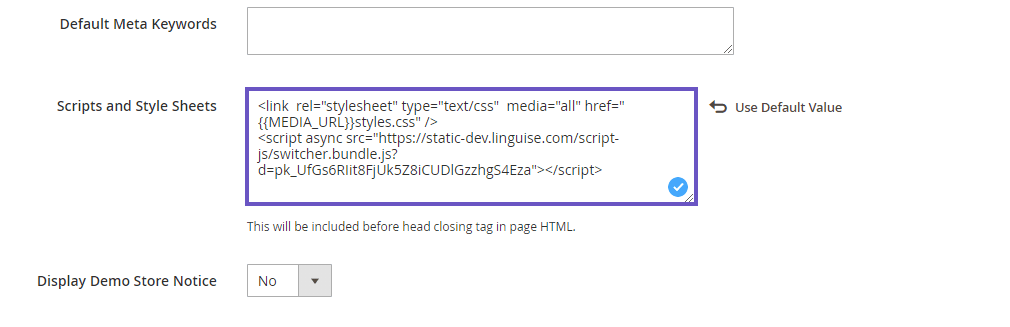
The language switcher is a flag popup that allows users to select their preferred language. To load it, copy the code provided at the end of the website configuration and place it in the head of your HTML page. The flag language switcher will then load automatically.
Kopyalayacak ve yükleyecek kodu web sitenizin başlık kısmında Linguise kontrol panelinde bulabilirsiniz; bunun için Your Domain > Settings > Tab > Script PHP

This code should be inserted into the header of your page. Magento 2 enables you to add content to the head of your page via the configuration settings.
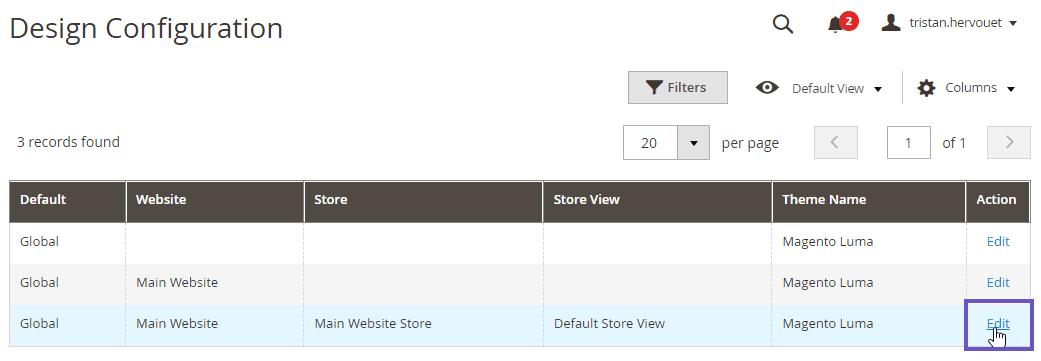
In the admin panel, navigate to Content > Configuration and edit your default store theme view. Next, click the HTML Head section and paste the copied script into the Scripts and Style Sheets input field. Finally, save the configuration.
Dil değiştirici başlangıçta web sitenizin sağ alt kısmında kayan bir konumda görüntülenir. Görünümünü ve yerleşimini Linguise kontrol paneli > Ayarlar > Dil Bayrakları Görüntüle bölümüne giderek özelleştirebilirsiniz.
Step 6: Set up the main display
The language switcher appears by default in a floating position at the bottom right of your website. You can adjust its appearance and placement through the Linguise dashboard by going to Settings > Language Flags Display.
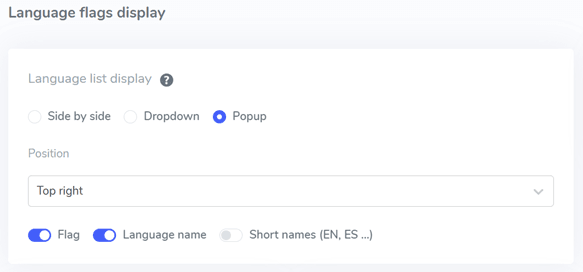
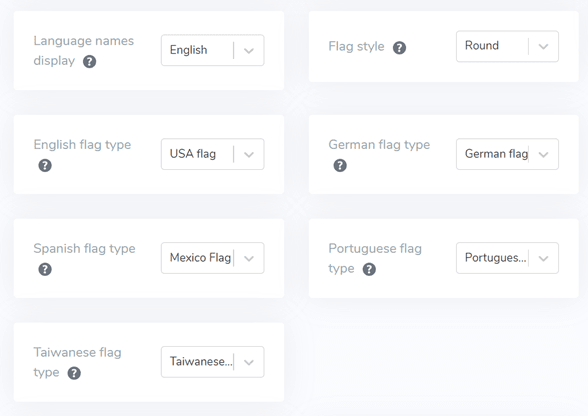
Adım 7: Bayrak tasarımını yapılandırın
Ana ekran ayarlarını düzenledikten sonra, dil bayraklarının tasarımını daha da özelleştirebilirsiniz.
- Dil Adı Görünümü: Dil adını ülkeye veya dile göre gösterme seçeneğiniz vardır, örneğin “Fransızca” veya “Français.”
- English Flag Type: This is useful for languages with multiple variations, such as US or British English, Spanish, Taiwanese, German, and Portuguese.
- Flag Style: Select the shape of the flag icon, either round or rectangular.
Adım 8: Renk ve boyutu ayarla
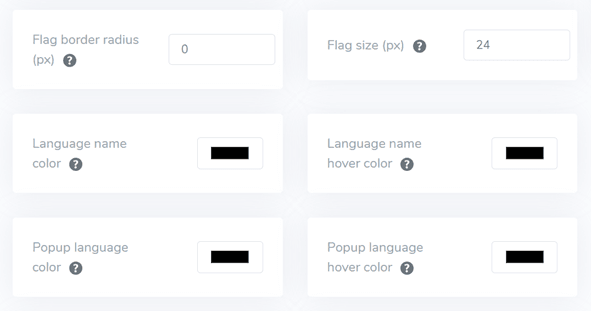
After finalizing the flag design, you can proceed to customize the color and size of the flags with the following settings:
- Flag Border-Radius: Adjust the border-radius for the rectangular flag style, measured in pixels.
- Dil Adı Rengi: Dil adı için varsayılan metin rengini seçin.
- Açılır Dil Rengi: Açılır pencere veya açılır menü alanında dil başlığı metni için rengi ayarlayın.
- Bayrak Boyutu: Bayrak simgelerinin boyutunu ayarlayın.
- Language Name Hover Color: Define the text color that appears when the user hovers over the language name.
- Açılır Pencere Dil Vurgu Rengi: Kullanıcı dil başlığı üzerine geldiğinde açılan pencerede veya açılır menü alanında görünen metin rengini belirtin.
Step 9: Set up the flag box-shadow
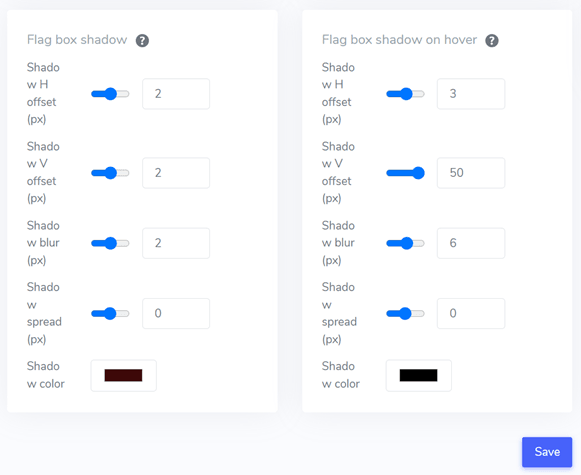
Son olarak, bayrak kutusu gölge ayarlarını ayarlayabilirsiniz. İlk seçenek, web sitenizde görüntülenen her bayrak simgesine bir gölge efekti eklemenizi sağlar. İkinci seçenek, kullanıcıların farelerini dil bayrakları üzerine getirdiğinde gölge efektini kontrol eder.
Gerekli tüm ayarlamaları yaptıktan sonra, özelleştirme değişikliklerini uygulamak için Kaydet düğmesine tıklayın. Ardından, yapılandırmanın başarıyla uygulandığını doğrulamak için Magento web sitenize gidin. Bu, dil değiştiricinin nasıl görüntüleneceği hakkında size fikir verecektir.
After completing the setup, you can see the language switcher on your Magento multilingual website.
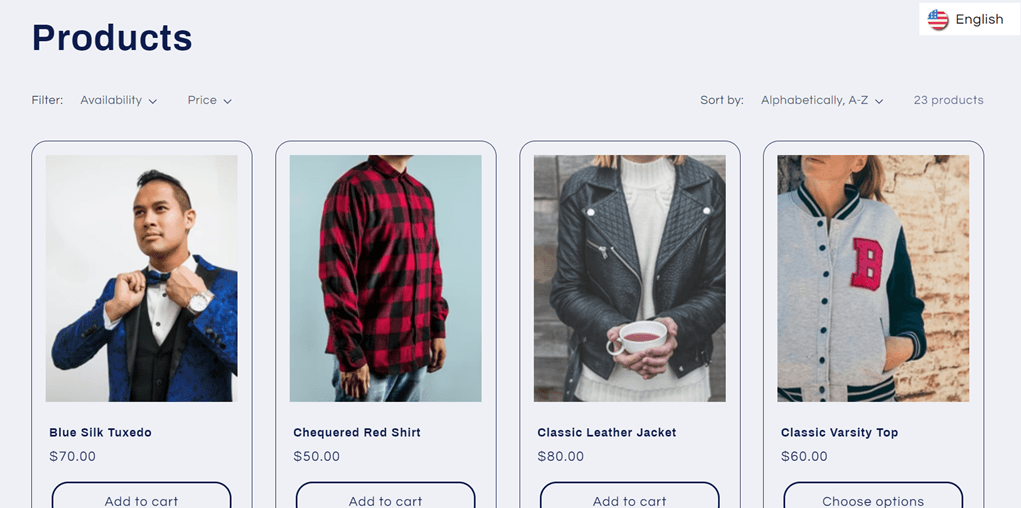
We will automatically translate the Magento website into other languages, such as Spanish.
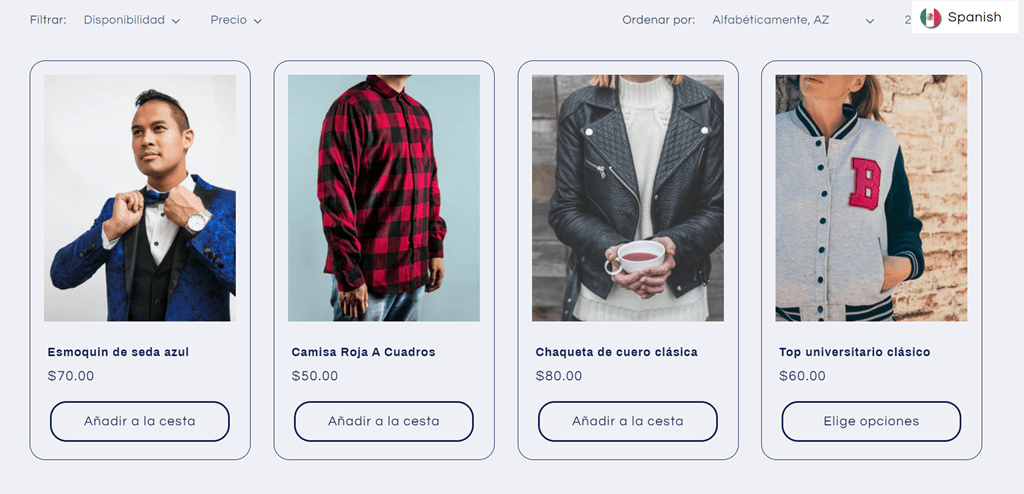
4 strategies for enhancing the language switcher on Magento
Once you’ve set up the language switcher on your Magento multilingual website, you must grasp optimal strategies for designing a language selector and optimizing its performance to enhance your site and user experience.
Dil göstergelerini kolayca uygulayın
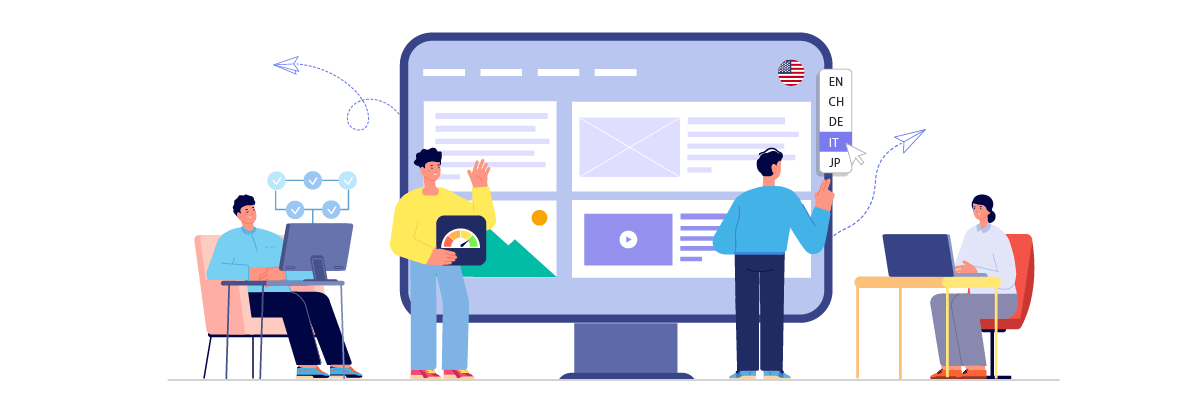
Using universally recognized language symbols or flags in your language switcher is crucial. This allows visitors to locate and choose their preferred language quickly. Implementing familiar symbols creates an intuitive user experience, enabling visitors to navigate effortlessly to their desired language version. The key is to select globally recognized indicators to prevent misinterpretation.
For example a multilingual e-commerce site selling sports equipment. Their language switcher could use a combination of country flags and language abbreviations:
- EN (for English)
- ES (for Spanish)
- FR (Fransızca için)
- DE (for German)
- JP (for Japanese)
Bu yaklaşım, görsel ipuçlarını (bayraklar) metinle (dil kodları) birleştirerek, farklı geçmişlere sahip kullanıcıların tercih ettikleri dili kolayca belirlemelerini sağlar. Bayraklar anında tanınabilirken, kısaltmalar ek netlik sağlar.
Örneğin, İspanyolca konuşan bir ziyaretçi, İspanyol bayrağını ve 'ES' kısaltmasını hızlıca fark edebilir ve siteyi tek tıklamayla İspanyolca'ya çevirebilir. Bu kullanıcı dostu tasarım, genel gezinme deneyimini geliştirir ve potansiyel olarak sitedeki etkileşimi ve dönüşümleri artırır.
Combine language names and flags
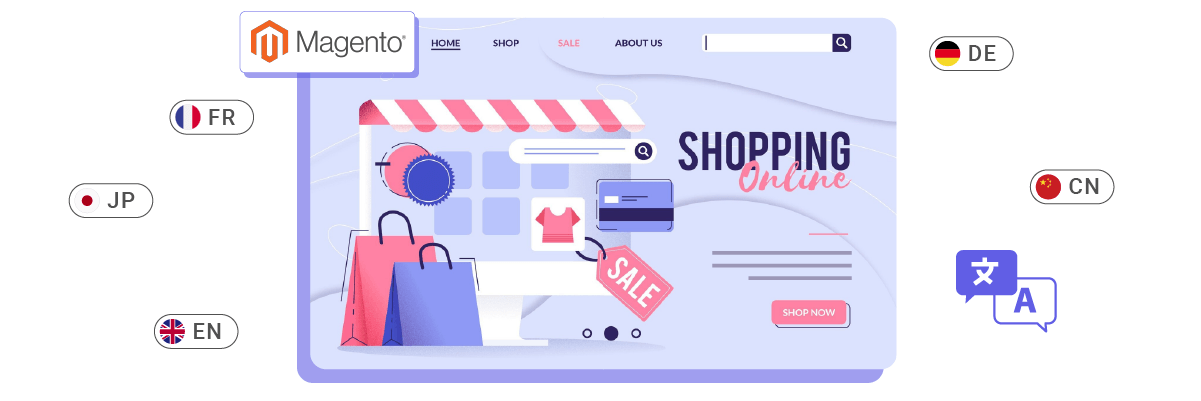
Bayraklar görsel olarak çekici olsa da, onları dilin yerel adlarıyla eşleştirmek faydalıdır. Bu strateji, özellikle bazı dillerin farklı bayraklara sahip birden fazla ülkede kullanılması nedeniyle kafa karışıklığını önlemeye yardımcı olur.
Using the actual language names eliminates ambiguity, ensuring visitors can accurately identify and choose their preferred language without misunderstandings. Furthermore, this approach promotes inclusivity and shows respect for cultural diversity.
For example a global news website that caters to a diverse audience. Their language switcher might look like this.
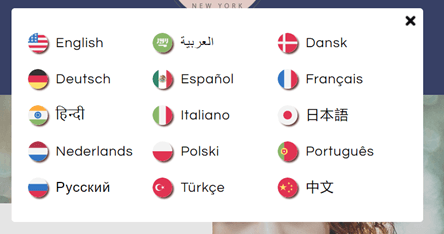
In this case:
- The use of flags provides quick visual cues.
- Dil adları, o dili konuşanlar tarafından anında tanınabilen yerel komut dosyalarında (örneğin Japonca, Fransızca vb.) yazılmıştır.
This approach is particularly helpful for languages like Spanish or English spoken in multiple countries. For instance, a user from Mexico or Argentina would see “Español” rather than choose between multiple Spanish-speaking country flags. Similarly, users from the UK, USA, Australia, or other English-speaking countries can all identify with “English” regardless of the flag used.
Strategically position the language switcher
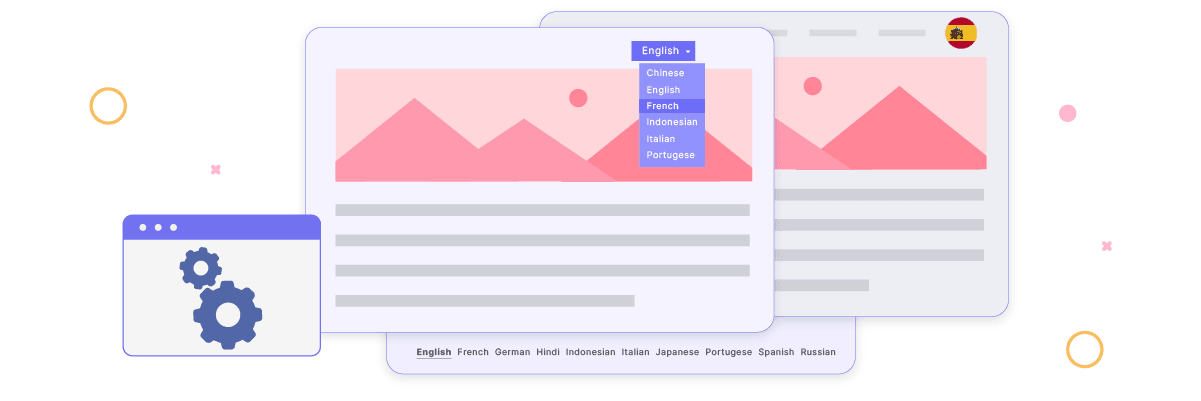
It’s crucial to place the language switcher in a prominent, easily accessible location on your website. Common and effective positions include the header, footer, or main navigation menu. These spots are intuitive for most web users and align with their expectations when looking for language options.
Tutarlı yerleştirme işlemini tüm sayfalarda sürdürmek, ziyaretçilerin giriş noktasına veya mevcut sayfaya bakılmaksızın dil değiştiricisine kolayca erişmelerini sağlar. Bu tutarlılık, sorunsuz ve öngörülebilir bir kullanıcı deneyimine katkıda bulunur.
Örneğin, küresel bir kitleye hitap eden uluslararası bir otel rezervasyon sitesi. Dil değiştirme stratejilerini aşağıdaki gibi uygulayabilirler.
- Header Placement: The language switcher is located in the top-right corner of the header, next to the user account icon and currency selector. It’s visible on every page and allows users to switch languages anytime during their browsing or booking process.
- Consistent Design: The language switcher appears as a globe icon followed by the current language (e.g., “🌐 English”). When clicked, it opens a dropdown menu with other language options.
- Footer Backup: The footer includes a text-based list of all available languages, providing an alternative access point.
Bu stratejik yerleştirme, bir kullanıcının ana sayfaya, belirli bir otel sayfasına veya rezervasyon onay sayfasına geldiğinde dil değiştiriciyi kolayca bulup kullanabilmesini sağlar. Örneğin, Tokyo'daki otel seçeneklerine göz atarken Fransızca diline hızlı bir şekilde geçebilen bir Fransız kullanıcı, oda açıklamalarını ve rezervasyon koşullarını daha kolay anlayarak kullanıcı deneyimini geliştirir ve potansiyel olarak rezervasyon yapma olasılığını artırır.
Maintain consistency in language switcher across all pages
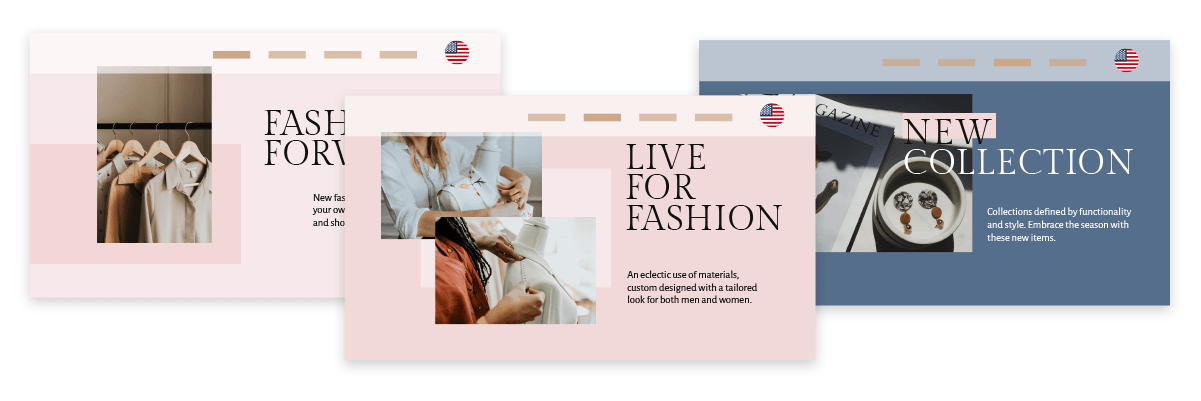
Dil değiştiricinin web siteniz boyunca tek tip bir görünüm ve işlevsellik sürdürmesini sağlamak hayati önem taşır. Kullanıcılar, içinde bulundukları sayfadan veya görüntüledikleri içerikten bağımsız olarak diller arasında zahmetsizce geçiş yapabilmelidir. Bu tutarlılık, sorunsuz bir kullanıcı deneyimi sağlar ve dil seçeneklerinin erişilebilirliğini güçlendirerek çok dilli web sitenize olan güveni ve güveni artırır.
For example, a global e-commerce platform selling electronics. Here’s how they might implement a consistent language switcher strategy.
- Uniform Design: The language switcher appears as a globe icon with the current language code (e.g., “🌐 EN”) in the top-right corner of every page, including product listings, individual product pages, shopping carts, and checkout pages.
- Tutarlı İşlevsellik: Dil değiştiriciye tıklamak, sayfadan bağımsız olarak her zaman tüm kullanılabilir dillerle aynı açılır menüyü açar.
- İçerik Koruma: Kullanıcılar dilleri değiştirdiğinde aynı sayfada kalırlar, ancak içerik yeni seçilen dilde görüntülenir. Örneğin, bir kullanıcı İngilizce bir dizüstü bilgisayarın teknik özelliklerini incelerken İspanyolca'ya geçerse, aynı dizüstü bilgisayarın detaylarını şimdi İspanyolca olarak görür.
- URL Structure: The URL structure changes consistently when switching languages. For example:
Case Study: A Japanese customer browsing laptops on the English version of the site decides to switch to Japanese for better understanding. They click the “🌐 EN” icon in the header, select “日本語” from the dropdown, and the page refreshes, showing the same laptop details but in Japanese. The URL changes from “/products/…” to “/ja/製品/…”.
Bu tutarlı deneyim, sitenin tüm sayfalarında ve işlevlerinde, kullanıcının tercih ettiği dilde güvenle gezinebilmesini ve alışveriş yapabilmesini sağlar, potansiyel olarak bir satın alma işlemini tamamlama ve gelecekte siteye geri dönme olasılığını artırır.
Setup language switcher on Magento with Linguise!
By now, you should be aware that you’re setting up a language switcher for a multilingual Magento website. Implementing a language switcher can offer numerous benefits and be customized according to our guidelines.
Optimizing your language switcher can significantly enhance the overall user experience on your Magento site. The next step is to create a Linguise account, integrate it with your Magento website, and fine-tune the language switcher settings. These actions will improve the user experience, making your multilingual e-commerce site more accessible and user-friendly.
Unutmayın, Magento platformunuzda iyi uygulanan bir dil değiştirici, farklı dil pazarlarında daha iyi etkileşim, artan dönüşümler ve gelişmiş müşteri memnuniyeti sağlayabilir. Gerçekten çok dilli bir web sitesi oluşturmada önemli bir unsurdur.