Zasady tłumaczeń, które każdy Shopify powinien wdrożyć jako pierwsze, często wydają się drobnymi szczegółami technicznymi, ale wielu właścicieli sklepów zdaje sobie sprawę z ich wagi dopiero wtedy, gdy coś pójdzie nie tak. Wyobraź sobie, że uruchamiasz sklep wielojęzyczny , a nazwa Twojej marki jest niezręcznie przetłumaczona, rozmiary produktów są niepoprawnie przekonwertowane lub kluczowa funkcja jest opisana w niezrozumiały sposób. Takie drobne błędy w tłumaczeniu mogą dyskretnie podważyć zaufanie i zmniejszyć konwersję.
Dlatego ustalenie jasnych zasad tłumaczeń od samego początku to nie tylko zadanie techniczne, ale strategiczny krok w celu ochrony marki i doświadczeń klientów. W tym przewodniku poznasz podstawowe zasady, które każdy sprzedawca Shopify powinien wdrożyć przed przejściem na wersję wielojęzyczną. Czytaj dalej, aby uniknąć kosztownych błędów w tłumaczeniu od samego początku.
Kluczowe punkty: Tłumaczenie jest mottem każdego sprzedawcy Shopify
Chroń tożsamość przed przejściem na wielojęzyczność
Zachowaj nazwy marek i produktów we wszystkich językach, aby zachować rozpoznawalność, zaufanie i profesjonalizm. Nigdy nie pozwól, aby automatyczne tłumaczenia zmieniały Twoje podstawowe identyfikatory.
Zablokuj krytyczne dane przed błędami tłumaczenia
Zachowaj numery SKU, kody modeli, numery i terminy techniczne bez zmian. Ustandaryzuj sposób wyświetlania dat, walut i miar, aby uniknąć nieporozumień i zwiększyć pewność zakupu.
Lokalizuj znaczenie, nie tylko język
Dostosuj wrażliwe lub specyficzne dla marki frazy – takie jak slogany czy hasła marketingowe – do niuansów kulturowych i tonu. Zdefiniuj reguły zastępowania, które zapewnią jasność, poprawność i zgodność przekazu z marką na każdym rynku.
Dlaczego zasady tłumaczenia są ważne w przypadku sklepów Shopify ?
Kiedy sklep Shopify zaczyna dodawać nowe języki, tłumaczenie często wydaje się prostym krokiem technicznym. W rzeczywistości nawet drobne błędy w tłumaczeniu mogą zmienić postrzeganie marki przez klientów. Błędnie przetłumaczona nazwa marki, niepoprawny rozmiar produktu lub mylący termin techniczny mogą szybko sprawić, że sklep będzie postrzegany jako nieprofesjonalny.
Reguły tłumaczeń pomagają uniknąć tych problemów, dając Ci kontrolę nad tym, co powinno, a co nie powinno być tłumaczone. Chronią nazwy marek i produktów, zapewniają spójność liczb i kodów SKU oraz gwarantują zgodność dat, walut i jednostek miary z lokalnymi formatami. Zapobiega to nieporozumieniom i pomaga klientom jasno zrozumieć, co kupują, niezależnie od używanego języka.
Dzięki odpowiednim zasadom Twój sklep będzie wyglądał bardziej wiarygodnie i będzie bardziej naturalny dla zagranicznych klientów. Zamiast poprawiać błędy w tłumaczeniu jeden po drugim, tworzysz system, który od samego początku dba o poprawność treści – czytaj dalej, aby poznać podstawowe zasady tłumaczenia, które każdy sprzedawca Shopify powinien ustalić w pierwszej kolejności.
Typowe błędy w tłumaczeniach w sklepach Shopify

Wielu sprzedawców Shopify zauważa problemy z tłumaczeniem dopiero po uruchomieniu sklepu w wielu językach. To, co wydaje się drobnym błędem w sformułowaniu, może szybko doprowadzić do nieporozumień, braku zaufania, a nawet utraty sprzedaży. Większość tych problemów wynika z automatycznych tłumaczeń, które działają bez żadnych reguł i nadzoru.
Nazwy marek tłumaczone na słowa ogólne
Jednym z najczęstszych błędów jest dosłowne tłumaczenie nazwy marki. Na przykład nazwa marki, która funkcjonuje również jako słowo pospolite, może brzmieć zupełnie inaczej w innym języku. Zamiast budować rozpoznawalność, tłumaczenie sprawia, że marka brzmi generycznie lub nieznajomo.
Może to osłabić tożsamość marki i sprawić, że klienci będą mieli wątpliwości, czy są w oficjalnym sklepie. Utrzymanie spójnej nazwy marki we wszystkich językach pomaga utrzymać rozpoznawalność i zaufanie, zwłaszcza wśród nowych użytkowników, którzy odkrywają Twój sklep po raz pierwszy.
Rozmiary lub specyfikacje produktów stają się niejasne
Innym częstym problemem są rozmiary, wymiary lub specyfikacje techniczne produktów. Automatyczne tłumaczenia mogą zmieniać strukturę zdań lub kolejność wyrazów, utrudniając zrozumienie informacji. W niektórych przypadkach rozmiary takie jak „M” lub „XL” mogą zostać przetłumaczone na słowa, które nie mają sensu.
Gdy klienci nie są pewni specyfikacji produktu, chętniej opuszczą stronę lub odłożą zakup. Jasne i spójne informacje o produkcie są kluczowe, szczególnie w przypadku kategorii takich jak odzież, elektronika i meble.
Zmieniane są jednostki SKU i kody modeli
Numery SKU i modele powinny pozostać identyczne we wszystkich językach, ale systemy tłumaczeniowe mogą je modyfikować w połączeniu z tekstem. Niewielka zmiana odstępów lub formatowania może sprawić, że kod będzie wyglądał na zupełnie inny produkt.
Powoduje to zamieszanie wśród klientów porównujących produkty lub próbujących potwierdzić ich kompatybilność. Może to również stwarzać problemy dla obsługi klienta, gdy kupujący podają nieprawidłowe lub zmienione kody produktów.
Daty, waluty lub jednostki wyświetlane w niewłaściwym formacie
W różnych krajach stosuje się różne formaty dat, walut i jednostek miary. Bez odpowiednich zasad sklep może wyświetlać datę w nietypowym formacie lub ceny w mylący sposób. Na przykład przecinek i kropka mogą całkowicie zmienić sposób odczytu ceny.
Te problemy z formatowaniem mogą wydawać się drobne, ale mogą wpłynąć na wiarygodność Twojego sklepu. Klienci czują się bardziej komfortowo, gdy informacje są prezentowane w formacie, który rozpoznają i używają na co dzień.
5 zasad tłumaczeń, które sprzedawcy Shopify powinni ustalić w pierwszej kolejności

Zanim przetłumaczysz cały sklep na wiele języków, ważne jest, aby ustalić kilka kluczowych zasad, które ochronią najbardziej wrażliwe części treści. Zasady te służą jako zabezpieczenie, gwarantując, że Twoja marka, szczegóły produktów i komunikaty pozostaną dokładne i profesjonalne we wszystkich językach.
Zasada nr 1: Chroń nazwy marek i produktów
Nazwy marek i produktów rzadko powinny być tłumaczone. Nazwy te reprezentują Twoją tożsamość, a ich zmiana może sprawić, że Twój sklep będzie wyglądał na niespójny, a nawet niewiarygodny. Widząc różne wersje nazwy marki w różnych językach, klienci mogą założyć, że mają do czynienia z różnymi firmami lub nieoficjalnymi dystrybutorami.
Ustawiając reguły wykluczające nazwy marek i produktów z tłumaczenia, zachowujesz spójną tożsamość marki na wszystkich rynkach. Pomaga to budować rozpoznawalność i gwarantuje, że klienci zawsze wiedzą, że mają do czynienia z tą samą marką, niezależnie od wybranego języka.
Na przykład nazwa marki „Golden Leaf” mogłaby zostać automatycznie przetłumaczona na język polski w dosłownym znaczeniu. Zamiast być postrzegana jako marka, mogłaby wyglądać jak ogólny opis produktu, co osłabiłoby rozpoznawalność i zaufanie do marki.
Zasada nr 2: Nie zmieniaj numerów, kodów SKU i kodów modeli
Numery, kody SKU i kody modeli mają być uniwersalnymi identyfikatorami. Pomagają klientom porównywać produkty, sprawdzać kompatybilność i potwierdzać, że kupują właściwy produkt. Jeśli te elementy zostaną przetłumaczone lub sformatowane, mogą wprowadzać w błąd, a nawet prowadzić do błędnych zakupów.
Ustawienie reguły, która nie zmienia tych elementów, zapewnia spójność we wszystkich językach. Jest to szczególnie ważne w przypadku elektroniki, części samochodowych i innych produktów, w których numery modeli odgrywają kluczową rolę w decyzji o zakupie.
Na przykład produkt oznaczony etykietą „Model X200” może zostać przetłumaczony na frazę zmieniającą odstępy lub strukturę. Klienci szukający tego konkretnego modelu mogą mieć trudności z jego rozpoznaniem, co może prowadzić do frustracji lub utraty sprzedaży.
Zasada nr 3: Ujednolić daty, waluty i jednostki
W różnych regionach stosuje się różne formaty dat, walut i miar. Bez jasnych zasad Twój sklep może wyświetlać informacje w formacie, który jest nieznany lub mylący dla lokalnych klientów. Może to powodować wątpliwości, zwłaszcza w kwestii cen lub szczegółów dostawy.
Standaryzacja tych elementów na różnych rynkach pozwala stworzyć płynniejsze i bardziej naturalne doświadczenie zakupowe. Klienci czują się pewniej, gdy informacje są prezentowane w formacie, który rozpoznają, co może pozytywnie wpłynąć na wskaźniki konwersji.
Na przykład cena wyświetlana jako „1299” w jednym kraju może być interpretowana jako tysiąc dwieście dziewięćdziesiąt dziewięć, podczas gdy w innym regionie może być odczytana jako jeden i dwa i dziewięć. Tego rodzaju nieporozumień można łatwo uniknąć, stosując odpowiednie zasady formatowania.
Zasada nr 4: Kontroluj terminologię techniczną i branżową
Terminy techniczne i branżowe często tracą znaczenie po dosłownym tłumaczeniu. Słowa takie jak „Bluetooth”, „Wi-Fi” czy „Smart Lock” są powszechnie znane w oryginalnej formie, ale automatyczne tłumaczenia mogą zastąpić je nieznanymi lub niezręcznymi odpowiednikami.
Tworząc reguły dla tych terminów, dbasz o to, aby były jasne i rozpoznawalne dla klientów. Dzięki temu opisy produktów są dokładne i zachowują profesjonalny ton we wszystkich językach.
Na przykład „Smart Lock” można by przetłumaczyć jako „sprytny zamek do drzwi”. Choć technicznie rzecz biorąc, jest to poprawne, dla klientów przyzwyczajonych do oryginalnego terminu może to brzmieć obco lub niezrozumiale.
Zasada nr 5: Zastąp słowa wrażliwe lub odnoszące się do konkretnej marki
Niektóre słowa lub frazy mogą mieć inne znaczenie w innych językach. Slogan, hasło kampanii lub wyrażenie marketingowe mogą brzmieć naturalnie w jednym języku, ale niezręcznie, a nawet niestosownie w innym. Automatyczne tłumaczenie nie zawsze oddaje te niuanse kulturowe.
Reguły zastępowania pozwalają kontrolować, jak te słowa będą się pojawiać w poszczególnych językach. Zamiast polegać na dosłownych tłumaczeniach, możesz zdefiniować wersję zlokalizowaną, która jest zgodna z tonem i przekazem Twojej marki.
Na przykład hasło takie jak „Poczuj moc” może brzmieć zbyt agresywnie lub nienaturalnie w innym języku. Stosując regułę zastępczą, można dostosować je do bardziej odpowiedniej kulturowo wersji, jednocześnie przekazując zamierzony przekaz.
Jak krok po kroku ustawić reguły tłumaczenia w Shopify
Ustawianie reguł tłumaczenia w Shopify może wydawać się techniczne, ale proces jest zazwyczaj prosty, gdy wiesz, od czego zacząć. Większość aplikacji do tłumaczeń oferuje przejrzyste ustawienia wykluczeń i zamian, dzięki czemu możesz kontrolować, jak konkretne słowa lub formaty będą wyświetlane w różnych językach.
Krok 1: Otwórz aplikację do tłumaczeń lub ustawienia języka
Zacznij od zalogowania się do Shopify i otwarcia używanej aplikacji do tłumaczeń. Większość aplikacji ma dedykowaną sekcję dla reguł tłumaczenia, glosariusza lub wykluczeń. To tutaj możesz zarządzać słowami, które mają pozostać niezmienione, a które mają zostać zastąpione. Narzędzia takie jak Linguise zawierają wbudowane reguły tłumaczenia, ułatwiające zarządzanie nazwami marek, numerami i terminami technicznymi bez konieczności ręcznego wprowadzania poprawek. Aplikacja do tłumaczeń Linguise Shopify udostępnia te opcje reguł bezpośrednio w Shopify , dzięki czemu możesz kontrolować wykluczenia, zamienniki i reguły na poziomie strony w jednym miejscu.
Poświęć chwilę na zapoznanie się z tą sekcją, aby zrozumieć, gdzie tworzy się i edytuje reguły. Gdy znajdziesz ustawienia reguł, możesz zacząć dodawać swoją pierwszą regułę.
Krok 2: Zidentyfikuj słowa lub elementy, których nie należy tłumaczyć
Następnie wypisz elementy, które muszą pozostać niezmienione we wszystkich językach. Zazwyczaj obejmuje to nazwy marek, nazwy produktów, kody SKU, numery modeli i niektóre terminy techniczne. Możesz zacząć od przejrzenia swojej strony głównej lub kilku stron produktów.
Zapisz te ważne terminy, aby niczego nie pominąć. Ten krok pomoże Ci zbudować jasny fundament przed stworzeniem właściwych reguł tłumaczenia.
Krok 3: Utwórz reguły wykluczające lub zastępujące
Wróć teraz do ustawień reguł w aplikacji do tłumaczeń i zacznij tworzyć reguły. Wybierz, czy chcesz wykluczyć termin z tłumaczenia, czy zastąpić go konkretną, zlokalizowaną wersją. Narzędzia do tłumaczeń, takie jak Linguise oferują wiele opcji reguł, w tym wykluczenia lub zastąpienia w oparciu o strony, konkretne wiersze lub inne elementy treści, dzięki czemu możesz zachować spójność ważnych terminów we wszystkich językach.
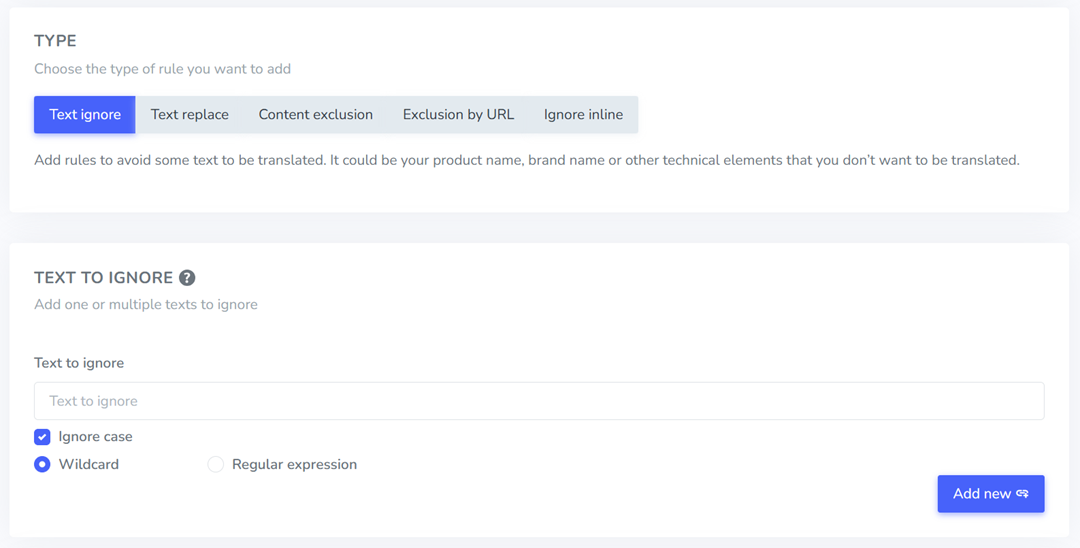
Możesz na przykład utworzyć regułę wykluczającą dla nazwy swojej marki lub regułę zastępczą dla sloganu. Zapisz każdą regułę i sprawdź dokładnie, czy pisownia dokładnie odpowiada oryginalnej treści.
Krok 4: Przetestuj reguły na kluczowych stronach sklepu
Po utworzeniu reguł, wyświetl podgląd sklepu w innym języku, aby zobaczyć zmiany. Sprawdź kluczowe strony, w tym stronę główną, strony produktów i stronę płatności.
Przyjrzyj się uważnie nazwom marek, szczegółom produktów, cenom i terminom technicznym. Jeśli coś nadal wydaje się nie tak, możesz wrócić i dostosować zasady, aż wszystko będzie wyglądać poprawnie.
Krok 5: Monitoruj i aktualizuj zasady w miarę rozwoju sklepu
Zasady dotyczące tłumaczeń należy regularnie weryfikować, zwłaszcza po dodaniu nowych produktów, kolekcji lub kampanii marketingowych. Mogą pojawić się nowe terminy, które również będą wymagały wykluczeń lub zastąpienia.
Ustaw przypomnienie o przeglądaniu zasad co kilka tygodni lub przy każdej istotnej aktualizacji. Dzięki temu Twój wielojęzyczny sklep będzie spójny i zapobiegniesz eskalacji drobnych problemów z tłumaczeniem w poważniejsze problemy.
Najlepsze praktyki dotyczące utrzymywania reguł tłumaczeniowych w miarę rozwoju sklepu
Wraz z rozwojem Twojego sklepu Shopify i dodawaniem nowych produktów, kampanii i języków, reguły dotyczące tłumaczeń również wymagają regularnej uwagi. To, co sprawdziło się w przypadku małego katalogu, może okazać się niewystarczające, gdy Twój sklep się skaluje, dlatego przestrzeganie tych reguł staje się częścią bieżącego zarządzania sklepem.
Przejrzyj zasady przy dodawaniu nowych produktów
Każdy nowy produkt wprowadza nowe nazwy, specyfikacje i terminy techniczne, które mogą wymagać ochrony. Jeśli nie sprawdzisz zasad podczas dodawania produktów, ważne terminy mogą zostać nieprawidłowo przetłumaczone, a Ty tego nie zauważysz.
Wyrób sobie nawyk sprawdzania zasad tłumaczenia za każdym razem, gdy dodajesz nową kolekcję lub linię produktów. Ten szybki przegląd pomoże Ci wcześnie wykryć potencjalne problemy i zachować spójność treści w sklepie we wszystkich językach.
Prowadź centralny słownik kluczowych terminów
Słownik służy jako źródło informacji o nazwach marek, terminach technicznych i frazach kluczowych, które powinny być spójne. Zamiast zgadywać, jak dany termin powinien wyglądać w każdym języku, masz jedno źródło prawdy.
Prowadzenie glosariusza ułatwia również pracę w sklepie, jeśli zarządza nim wiele osób. Wszyscy mogą stosować te same zasady, zachowując spójność tłumaczeń i unikając mieszania terminologii na różnych stronach.
Przetestuj tłumaczenia na ważnych stronach
Nie wszystkie błędy w tłumaczeniu są widoczne w panelu ustawień. Niektóre pojawiają się dopiero po wyświetleniu witryny sklepowej, zwłaszcza na stronach produktów, banerach lub w kasie.
Regularnie przeglądaj swój sklep w różnych językach i sprawdzaj strony o dużym ruchu. Dzięki temu wykryjesz błędy w formatowaniu, niezręczne frazy lub nieprzetłumaczone terminy, zanim klienci je zauważą.
Aktualizuj zasady podczas kampanii lub zmiany marki
Kampanie marketingowe, promocje sezonowe czy działania rebrandingowe często wprowadzają nowe hasła lub frazy kluczowe. Jeśli nie są one uwzględnione w Twoich zasadach tłumaczenia, mogą zostać przetłumaczone w sposób niezgodny z przekazem Twojej marki.
Za każdym razem, gdy uruchamiasz kampanię lub aktualizujesz komunikaty, sprawdź swoje zasady i dodaj wszelkie nowe terminy, które wymagają wykluczeń lub zamienników. Dzięki temu ton Twojej marki pozostanie spójny, nawet gdy Twój sklep będzie się rozwijał.
Wnioski
Zasady dotyczące tłumaczeń, które każdy sprzedawca Shopify powinien ustalić w pierwszej kolejności, to nie tylko kwestie techniczne; to niezbędne zabezpieczenia dla Twojej marki i doświadczeń klientów. Chroniąc nazwy marek, dbając o poprawność danych produktów, standaryzując formaty i kontrolując wrażliwe terminy, tworzysz wielojęzyczny sklep, który jest spójny, przejrzysty i godny zaufania na każdym rynku.
Zamiast naprawiać błędy w tłumaczeniu po uruchomieniu, możesz zapobiegać im od samego początku, stosując odpowiednie reguły i narzędzia. Jeśli chcesz prostszego sposobu zarządzania regułami tłumaczeniowymi i zapewnić poprawność działania swojego Shopify w różnych językach, załóż konto i zarejestruj się w Linguise , aby rozpocząć.