
Free terminology resources help businesses build a consistent multilingual website glossary by providing reliable translations, definitions, and industry-specific terms. Instead of translating content word for word, businesses can use these resources to choose accurate terminology that fits each language and target market.
A well-organized terminology glossary also helps translators, content teams, and website managers use the same terms across every page. In this article, we’ll explore eight free terminology resources for building your glossary. Keep reading to find the right resources for your multilingual website.
Key points: Free terminology resources to build a multilingual website glossary
Free terminology resources
Explore eight free resources, including terminology databases, dictionaries, style guides, and translation tools, to find accurate terms for different languages and industries.
Consistent website glossary
Build a multilingual glossary to keep terminology consistent across website pages, improve translation accuracy, and maintain your brand voice in every language.
Linguise translation rules
Use Linguise Translation Rules to apply preferred translations, preserve brand and product names, and maintain consistent terminology across your multilingual website.
Why your multilingual website needs a glossary

A terminology glossary is a collection of approved words and phrases with their definitions and translations. It helps ensure that important terms, such as product names, technical phrases, and brand-specific expressions, are translated consistently across a multilingual website.
Without a glossary, different translators or content teams may use different translations for the same term. This can confuse visitors, weaken brand messaging, and make technical information harder to understand. A glossary helps businesses:
- Maintain consistent translations across website pages.
- Preserve brand voice and terminology.
- Improve translation accuracy.
- Reduce repeated translation work.
- Make content easier to understand in different markets.
8 free terminology resources for multilingual websites

Businesses can build a multilingual website glossary using a combination of free online databases, dictionaries, industry references, and internal content sources. Each resource serves a different purpose, from checking general vocabulary to finding specialized industry terms and understanding how competitors localize their content.
1. Public terminology databases
Public terminology databases provide collections of approved terms, definitions, and translations across different languages. Many are maintained by government agencies, universities, or international organizations, making them useful for finding reliable terminology in specific fields.
Some databases focus on legal, scientific, technical, or administrative terms. However, their coverage and usage rights can vary, so check the licensing conditions before reusing their content in commercial projects.
- IATE: EU terminology database covering multiple languages and fields such as law, medicine, agriculture, and technology.
- UNTERM: United Nations database containing official terminology in its six official languages.
- TERMIUM Plus: Canadian government terminology and linguistic database with multilingual terminology and downloadable data.
- WIPO Pearl: Provides validated scientific and technical terminology in 10 languages, including English, French, Chinese, and Japanese.
- FAO Term Portal: Collects concepts, terms, and definitions related to agriculture, food, and other FAO subject areas.
- SAPterm: SAP’s terminology database containing thousands of terms used across its products and documentation.
Use these databases when you need authoritative translations for technical, legal, governmental, or institutional content.
2. Localization style guides
Localization style guides provide writing and language guidelines from technology companies. They explain preferred word choices, terminology, capitalization, punctuation, and localization conventions that help businesses maintain consistent communication across different languages.
Many technology companies make their style guides publicly accessible, although some guidelines are intended primarily for their own products and localization teams. Check whether their recommendations can be applied to your own content, especially when developing commercial materials.
- Google Developer Documentation Style Guide: Provides preferred word choices and writing conventions for developer documentation.
- Apple Style Guide: Offers localization guidance, language conventions, and writing standards for Apple-related content.
- Microsoft Writing Style Guide: Provides terminology, word choice, and writing recommendations for Microsoft-related content.
3. Bilingual dictionaries and concordancers
Bilingual dictionaries help you find translations and understand how words are used in different languages. They are useful for checking general vocabulary, comparing possible translations, and identifying differences in meaning based on context.
Concordancers take this a step further by showing how a word or phrase appears in real sentences and documents. However, dictionary entries and example sentences may come from different sources, so verify their accuracy and usage rights before adding them to a commercial glossary.
- Cambridge Dictionary: Provides definitions, bilingual translations, and usage examples.
- WordReference: Offers bilingual dictionaries, vocabulary references, and language discussion forums.
- Reverso Context: Shows translated words and phrases through examples collected from previously translated texts.
- Linguee: Combines bilingual dictionary entries with translated sentence examples.
- AntConc: A free corpus analysis tool that allows users to analyze collections of text (corpora) by identifying word frequencies, patterns, and concordance lines. It helps users examine how specific words and phrases are used in different contexts.
Use dictionaries for general vocabulary and concordancers when you need to understand how a term works in a particular sentence or context.
4. Industry terminology standards
Industry terminology standards provide standardized terms and definitions used in specific professional fields. These references help businesses avoid inconsistent translations, particularly when dealing with technical, scientific, medical, or engineering content.
Some standards are publicly accessible, while others require payment or restrict redistribution. Always check the terms of access and licensing before copying definitions or terminology into your glossary.
- ISO Online Browsing Platform: Provides searchable previews and metadata for selected ISO standards, including terminology and technical references.
- IEC Electropedia: Provides electrotechnical vocabulary and definitions used in the electrical and electronic industries.
- NIST Computer Security Resource Center Glossary: Collects cybersecurity and privacy terms from NIST publications and related standards.
- NIST AI Risk Management Framework Glossary: Provides terminology related to trustworthy and responsible artificial intelligence.
These resources are especially useful for websites that publish specialized content and need accurate terminology across different markets.
5. Competitor localized pages
Competitor localized pages are useful references for understanding how other businesses translate product descriptions, navigation labels, industry phrases, and marketing messages for different markets. Reviewing these pages can reveal commonly used translations and local expressions that may not appear in general dictionaries.
However, competitor content should be treated as a reference rather than copied directly. Their translations may reflect different brand positioning, target audiences, or terminology preferences. Publicly accessible pages can be reviewed for research, but their text and proprietary content remain subject to copyright.
- Localized Product Pages: Show how competitors translate product names, descriptions, and features.
- Pricing Pages: Reveal how pricing, subscriptions, and payment terms are presented in different markets.
- Help Centers: Provide examples of localized technical explanations and support terminology.
- Feature Comparison Pages: Help identify common industry terms used to describe similar products.
- Localized Landing Pages: Show how marketing messages, calls to action, and product benefits are adapted for local audiences.
Use competitor pages when researching market-specific vocabulary and understanding how similar businesses communicate with local audiences.
6. Customer support logs
Customer support logs contain real questions, complaints, and feedback from customers in different markets. They can reveal the words customers actually use when describing products, services, technical issues, and common problems.
Businesses can review support tickets, live chat conversations, emails, and frequently asked questions to identify recurring terminology. However, customer conversations may contain personal information, so anonymize records and follow applicable privacy policies before using them for terminology research.
- Support Tickets: Reveal recurring product issues and terminology used by customers.
- Live Chat Transcripts: Show how customers describe questions and problems in their own words.
- Customer Emails: Provide examples of frequently used product and service-related expressions.
- FAQ Records: Highlight common questions and the terminology used to answer them.
- Customer Reviews: Reveal local expressions and vocabulary customers use when discussing products.
These sources are useful for building customer-friendly terminology that reflects how people naturally describe products and services.
7. Open-source localization resources.
Open-source localization resources provide access to community-driven translation projects, localization platforms, and multilingual language data. They can help businesses research translated interface strings, technical expressions, and terminology used in software projects.
However, open-source does not always mean unrestricted use. Each project may have its own license, attribution requirements, and redistribution rules. Review these conditions before incorporating terminology into a commercial glossary.
- Mozilla Pontoon: Provides community-contributed translations for Mozilla products and localization projects.
- Weblate: An open-source localization platform that supports project glossaries and collaborative translation.
- Translatewiki.net: A collaborative translation platform for open-source projects and software interfaces.
- WordPress Polyglots: Provides community translation contributions for WordPress core, themes, and plugins.
- Wikidata: Offers multilingual labels and descriptions that can help identify equivalent terms across languages.
These resources are useful for software localization and finding terminology contributed by multilingual communities.
8. Translation memory resources
Translation memory resources store previously translated sentences and phrases so they can be reused in future translation projects. They help businesses maintain consistency across repeated website content, product descriptions, and documentation.
Some translation tools provide free translation memory features or sample resources, while others restrict access to paid plans or specific accounts. Check the platform’s terms before exporting or reusing translation memories from external projects.
- OmegaT: A free, open-source translation memory tool that supports glossaries, fuzzy matching, and multiple file formats.
- MateCat: A free online computer-assisted translation tool with translation memory and terminology management features.
- MyMemory: A searchable translation memory containing sentence pairs contributed by users and other translation sources.
Use translation memory resources when managing large websites with recurring phrases and content that needs consistent translations across multiple pages.
How to use approved terms with Linguise

After collecting terminology from these resources, the next step is to organize approved terms and apply them consistently across your website. Linguise helps businesses manage website translations through Translation Rules, which provide greater control over how specific words and phrases are handled during translation.
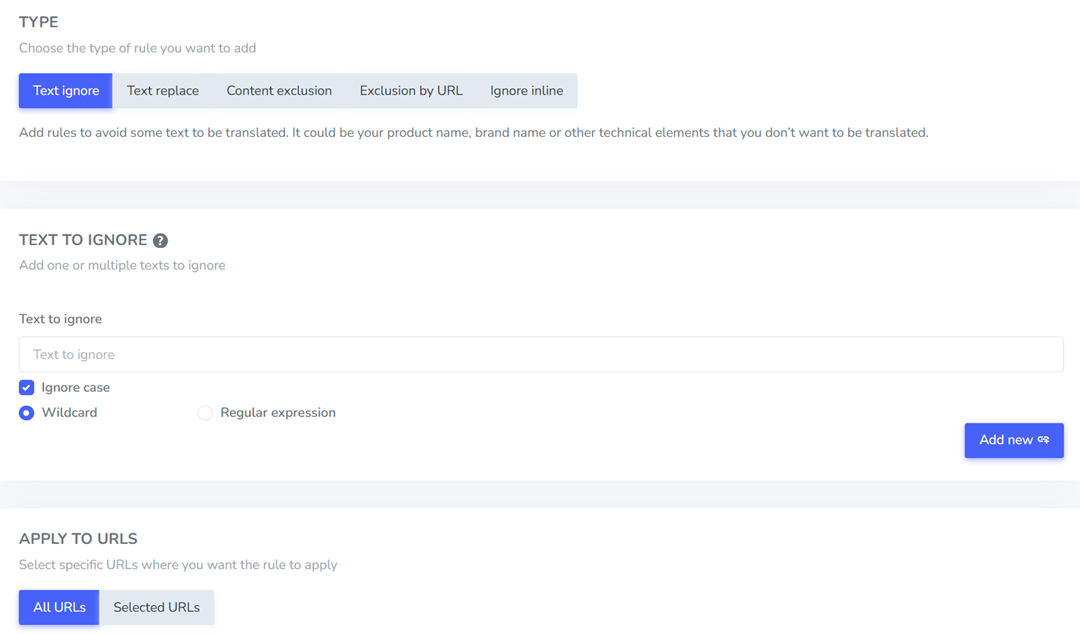
You can use these rules to replace inconsistent translations with preferred terms or prevent brand names and other specific expressions from being translated.
- Replace terms with preferred translations: Create text replacement rules to replace specific words or phrases with approved terminology across translated pages. You can configure replacements for particular languages, URLs, or content conditions.
- Preserve brand and product names: Use ignore text rules to exclude names, technical expressions, or other terms that should remain in their original form.
- Review translated content: Use the Linguise front-end translation editor to check and adjust translations that need further refinement.
- Maintain consistent terminology: Review and update your translation rules whenever your business introduces new products, features, or terminology preferences.
By combining reliable terminology resources with Linguise Translation Rules, businesses can reduce inconsistent translations and maintain a more consistent multilingual website experience.
Conclusion
Building a multilingual website glossary does not always require expensive terminology tools. Free resources such as public databases, bilingual dictionaries, industry standards, and customer support logs can help businesses find accurate terms for different languages and markets.
The key is to select reliable sources, check their usage restrictions, and document approved translations before applying them across your website. Linguise translation rules can help manage preferred terminology by replacing specific terms or preserving expressions that should remain unchanged. Try Linguise and simplify terminology management across your multilingual website.