
RTL website support is essential for multilingual websites targeting Arabic, Hebrew, and Farsi users. Unlike left-to-right languages, RTL languages require layouts, navigation, spacing, and interface elements to mirror automatically. Without proper RTL support, websites can experience broken layouts, incorrect alignment, and navigation issues, negatively affecting the user experience.
In this guide, you’ll learn what RTL support means, common RTL website problems, how to check if your site is RTL-ready, and how different platforms handle RTL layouts for multilingual users.
Key points: Essential insights for building an RTL-ready website
RTL support requires layout adaptation
Making a website RTL-ready involves more than translating text because navigation, forms, spacing, icons, and content flow must also adjust to right-to-left reading behavior.
Logical CSS properties simplify RTL implementation
Using logical CSS properties such as margin-inline and padding-inline helps websites automatically adapt between LTR and RTL layouts without maintaining separate stylesheets.
RTL optimization improves multilingual SEO
Proper RTL implementation with localized metadata, hreflang tags, and structured multilingual pages helps Arabic, Hebrew, and Farsi content remain readable and correctly indexed by search engines.
What RTL support means for websites?
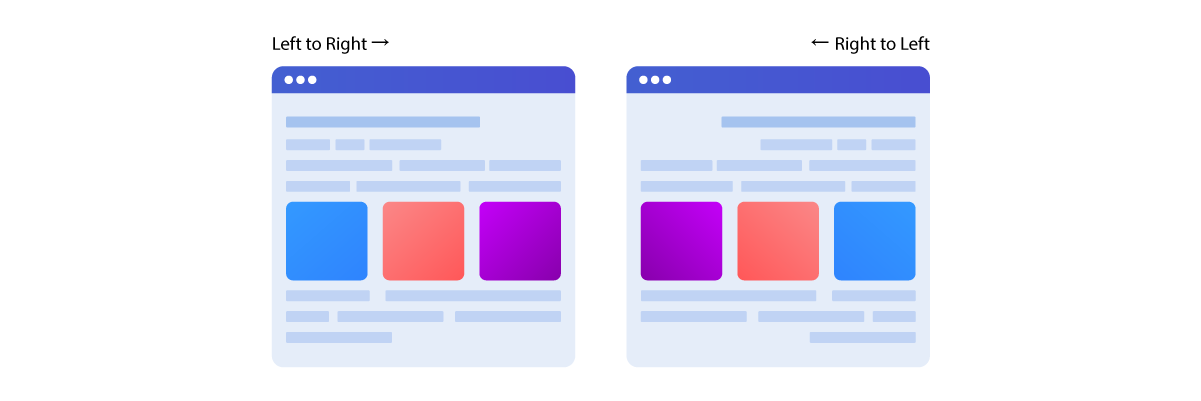
RTL website support ensures your website displays and functions properly for languages written right-to-left, such as Arabic, Hebrew, and Farsi. Instead of simply translating text, RTL support also affects layout direction, navigation flow, alignment, spacing, and interface behavior to ensure users can browse your website naturally and comfortably. RTL support mirrors the visual structure of a website, so the browsing experience follows right-to-left reading behavior.
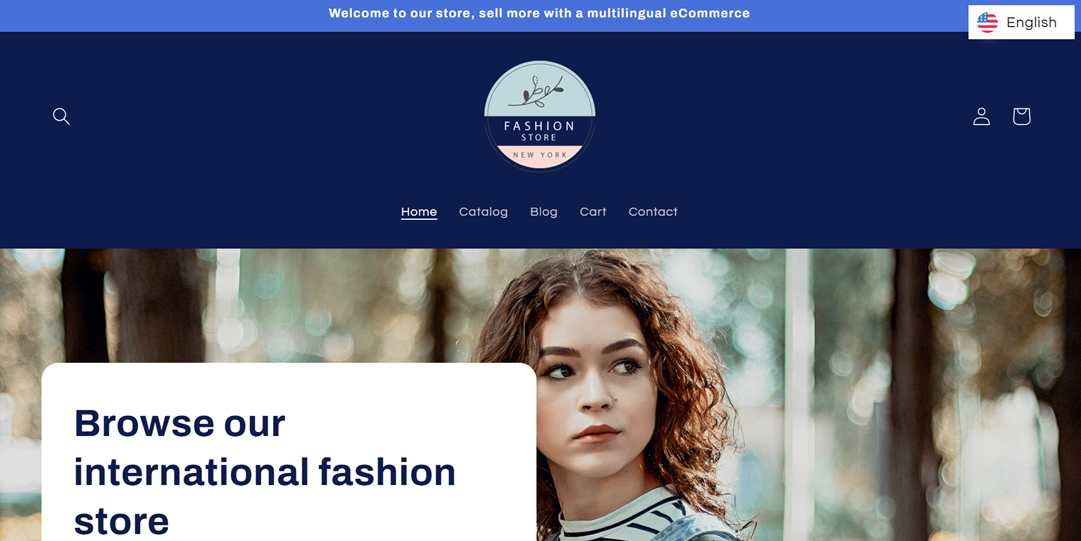
Here is an example of how a website appears in a left-to-right (LTR) layout, where navigation, text alignment, and interface elements follow the standard reading direction used in languages such as English.
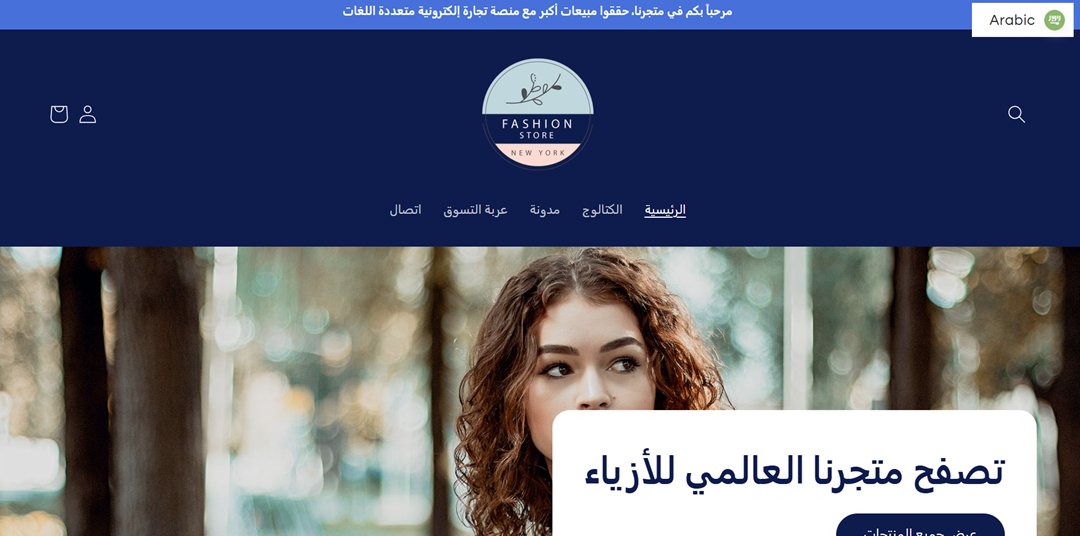
Meanwhile, this is how the same website appears in a right-to-left (RTL) layout, where menus, content alignment, icons, and page flow are mirrored to match Arabic.
RTL languages and their differences
Arabic, Hebrew, and Farsi all use a right-to-left writing system, but each language has its own script characteristics, typography, and localization needs. Understanding these differences helps website owners prepare layouts, fonts, and user interfaces that work correctly across different RTL audiences.
Language | Writing direction | Shared RTL behavior | Unique characteristics |
Arabic | Right-to-left | Mirrored layout, RTL navigation, right-aligned text | Uses connected script characters and requires Arabic-compatible fonts |
Hebrew | Right-to-left | RTL layout and interface direction | Characters are not connected like Arabic and often use different typography spacing |
Farsi (Persian) | Right-to-left | Similar RTL behavior to Arabic | Uses Persian-specific characters and localized number formatting |
Shared RTL elements | Right-to-left | Navigation, icons, spacing, forms, and layouts often need mirroring | Mobile responsiveness and UI consistency are important across all RTL languages |
In most RTL websites, elements such as menus, sidebars, arrows, sliders, forms, and content alignment need to adapt automatically to match the reading direction. Without these adjustments, the website may feel visually confusing or difficult to use for RTL visitors.
While layout requirements for these scripts are similar, linguistic nuances vary. For instance, handling the cursive connectivity of the Arabic alphabet requires specific attention to font rendering, as detailed in our guide on how to translate a website to Arabic language to ensure cultural accuracy.
Why RTL support matters for user experience
Proper RTL support helps users navigate your website more naturally by aligning with their reading habits and expectations. When layouts, buttons, forms, and navigation follow the correct RTL direction, visitors can browse content more comfortably and complete actions more easily.
On the other hand, poor RTL implementation can make a website look broken or unprofessional. Misaligned text, incorrect icon directions, and inconsistent spacing may reduce trust, increase bounce rates, and create accessibility issues, especially for ecommerce or multilingual websites targeting global audiences.
Common RTL website problems
Many websites appear to be translated on the surface but still fail to provide a proper RTL experience. This usually happens because the content changes language, while the layout, interface direction, and interactive elements continue to behave as if it were a left-to-right (LTR) website. As a result, users may experience confusing navigation, broken alignment, or interface inconsistencies that make the website difficult to use.
Broken layouts
Broken layouts are one of the most visible RTL issues on multilingual websites. Since many themes and templates are originally designed for left-to-right languages, the layout may not mirror correctly when switching to Arabic, Hebrew, or Farsi. Elements such as sidebars, images, cards, buttons, and content sections can remain misaligned, making the page look unbalanced or visually confusing.
These issues often become worse on mobile devices, where responsive layouts need to adapt dynamically. Sliders, product grids, menus, and ecommerce sections may overlap or display inconsistent spacing because the website still uses left-to-right styling rather than RTL-friendly CSS properties. Even if the content is translated correctly, a broken layout can make the website feel unprofessional and difficult to navigate.
Wrong text direction
Wrong text direction happens when RTL languages are displayed using left-to-right formatting rules. This can make paragraphs difficult to read because the sentence flow no longer matches how native users naturally scan content. Text alignment may also remain left-aligned instead of automatically shifting to the right.
Mixed-language content creates additional problems. Arabic or Hebrew text combined with numbers, URLs, or English words may appear visually disorganized if bidirectional text handling is not configured properly. In some cases, unsupported fonts can break Arabic character ligatures or cause inconsistent spacing, reducing readability and making the website look unreliable.
For a deeper look at solving these linguistic hurdles, see our advice on overcoming translation problems in Arabic.
Unmirrored navigation and icons
Navigation and directional icons also need to mirror correctly in RTL layouts. If arrows, sliders, pagination controls, or dropdown indicators continue pointing in the original left-to-right direction, users may feel confused while navigating the website. Even minor interface inconsistencies can disrupt the browsing experience, as RTL users naturally expect visual movement to flow from right to left.
Menus and interactive elements are also commonly affected. Navigation bars may retain their original structure rather than mirroring properly, while dropdown menus and mega menus may open in the wrong direction. In addition, left-to-right sliders and animations can make the website feel inconsistent and less intuitive for RTL visitors.
Form and pop-up issues
Forms are another common source of RTL usability problems because users interact with them directly. Input fields, placeholders, labels, and buttons should align to the right in RTL languages, but many websites keep their original left-aligned structure. This can make forms feel awkward and harder to complete, especially during checkout or account registration processes.
Pop-ups, dropdowns, date pickers, and third-party widgets may also fail to adapt properly to RTL layouts. Error messages may appear in unexpected positions, modal windows may appear misaligned, and some plugins may continue using LTR formatting even when the rest of the website supports RTL correctly. These inconsistencies can negatively affect usability and reduce user trust, particularly on ecommerce websites.
How to check if your website is RTL-ready

A website may look fine after translating the content into Arabic, Hebrew, or Farsi, but that does not always mean it is truly RTL-ready. Many RTL issues only appear when users start interacting with menus, forms, mobile layouts, or dynamic elements. That is why testing your website from a real user perspective is important before launching multilingual RTL support.
Test RTL languages
The easiest way to check RTL readiness is to switch your website to an RTL language and review every major page carefully. Start by testing core pages, including the homepage, navigation menu, product pages, blog posts, contact forms, and checkout pages. Instead of only checking whether the translation appears correctly, focus on how the entire layout behaves when the reading direction changes.
For example, imagine a user visiting your ecommerce store in Arabic. They expect the navigation menu to start on the right, product information to align naturally, and directional icons to mirror correctly. If product filters stay on the left side, arrows point the wrong way, or paragraphs remain left-aligned, the website may technically support translation but still fail to deliver a proper RTL experience.
Check mobile layouts
RTL problems often become more noticeable on mobile devices because responsive layouts need to reorganize content within smaller screen sizes. A desktop layout that appears normal may break completely on mobile when menus collapse, sliders move incorrectly, or buttons overlap with text.
For instance, a mobile navigation menu in Hebrew may open from the wrong side, while sliders, pop-ups, or sticky buttons may not adapt properly to RTL layouts. Testing across different screen sizes helps ensure a consistent experience for RTL users on both desktop and mobile devices.
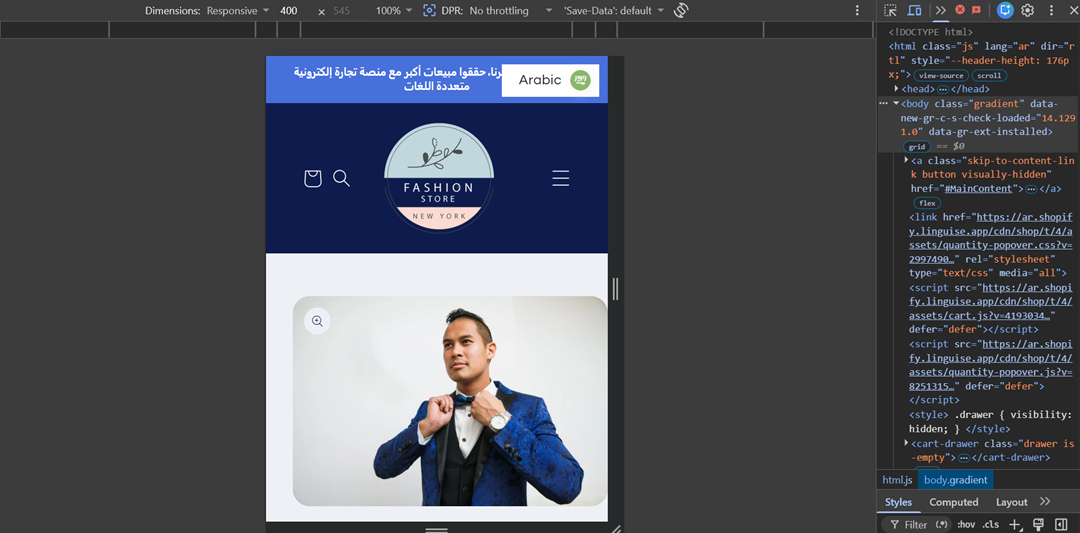
Below is an example of a properly optimized RTL mobile layout, where menus, spacing, navigation, and content alignment adapt correctly for Arabic.
Review typography and spacing
Typography plays a major role in RTL readability, especially for Arabic and Farsi scripts that use connected characters. Some fonts may look visually appealing in English but fail to display RTL languages properly, resulting in broken letter connections, uneven spacing, or overlapping text.
Spacing should also feel balanced throughout the interface. For example, buttons, cards, navigation menus, and content sections should maintain consistent padding and alignment after switching to RTL mode. If elements suddenly feel crowded on one side or leave awkward gaps, the website may still rely on fixed left/right styling rather than RTL-friendly layout rules.
Test forms and navigation
Forms and navigation elements are some of the most important areas to test because users interact with them directly. Try filling out contact forms, login pages, search bars, checkout forms, and newsletter pop-ups in RTL languages. Pay attention to whether labels, placeholders, and input fields align naturally to the right side.
Navigation testing is equally important. Users should immediately understand where menus open, how sliders move, and which direction arrows or breadcrumbs point. For example, if a customer browsing your Shopify store in Arabic clicks a product slider and the carousel moves left-to-right instead of right-to-left, the interaction can feel unintuitive even if the rest of the website appears translated correctly.
RTL support across website platforms

RTL support can vary significantly depending on the website platform you use. Some platforms provide built-in RTL compatibility, while others require additional themes, custom CSS, or manual adjustments to ensure layouts work properly for Arabic, Hebrew, and Farsi users.
WordPress and WooCommerce
WordPress is one of the most flexible platforms for RTL websites because many themes and plugins already include built-in RTL support. When an RTL language is activated, compatible themes can automatically mirror layouts, align content correctly, and adjust navigation direction. WooCommerce also supports RTL behavior for product pages, carts, and checkout flows when paired with RTL-ready themes and a compatible WooCommerce translation plugin.
However, not every plugin or theme works perfectly in RTL mode. For example, a WooCommerce product slider may still move left-to-right even when the rest of the website appears correctly mirrored. This is why WordPress website owners should test third-party plugins, page builders, ecommerce features, and translation plugins carefully after enabling RTL languages.
Shopify RTL support
Shopify supports multilingual stores, but RTL compatibility often depends on the theme being used. Some modern Shopify themes already include RTL-friendly styling, while others require custom CSS adjustments to properly mirror layouts, navigation, and product pages for Arabic or Hebrew users.
For example, a Shopify store may successfully translate product descriptions into Arabic, but filters, cart icons, or sliders might still follow left-to-right behavior. In some cases, store owners need additional apps or manual theme customization to fully support RTL layouts, especially for ecommerce features such as checkout flows and mobile navigation.
Wix and Squarespace
Wix and Squarespace are generally easier for beginners because they offer visual website builders and simpler setup processes. Both platforms offer some level of RTL support, enabling users to create multilingual websites without extensive coding knowledge.
However, RTL flexibility can still be limited compared to platforms like WordPress. Certain templates, animations, or third-party integrations may not mirror perfectly in RTL mode. For instance, a Wix website may display Arabic text correctly but still use left-to-right alignment for buttons or gallery layouts, requiring manual adjustments to improve consistency.
Webflow and custom sites
Webflow and custom-built websites provide greater design flexibility for RTL implementation because developers have more control over layout structure and styling behavior. This makes it easier to create fully customized RTL experiences using CSS logical properties, mirrored grids, and responsive RTL layouts.
At the same time, these platforms usually require more technical work because RTL support is not always automatic. For example, a custom ecommerce website may need manual configuration for navigation direction, sliders, animations, and form alignment to ensure everything behaves naturally in Arabic or Farsi. Without proper testing, small interface inconsistencies can still appear across different devices and browsers.
RTL website checklist for developers
Building an RTL-ready website involves more than translating text into Arabic, Hebrew, or Farsi. Developers also need to ensure that layouts, navigation, forms, and interactive elements adapt correctly to right-to-left behavior across all devices and pages.
Use RTL-friendly themes
Using an RTL-friendly theme is one of the easiest ways to simplify RTL implementation. Many modern website themes already include built-in RTL support, allowing layouts, menus, typography, and alignment to automatically mirror when an RTL language is activated.
Without an RTL-compatible theme, developers often need to manually fix layout issues using custom CSS. For example, sidebars may stay on the wrong side, menus may not align properly, or spacing between elements may appear inconsistent. Choosing a theme designed for multilingual and RTL websites helps reduce these problems from the beginning.
Apply RTL CSS rules
RTL websites require CSS rules that can adapt layouts dynamically based on text direction. Instead of relying on fixed properties like margin-left or padding-right, developers should use logical CSS properties that automatically adjust between left-to-right and right-to-left layouts.
This becomes especially important for responsive websites. For example, navigation menus, buttons, sliders, and product cards should maintain balanced spacing regardless of language direction. Proper RTL CSS implementation helps ensure the website remains visually consistent across desktop and mobile devices without requiring separate layouts for each language.
Test plugins and apps
Third-party plugins and apps are one of the most common causes of RTL problems. Even if the main website supports RTL correctly, external tools such as pop-ups, sliders, payment gateways, live chat widgets, or forms may still use left-to-right layouts.
Developers should test every important plugin after enabling RTL languages to identify interface inconsistencies early. For example, a contact form plugin may display labels correctly in Arabic, while the submit button and validation messages remain left-aligned. Regular testing helps prevent small RTL issues from affecting usability and customer trust.
Use automatic RTL support
Automatic RTL support tools can simplify multilingual website management by automatically adjusting layout direction, alignment, and interface behavior when RTL languages are detected. This reduces the amount of manual CSS customization required for Arabic, Hebrew, and Farsi websites.
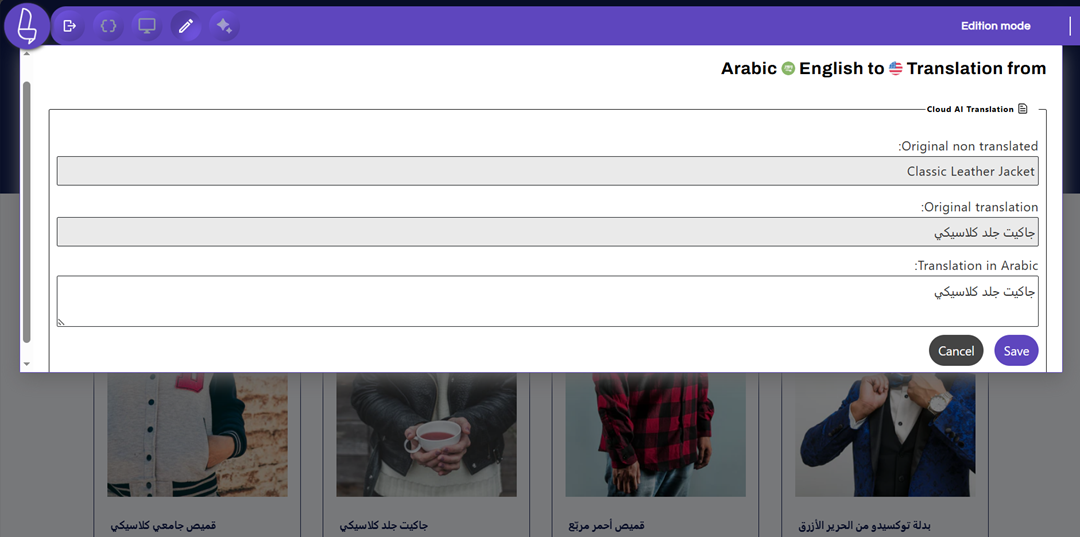
For website owners managing multiple languages, automatic RTL handling can also improve consistency across pages and devices. Instead of manually correcting menus, forms, spacing, and navigation for every translated page, developers can use tools such as Linguise to streamline RTL implementation, reduce maintenance effort, and manually adjust translations or layout elements directly from the front-end live editor when needed.
To make RTL implementation easier to review, website owners can also prepare a simple checklist before working with developers or launching multilingual RTL support. This helps ensure that important RTL elements, such as layouts, navigation, responsiveness, and third-party integrations, are properly tested across the website.
What to ask your developer | Why it matters |
Use an RTL-ready theme | Prevents broken layouts and alignment issues |
Apply RTL CSS properties | Ensures layouts adapt correctly in RTL mode |
Test third-party plugins | Avoids RTL issues in forms, sliders, and widgets |
Check mobile RTL responsiveness | Keeps RTL layouts consistent across devices |
Enable automatic RTL handling | Reduces manual fixes for multilingual websites |
Conclusion
RTL website support is an important part of building a multilingual website for Arabic, Hebrew, and Farsi audiences. Proper RTL implementation goes beyond translation by ensuring layouts, navigation, forms, spacing, and interactive elements adapt naturally to right-to-left reading behavior. Without these adjustments, even a fully translated website can still create usability issues that affect user trust and overall experience.
Whether you use WordPress, WooCommerce, Shopify, Wix, or a custom-built website, testing RTL compatibility carefully can help you avoid broken layouts and inconsistent interfaces. To simplify the process, website owners and developers can also use automatic RTL solutions, such as Linguise, to manage multilingual content and improve RTL layout handling.