

Setting up GA4 for a multilingual website is essential to understanding how each language version contributes to your business goals. While translating a website helps you reach new audiences, tracking all visitors in a single report makes it difficult to identify which languages drive the most conversions, revenue, and engagement.
Without language-specific tracking, valuable insights can be hidden in aggregate data. In this guide, you’ll learn how to configure GA4 to track conversions, goals, and revenue by language version, helping you measure performance more accurately and make better decisions for each market. Read on to get started.
Key points: Setting up GA4 to analyze multilingual website performance
Track multilingual performance accurately
Configure GA4 to identify language versions using URL structures, language dimensions, or audience segments, allowing you to measure traffic, engagement, conversions, and revenue by language.
Measure conversions and revenue by language
Create language-specific reporting in GA4 to compare conversion rates, goal completions, and revenue across all language versions and identify your highest-performing markets.
Monitor multilingual performance proactively
Use Explorations, DebugView, and GA4 alerts to validate tracking, detect performance issues early, and avoid common mistakes such as treating cross-language journeys as separate user sessions.
Why GA4 tracking matters for multilingual websites

When a website is available in multiple languages, understanding overall traffic alone is no longer enough. While GA4 can show how many visitors, conversions, and sales your website generates, these metrics become much more valuable when broken down by language version. This allows you to see how users across different language audiences interact with your content and whether each localized experience delivers the results you expect.
For example, your Spanish pages may attract a large number of visitors but generate fewer conversions, while your German pages may have lower traffic but produce higher revenue. Without proper language-based tracking, these differences can easily be hidden within overall website data. As a result, you may miss opportunities to optimize underperforming language versions or invest more resources in the markets that are driving the strongest results.
GA4 helps address this challenge by enabling you to segment users, track conversions, and analyze revenue using language-specific data. Instead of relying on assumptions, you can use real performance metrics to understand which language versions contribute the most to your business goals and where improvements are needed.
Configure language tracking in GA4

Before you can measure conversions, goals, and revenue by language, you need to make sure Google Analytics 4 can identify which language version a visitor is viewing. This setup lays the foundation for all multilingual reporting, helping you separate performance data across language versions rather than combining everything into a single report.
Choose a tracking method
The first step is deciding how GA4 will identify the language version a visitor is viewing. There are several ways to do this, but the most common approach is to use language-specific URL structures. Because the language information is included in the page URL, GA4 can easily categorize visitors and their actions by language version.
Another option is to use language-related dimensions, such as browser language or custom dimensions that pass language information to GA4. This approach can be useful when a website does not use dedicated language URLs. However, URL-based tracking is often preferred because it directly reflects the language version being accessed rather than relying on a visitor’s browser settings.
Once you have chosen a tracking method, you can configure GA4 to segment data and analyze performance for each language version separately.
Track languages by URL
If your website uses language folders or subdirectories, you can use the page_location parameter in GA4 to identify language versions. For example:
- /en/ for English
- /fr/ for French
- /es/ for Spanish
When visitors access these pages, GA4 records the URL path, allowing you to filter and analyze data by language. This makes it easier to compare metrics such as traffic, engagement, conversions, and revenue across language versions.
For example, if your English pages generate 500 conversions while your French pages generate only 150, URL-based tracking helps you quickly identify the difference and investigate the cause. You may discover that the French pages need stronger calls to action, better localization, or a more streamlined user experience.
Create language audiences
Once language tracking is available, you can create audiences for each language group in GA4. An audience is a segment of users who meet specific conditions, allowing you to analyze and target them separately.
Creating language-based audiences makes reporting more organized because you can compare user behavior, engagement, conversions, and revenue across different language versions. Instead of reviewing all visitors as a single group, you can evaluate how each audience interacts with your website and identify opportunities for improvement.
Language audiences can also support remarketing and campaign optimization. By understanding how different language groups behave, you can deliver more relevant content and marketing messages while making more informed decisions about localization strategies.
Verify tracking data
After configuring language tracking, it is important to confirm that GA4 is collecting data correctly. One of the easiest ways to do this is to use Realtime reports or DebugView, which let you monitor incoming data and verify that tracking is working as expected.
During this process, check whether user activity, page views, and conversion events are being recorded accurately. Reviewing your data early can help identify configuration issues before they affect reporting and decision-making.
You should also review your reports after a few days to ensure traffic, conversions, and engagement metrics are being categorized correctly. If the data appears inconsistent or grouped incorrectly, it may indicate a tracking configuration issue that needs to be addressed. Verifying your setup early helps ensure that future performance analysis is based on accurate and reliable data.
Create conversions for each language

After setting up language tracking, the next step is to measure the actions that matter most to your business. Creating language-specific conversions lets you see how effectively each language version converts visitors into customers, subscribers, or leads. Instead of relying on overall conversion rates, you can evaluate performance at the language level and identify which markets deliver the best results.
Define conversion events
Before creating conversions in GA4, identify the actions that indicate success on your website. These actions will vary depending on your goals, but common examples include completing a purchase, submitting a contact form, signing up for a newsletter, requesting a demo, or downloading a resource.
For example, an e-commerce website may define a completed purchase as its primary conversion event, while a SaaS company may focus on free trial registrations. The key is to choose events that directly contribute to business objectives rather than tracking every user interaction as a conversion. This keeps your reports focused on metrics that have a meaningful impact on growth and revenue.
Create language conversions
Once your conversion events are defined, you can analyze conversions by language using the GA4 tracking setup you’ve configured. By filtering conversion data based on language-specific URL paths or audiences, you can see which language versions generate the most valuable actions on your website.
For example, if your website includes English, French, and Spanish versions, GA4 can show how many purchases, form submissions, or sign-ups come from each language. This allows you to compare performance across language versions rather than relying solely on overall conversion totals.
You may discover that the English version generates the most conversions, while the French version achieves a higher conversion rate despite attracting less traffic. These insights can help prioritize localization efforts, content improvements, and marketing investments.
Set up goals
Goals help translate conversion data into measurable business outcomes. In GA4, important conversion events can be marked as key events, making them easier to track and analyze across reports.
For example, if your goal is to increase demo requests in French-speaking markets, you can monitor how many users on French pages complete the demo request form. Similarly, if your objective is to grow revenue from Spanish-speaking customers, you can track purchase-related conversions from Spanish-language pages.
Setting up goals for each language version provides a clearer picture of whether your localization efforts are supporting broader business objectives. Rather than evaluating multilingual performance as a whole, you can assess the success of each language independently.
Test conversions
Before relying on conversion data for decision-making, verify that tracking works correctly across all language versions. A minor configuration error can lead to missing or inaccurate data, making performance comparisons unreliable.
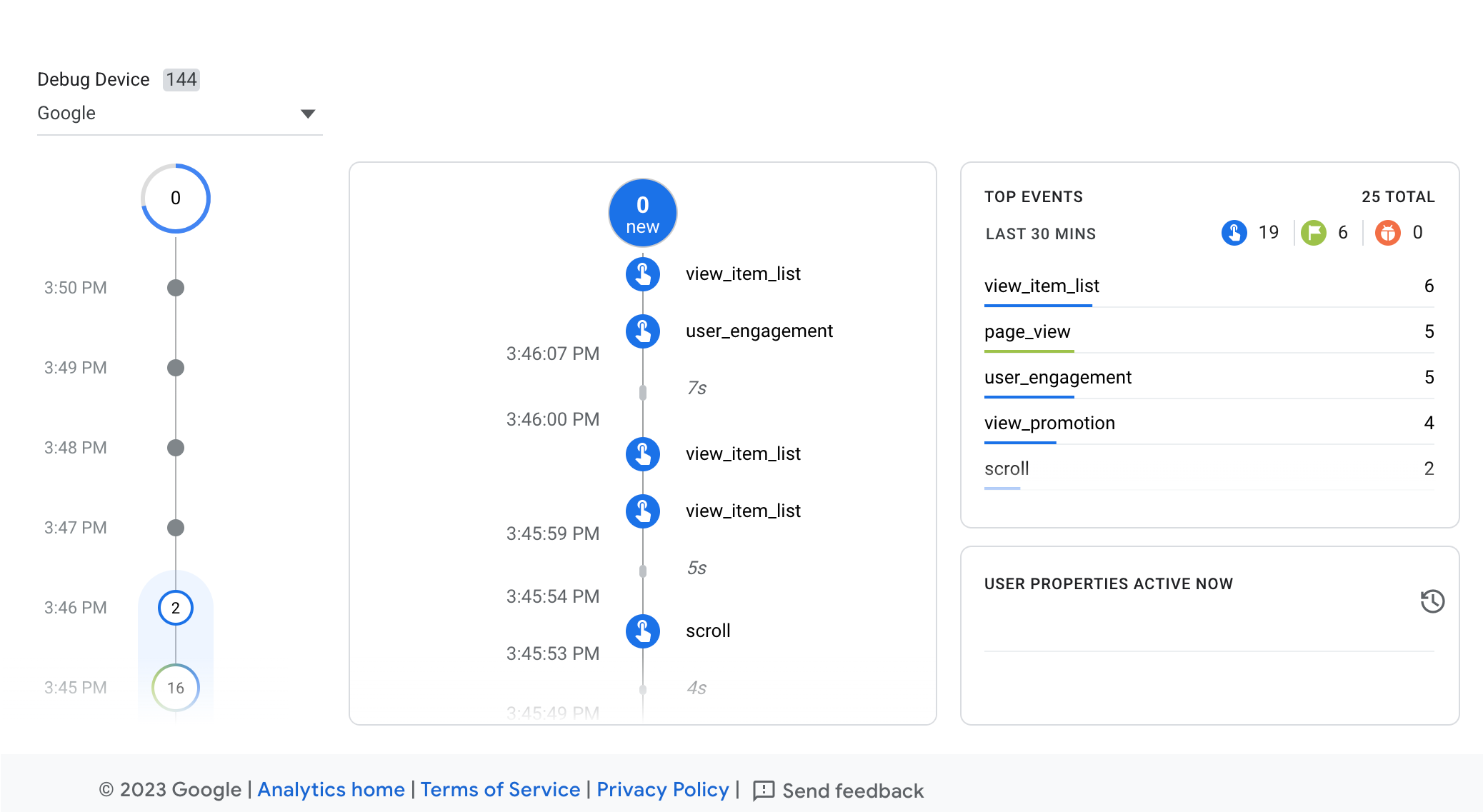
A practical approach is to visit each language version of your website and complete the desired action yourself. Then, check Realtime reports or DebugView in GA4 to confirm that the event is recorded correctly. The example below shows GA4’s DebugView, which displays events as they are recorded in real time and helps validate your tracking setup.
Regular testing is especially important when new language versions are added or existing pages are updated. By validating conversion tracking early, you can ensure that future reports accurately reflect how users interact with each language version of your website.
The example below shows GA4’s DebugView interface, where events are displayed in real time as users interact with a website. This view helps verify that conversion events are being recorded correctly during testing.
Analyze revenue and conversions by language

Once language-specific tracking and conversions are in place, the next step is turning that data into actionable insights. By analyzing revenue and conversion performance by language, you can identify which markets generate the greatest business value and where optimization efforts are needed.
Build an exploration report
GA4’s Explorations feature allows you to create custom reports that go beyond standard analytics dashboards. For multilingual websites, this is one of the most effective ways to view language performance side by side.
Start by creating a Free Form Exploration and adding a language-related dimension, such as language audience, URL path, or custom language dimension. Then include metrics such as revenue, conversions, sessions, and conversion rate. This creates a centralized report that lets you compare performance across all language versions in a single view.
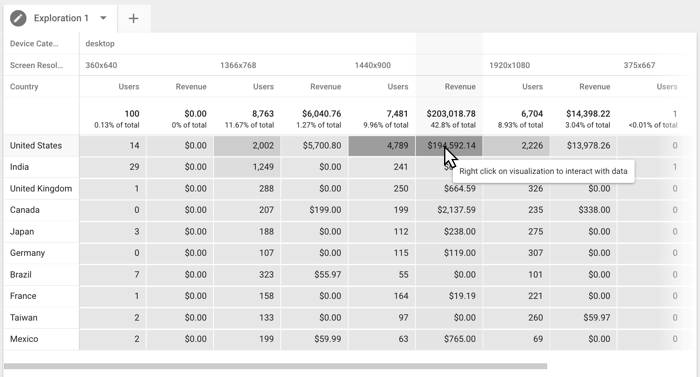
The example below shows a Free-form Exploration report in GA4. While this example uses dimensions such as device category and screen resolution, the same exploration framework can be customized to analyze multilingual performance by language. By replacing these dimensions with language-related data, you can compare revenue, conversions, and goal completion rates across different language versions in a single report.
Compare revenue by language
Traffic alone does not always indicate success. Some language versions may attract large numbers of visitors but generate little revenue, while others may drive fewer visits yet produce stronger financial results.
Comparing revenue by language helps reveal the true business impact of each localized experience. For instance, an English version may generate $10,000 in monthly revenue, while a German version generates $7,000 from significantly fewer visitors. In this scenario, the German audience may have higher purchase intent or a more effective customer journey.
These insights can influence decisions about marketing budgets, content localization priorities, and expansion strategies. Rather than focusing only on traffic growth, you can prioritize the language versions that contribute the most revenue.
Measure goal completion rates
Revenue is important, but many multilingual websites also rely on non-purchase goals such as lead generation, account registrations, newsletter sign-ups, or demo requests. Measuring goal completion rates helps determine how effectively each language version encourages users to take these actions.
For example, a French landing page may receive fewer visitors than its English counterpart but achieve a higher form submission rate. This could indicate that the content resonates more strongly with the target audience or that the localized messaging is particularly effective.
By comparing goal completion rates across languages, you can identify opportunities to improve underperforming pages and replicate successful strategies in other markets. This provides a more complete view of performance than revenue metrics alone.
Identify top-performing languages
After reviewing revenue, conversions, and goal completion rates, the final step is identifying your top-performing language versions. This involves looking beyond a single metric and evaluating overall performance across multiple indicators.
For example, one language may generate the highest revenue, another may achieve the best conversion rate, and a third may drive the strongest user engagement. Together, these metrics provide a more accurate picture of how each market contributes to your business objectives.
Identifying top-performing languages allows you to allocate resources more strategically. You can invest more heavily in markets that consistently deliver strong results while uncovering opportunities to improve language versions that are not meeting expectations. Over time, this data-driven approach helps maximize the return on your multilingual website and localization efforts.
Avoid common multilingual GA4 mistakes

Even with proper tracking and reporting in place, certain configuration mistakes can still lead to inaccurate data. Understanding these common issues can help ensure that your multilingual analytics reflect actual user behavior and provide reliable insights for decision-making.
Track cross-language journeys
One of the most common mistakes in multilingual analytics is treating each language version as a completely separate user experience. In reality, visitors often switch between languages before completing a conversation.
For example, a user may first discover your website through an English blog post, browse several pages, and then switch to the French version before making a purchase. If this journey is not tracked correctly, the conversion may appear disconnected from the user’s earlier interactions, making it difficult to understand the full customer journey.
To avoid this issue, ensure that users can move between language versions without triggering unnecessary session fragmentation. When implemented correctly, GA4 can provide a clearer view of how visitors interact with multiple language versions before converting. This helps you understand which content and languages contribute to conversions, even if the final action occurs in a different language.
Fix hreflang errors
Hreflang tags help search engines understand the relationship between different language versions of the same page. However, incorrect hreflang implementation can create reporting challenges and negatively affect multilingual SEO performance.
Common issues include missing hreflang tags, incorrect language codes, broken alternate URLs, or pages pointing to the wrong language version. Regularly auditing your hreflang implementation helps ensure that language versions are correctly connected. This not only improves search visibility but also enhances the user experience, making it easier for visitors to access content tailored to their language preferences.
Set up alerts
Manually monitoring reports can become difficult as your multilingual website grows. Important performance changes may go unnoticed, especially when managing multiple language versions simultaneously.
GA4 allows you to create alerts that notify you when significant changes occur. For example, you can configure alerts for sudden drops in conversions, unusual traffic fluctuations, or unexpected decreases in revenue for a specific language audience.
Imagine that your French-language pages typically generate 50 conversions per week but suddenly drop to 20. Without an alert, this issue may remain hidden within the overall website data. With automated notifications, you can investigate the problem quickly and take corrective action before it has a larger impact on business performance.
Monitor performance drops
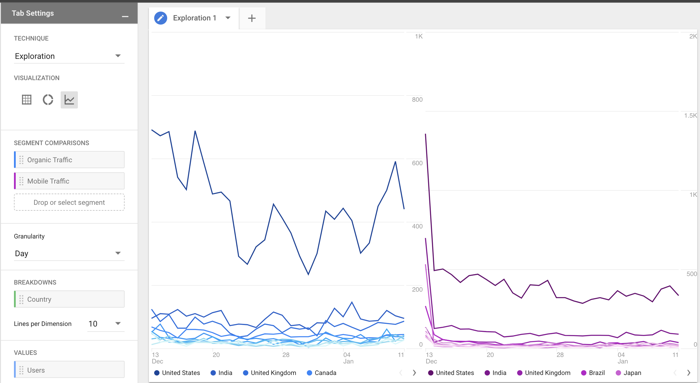
Setting up alerts is only the first step. It is equally important to regularly review language-specific reports to identify trends that may indicate performance problems. GA4 Explorations offers multiple visualization options, including line charts, which can help you monitor performance changes over time and uncover patterns that may not be immediately visible in standard reports.
The example below shows a line chart visualization in GA4 Explorations. By viewing metrics in this format, you can more easily track trends in traffic, conversions, revenue, or goal completions across different language versions and identify unusual changes that require further investigation.
For example, you may notice that traffic remains stable while conversions gradually decline over several weeks. This could indicate issues such as outdated content, translation inconsistencies, broken forms, pricing concerns, or changes in user behavior. By consistently monitoring revenue, conversion rates, and goal completion metrics by language, you can detect issues early and respond before they affect overall results.
Conclusion
Setting up GA4 for a multilingual website allows you to move beyond aggregate analytics and understand how each language version contributes to conversions, goals, and revenue. By properly tracking language-specific user behavior, creating conversions for each market, and analyzing performance through customized reports, you can make more informed decisions and continuously improve the results of your multilingual website.
For businesses managing multilingual content at scale, combining GA4 with the right translation solution can make performance tracking much easier. Linguise helps you translate your website into multiple languages while supporting a structured URL setup that works seamlessly with Google Analytics and GA4. Try Linguise to simplify multilingual website management and gain deeper insights into the performance of every language version.