
If your multilingual website isn’t appearing in search results as expected, Google Search Console is one of the best tools to identify the cause. It helps you detect technical issues, such as hreflang errors, noindex directives, and crawl anomalies, that can prevent international pages from being indexed properly.
Many of these problems go unnoticed until traffic starts to decline. In this guide, you’ll learn the most common Google Search Console red flags, what they mean, and how to fix them before they impact your international SEO performance.
Key points: Google Search Console red flags for international indexing
Detect indexing issues early
Google Search Console helps you identify technical problems that prevent translated pages from being indexed before they affect rankings and traffic.
Spot common indexing red flags
Learn to recognize hreflang errors, noindex directives, crawl anomalies, and other issues that impact multilingual page visibility.
Fix international indexing issues
Follow practical steps to resolve indexing problems, improve crawlability, and keep your localized pages visible in search results.
Why use Google Search Console for international indexing

Google Search Console provides the insights needed to detect indexing problems early, helping you resolve technical issues before they affect your international SEO performance. Here are some of the main reasons why Google Search Console is essential for international indexing:
- Identify indexing issues across language versions: Google Search Console shows whether your translated pages are indexed, excluded, or experiencing indexing errors. This makes it easier to spot problems affecting specific languages or regional URLs before they impact visibility.
- Monitor crawling activity: The Crawl Stats and Page Indexing reports help you understand how Googlebot is accessing your multilingual content. Unusual crawl patterns may indicate issues such as inaccessible language directories, server errors, or inefficient crawl allocation.
- Detect hreflang and canonical conflicts: An incorrect hreflang implementation or conflicting canonical tags can prevent the correct language pages from appearing in search results. Google Search Console helps uncover these issues so you can fix them before they affect international rankings.
- Measure international search performance: Use the Performance report to compare clicks, impressions, and average positions across countries and language-specific URLs. Sudden changes may reveal indexing or localization issues that require further investigation.
- Validate fixes after resolving issues: Once you’ve corrected indexing errors, Google Search Console lets you request validation and monitor whether the affected pages return to Google’s index, making it easier to confirm that your fixes have been successful.
7 red flags in Google Search Console for international pages

Google Search Console provides valuable insights into how Google crawls and indexes your multilingual website. While some warnings are harmless, others can indicate technical issues that prevent your international pages from appearing in search results. Below are seven common red flags to watch for, along with their causes and the steps you can take to resolve them.
1: Hreflang no return tag errors
A “Hreflang No Return Tag” error occurs when one localized page points to another language version using an hreflang annotation, but the referenced page doesn’t return the same reference. Because Google requires reciprocal hreflang relationships, both pages must acknowledge each other as alternate versions. If the reciprocal tag is missing, Google may ignore the hreflang annotations altogether, making it harder to serve the correct language page to users in different regions.
This issue commonly appears after launching new language versions, migrating a multilingual website, or updating templates without synchronizing hreflang tags across all localized pages. It can also happen when one language version is removed or redirected while other pages still reference it. For example, your English page includes the following hreflang annotation:
/en/ → hreflang="fr" → /fr/
However, the French page doesn’t include the reciprocal reference:
/fr/ → hreflang="en" → /en/
Since Google cannot confirm that these pages recognize each other as alternate versions, it may ignore the hreflang relationship entirely. As a result, users searching in French could be shown the English page, or vice versa, leading to a poorer user experience and weaker international SEO performance. To resolve hreflang no return tag errors, follow these best practices:
- Verify reciprocal hreflang annotations by ensuring every localized page references all alternate language versions, including itself.
- Review language and region codes to confirm they follow Google’s recommended ISO formats, such as en, en-US, fr, or fr-CA.
- Check the canonical tags to ensure they don’t conflict with your hreflang implementation by pointing to a different URL.
- Update your XML sitemap if you use hreflang annotations based on sitemap entries, ensuring all language variants are included and correctly linked.
- Validate your changes using the URL Inspection tool in Google Search Console, then request reindexing if necessary so Google can process the updated hreflang relationships.
Regularly auditing your hreflang implementation—especially after adding new languages, migrating your website, or changing URL structures, can help prevent reciprocal linking issues and ensure Google serves the correct language version to international users.
Using a multilingual solution like Linguise can also simplify hreflang management by automatically generating reciprocal hreflang tags for supported CMS platforms.
2: Hreflang points to a non-canonical URL

This issue occurs when an hreflang annotation references a URL that isn’t the page’s canonical version. Since canonical tags tell Google which page to index, hreflang annotations should always point to the canonical URL. Otherwise, Google may ignore the language relationship and display the wrong version in search results. This issue commonly occurs after website migrations, URL changes, or incorrect canonical configurations across localized pages.
For example, your English page contains the following hreflang annotation:
/en/product → hreflang="fr" → https://example.com/fr/product?utm_source=newsletter
However, the French page specifies the following canonical URL:
Canonical: https://example.com/fr/product
Because the hreflang annotation points to the parameterized URL instead of the canonical URL, Google may ignore the language relationship. The same issue can also occur if hreflang points to a redirected URL or a duplicate page that isn’t selected as the canonical version.
As a result, Google may fail to associate your localized pages correctly, causing the wrong language version to appear in search results or reducing the visibility of regional pages altogether. To resolve this issue, review both your canonical tags and hreflang implementation to ensure they work together rather than conflict.
- Point every hreflang annotation to the canonical URL, not to URLs with tracking parameters, session IDs, or pagination.
- Verify that each language version has a self-referencing canonical tag, unless another canonical URL is intentionally required.
- Avoid referencing redirected or duplicate URLs, as Google may ignore hreflang annotations that point to them.
- Audit your multilingual templates or CMS settings to ensure canonical and hreflang tags are generated consistently across all language versions.
- Inspect the affected pages in Google Search Console after making changes and request reindexing if necessary.
3: Spike in "Excluded by noindex tag"
A sudden spike in “Excluded by Noindex Tag” indicates that Google has found an increasing number of pages containing a noindex directive, preventing them from being indexed. While this may be intentional for pages such as admin areas or duplicate content, it becomes a serious issue when translated or localized pages are affected. This problem commonly occurs after deploying new language versions, updating SEO plugin settings, changing CMS templates, or accidentally applying a global noindex rule to multilingual directories.
For example, your Spanish product page contains the following meta tag:
<meta name="robots" content="noindex">
Although the page is publicly accessible and included in your XML sitemap, Google won’t add it to the index because the noindex directive overrides the sitemap submission. If this configuration is applied across an entire language folder, such as /es/ or /de/, hundreds of localized pages may disappear from search results.
As a result, translated pages can quickly lose visibility, causing a significant drop in impressions and organic traffic from specific regions. To resolve this issue, review the affected URLs in the Page Indexing report in Google Search Console and verify whether the noindex directive is intentional.
- Remove unintended noindex meta tags or HTTP headers from localized pages.
- Check your CMS, SEO plugin, or deployment settings for any rules that affect language-specific directories.
- Ensure indexable pages are included in your XML sitemap without conflicting directives.
- Inspect the updated URLs in Google Search Console and request reindexing after making changes.
Regularly reviewing indexing reports after website updates or the launch of new languages helps prevent accidental noindex issues from affecting large numbers of translated pages.
4: "Crawled – currently not indexed" URLs

The “Crawled – Currently Not Indexed” status means Google has successfully crawled a page but has decided not to index it. This doesn’t necessarily indicate a technical error, but it often suggests that Google doesn’t consider the page valuable enough to index at that time. On multilingual websites, this commonly affects translated pages with thin content, poor internal linking, or content that is too similar to another language version.
As shown in the Google Search Console report below, Google may crawl localized pages successfully but still exclude them from the index. This often happens when translated pages provide limited unique value or aren’t well-connected through internal links, making Google less likely to prioritize them for indexing.
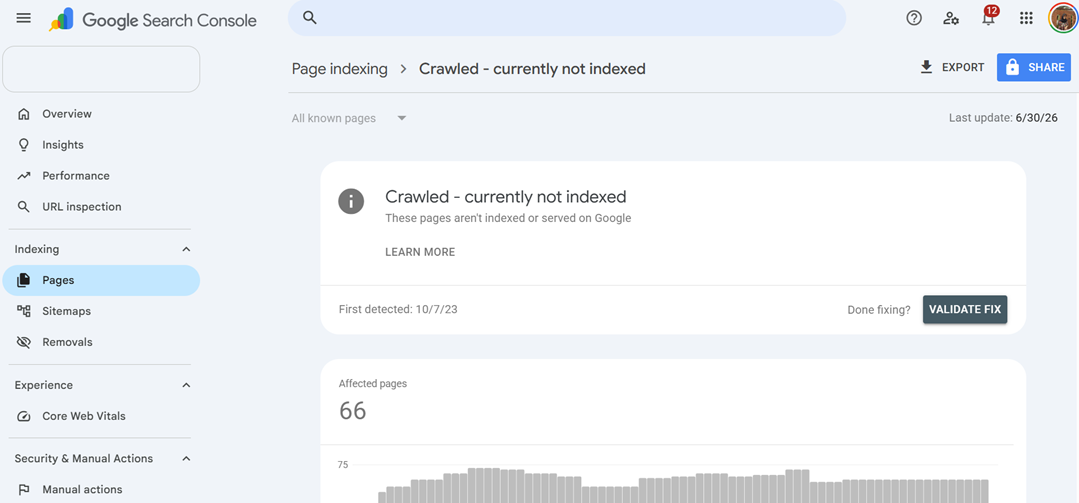
If this issue affects many regional URLs, important language pages may never appear in search results, limiting your visibility in international markets. To improve the chances of indexing, focus on increasing the value and accessibility of the affected pages.
- Expand localized content instead of relying solely on direct translations.
- Strengthen internal linking from relevant pages and language hubs.
- Verify that canonical and hreflang tags are correctly configured.
- Include important localized pages in your XML sitemap.
- Request reindexing after improving the content.
Regularly monitoring this report can help identify language pages that need stronger content or better site architecture before they affect your international SEO performance.
5: Googlebot Crawl rate anomalies
Googlebot crawl rate anomalies occur when Google suddenly crawls significantly more or fewer pages than usual. A sharp decline may indicate that Googlebot is having difficulty accessing your multilingual website, while an unexpected spike can suggest crawl inefficiencies, redirect loops, or duplicate URL generation. These issues often appear after website migrations, server configuration changes, or the introduction of new language directories.
As shown in the Crawl Stats report below, Google Search Console provides a clear overview of Googlebot’s crawling activity over time. Monitoring this report can help you identify unusual crawl patterns before they begin affecting the indexing of your localized pages.
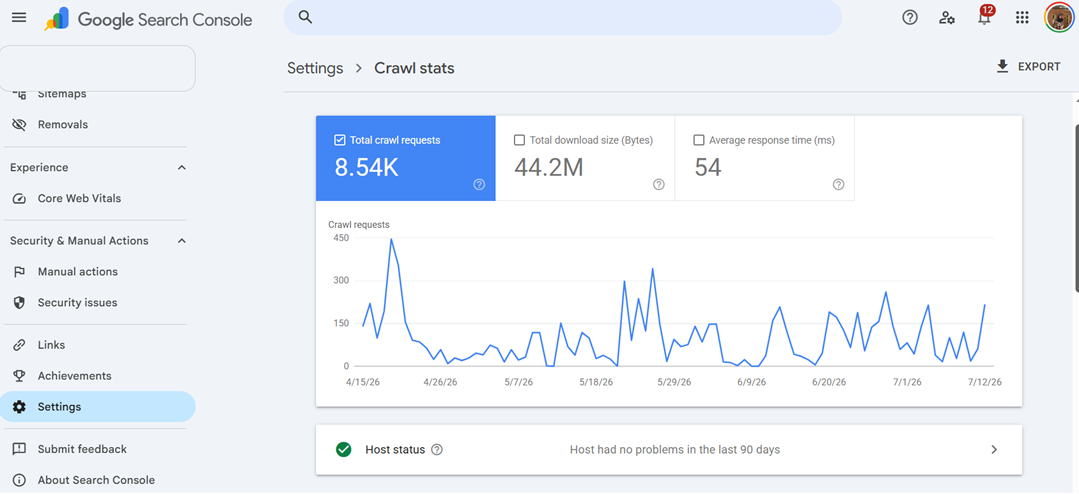
Poor crawl efficiency can delay indexing for newly translated content and reduce Google’s ability to discover updates across multiple language versions. To resolve crawl rate anomalies, review the Crawl Stats report in Google Search Console to identify unusual patterns.
- Check for server errors, slow response times, or temporary outages.
- Remove unnecessary redirect chains and redirect loops.
- Eliminate duplicate URLs created by parameters or inconsistent URL structures.
- Verify that robots.txt isn’t blocking important language directories.
- Improve internal linking so Googlebot can discover localized pages more efficiently.
Regularly monitoring Crawl Stats helps ensure Googlebot spends its crawl budget on your most important international pages instead of low-value or duplicate URLs.
6: International traffic discrepancies
International traffic discrepancies occur when one or more language versions experience a noticeable drop in impressions or clicks while other localized pages continue performing normally. Although this isn’t always an indexing error, it often serves as an early warning sign that Google is struggling to crawl, index, or serve the correct language pages to users in specific countries.
For example, your English pages continue to receive stable traffic, but clicks to your German pages suddenly decrease, even though no major content changes were made. After investigating, you discover that several German URLs contain incorrect hreflang annotations, preventing Google from serving them to German users.
If left unresolved, these discrepancies can reduce visibility in target markets and negatively affect international SEO performance. To identify the cause, compare country and language-specific performance reports in Google Search Console.
- Monitor clicks and impressions for each language directory.
- Compare affected URLs with the Page Indexing report.
- Review hreflang and canonical implementations for the impacted language versions.
- Confirm that localized pages remain indexable and accessible.
- Request reindexing after resolving technical issues.
Regularly tracking international performance makes it easier to identify regional indexing issues before they result in significant traffic losses.
7: Indexed pages don't match your localized URLs
If the number of indexed pages doesn’t match the number of localized URLs you’ve published, Google may be excluding part of your multilingual content from its index. This often happens when translated pages aren’t included in XML sitemaps, contain conflicting canonical or noindex directives, or can’t be discovered through internal links.
For example, your website contains 500 translated pages across five languages, but Google Search Console reports that only 420 pages are indexed. After reviewing the missing URLs, you find that many recently translated pages were never added to the XML sitemap and receive little internal linking from the rest of the site.
As a result, some localized pages remain invisible in search results, limiting your ability to attract users in different regions. To resolve this issue, compare the number of published multilingual pages with the number of Google-indexed pages and investigate any discrepancies.
- Compare your XML sitemap with the indexed pages reported in Google Search Console.
- Use the URL Inspection tool to check why specific localized pages aren’t indexed.
- Verify that each page is crawlable, indexable, and internally linked.
- Review canonical, hreflang, and robots directives for conflicting signals.
- Resubmit updated XML sitemaps after resolving any issues.
Performing regular indexing audits helps ensure every translated page has the opportunity to appear in search results and contribute to your international SEO strategy.
International SEO monitoring checklist

Fixing indexing issues is only part of maintaining a successful multilingual website. To prevent the same problems from recurring, it’s important to regularly monitor your international pages. By regularly reviewing Google Search Console reports, you can identify technical issues early and keep your localized content visible in search results.
The following checklist can help you maintain healthy indexing across all language versions of your website.
Task | Frequency | Why It Matters |
Review the Page Indexing report | Weekly | Identify newly excluded, indexed, or error pages before they affect search visibility. |
Check for hreflang implementation issues | Weekly | Ensure every language page correctly references its alternate versions and prevent localization errors. |
Monitor Crawl Stats | Weekly | Detect unusual crawl rate changes, server issues, or crawl budget inefficiencies that may delay indexing. |
Review the Performance report by country or language | Monthly | Spot unexpected traffic changes that could indicate international indexing or targeting issues. |
Compare indexed pages with published localized URLs | Monthly | Confirm that newly translated pages have been indexed and no language versions are missing. |
Inspect newly published translated pages | After each content update | Use the URL Inspection tool to confirm that new language pages are crawlable and eligible for indexing |
Request reindexing after major technical changes | As needed | Help Google process updates faster after fixing hreflang, canonical, or indexing issues. |
Conclusion
Identifying and resolving indexing issues early is essential to keeping your international pages visible in search results, and Google Search Console provides the insights needed to detect and troubleshoot them efficiently. By monitoring common red flags, such as hreflang errors, noindex directives, crawl anomalies, and indexing discrepancies—you can quickly diagnose problems, apply the appropriate fixes, and maintain healthy visibility across all language versions of your website.
If you manage a multilingual website, combining regular Google Search Console audits with a reliable translation solution can make international SEO much easier. Start with Linguise, you can automatically generate SEO-friendly translated pages, support proper hreflang implementation, and simplify multilingual website management, helping search engines discover and index your localized content more efficiently.