
A technical checklist for translating complex custom post types on large sites can save developers countless hours when building a multilingual website. While translating standard pages is usually straightforward, enterprise websites often rely on custom post types for directories, real estate listings, booking systems, or customer portals. These content structures typically include custom fields, meta boxes, and dynamic layouts that require more than a basic translation setup.
That’s why following a structured checklist is so important before translating your site. In this guide, we’ll cover the essential technical steps to help you translate complex custom post types correctly and avoid the most common pitfalls, so be sure to read through to the end.
Key points: Guide to translating complex custom post types on large sites
Audit your custom post types
Review custom post types, taxonomies, custom fields, templates, and content relationships before translation to avoid missing critical multilingual content.
Configure and translate correctly
Prepare custom fields, configure translation rules, and localize meta boxes and dashboard elements to ensure every user-facing component is translated consistently.
Test before launch
Validate search, filters, dynamic content, and multilingual functionality across all languages to identify issues early and deliver a seamless user experience.
Why translating custom post types is challenging

Translating standard pages is usually straightforward, but custom post types (CPTs) add another layer of complexity. On large websites, content is often built with custom fields, dynamic components, and interconnected data, requiring more than a simple text translation. Without proper planning, even small configuration mistakes can affect how multilingual content works across the site. Some of the main challenges include:
- Custom fields require separate translation settings: Information such as product specifications, property details, or booking data is often stored outside the main content editor, so each field must be configured correctly for translation.
- Content relationships must remain intact: Custom post types frequently connect with taxonomies, related posts, or other data. These relationships should continue to work across all language versions.
- Custom interfaces aren’t translated automatically: Meta boxes, user dashboards, and other backend or dynamic interface elements often need additional localization because they aren’t part of standard page templates.
- Dynamic content needs thorough testing: Features like search, filters, booking forms, and directory listings should be tested after translation to ensure they display the correct content and function as expected in every language.
Technical checklist for translating complex custom post types

Once you understand the challenges, the next step is to follow a structured process. Instead of translating everything at once, work through each component of your custom post types to ensure nothing is overlooked. The checklist below covers the essential areas developers should review before launching a multilingual enterprise website.
Audit custom post types
Before translating any content, review all custom post types used across your website. Enterprise websites often contain much more than standard posts and pages, with content spread across listings, directories, booking systems, products, customer portals, and other specialized content. Understanding this structure early helps prevent important content from being overlooked during translation and creates a clear roadmap for the rest of the localization process. As part of your audit, review the following:
- Every custom post type used on the website.
- Associated taxonomies and archive pages.
- Relationships between different content types.
- Templates used to display each custom post type.
- Plugins that manage the custom post types, such as Advanced Custom Fields (ACF), JetEngine, or Meta Box.
- Custom queries, REST API endpoints, or third-party integrations that rely on custom post type data.
For example, a real estate website may include a Property custom post type connected to Location, Property Type, and Agent. The same content may also power property search filters, map listings, or external APIs. If one of these relationships or integrations is overlooked during translation, visitors could encounter incomplete listings, broken filters, or inconsistent search results across different languages.
A thorough audit helps you identify these dependencies before translation begins, reducing the risk of having to troubleshoot complex issues after your multilingual website goes live.
Prepare custom fields for translation

Custom fields often store the most valuable information on an enterprise website. Instead of placing everything in the WordPress editor, developers often use custom fields to manage structured data such as specifications, prices, booking details, and contact information.
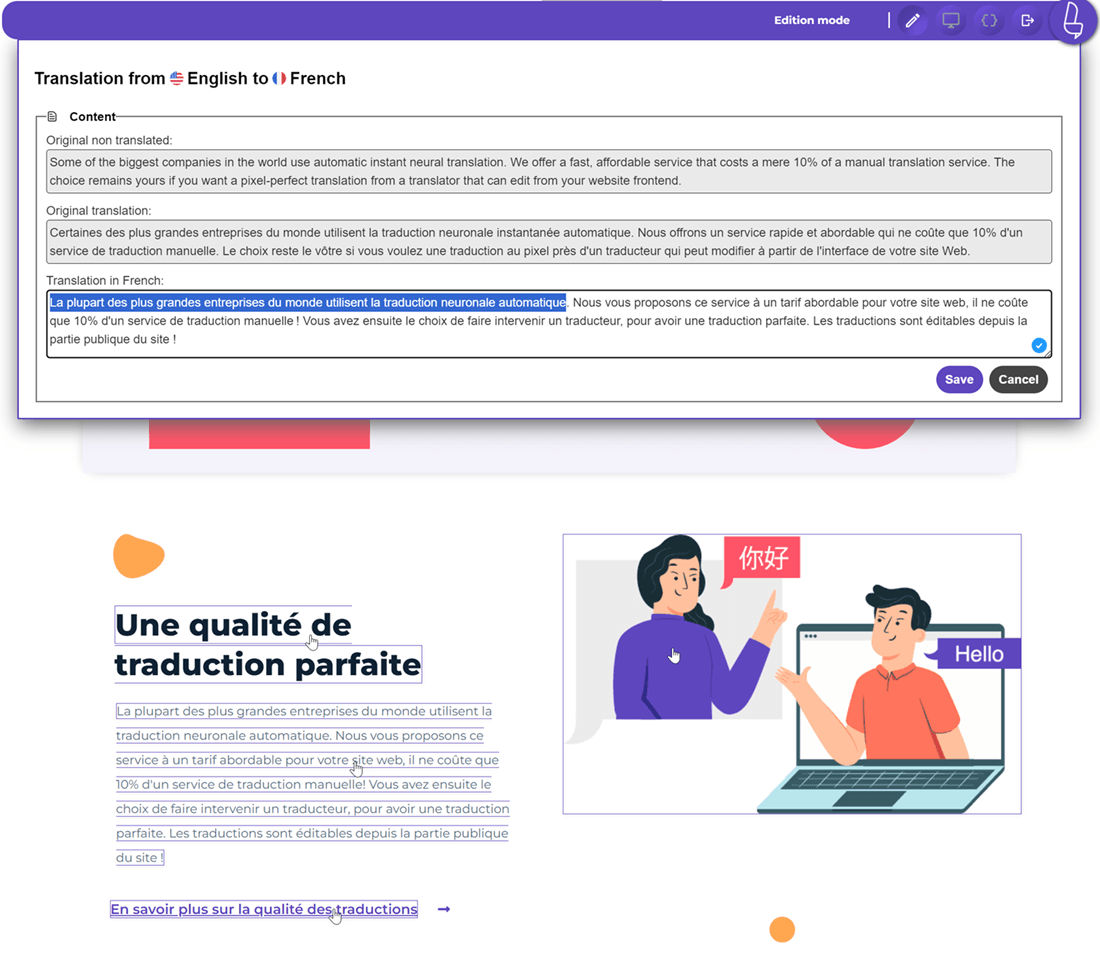
Before enabling multilingual support, identify which fields actually need translation. Depending on your website, these fields may be managed using plugins such as Advanced Custom Fields (ACF), Meta Box, JetEngine, or other custom field frameworks. Since each plugin stores data differently, it’s important to review how your multilingual solution handles these fields to ensure no important content is skipped during translation. Solutions like Linguise translation can help streamline the translation of supported custom field content. It also lets you edit translated content directly without modifying the original custom post type.
A simple way to categorize them is:
- Translate customer-facing content, such as descriptions, specifications, and promotional text.
- Copy values that should remain identical across languages, such as prices, SKUs, IDs, or coordinates.
- Ignore fields used only for backend functionality or plugin settings.
For instance, a hotel booking website should translate the Room Description and Cancellation Policy, while keeping the Room ID, Nightly Rate, and Availability Status unchanged. Separating translatable content from technical data not only creates a more consistent multilingual experience but also helps prevent configuration errors that could affect your website’s functionality.
Configure translation rules
Once your custom fields are organized, configure translation rules for each content type. These rules determine how multilingual plugins process different data types and help maintain consistency across all language versions. When defining translation rules, make sure you:
- Specify which fields are translatable.
- Keep technical or system values synchronized.
- Exclude unnecessary backend fields from translation.
- Apply consistent rules across all similar custom post types.
Having clear translation rules not only reduces translation errors but also makes future maintenance much easier, especially on websites managed by multiple developers or content editors.
Translate custom meta boxes

Many plugins store additional information in custom meta boxes rather than in the default WordPress editor. Since these fields often appear on the frontend, they should be reviewed carefully during localization. Check whether your meta boxes contain:
- Product or property specifications.
- Booking instructions.
- Contact information.
- Call-to-action text.
- Additional descriptions or notes.
For example, a property listing may display a translated description while the specifications inside a meta box remain in the original language. Reviewing these sections separately helps ensure the entire page feels fully localized.
Localize user dashboard layouts
Many enterprise websites provide personalized dashboards for customers, vendors, or administrators. These interfaces contain much more than static text, often combining navigation, forms, notifications, and dynamically generated content. When reviewing dashboard localization, verify that:
- Navigation menus appear in the correct language.
- Buttons and interface labels are translated.
- Notifications and validation messages are localized.
- Dynamic user information continues to display correctly.
For example, a booking platform should translate labels such as “Upcoming Reservations” and “Payment History” while leaving reservation numbers and payment amounts unchanged.
Test dynamic content

Even after every field has been translated, your work isn’t finished. Dynamic content requires thorough testing because many enterprise websites rely on custom queries, filters, AJAX requests, and other interactive features that may behave differently in a multilingual environment. While static pages might appear correctly translated, dynamic components can still display incorrect results if they’re not configured properly. Before launching, test features such as:
- Search functionality.
- Category and taxonomy filters.
- Related content.
- Archive pages.
- Booking or contact forms.
- AJAX-powered listings.
- Pagination and sorting options.
- Map-based listings or location searches, if applicable.
Before testing, make sure to clear your website cache and rebuild any multilingual indexes if required. Cached pages or object caching may continue serving outdated content after translations are published, making it appear as though the translation hasn’t been applied correctly.
For example, filtering properties by Apartment should return the correct translated listings rather than displaying empty results or content in another language. Likewise, sorting listings by price or browsing to the next page of search results should continue working seamlessly regardless of the selected language.
Testing these dynamic interactions helps uncover issues that aren’t immediately apparent during page reviews, ensuring visitors receive a consistent and reliable experience across all language versions.
Validate multilingual functionality
Finally, review the complete multilingual experience from the visitor’s perspective. Rather than checking pages individually, test the entire user journey to ensure everything works consistently across languages. Your final validation should include:
- All custom post types display correctly.
- Internal links point to the appropriate language.
- Forms and user interactions function properly.
- No mixed-language content appears.
- Dynamic elements remain synchronized after translation.
Completing this final review helps catch issues before launch and ensures visitors enjoy a seamless multilingual experience, especially when paired with a reliable automatic translation solution.
Common issues when translating custom post types

Even with careful planning, translating complex custom post types can still present challenges. Identifying the most common issues early helps you resolve them before they impact your multilingual website.
Missing custom field translations
One of the most common issues is discovering that important information is still displayed in the original language, even though the main page has already been translated. This usually happens because the content is stored in custom fields rather than the default WordPress editor. If those fields aren’t included in your translation configuration, multilingual plugins may simply ignore them.
For example, a real estate listing may show a translated property description while fields such as Property Features, Nearby Facilities, or House Rules remain in the original language. On a booking website, visitors might see translated room descriptions but untranslated cancellation policies or check-in instructions.
To avoid this issue, review every custom field during the planning stage and decide whether it should be translated, copied, or excluded. It’s also a good practice to preview several translated pages after localization to ensure no visible content has been left behind.
Broken content relationships
Custom post types are often connected to taxonomies, related posts, users, or other content across the website. If these relationships aren’t preserved after translation, visitors may see broken navigation, incomplete listings, or incorrect search results.
For example, a business directory may stop returning results when users filter by location or category because the translated page is no longer linked to the correct taxonomy terms. Testing archive pages, filters, and related content after translation helps ensure these connections continue to work across all languages.
Untranslated dashboard elements
Many multilingual projects focus primarily on frontend pages, but logged-in users also expect a fully localized experience. Customer dashboards, vendor portals, membership areas, and booking systems often include interface elements generated by plugins, custom themes, or dynamic templates that aren’t translated automatically.
As a result, users may encounter menus, buttons, notifications, or form labels that still appear in the default language while the rest of the interface has already been translated. For example, a booking dashboard may display translated page headings, but buttons like Cancel Reservation, Download Invoice, or Update Profile remain untranslated. Reviewing both public-facing pages and authenticated user areas helps ensure a consistent multilingual experience throughout the entire website.
Dynamic content is not displaying correctly
Dynamic content relies on queries, filters, and real-time database requests, making it one of the most challenging aspects of translating custom post types. Even with proper translation settings, features like property searches or booking systems may fail to display the correct localized content.
This issue can also affect related content, AJAX-powered search results, and custom widgets. To prevent inconsistencies, thoroughly test search, filters, sorting, pagination, and form submissions before launch to ensure every dynamic feature works correctly across all languages.
Inconsistent translated content
Sometimes, the main content is fully translated while supporting elements such as sidebars, widgets, call-to-action (CTA) buttons, or related listings still appear in the default language. This usually happens because these components are managed separately from the main content, resulting in an inconsistent multilingual experience.
For example, a translated property listing may display its description in French, but the Contact Agent button or related property recommendations remain in English. To avoid this issue, review each page as a whole and ensure all reusable interface elements are translated consistently across all languages.
Conclusion
Following a technical checklist for translating complex custom post types on large sites helps ensure every part of your multilingual website works as expected. By auditing custom post types, preparing custom fields, configuring translation rules, and testing dynamic content, you can minimize common issues such as missing translations, broken relationships, and inconsistent user experiences.
If you want to simplify the process, try Linguise. Its automatic translation solution streamlines multilingual workflows and supports complex WordPress content, making it easier to scale enterprise websites without sacrificing accuracy or performance.