Managing multilingual clients without a translation team may sound impossible for many agencies, especially if you’re still relying on manual, time-consuming processes. At a certain point, more clients don’t mean more growth—they mean more bottlenecks, revisions, and messy workflows.
But in reality, many agencies are already shifting to a more scalable approach using automation, centralized dashboards, and systems that run without depending on large translation teams. In this article, you’ll discover a practical playbook you can apply right away.
Keypoints: Managing 50+ multilingual clients without a translation team
Automate translation workflows
Shift from time-consuming workflows to automation using dashboards and smart rules to scale efficiently.
Build scalable localization
Standardize processes, reduce costs, and manage more clients without increasing resources.
Use the right tools to scale
Leverage solutions like Linguise to automate translation, maintain consistency, and ensure SEO-ready content.
Why manual translation slow agency growth?

At first, manual translation might seem manageable, especially when you only handle a few clients. But as your agency grows, this approach quickly turns into a bottleneck that limits both efficiency and scalability.
- Time-consuming workflows: Every step copying content, sending it to translators, reviewing, and publishing—takes time. When repeated across dozens of clients, it significantly slows your delivery.
- Difficult to scale operations: Manual processes rely heavily on human effort. This means the only way to grow is by hiring more people, which increases costs and complexity.
- High risk of inconsistency: Different translators may use different terms or styles, making it hard to maintain a consistent brand voice across multiple languages and clients.
- Frequent back-and-forth revisions: Without automation or clear rules, revisions can go on for multiple rounds, delaying project timelines and frustrating both teams and clients.
- Limited visibility and control: Managing everything manually makes it harder to track progress, identify issues, or ensure that all translations are up to date.
- Inefficient content updates: When content changes, you have to repeat the entire translation process, which wastes time and slows down website updates.
Use a multilingual dashboard to manage clients

As your client base grows, managing everything manually becomes overwhelming. A multilingual dashboard helps you bring all projects, languages, and workflows into one place—making it easier to stay organized and in control without increasing complexity.
Monitor all projects in one place
With a centralized view, you no longer need to jump between tools or tabs to check each client’s progress. Everything is accessible in one dashboard, allowing you to quickly see what’s happening across all projects.
This not only saves time but also reduces the chances of missing updates or making errors. When you can monitor everything at once, you can respond faster and keep projects running smoothly.
Manage languages without complexity

Handling multiple languages can quickly become confusing if done manually. A multilingual dashboard simplifies this by letting you manage all languages through a single interface.
Instead of setting up each language separately, you can add, edit, or adjust language settings in just a few clicks. This makes scaling to new markets much easier without adding extra workload.
Simplify workflows across clients
Different clients often mean different processes—but that doesn’t mean your workflow has to be complicated. With a dashboard, you can standardize how translation and updates are handled.
This consistency helps your team work more efficiently and reduces confusion. Everyone follows the same system, which leads to faster execution and fewer mistakes.
Centralize client data

When data is scattered across tools, it becomes harder to manage and track. A multilingual dashboard keeps all client-related information in one place, from content to language settings.
Having everything centralized makes it easier to access information whenever needed. It also helps ensure consistency across projects, since all data is managed within the same system.
Improve project visibility and control
Without clear visibility, it’s difficult to know what’s working and what needs attention. A dashboard gives you a clear overview of each project’s status, helping you stay in control.
This level of visibility allows you to identify issues early, prioritize tasks, and make better decisions. In the end, it helps you deliver better results for your clients while maintaining efficiency.
Apply smart rules to automate translation

Once you have a dashboard in place, the next step is making your system smarter—not heavier. Instead of handling translations manually, smart rules let you control how content is translated automatically, making your workflow faster, more consistent, and easier to scale.
Set translation rules for different content
Not all content should be treated the same. With smart rules, you can define how different types of content are translated—such as product descriptions, blog articles, or UI elements.
For example, you can set a rule where blog content is fully translated, but navigation menus follow a predefined structure. This ensures that important content gets full attention while repetitive elements stay consistent across all pages.
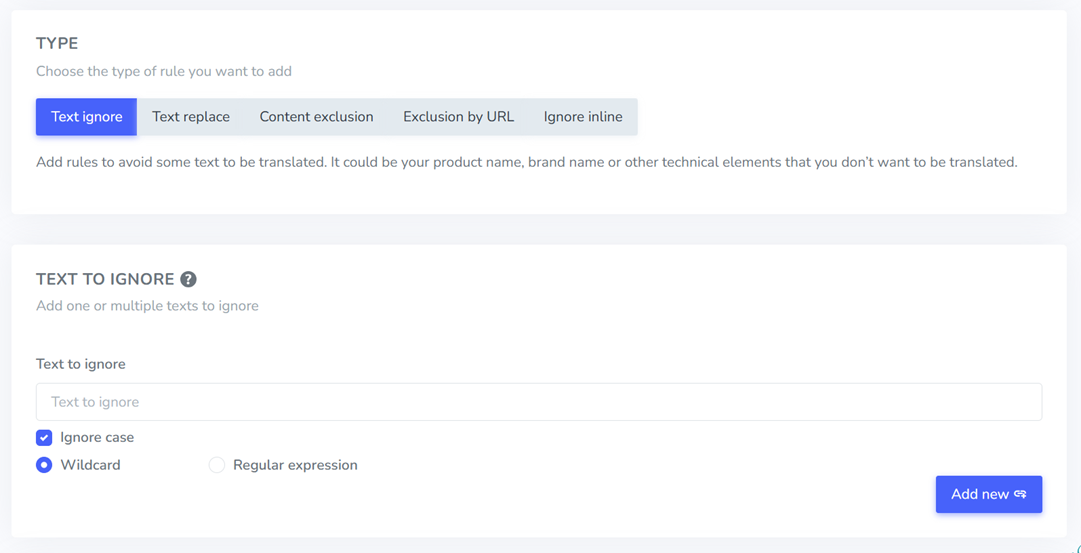
Exclude non-translatable elements

Some parts of a website should never be translated, such as brand names, product codes, or technical terms. Without proper control, these elements can be misinterpreted, affecting brand consistency across languages.
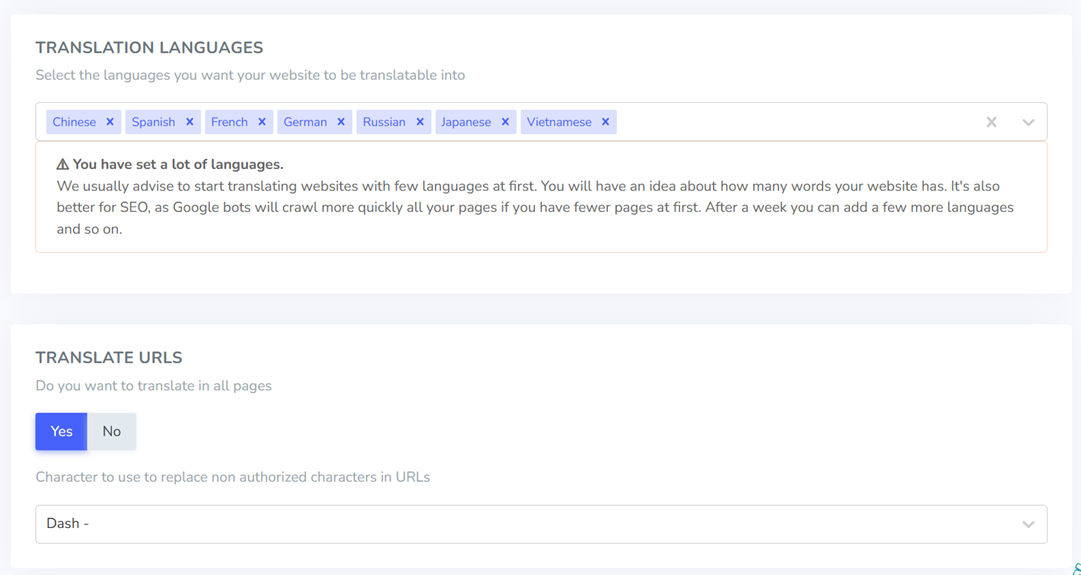
With Linguise smart translation rules, you can easily ignore specific text, replace terms, or even apply rules based on URLs. For example, you can keep “SmartFlow Pro” unchanged across all languages, replace certain phrases with preferred translations, or exclude specific pages (like legal or technical sections) from being translated. This gives you full control while keeping translations accurate and consistent at scale.
Reduce repetitive manual work
Start by identifying content patterns that appear frequently, such as CTAs (“Get Started”, “Learn More”) or similar product descriptions. Then, create predefined translation rules for these elements so they don’t need to be translated repeatedly.
For example, if you manage multiple SaaS websites, you can define that “Start Free Trial” is always translated the same way across all clients. This removes the need to review every page manually and ensures consistency automatically.
Automate content updates in real time

Make sure your translation system is directly connected to the website, so any changes to the original content are automatically detected and translated without manual input.
For instance, when a client updates a multilingual landing page or adds a new feature, you don’t need to resend content to a translator. As long as your rules are in place, the system will instantly update all language versions in real time.
Maintain consistent translations
Create a glossary of key terms that must always be translated consistently, especially for brand names, CTAs, and technical terms. Then apply rules to enforce these standards across all content.
For example, if you decide that “Dashboard” should always remain untranslated (or always be translated a certain way), this rule will apply across every page and client. This helps maintain brand consistency without constant manual checks.
Build a scalable localization system without extra costs

Scaling your agency doesn’t have to mean increasing your expenses. By building the right system with automation and standardized workflows, you can handle more clients efficiently while keeping costs under control.
Lower costs with automation
Start by identifying the most time-consuming manual tasks, such as translating repetitive content or updating multiple language versions. Replace these with automated processes to reduce dependency on manual effort.
For example, you can use auto-translation for all pages and only review key pages manually. This approach helps you cut operational costs while still maintaining quality where it matters most.
Increase profit per client
Focus on improving efficiency rather than increasing pricing. When you reduce the time and effort needed per client, your profit margins naturally grow.
For instance, if a project that used to take several hours can now be completed in less time through automation, you’re delivering the same value with lower effort, resulting in higher profitability.
Build a sustainable workflow
Create a repeatable system that can be applied to every client. Standardizing your processes ensures consistency and reduces confusion as your client base grows.
For example, you can set up a fixed workflow for onboarding, translation rules, and updates. This makes your operations more predictable and easier to manage over time.
Support more clients easily
Prepare your system so that adding new clients doesn’t increase complexity. A scalable setup allows you to onboard clients quickly without redoing everything from scratch.
For example, once your dashboard and automation rules are in place, you can apply the same configuration to new clients, making expansion much easier.
Scale without extra resources
Avoid relying on hiring more people every time your workload increases. Instead, build a system that can handle growth automatically.
For example, rather than expanding your translation team, use automation and smart rules to handle most of the workload, allowing your existing team to focus on optimization and quality control.
Track performance and prove value to clients

By tracking performance and presenting clear insights, you can help clients understand the impact of localization and strengthen their trust in your agency.
Track traffic per language
Start by monitoring how each language version of a website performs. This helps you understand which markets are growing and which ones may need further optimization.
For example, you might notice that the Spanish version of a site brings in high traffic but low engagement. This insight allows you to adjust content or messaging to better match the audience in that region.
Generate clear reports
Make it a habit to create simple, easy-to-understand reports for your clients. Focus on key metrics such as traffic, engagement, and conversions across different languages.
Instead of overwhelming clients with raw data, present insights in a clear format. For instance, you can highlight which languages are performing best and what actions are being taken to improve underperforming ones.
Show localization ROI
Clients want to know if their investment in localization is worth it. Your role is to connect performance data with business outcomes.
For example, you can show how translating key pages led to increased traffic or higher conversions in specific regions. This makes it easier for clients to see the direct value of localization and continue investing in it.
Choose the right tool to scale multilingual management

Even with the right strategy, your results will depend heavily on the tools you use. The right solution doesn’t just help you translate—it helps you manage, automate, and scale multilingual projects efficiently across all clients.
Simplify client translations
Choose a tool that allows you to translate entire websites without complicated setup or manual processes. The goal is to reduce friction so you can handle multiple clients without slowing down.
For example, instead of translating page by page, a good tool can automatically detect and translate all content across a website. This makes it easier to onboard new clients and deliver faster results.
Control with live editing
While automation is important, you still need control over the final output. A live-editing tool lets you adjust translations directly on the website in real time.
For instance, if a translation doesn’t match the client’s tone or branding, you can quickly edit it on the front end without going through a long revision process. This makes collaboration faster and more efficient.
Automate with smart features
Look for tools that offer automation features such as translation rules, content detection, and automatic updates. These features reduce manual work and keep everything running smoothly.
For example, you can set rules to automatically handle recurring phrases or specific content types. This allows your system to work in the background while your team focuses on higher-level tasks.
Ensure SEO-ready content
Make sure the tool supports multilingual SEO so translated content performs well in search engines. This includes proper URL structure, metadata translation, and indexing support.
For example, a good tool will automatically generate SEO-friendly URLs and translate meta tags across languages. This ensures that your clients not only reach global audiences but also rank effectively in search results.
Best solution for scaling multilingual client management
After setting up the right strategy from dashboards to automation and performance tracking, the final piece is choosing a solution that brings everything together. This is where tools like Linguise become highly relevant, especially for agencies looking to scale without adding operational complexity.
Linguise is designed to handle multilingual website translation in a way that aligns perfectly with this playbook. Instead of relying on manual processes, it offers automated translation powered by smart rules, allowing agencies to manage multiple clients efficiently within a single system.
Additionally, Linguise is built with SEO in mind, automatically generating search engine-friendly multilingual content. This allows your clients not only to reach global audiences but also to perform well in local search results. Key features that support scaling without a translation team.
- Automatic website translation: Translate entire websites instantly, including dynamic content, without manual setup.
- Live editing (frontend control): Edit translations directly on the website for quick fixes and better accuracy.
- Smart translation rules: Set rules to control translations, replace terms, and exclude specific content.
- Real-time content updates: Automatically update translations whenever the original content changes.
- Dynamic content translation: Translate AJAX and app-based content that traditional tools often miss.
- Multi-language scalability: Support multiple languages easily without increasing operational complexity.
In short, if your goal is to scale multilingual client management without building a large translation team, Linguise provides a practical and efficient solution that supports every step of this playbook, from automation to optimization.
Conclusion
Managing multilingual clients without a translation team is no longer impossible. By combining dashboards, automation, smart rules, and performance tracking, agencies can scale efficiently without increasing operational complexity. This approach allows you to handle more clients, maintain consistency, and deliver measurable results without relying on manual translation processes.
If you’re ready to turn this playbook into action, now is the time to start with Linguise. With its automation, live editing, and built-in SEO features, you can streamline your workflow and scale multilingual client management with ease. Start using Linguise to transform localization into a sustainable, profitable growth strategy.