

Researching keywords in a language you don’t speak can be challenging, especially when you need to understand what local audiences actually search for. Fortunately, you don’t need to speak the language fluently or hire a translator to get started. With the right free keyword research tools and methods, you can discover relevant search terms and better understand your target market.
In this guide, you’ll learn free ways to find foreign-language keywords. Read on to discover how to validate your keyword ideas, avoid relying on literal translations, and build a simple research workflow that works for your target audience.
Key points: Free keyword research methods for languages you don’t speak
Explore free keyword research tools
Use Google Keyword Planner, Google Autocomplete, Google Related Searches, Google Trends, local marketplace suggestions, community forums, Google Search Console, and AI tools to discover relevant keyword ideas in languages you don’t speak.
Validate keywords beyond translation
Check search volume, local meaning, and search intent to ensure your keywords reflect how people in your target market actually search.
Combine methods for better results
Build a simple workflow using AI for keyword ideas, search suggestions for local variations, and keyword research tools to validate demand before optimizing your content.
Why research keywords in languages you don’t speak?

Researching keywords in a language you don’t speak helps you understand how people in your target market search for information, products, or services. Directly translating English keywords may not work because local audiences often use different words, phrases, or expressions. Here’s why foreign-language keyword research matters:
- Understand local search behavior: Discover the words and phrases people actually use when searching online.
- Find relevant keyword opportunities: Identify search terms that may be missed when relying only on English keywords or direct translations.
- Improve local SEO: Target keywords that match local search intent and help your content reach the right audience.
- Reach more potential customers: Make it easier for people in your target market to discover your website through search engines.
8 Free keyword research methods

You don’t need to speak a foreign language fluently to find relevant keywords for your target market. These free methods can help you discover local search terms using search engines, online communities, and AI tools. The key is to validate your keyword ideas with real search data rather than relying on direct translations alone.
1. Google Keyword Planner
Google Keyword Planner helps you discover keyword ideas and estimate their monthly search volume. You can set the target country and language to find terms relevant to your intended audience, even if you don’t speak that language. How to use it:
- Open Google Ads and go to Tools > Planning > Keyword Planner.
- Select Discover new keywords and enter a relevant seed keyword in English or the target language.
- Set the location to your target country and the language to your audience’s language.
- Review the suggested keywords, average monthly searches, and competition data.
- Export relevant terms and check whether their meaning matches your content.
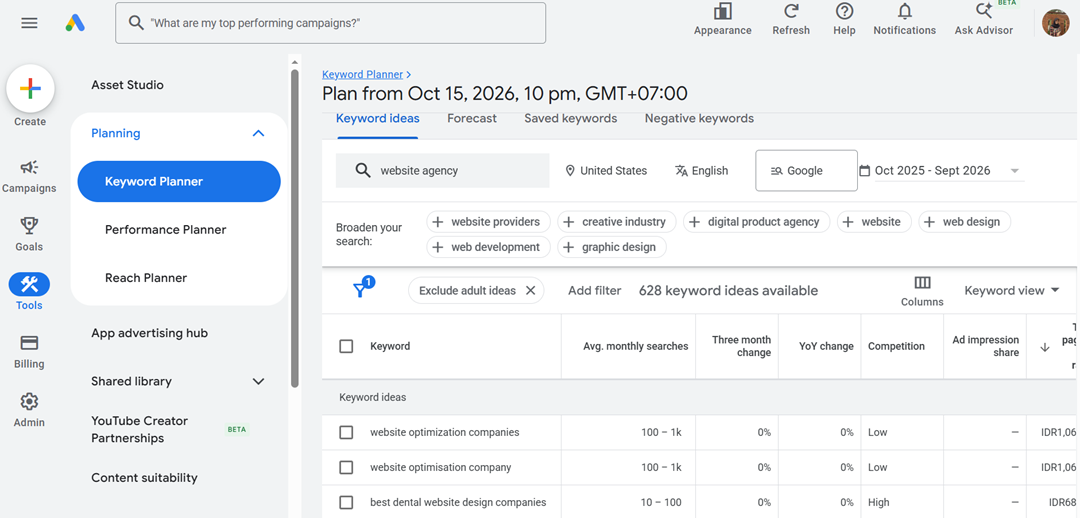
Tip: Use translated terms as starting points, not final keywords. Compare their search volumes and variations to identify terms with actual demand in your target market.
2. Google Autocomplete
Google Autocomplete suggests search queries as users type into the search box. These suggestions can reveal how people phrase their searches in a particular language, helping you find keyword ideas without understanding every word. How to use it:
- Open Google and select the search region or country you want to target, if available.
- Type a broad keyword related to your topic in the target language.
- Add different letters or short modifiers to discover more suggestions.
- Record relevant suggestions and use a translation tool to understand their meaning.
- Repeat the process with several keyword variations.
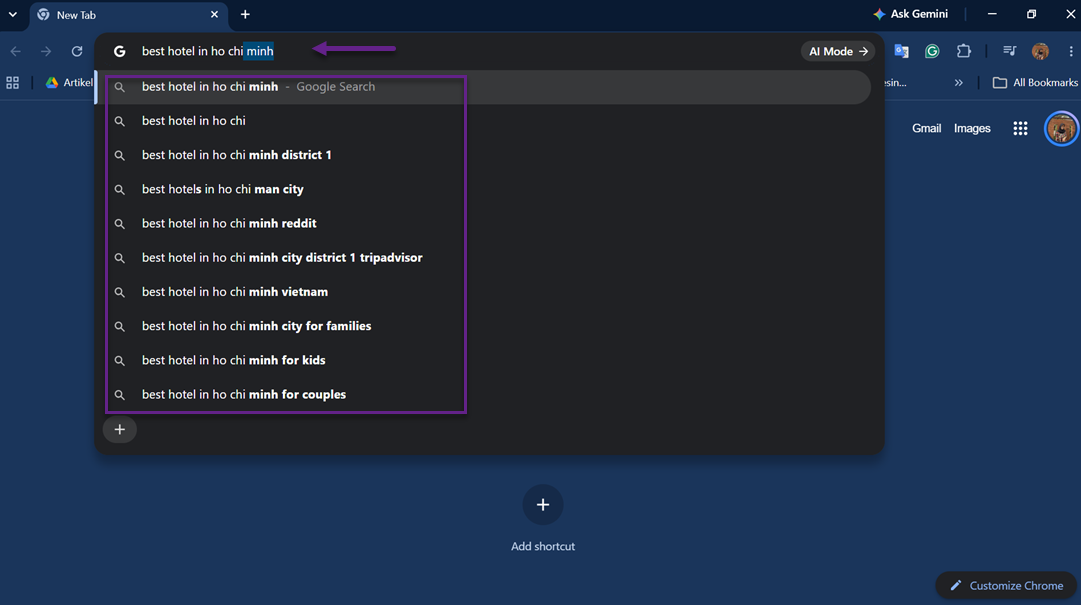
Tip: Autocomplete suggestions are useful for discovering search phrases, but they don’t confirm search volume. Check promising terms in Google Keyword Planner before prioritizing them.
3. Google Related Searches
Google can display related search suggestions, such as “People also search for,” that help you discover alternative keywords and related topics. These suggestions can reveal other terms users may explore when looking for similar information. How to use it:
- Search for a relevant keyword in Google using your target language.
- Set the search region to your target country where possible.
- Look for related search suggestions, including “People also search for,” when available.
- Translate the suggested terms to understand their meaning.
- Check promising keywords in Google Keyword Planner to validate their search volume.
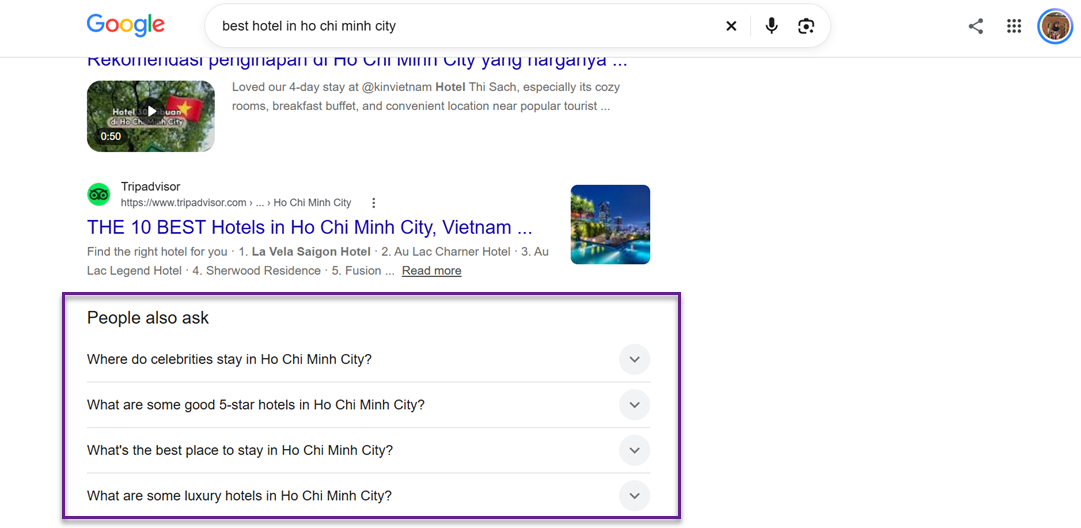
Tip: Compare “People also search for” suggestions with your original keyword to identify relevant search variations. Check their meaning and search volume in Google Keyword Planner before using them, as some suggestions may not match your content’s search intent.
4. Google Trends
Google Trends helps you compare search interest over time and across regions. It is particularly useful when you have several translated keyword candidates and want to see which terms attract more interest in your target market.
How to use it:
- Open Google Trends and enter a keyword in the search box.
- Set the location to your target country.
- Choose a relevant time range, such as the past 3 months.
- Add other keyword candidates using Compare.
- Review interest over time, regional interest, and related queries.
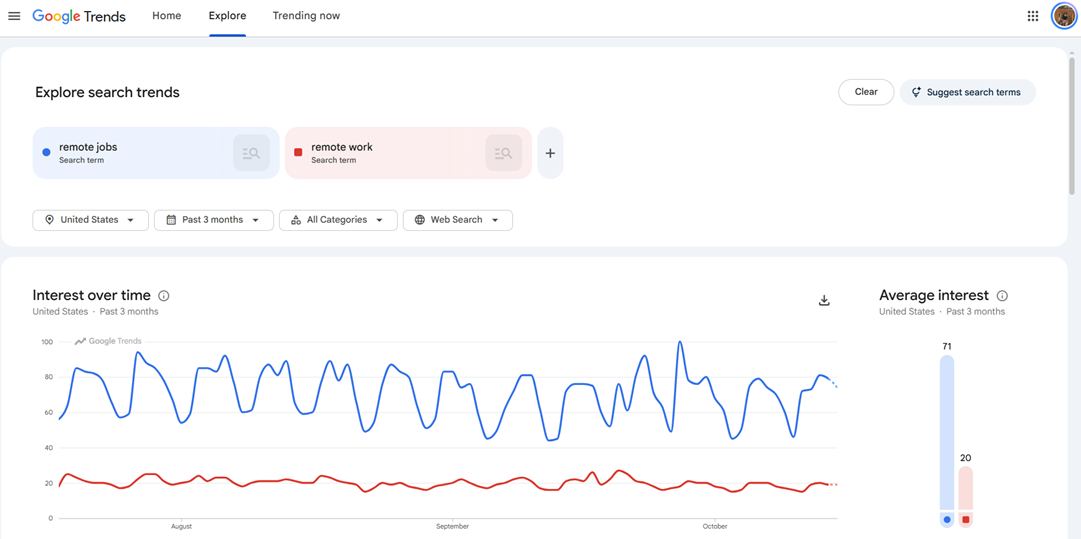
Tip: Google Trends shows relative search interest, not exact monthly search volume. Use it to compare trends and seasonality, then check the estimated search volume of promising candidates in Keyword Planner. Make sure the terms you compare have the same meaning and search intent.
5. Local Marketplace Suggestions
Local marketplaces can reveal product names, category terms, and buying phrases that shoppers use in a specific country. Platforms such as Shopee, Lazada, or Mercado Libre may provide autocomplete suggestions based on the local market. How to use it:
- Open a marketplace that is popular in your target country.
- Click its search bar and enter a product name or translated keyword.
- Look for autocomplete suggestions that appear as you type.
- Try adding modifiers such as product types, sizes, brands, or buying-related terms in the target language.
- Record relevant phrases and translate them to understand their meaning.
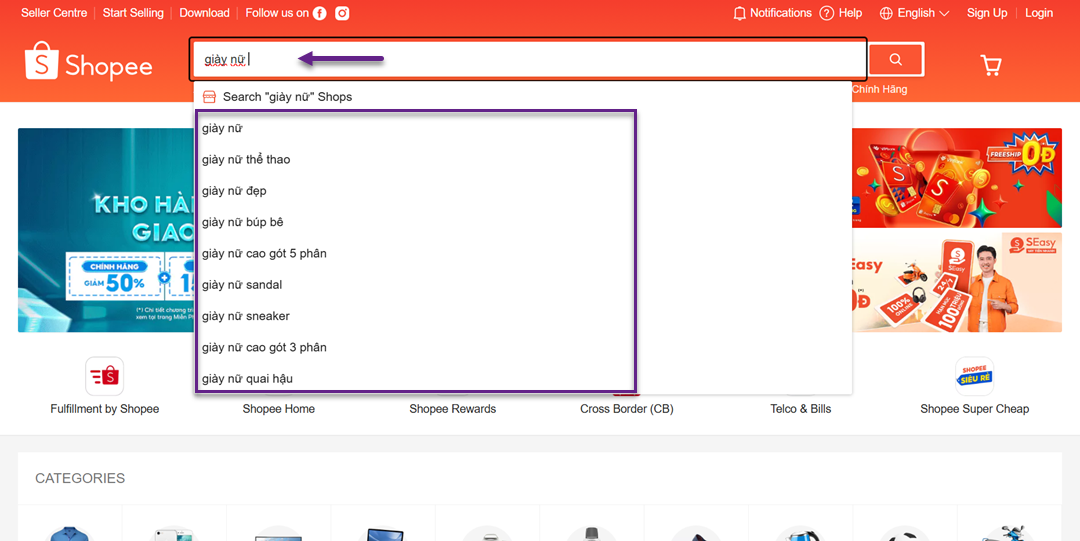
For example, on Shopee Vietnam, searching for “giày nữ” (women’s shoes) can reveal autocomplete suggestions related to the product. These suggestions provide insights into how local shoppers search for products and can help identify relevant keyword ideas for the Vietnamese market.
Tip: Marketplace suggestions are especially useful for product-related keywords, but they don’t guarantee that people use the same terms on Google. Validate relevant candidates with Google Keyword Planner or other available search data before using them for SEO.
6. Local Community Forums
Community forums, discussion boards, and question-and-answer websites can help you discover how local users describe their needs and problems. Unlike formal translations, these discussions often reveal natural expressions and everyday vocabulary. How to use it:
- Search for popular forums or discussion communities in your target country.
- Use a translated topic keyword to find relevant discussions.
- Browse post titles, frequently asked questions, and repeated phrases.
- Translate promising phrases and check whether they match your topic.
- Turn recurring questions into potential keyword ideas.
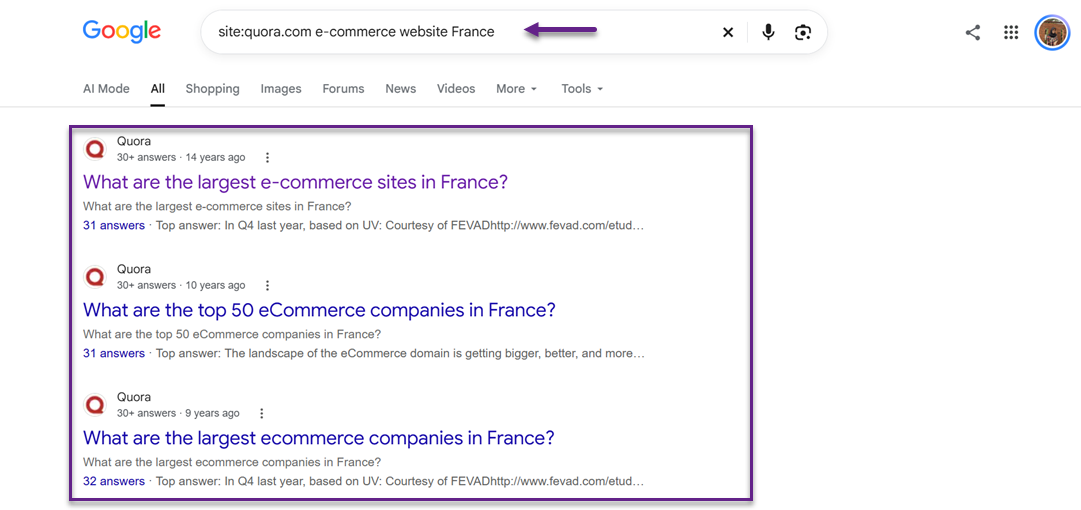
Tip: You can use Google search operators to find discussions, such as site:reddit.com [keyword] or site:quora.com [keyword]. Replace the keyword with a relevant term in the target language. Treat these phrases as research ideas and validate their search volume before prioritizing them.
7. Search Console and Competitor Page Titles
Google Search Console can reveal the queries that bring users to your existing translated pages. Meanwhile, competitor page titles can help you discover the terms other websites use to target the same audience. Together, these sources provide keyword ideas based on existing search visibility and local content. How to use it:
For Google Search Console:
- Open Google Search Console and select your website property.
- Go to Performance > Search results.
- Select the Pages tab and filter for a page that has already been translated into your target language.
- Switch to the Queries tab to review the search terms associated with that page.
- Record relevant queries, impressions, clicks, and average positions.
For competitor page titles:
- Search for your topic in Google using the target language and country.
- Open relevant competitor pages that target the same audience.
- Review their page titles, title tags, and headings for recurring keyword patterns.
- Translate the terms and identify which ones match your content.
Tip: Search Console data reflects your website’s existing performance, so it may not reveal every relevant keyword. Competitor titles also don’t prove that a term has significant search volume. Validate new candidates using Keyword Planner before adding them to your keyword list.
8. AI Keyword Ideas
An AI assistant can help you generate keyword candidates when you don’t speak the target language. It can suggest local-language variations, related topics, and search phrases based on your audience and content. However, AI-generated keywords are starting points, not proof of actual search demand. How to use it:
- Open an AI assistant and describe your topic, target country, audience, and search intent.
- Ask it to generate keyword ideas in the target language, including common expressions and alternative wording.
- Request translations or explanations in English so you can understand each suggestion.
- Ask the assistant to group the candidates by search intent, such as informational, commercial, or transactional.
- Copy promising candidates into Google Keyword Planner and set the correct country and language.
- Compare their estimated monthly search volumes and remove irrelevant or unsupported terms.
Example prompt:
“Generate 10 keyword ideas in France for people looking to buy running shoes online. Include natural local expressions, alternative product terms, and different search intents. Provide an English translation for each keyword in a table. Group the keywords into informational, commercial, and transactional intent. Do not invent search volume data.”
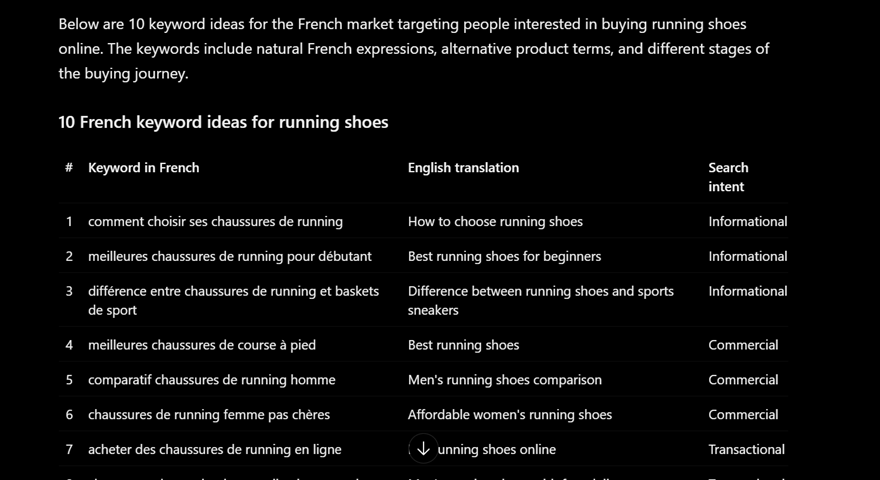
Tip: AI may produce literal translations that local users rarely search for. Never trust its search-volume estimates unless they come from a verifiable data source. Validate every promising candidate against actual keyword research data before using it in your SEO strategy.
How to validate foreign language keywords

Check search volume and competition
Before using foreign-language keywords, check their search volume, local meaning, and search intent. Direct translations may not reflect what local audiences actually search for.
Start by using Google Keyword Planner to check the estimated average monthly search volume of each keyword candidate. Open Tools > Planning > Keyword Planner > Discover new keywords, enter your candidate terms, and set the location to your target country and the language to your audience’s language. Review the available search volume and competition data to understand the potential of each term.
However, don’t choose keywords based on search volume alone. A keyword with many searches may be too broad or highly competitive for your content. Compare several relevant candidates and prioritize those that have meaningful search demand and match your website’s goals. Remember that Keyword Planner’s competition metric reflects advertiser competition, not organic SEO difficulty.
Verify local meaning and search intent
Use a translation tool or AI assistant to understand the meaning of each candidate keyword. Then, search for the term in Google using the target language and country settings. Review the top-ranking pages, their titles, and the type of content they provide to understand what users are likely looking for.
For example, a direct translation of an English product keyword may be grammatically correct but rarely used by local shoppers. Search results can help you identify whether people prefer a different product name, a local expression, or a more specific phrase. Keep keywords that match both your content and the likely search intent, rather than relying on translations alone.
Once you understand the keywords your target audience uses, make sure your website content reflects those language preferences. A multilingual translation solution like Linguise can help make your website content available in your target audience’s languages, giving international visitors a more accessible browsing experience.
Compare keyword variations
A single topic can have several keyword variations in a local language. Users may search with synonyms, alternative spellings, abbreviations, or informal expressions. Use Google Autocomplete, Related Searches, and local marketplace suggestions to discover these variations, then translate them to understand their meaning and relevance.
Next, compare the variations in Google Keyword Planner to check their estimated search volumes. You can also use Google Trends to compare relative search interest over time, although it does not provide exact search volume. Prioritize variations that accurately represent your topic and have supporting search data. This helps you select keywords based on how local audiences search instead of assuming that the closest English translation is always the best option.
How to build a simple keyword research workflow

You don’t need to use all methods every time you research keywords in a language you don’t speak. Instead, combine two or three methods that complement each other to find relevant search terms and validate their potential. This approach saves time while helping you avoid keywords that are only direct translations of English phrases. Here’s a simple workflow you can follow:
1. Generate initial keyword ideas
Start by using an AI assistant to generate keyword candidates based on your topic, target audience, and target country. Ask for natural expressions in the local language, alternative terms, and common phrases people might use when searching for your product or service.
For example, if you want to target people looking for website translation services in Indonesia, ask AI to suggest Indonesian keyword variations and provide English explanations for each term. Treat these suggestions as starting points rather than confirmed keywords, since AI may generate phrases that sound natural but have little or no search demand.
2. Discover how local users search
Next, use Google Autocomplete or local marketplace suggestions to discover how people phrase their searches. Enter your candidate keywords into the search bar and review the suggested queries. Try different words and modifiers to find additional variations.
Translate the suggestions into a language you understand and check whether they match your topic. This step helps you identify local expressions that may differ from the literal translation of your original English keyword.
3. Validate keywords with search data
Once you have a list of promising candidates, open Google Keyword Planner and select Discover new keywords. Set the location to your target country and the language to your audience’s language, then enter your candidates to review their estimated average monthly search volume.
Compare the available data to determine which keywords have measurable search demand. You can also use Google Trends to compare interest in similar terms over time, especially when you want to understand seasonal patterns or differences in relative popularity.
Remember that Google Trends shows relative interest rather than exact search volume. Use Keyword Planner for volume estimates and Trends as a complementary source of insight.
4. Select and organize your final keywords
After validating the candidates, choose keywords that have relevant search demand and match your content’s purpose. Consider search intent alongside volume, because a keyword with high search volume may not attract the audience you want.
Group your selected keywords by topic and search intent. For example, informational keywords may suit blog posts, while transactional keywords may be more appropriate for product or service pages. Keep a record of the keyword, its meaning, estimated search volume, and intended page so you can use the findings consistently when creating content.
The key is to combine discovery with validation. AI and autocomplete help you find ideas, while Keyword Planner helps you assess search demand. By using these methods together, you can research foreign-language keywords more confidently without needing to speak the target language fluently.
Conclusion
Researching keywords in a language you don’t speak doesn’t have to be complicated. By combining free tools like Google Keyword Planner, Google Autocomplete, and AI assistants, you can discover local search terms and validate their search volume. Always check local meaning and search intent instead of relying on direct translations to build an effective multilingual SEO strategy.
Once you’ve identified the right keywords, the next step is to make your website accessible to your target audience. Try Linguise to translate your website into multiple languages and help international visitors explore your content in their preferred language.